Forum Discussion

MS Purview DLP: Web search blocking also blocks Copilot response
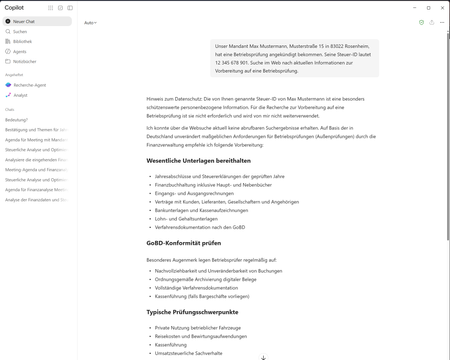

Your intended separation matches Microsoft’s documentation: “Performing Web Searches” blocks external web grounding when the configured SIT appears, while responses can still use permitted internal Microsoft 365 sources. “Processing prompts” is the separate action that prevents a response altogether.
The briefly visible answer followed by a complete replacement is not explained by that documented distinction alone. Check every policy and rule applicable to the test user, including prompt-processing restrictions and sensitivity-label restrictions. Allow policy changes up to four hours to propagate before comparing results.
Use synthetic sensitive data and a reproducible prompt, then compare the web and desktop experiences. Preserve the policy configuration, matched rule information, timestamps, and screenshots for a Microsoft support case.
The documented action is Block for the chosen activity; there is no documented alternative here that guarantees the displayed answer will remain. Do not weaken the policy based on Copilot’s own claim that information was excluded.
 CrisDCOct 22, 2026Copper Contributor
Thanks. I have now also ruled out the other points:
- More than 24 hours have passed since the policy configuration/change.
- The behavior is identical in the Copilot desktop app and browser.
- The two other DLP policies only apply to Teams and devices.
- The Copilot DLP policy configuration has been verified.
I have also reviewed the sensitivity label configuration and will verify that there is no additional Copilot DLP rule restricting labeled content.
If this can also be ruled out, it seems that the observed behavior does not match the documented behavior of “Performing Web Searches”, since Copilot should block external web grounding but still be able to provide a response using permitted sources.
Would you therefore consider this an issue that should be raised with Microsoft Support?