Forum Discussion

Mpangwin1
May 20, 2025Copper Contributor
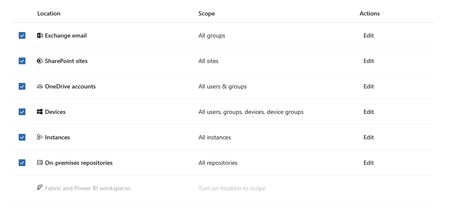
Microsoft 365 Copilot not showing up as location in DLP
Hi, I am working on implementing security measures for Microsoft Copilot in a client environment. I want to create a DLP policy to not process data with certain sensitivity labels but when I go i...

nikkichapple
Apr 20, 2026MVP
This isn’t an E3 vs E5 issue on its own.
Microsoft Purview has two separate DLP capabilities for Copilot, with different requirements:
- DLP for Copilot prompts (blocking sensitive data in prompts) is available to all licence tiers (E1/E3/E5) for tenants with access to Copilot and Copilot Chat.
- DLP to prevent Copilot from processing files and emails based on sensitivity labels does require E5 (or E5 Compliance add-on).
Because of this, an E3 tenant can legitimately see the Microsoft 365 Copilot location when creating a custom DLP policy, depending on what capability is enabled.
More info Microsoft Purview service description - Service Descriptions | Microsoft Learn. So this should not be an issue.
If the Copilot location is missing despite using the Custom template, the most common causes are:
- RBAC – only specific roles (for example Purview Data Security AI Admin or Entra AI Admin) can configure DLP for Copilot; without these, the location may not appear. Check the roles here Learn about using Microsoft Purview Data Loss Prevention to protect interactions with Microsoft 365 Copilot and Copilot Chat | Microsoft Learn
- Tenant rollout/flighting – Copilot DLP has been gradually rolled out, and availability can still differ between tenants, even with identical licensing.
Licensing alone doesn’t explain the behaviour you’re seeing; I’d validate roles first, then assume tenant-level rollout variance.