Forum Discussion

Getting sensitivity label working for specific domain
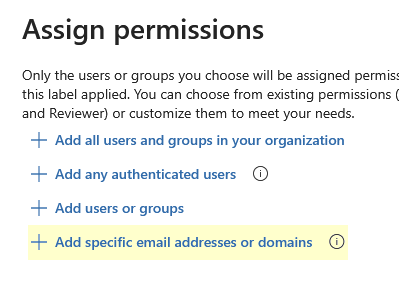

The domain-based access control in sensitivity labels works differently than most people expect, and the documentation doesn't spell it out clearly.
When you configure "specific email addresses or domains" under label encryption (Rights Management), Microsoft expects the domain in a bare format without wildcards. So instead of *@mail.com, just enter mail.com. That's it. No asterisk, no at-sign prefix.
Here's the exact format that works:
- ✅ mail.com
- ❌ *@mail.com
- ❌ mail.com
A few other things that trip people up:
- You're using the right label type, right? Domain-based access only works on labels configured with Microsoft Purview encryption (not just classification labels with no encryption). If your label is classification-only, there's no access control to configure.
- Label scope matters. If you set this up at the tenant level in the Purview compliance portal, confirm the label is published to the users who will be applying it. Unpublished labels won't behave predictably.
- Propagation lag is real. After you save changes to a label's encryption settings, give it 24 hours before testing again. I've seen people troubleshoot for hours on what was just a sync delay.
- Test with a labeled file, not just policy review. Apply the label to a test document, share it with someone at mail.com, and have them try to open it from a browser (not a cached Office client). The browser path gives you cleaner error output to troubleshoot against.
If you're still hitting issues after trying bare domain format, check whether the label was previously configured with different permissions. Old encryption settings can conflict with new ones until you strip and reapply.
Please mark this solution as the answer if you found it helpful! Cheers