Forum Discussion

Root directory path in SFTP Copy Pipeline
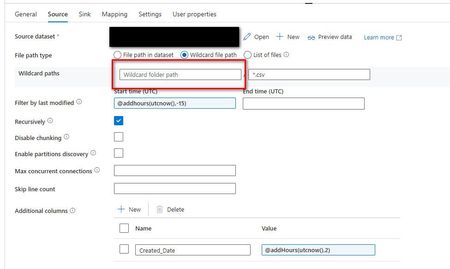

To specify the root in the source configuration of a copy pipeline that uses an SFTP location with multiple folders, you need to configure the Source tab in your copy activity. Don you can try the steps, Note: This is personal suggestions.
Data store type: Select External.
Connection: Choose your SFTP connection from the list. If it doesn’t exist, create a new one.
File path type: Choose File path, Wildcard file path, or List of files based on your needs.
File path: Manually enter the root path or use the browse option. Wildcard file path: Use wildcards to filter folders or files. For example, root/folder/* to include all files in the folder.
List of files: Specify the folder path and provide a text file with the list of files to copy.Partition root path: When partition discovery is enabled, specify the absolute root path to read partitioned folders as data columns. https://learn.microsoft.com/en-us/fabric/data-factory/connector-sftp-copy-activity
For example, if your root path is root/folder, you would enter this in the File path field. If using wildcards, ensure the path before the first wildcard is correct.
 DominicA1750Sep 30, 2024Copper Contributor
Patooworld Thanks for your input - it looks like removing the Recursively checkbox has helped solve the issue. The files in the root folder were not present every day and it seems the process failed only on days when the files were missing.