Forum Discussion

Addin Eligible role to Subscription by powershell Question
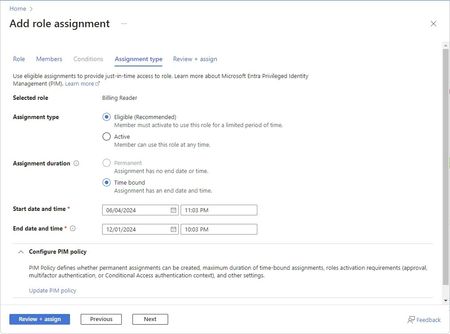

This should be doable. Assuming you are assigning the permissions to Resource Groups you ideally want to specify the group names, and the Resource Group names in a CSV file. Something like the following, remember to keep the column header as they will be referenced in the powershell script.
CSV File with Groups and Resource Groups
GroupName,ResourceGroup
Group1,ResourceGroup1
Group2,ResourceGroup2
Group3,ResourceGroup3
etc
In the script below the duration is specified using the ISO 8601 format. PT8H means 8 hours, you can use P1D for 1 day or P3M to denote 3 months, P1Y for 1 year and so on.
The script will loop through all the rows in your CSV file and try the role assignment.
Script:
# Import the CSV file
$groups = Import-Csv -Path "path\to\your\groups.csv"
# Connect to Azure
Connect-AzAccount
# Define the role
$roleDefinitionId = (Get-AzRoleDefinition -Name "Contributor").Id
# Loop through each group and assign the role
foreach ($group in $groups) {
try {
$groupName = $group.GroupName
$resourceGroup = $group.ResourceGroup
$scope = "/subscriptions/your-subscription-id/resourceGroups/$resourceGroup"
$groupObject = Get-AzADGroup -DisplayName $groupName
$groupId = $groupObject.Id
# Assign the role with eligible and time-bound settings
New-AzRoleAssignment -ObjectId $groupId -RoleDefinitionId $roleDefinitionId -Scope $scope -AssignmentType "Eligible" -Duration "PT8H"
Write-Output "Successfully assigned role to group: $groupName for resource group: $resourceGroup"
}
catch {
Write-Error "Failed to assign role to group: $groupName for resource group: $resourceGroup. Error: $_"
}
}
Write-Output "Role assignments completed."

This is wrong.
New-AzRoleAssignment doesn't have parameter AssignmentType.
- AdeelazizJan 16, 2025Brass Contributor
My apologies for the oversight. This is the updated script, I've tested it in my lab. Please update the parameters as needed.
# Import the CSV file
$groups = Import-Csv -Path "path\to\your\groups.csv"

# Connect to Azure
Connect-AzAccount

# Define the role
$roleDefinitionId = (Get-AzRoleDefinition -Name "Contributor").Id

# Loop through each group and assign the role
foreach ($group in $groups) {
    try {
        $groupName = $group.GroupName
        $resourceGroup = $group.ResourceGroup
        $scope = "/subscriptions/your-subscription-id/resourceGroups/$resourceGroup"

        $groupObject = Get-AzADGroup -DisplayName $groupName
        $groupId = $groupObject.Id

        # Define the GUID for the request
        $guid = [guid]::NewGuid().Guid

        # Define the start time in ISO 8601 format
        $startTime = Get-Date -Format o

        # Assign the role with eligible and time-bound settings
        New-AzRoleEligibilityScheduleRequest -Name $guid -Scope $scope -ExpirationDuration "PT8H" -ExpirationType AfterDuration -PrincipalId $groupId -RequestType AdminAssign -RoleDefinitionId $roleDefinitionId -ScheduleInfoStartDateTime $startTime

        Write-Output "Successfully assigned role to group: $groupName for resource group: $resourceGroup"
    }
    catch {
        Write-Error "Failed to assign role to group: $groupName for resource group: $resourceGroup. Error: $_"
    }
}

Write-Output "Role assignments completed."