Forum Discussion

JAZ_OV
Jul 13, 2022Copper Contributor
Windows or Office 365 Updates on 7/12/22 Introduced Error with TransferText in vba for Access
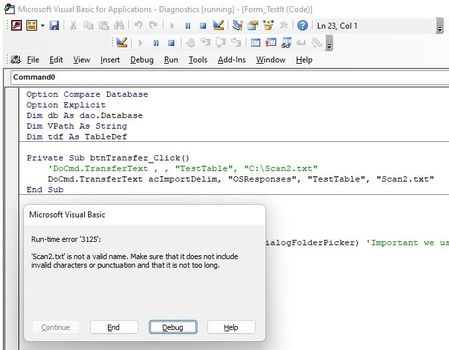
After the above noted updates I have received several reports of Access error 3125. I have traced this issue to a saved import specification. Below is an example of the error when using an import s...

Diegomarino
Jul 16, 2022Copper Contributor
hi, i got the same problem. So the only workaround is to read the file and add values row per row, right?
i'm not a great programmer, i'm wondering if they will solve the issue soon, i mean if there is some official communication
i'm not a great programmer, i'm wondering if they will solve the issue soon, i mean if there is some official communication
JAZ_OV
Jul 18, 2022Copper Contributor
Yes, unfortunately that's the only way right now to accomplish this. In my case, I don't have a lot of fields to import so it's workable and preferable (the saved import was legacy). I have made Microsoft aware of this and I hope they will rectify it. Not sure if it's in Windows or Office. My users have Windows 10, I have Windows 11 and it was broken on both. I use Office 365.
However, if you look at my code sample, it should not be too hard for you to reuse. I can give you tips if you need help and want to share your file format.
 JoneSh77Jul 19, 2022Copper ContributorHi
We have the same issue with a stable program and we can not change the behaviour of our code as easily.
We have just updated our Access to Microsoft 365 MSO Version 2206 Build 16.0.1530.20260 64bits and the command generating the 3125 error is like this :
DoCmd.TransferText A_EXPORTDELIM, IIf(pda, FORMAT_EXP_WINDOWS, FORMAT_EXP), latable, lefic, titre
We can still use this feature on not updated computers but we'd prefer keep the same configuration for all users.
Does anyone know if this bug is going to be solved ?
Thanks