Forum Discussion

Using MAX in Update Query
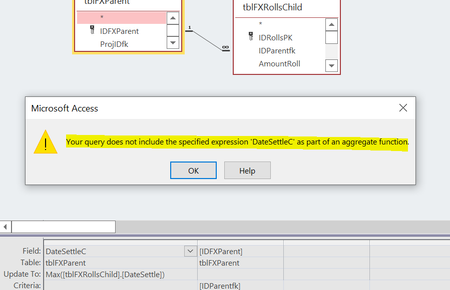
- Jun 29, 2022you may also try:
UPDATE tblFXParent Set DateSettleC = DMax("DateSettle","tblFXRollsChild","IDParentfk = " & [IDFXParent])

- Tony2021Jul 03, 2022Steel Contributor
Hi Arnel,
Yes, I did see your response. I responded:
Arnel: the update query worked and I compared it to George's output and they matched. I then thought I would have to fire it off many times to keep the data current, by firing an event, but I dont thk that is a "catch all" so some data would be I think "dirty" until I updated, which I think as George alluded to. I think a subquery is what I need since it works in the background without needing an event.I am not sure how to use that update query inside of a query in the record source. If I did, it seems that could be a workable solution since it would eliminate the need to fire an event.
What are your thoughts?
- arnel_gpJul 04, 2022Steel Contributorwell, it is a response to your original OP, that you can't make the query run.
using subquery and domain function are the same, the data need to be saved first.
what you can do is Run the update query on the Open event of the Form.
then again on the AfterUpdate event. that will make your date updated.- Tony2021Jul 04, 2022Steel Contributor
I have decided to use the update query. I think I have the events covered in the form to ensure it updates when needed (On Open as you mentioned). I also have added it to a report's On Load (I also added it to the form's AfterUpdate). I turned off the warnings and back on too. I will only be using this DMax for a report and will hide the field on the form. I think I am good now. I have tested and it works.
If no objections, I will mark Arnel's as best response since I have ended up using the Dmax function.
thanks for the help guys. I really appreciate it.
