Forum Discussion

Using MAX in Update Query
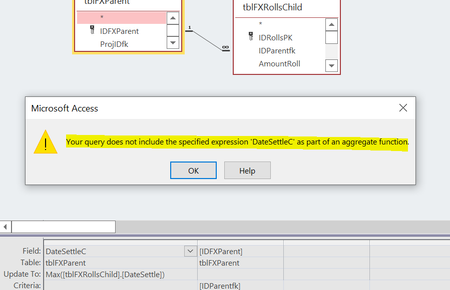
- Jun 29, 2022you may also try:
UPDATE tblFXParent Set DateSettleC = DMax("DateSettle","tblFXRollsChild","IDParentfk = " & [IDFXParent])


Actually, I think there are a couple of different kinds of problems.
First, attempting to update the field this way is not an appropriate approach in an Access relational database application. We do not recommend storing calculated values, such as this. For one thing, they run the risk of going out of synch because there's nothing to prevent a user from adding a new record in the tblFXRollsChild with a later date, which may or may not get updated again in the parent table. Risk of data integrity problems is one reason we seldom store calculated values.
Second, it can't be done with this syntax. I'm hesitating between saying, "just don't do it", and offering an example anyway.

Could I ask what other ideas do you have? thank you.
- George_HepworthJun 29, 2022Silver Contributor
Typically, this is done with a subquery to find the Max(Value) in the child table. Here that would be the Max date for each instance of IDParentfk, which links the records to the IDFXParent Primary Key:
SELECT IDParentfk, Max(DateSettle) AS LastSettlementDate
FROM tblFXRollsChild
GROUP BY IDParentfk
Then you can join this as a subquery in a SELECT query on the Parent table.
SELECT IDFXParent, LastSettlementDate
FROM tblFXParent INNER JOIN (
SELECT IDParentfk, Max(DateSettle) AS LastSettlementDate
FROM tblFXRollsChild
GROUP BY IDParentfk) AS MaxDates ON tblFXParent.IDFXParent = MaxDate.IDParentfk
ORDER BY IDFXParent
- Tony2021Jun 29, 2022Steel Contributor
HI George, thank you very much for the guidance. Queries alone are hard enough and queries in queries are diabolically confusing to me but I think I can do it.
Question:
I have a field named tblFXParent.[DateSettleC].
Is LastSettlementDate to be this field? Meaning that I should change LastSettlementDate to DateSettleC? I assume this is the case but wanted to make sure.Below is my sql if it helps.
All fields are denoted by the * so tblFXParent.[DateSettleC] is not showing. Note that I have 2 fields similarly named: tblFXParent.[DateSettleC] and tblFXParent.DateSettle (no "C")
SELECT tblFXParent.*, [rate]*[AmountOrig] AS USD, Nz([AmountOrig],0)+Nz(DSum("AmountRoll","tblFXRollsChild","[IDParentfk]=" & [IDFXParent]),0) AS [Balance EURO],
FROM tblFXParent
WHERE (((tblFXParent.AmountOrig) Like "*" & [Forms]![frmFXTracker]![txEndUser] & "*"))
ORDER BY tblFXParent.Vendor, tblFXParent.DateSettle;- George_HepworthJun 30, 2022Silver ContributorHmmm. Significantly more complex than the original....
Still the same principle applies. Join in the subquery on the Max(DateSettleC).
Try this, but beware it's hard to test without data.
SELECT tblFXParent.*
, [rate]*[AmountOrig] AS USD
, Nz([AmountOrig],0)+Nz(DSum("AmountRoll","tblFXRollsChild","[IDParentfk]=" & [IDFXParent]),0) AS [Balance EURO]
FROM tblFXParent
INNER JOIN (
SELECT IDParentfk
, Max(DateSettle) AS LastSettlementDate
FROM tblFXRollsChild
GROUP BY IDParentfk) AS MaxDateSettle
ON tblFXParent.[DateSettleC] = MaxDateSettle.[LastSettlementDate]
AND tblFXParent.[IDFXParent] = MaxDateSettle.[IDParentfk]
WHERE (((tblFXParent.AmountOrig) Like "*" & [Forms]![frmFXTracker]![txEndUser] & "*"))
ORDER BY tblFXParent.Vendor, tblFXParent.DateSettle;
NOTE: In my first post, I did miss the required join on the parentID as well as the settlement date.
Further note: While it is possible to store calculated values, most professional Database applications do it only when circumstances are appropriate. This case exposes why it's not desirable. Every time a new record, with a later DateSettle value is added in the child table, the calculated value in the other table goes bad. And we prefer not to store bad data. The work-around that would be to continually massage data hoping to catch such problems. Not an ideal use of anyone's time and talent.