Forum Discussion

Wes_Jan
Jun 17, 2020Copper Contributor
Unrecoverable Error
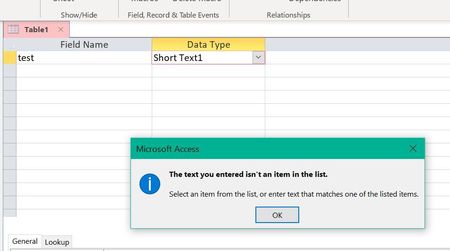
You all have probably made a typing, or other input, error. In this case I made a typing mistake while entering the Data Type for a Test Table, as can be seen in the above screen capture. ...

Wes_Jan
Aug 07, 2020Copper Contributor
Bert: Would you know whether you have Text Cursor or Narrator active on your system? I am told that having either one of these active on one’s system causes the error that we have experienced. I did have Text Cursor active on my system and disabling the Text Cursor eliminated the Access error. I am told that MS now knows about this and will get a fix out in a few weeks. Wes
- BertK1450Aug 08, 2020Copper Contributor
Hi Wes, YES I had Text Cursor turned on (Narrator is off) and YES turning it off corrected the error loop problem. I tested the error first then turned Text Cursor off after which I could not duplicate the error. Great find! Good to hear MS recognized the problem and is correcting it.
Thanks again Wes,
Bert
- George_HepworthAug 08, 2020Silver Contributor
Wow. The last thing I would have guessed might well be a Windows Cursor setting that caused this. Thanks for persisting and thanks for posting your resolution.
One last thing. Do you mind posting a screenshot of where and how you change this setting? Future visitors might benefit as well from the visual.
- BertK1450Aug 08, 2020Copper Contributor
Go to Windows settings > Ease of Use > Text Cursor
Credit goes to Wes, he did all the investigation.
Bert

