Forum Discussion

Unrecoverable Error
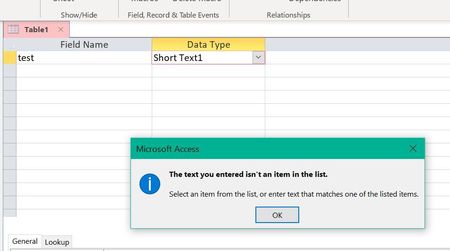

So far I can duplicate my error 2 ways.
1.
The phone field contains an input mask. If I enter and incorrect (non numeric) character the error responds correctly and lets me correct my entry. But if I press Tab or Return before completing the entry the error message pops up and now the Access process is frozen - no way out except Task Manager > Terminate Access.
2.
This one I am entering a query expression in the Criteria row. I typed > = (carrot then equal) and as soon as I pressed the space bar the error message popped up and now the Access process is frozen.
I installed MS Office 2 weeks ago on both my wife's PC and mine. I cannot duplicate the problem on her PC. ???
I also spoke to a "MS Tech Support" person for an hour on the phone and the bottom line was they do not have experience in Access and basically do not make input errors and use Task Manager to terminate Access to get out.
Bert

Yes sounds very familiar.
Is it correct to assume that you and your wife have different hardware?
I have a Dell XPS 15 7590. Any chance that you have related hardware?
Have you had a chance to try the Esc key to "escape" from the error?
Now that there are at least two of us with this problem, perhaps together we may have more success in getting the matter resolved.
Wes Jan
- Shane GroffAug 09, 2020
Microsoft
Thank you for the additional information.
Yes, this problem will be addressed as well with the same change.
Shane Groff
Access Engineering
- Wes_JanAug 09, 2020Copper Contributor
I think you have been kept in the loop to date.
But there is another issue that occurs with Text Cursor enabled on my machine.
Please see the attached word document
Wes Jan
- BertK1450Aug 03, 2020Copper Contributor
Wes,
Yes, my wife's ASUS AMD PC is about 2yrs old. I built my PC 10 yrs ago and upgraded it 5 yrs ago. The key to the pc's is the motherboard and processor combination, everything else is off the shelf. I don't think comparing hardware will help, mine is older that yours, our hardware is different but we have the same problem. I did not have Access before upgrading to Office 365 and never had a problem with the other MS apps. Maybe we can continue to exchange any ideas/problems/clues we find during the use of Access. Maybe more users will discover this problem and respond.
Also, I can clear the error loop if I hold the Esc key down. Thanks for that tip. I was just repeatedly pressing the Esc key which did not work.
Bert
- Wes_JanAug 02, 2020Copper Contributor
Bert:
Just to be clear, your wife has an ASUS AMD, but your change was a new motherboard added to your original PC. (What make is your PC?)
I don’t know the specs of your new motherboard. Is there anything that we might share? (Looking for some common factor.) Who writes the BIOS for you motherboard?
Can’t tell whether your Access problem would have existed before upgrading to MS Office 365. I have had my Dell XPS for about 60 days, and I believe that my problem developed immediately, but I needed to install MS Office 365 to get Access.
FYI: To escape from the error, I continuously hold down the Esc key and eventually the mis-typed entry clears, and I can type in a valid entry.
If you like, we can continue to see if the two of us working together can solve this problem.
Wes Jan
- BertK1450Aug 02, 2020Copper Contributor
Yes we have different hardware. Wife has an ASUS AMD, I had to upgrade my PC a few years back when upgrading from Win 7 to Win 10. I upgraded my PC to a Gigabyte mob with an intel i5 processor. My OS is 64bit, SSD 512mb C: drive for OS and software, 4tb 😧 hard drive for data. I use MS for virus and firewall. All of my computer startups are disabled except for MS SecurityHealth. No problems with any MS or other software to this point. I had used Word, Excel and PowerPoint but not Access before upgrading to MS Office 365.
I have repeated Esc many times - ANY keyboard or mouse click anywhere on the Access screen results in the error message and error alarm sound. Nothing responds to keyboard or mouse except for the repeated error.
Did you recently install MS Office 365?
I cannot believe we are the only ones with this problem.
Bert
