Forum Discussion

Mikeg0210
Jan 29, 2023Tin Contributor
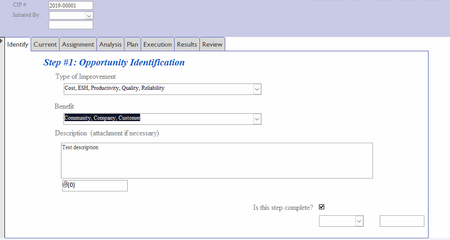
Suggestions to print tab information from a form
I have created a form which has 8 tabs in the body. I need to be able to print the form and all of the information on each tab. I have tried to create a report from the form which only prints the ...

Mikeg0210
Feb 09, 2023Tin Contributor
Thanks for your suggestion. All of the information in the tab is contained in a single table. I have tried to create the report manually by overlapping each tab in a continuous manner however, I cannot get more than 4 tabs on a page. In the existing application, the report just skips to the new page and continues to print. I can't find a way to insert the page break without having grouping involved. Is there a way to create a fixed page break

arnel_gp
Feb 09, 2023Steel Contributor
that is not the way to Create a Report.
on Navigation Pane, click on your table.
now, on the Ribbon->Create->Report.
bring the "new report" in design view and arrange the fields according to your "taste".
modify the "label" to a more descriptive one. you can drag a Label control to add more description to your report.
on Navigation Pane, click on your table.
now, on the Ribbon->Create->Report.
bring the "new report" in design view and arrange the fields according to your "taste".
modify the "label" to a more descriptive one. you can drag a Label control to add more description to your report.