Forum Discussion

Struggling to link pop-up form to main form
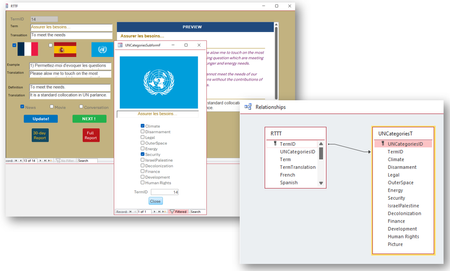

Hi,
1. > UNCategoriesID is a foreign key in RTTT (the main table)
that you don't need and should delete.
2. The text box with caption "TermID" in the pop-up form contains an expression=calculated control=unbound. Therefore, it's value doesn't get saved in the table. You have to assign the TermID value to a bound control or to the table field when you open the pop-up, or you have to save the TermID when you close the pop-up. The first one is better. Either way you will need VBA or a macro to do this.
3. How do you open the pop-up form?
Servus
Karl
****************
Access Forever
Access News
Access DevCon
Access-Entwickler-Konferenz AEK - 19./20.10. Nürnberg
 DMP2024Jul 16, 2024Copper Contributor
Hiiii Karl,
Hope all is well. I was actually coming here to write that I figured it out. I have no clue how I did it!
I remembered something about a default line. Anyway, the screen grabs can illustrated what I'm too clumsy to explain.
As you can see, what I have selected from the check list is, indeed, registered in the UNCategoriesT table, and those selections appear next to their corresponding TermID.
Oh, and I also removed the UNCategories field from the RTTT table as recommended. It is no longer a foreign key in the RTTT (main table). Thx!