Forum Discussion

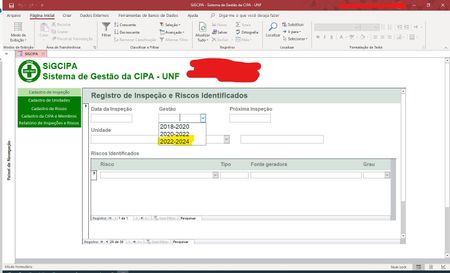
Set latest record as Default Value in Combo Box
- Dec 30, 2022
You could try this, but beware of the pitfalls of language. I may not have interpreted your data properly and I can't properly reproduce the accented letters. It's especially difficult working from screenshots, rather than having the actual SQL in the combo box's rowsource available.
DMax("Codigo", "tbl_Gestaos_da_CIPA")
That assumes Codigo is an AutoNumber and that the Gestaos are entered in the same sequence (oldest to newest) as the AutoNumber (smallest to largest). If that is not accurate, then the expression is more complex. However, that is the basic approach to finding the "latest" value in a table.
If you need to sort the records in "tbl_Gestaos_da_CIPA" from newest to oldest by date range, then you can create a query which does that and use it instead of the table.
DLookup("Codigo", "qry_Sorted_tbl_Gestaos_da_CIPA_by_Newest")

You could try this, but beware of the pitfalls of language. I may not have interpreted your data properly and I can't properly reproduce the accented letters. It's especially difficult working from screenshots, rather than having the actual SQL in the combo box's rowsource available.
DMax("Codigo", "tbl_Gestaos_da_CIPA")
That assumes Codigo is an AutoNumber and that the Gestaos are entered in the same sequence (oldest to newest) as the AutoNumber (smallest to largest). If that is not accurate, then the expression is more complex. However, that is the basic approach to finding the "latest" value in a table.
If you need to sort the records in "tbl_Gestaos_da_CIPA" from newest to oldest by date range, then you can create a query which does that and use it instead of the table.
DLookup("Codigo", "qry_Sorted_tbl_Gestaos_da_CIPA_by_Newest")