Forum Discussion

trdoan
Apr 09, 2019Copper Contributor
Return all results matching the search criterion
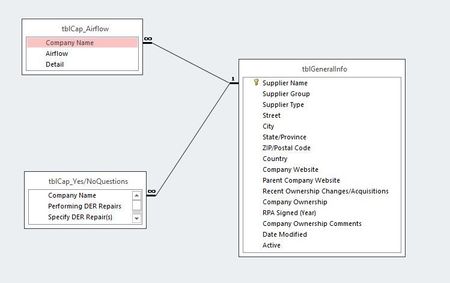
Hi everyone, I have 3 tables: tblGeneralInfo, tblCap_Airflow, and tblCap_Yes/NoQuestions and a form with 2 buttons: Airflow and DER Repairs. Here are the relationships: The Airflow co...

ianmckay
Apr 13, 2019Copper Contributor
You should make three forms: one for each table. You can use the form wizard to do this. In the navigation pane on the left, locate and select one of the tables, On the ribbon select Create->Form Wizard. Repeat for the other two. Then, in the navigation pane, right click on the form you created for the tblGeneralInfo and select 'Design view'. This should display and activate the Design table tab on the ribbon. Make some more space on the form by hovering over the bottom edge and dragging it down. In the Controls panel on the ribbon, locate the Subform/Subreport control (you can click once on each control icon..leave the mouse pointer hovering over it...and the description will be displayed). With the Subform/Subreport control selected, move the mouse pointer to the Detail section of your form, press and hold the left mouse button to create a rectangle to hold one of the two remaining forms and When you release the left mouse button, a popup window appears allowing you to specify the name of the existing subform that you want to include in the form, which fields should be listed on the subform and the name of the column used to link the data to the main form. Add a second subform control and repeat the process.