Forum Discussion

Problem display size boolean fields
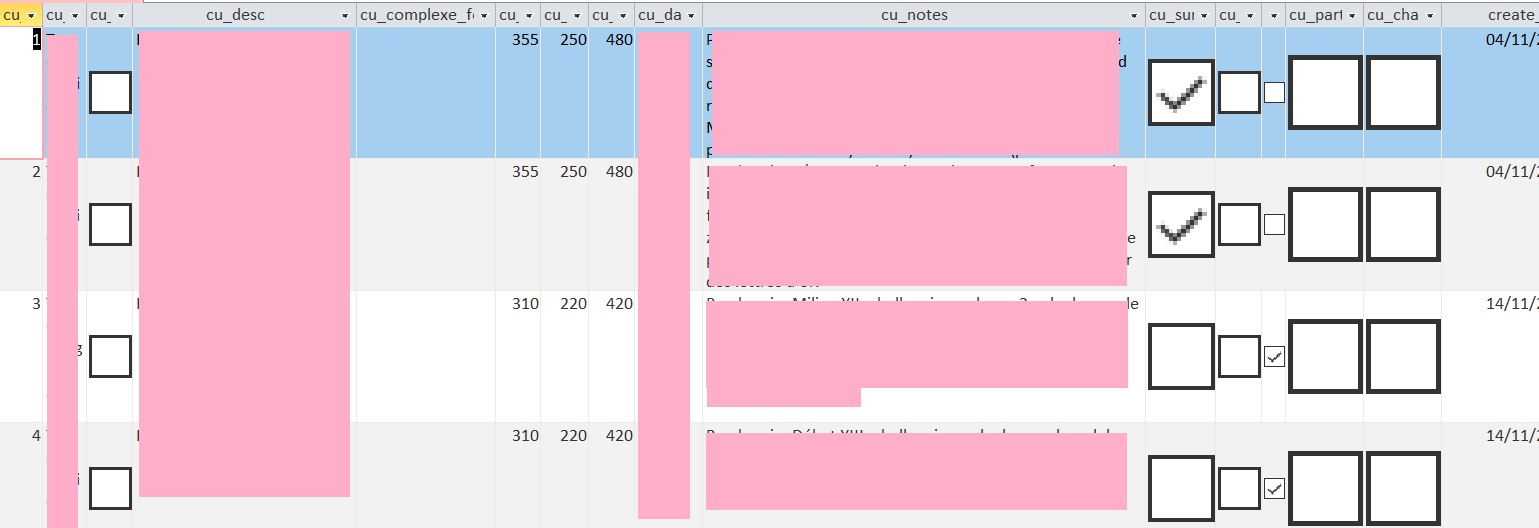

Is that a form or a table/query?
Check your error trapping settings in the Visual Basic Editor.
The only time I've seen anything similar was when the setting was Break On All Errors.
If that is the case, change to Break On Unhandled Errors
If its a form and that doesn't help, try decompiling your project: Decompile and Compact Your Microsoft Access Database to Improve Performance and Fix Corruption (fmsinc.com)


isladogs thanks for your message.
I have checked the Visual Basic Editor but the setting is already on "Break On Unhandled Errors".
The picture I am showing is from a table. However, I must precise : this disturbing display of Boolean fields boxes occures anytime on Access, even on new database. It does not happen on my old computer... so could it be a problem of PC resolution ? My new PC has a higher screen resolution than the former. But I'm sure plenty of Access users have even far better computer than mine, so I do not get why this problem is happening.
- isladogsAug 18, 2021MVPDoes it still happen if you create a form or report based on the table?
It mat be that there is an Access client setting on the new computer that is triggering this behaviour but I'm not sure what that would be. See if you can see any differences between the client settings on the two computers- BelisaireAug 19, 2021Copper ContributorIf I create a form or a report based on the tables with Boolean fields, the boolean fields will have normal size boxes in the form or report...
I have made a comparison between the Access client setting on my new computer and the old one, but they are strictly the same since I use Microsoft 365 with both.- isladogsAug 19, 2021MVPI should have asked you to check the appearance in a query and in a datasheet form as well.
The only other option settings I suggest you check are those for object designers and datasheets... but I'm not too optimistic that either will provide a solution.
Of course, I could say it doesn't matter as end users should never look at tables or queries directly. All interaction should be done using forms. Whilst that is true, I would also want to determine the cause. Have you tried compacting?