Forum Discussion

Open Subform to ID that's on an Unbound Main Form
- Oct 26, 2022
here is a demo.
open report Table1 (report view).
then open frmFXTracker
on the report click the amount textbox.
did it go to the record on the subform?
view the code on the textbox on report and also the code on the subform.

Arnel,
to answer your question, yes. The frmFXTracker is open and I will sometimes click txtAmountORIG_Click() from another report and go to frmFXTracker.
I have added and removed the codes as instructed.
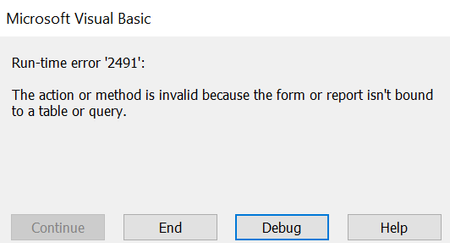
It seems I have an msg box pop up when I click on txtAmountORIG_Click() in my rpt:
txtIDFXParent I can guarantee is the field name of IDFXParent on frmFXParent (the subform of frmFXTracker unbound Parent form).
If I click cancel then the debugger highlights the code in my report:
I am not sure if a filter is what I need since I also noticed an error on frmFXTracker if I open it up on its own instead of opening frmFXTracker from the click event of txtAmountORIG_Click().
I only need the record frmFXParent.txtIDFXParent to be selected (ie the record selector that you see in datasheet). I am thinking there would have to be more codes if using a filter to account for opening the form on its own but I dont really know...just assuming.
Let me know if you have any questions. Thank you for the help!

here is a demo.
open report Table1 (report view).
then open frmFXTracker
on the report click the amount textbox.
did it go to the record on the subform?
view the code on the textbox on report and also the code on the subform.
- Tony2021Oct 26, 2022Steel Contributor
I see what the issue is.
the actual name of the field is in my table is IDFXParent and the code had it as txtIDFXParent. I see in your table that the actual name is also txtIDFXParent...so I changed it to the below (removed the "txt" part)Public Sub subGoToID(ByVal ID As Long)
With Me.RecordsetClone
.FindFirst "IDFXParent = " & ID
If Not .NoMatch Then
Me.Bookmark = .Bookmark
End If
End With
End Sub
I also needed to modify the below for when the frmFXTracker is not open. Most of the time it is though.
Private Sub AmountORIG_Click()
If IsLoaded("frmFXTracker") Then
[Forms]![frmFXTRacker]![frmFXParent].[Form].subGoToID Me.txtIDFXParent
[Forms]![frmFXTRacker].SetFocus
Else
DoCmd.OpenForm "frmFXTRacker"
[Forms]![frmFXTRacker]![frmFXParent].[Form].subGoToID Me.txtIDFXParent
End IfIts working great! thank you again. Really appreciate the expert help!