Forum Discussion

Open Subform to ID that's on an Unbound Main Form
- Oct 26, 2022
here is a demo.
open report Table1 (report view).
then open frmFXTracker
on the report click the amount textbox.
did it go to the record on the subform?
view the code on the textbox on report and also the code on the subform.

pass your filter as OpenArgs parameter (not WhereClause), example:
Private Sub txtAmountORIG_Click()
DoCmd.OpenForm FormName := "frmFXTracker", OpenArgs := "txtIDFXParent=" & Me.txtIDFXParent
End Sub
Now open "frmFXTracker" form in desgin view and click on the subform.
Add Code on it's Load Event, and add this code:
Private Sub Form_Load()
Dim varFilter As Variant
varFilter = Me.Parent.OpenArgs
If IsNull(varFilter) = False Then
Me.Filter = varFilter
Me.FilterOn = True
End If
End Sub

Hi Arnel, thank you very much for the response.
Question:
What if frmFXTracker is already open? this is the case.
I am thinking I need to put the ON Load event in a different event?
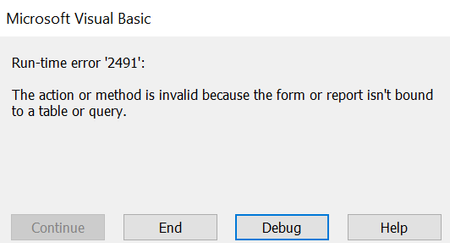
I tried On Activate but get an error (below). I dont think it would be ON Open either since its already open. Not sure about ON Current either since the form is already open.
Let me know what you think. Maybe close the frmFXTracker and reopen? I imagine you have a better idea. Let me know what you suggest.
frmFXTracker ON Activate:
thank you....
- Tony2021Oct 26, 2022Steel ContributorI do have a function to check if the form IsLoaded though:
Function IsLoaded(ByVal strFormName As String) As Integer
' Returns True if the specified form is open in Form view or Datasheet view.
Const conObjStateClosed = 0
Const conDesignView = 0
If SysCmd(acSysCmdGetObjectState, acForm, strFormName) <> conObjStateClosed Then
If Forms(strFormName).CurrentView <> conDesignView Then
IsLoaded = True
End If
End If
End Function- arnel_gpOct 26, 2022Steel Contributor
so form frmFXTracker is Open and on some Report you click txtAmountORIG textbox to filter the sub-form of frmFXTracker?
remove the code i gave you, instead add a Public Sub on the subform:
Public Sub subApplyFilter(Byval id As Long)
Wtih Me
.Filter = "txtIDFXParent=" & id
.FilterOn = True
End With
End Sub
back to your Report's textbox click event, modify this to:
Private Sub txtAmountORIG_Click()If IsLoaded("frmFXTracker") Then
[Forms]![frmFXTracker]!frmFXParent.Form.subApplyFilter Me.txtIDFXParentEnd If
End Sub
- Tony2021Oct 26, 2022Steel Contributor
Arnel,
to answer your question, yes. The frmFXTracker is open and I will sometimes click txtAmountORIG_Click() from another report and go to frmFXTracker.
I have added and removed the codes as instructed.
It seems I have an msg box pop up when I click on txtAmountORIG_Click() in my rpt:txtIDFXParent I can guarantee is the field name of IDFXParent on frmFXParent (the subform of frmFXTracker unbound Parent form).
If I click cancel then the debugger highlights the code in my report:
I am not sure if a filter is what I need since I also noticed an error on frmFXTracker if I open it up on its own instead of opening frmFXTracker from the click event of txtAmountORIG_Click().
I only need the record frmFXParent.txtIDFXParent to be selected (ie the record selector that you see in datasheet). I am thinking there would have to be more codes if using a filter to account for opening the form on its own but I dont really know...just assuming.
Let me know if you have any questions. Thank you for the help!