Forum Discussion

ErnieArn
Jan 31, 2024Copper Contributor
Missing Menu Bar
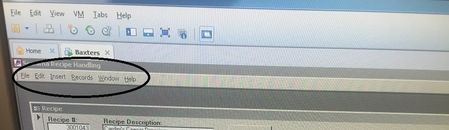
Dear community, I have a customer who uses an old access frontend and it currently runs on Windows2000. It is a 32bit .mde file and unfortunatley I don't have the original so I cannot edit it or loo...

Tom_van_Stiphout
Jan 31, 2024Steel Contributor
> I'm not even sure if these are standard menu items
These are standard menu items. The users may not use them. There is no way to get them back. We have a ribbon now, which replaces the menu bar. I don't see much of the ribbon in your second picture, but there may be a way to get it back. Start with File > Options > Customize Ribbon.
These are standard menu items. The users may not use them. There is no way to get them back. We have a ribbon now, which replaces the menu bar. I don't see much of the ribbon in your second picture, but there may be a way to get it back. Start with File > Options > Customize Ribbon.
 ErnieArnFeb 01, 2024Copper ContributorMany thanks for the reply. The reason there isn't much of the ribbon in the photo is that it was taken when the database was running on Access Runtime. I thought that might be the reason as to why the menu's were not showing so I upgraded to a full version of Access but still having no luck. But the fact that you think these are standard menu's means I should be able to find them and add them to a cutsom menu in the Ribbon. Do you know if envoking a menu system like this from the VBA is possible or are you fairly sure these are standard? Hopefully I can get to site soon and see what these butttons do for myself and then maybe I replicate them. Many thanks.