Forum Discussion

Microsoft Access Question
Hi,
I am new to MS Access but have used other MS products for decades. I am trying to figure out a solution to this problem. I have 5 categories (with 1 to many locations associated to a category). Each category can have 1 to many black out dates. I want to run a query with a date to see which category(s) are not blacked out on that date. So far i created 2 tables. 1 has the categories and location and the 2nd has the Black Out date(s) by category. I linked the category between the 2 tables. When i run the query and say black out date not equal a given date, it doesn't show that row for that date, but does show it if there is another black out date associated with that category. I think it has to do with the 1 to many relationship. Anyone have an idea on how to solve this? Or is there a better way to approach it?
11 Replies
- EricStarkerFormer Employee
gziegelmeyer Great discussion! I'm moving it to the Microsoft Access discussion space as the Tech Community Discussion space is reserved for discussion about the Tech Community website.
- chrisgrahamdackCopper Contributor
For the purposes of explaining a potential answer in this thread this is what I did on my database reconstruction...
- I created three tables tblGEOCodes, tblStoreMasterOLD and tblBODates. The table tblGEOCodes are where each location/category are stored for subsequent assigning in other tables. As each category in this table is unique I simply created one field as the primary key.
- One to many relationships were formed from the tblGEOCodes listing/table to the appropriately linked fields in tblStoreMasterOLD and tblBODates.
- Created a query called qryBODateStores which showed all stores which correspond to the BO Date entered in the query itself.
- Created an unmatched query (using the Access Query Wizard) to show all store details from tblStoreMasterOLD which haven't appeared in the query above, therefore providing you with the answer specifically for the date in question entered in qryBODateStores.
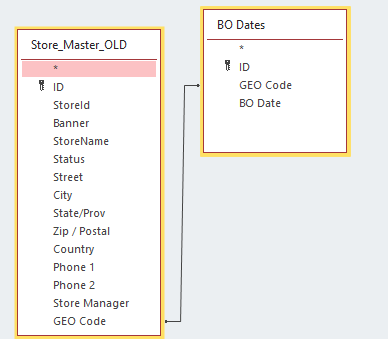
I've attached a relationship diagram showing the structure. Notice I've checked the "Enforce Referential Integrity" box when setting the one-to-many relationships as one location/category (GEO Code) can appear multiple times in both corresponding tables.
I tried to attach my database but it isn't being allowed, happy to WeTransfer to you if desired, drop me a private message with your email address if so 🙂
I look forward to seeing if this has resolved your issue or any further feedback you wish to provide.
Chris
- chrisgrahamdackCopper ContributorHi Gary, hope all is well.
I am trying to replicate the database structure you've mentioned but would appreciate some more clarity, is this correct?...
2 tables, one containing "Category" as primary key and another "Location" field.
One containing "BlackOutDate" as primary key and another "Category" field.
You've linked "Category" fields together with a one-to-many relationship.
I don't believe this is your setup but would love to know more so I can replicate and help 🙂
Chris gziegelmeyerCopper Contributor
Thanks for taking a look at this!!
I added a screen shot of the tables. There can be 6 categories with multiple rows per category. There can also be multiple blackout dates per category. I want to be able to do a query on a given date and give me back all rows (for a category(s)) that are Not blacked out on that date. When I did a query and put Not (specified date), it returns the row that has multiple black out dates, but with a different blackout date than specified. Example if category 1 has a blackout date of 6/1/21 and 12/13/21, it will still return the row with the 12/13/21 blackout date.
I am not sure these tables are set up the most efficient way either. Let me know if this helps.
- chrisgrahamdackCopper ContributorBy "Category" I assume you mean "GEO Code" in this instance?