Forum Discussion

gziegelmeyer
May 27, 2021Copper Contributor
Microsoft Access Question
Hi, I am new to MS Access but have used other MS products for decades. I am trying to figure out a solution to this problem. I have 5 categories (with 1 to many locations associated to a category)...

gziegelmeyer
May 29, 2021Copper Contributor
Thanks for taking a look at this!!
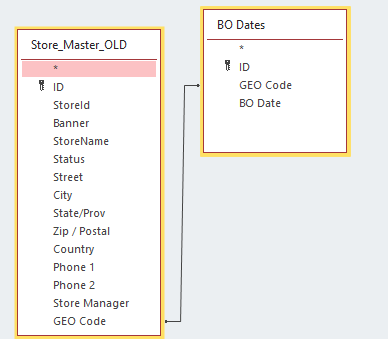
I added a screen shot of the tables. There can be 6 categories with multiple rows per category. There can also be multiple blackout dates per category. I want to be able to do a query on a given date and give me back all rows (for a category(s)) that are Not blacked out on that date. When I did a query and put Not (specified date), it returns the row that has multiple black out dates, but with a different blackout date than specified. Example if category 1 has a blackout date of 6/1/21 and 12/13/21, it will still return the row with the 12/13/21 blackout date.
I am not sure these tables are set up the most efficient way either. Let me know if this helps.

chrisgrahamdack
May 29, 2021Copper Contributor
By "Category" I assume you mean "GEO Code" in this instance?
- gziegelmeyerMay 29, 2021Copper ContributorYes Category = Geo Code. And yes it may not have been set up properly 🙂 I have worked almost any job you can think of in IT, but never a DBA.
- chrisgrahamdackMay 29, 2021Copper ContributorNo worries whatsoever, OK I look forward to seeing if I can help out here 🙂
- chrisgrahamdackMay 29, 2021Copper ContributorHi once more, I've put a meaningful structure together but have a feeling you're wanting to see which applicable stores assigned to the GEO Code in question are not blacked out on the chosen date, more than just the GEO Code itself which my structure aligns to?
It is coming up to 2am over here in the UK so I look forward to your response and will look at this again ASAP as I better get to bed! All the best for now 🙂