Forum Discussion

DMP2024
Jul 13, 2024Copper Contributor
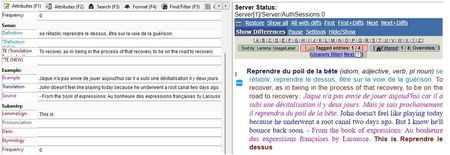
Merging formatted text boxes in MS Access
Hi All, Is what you see in the first image below possible in MS Access? (See first image below, right side!) My goal is to merge multiple formatted text boxes into a single, coherent paragraph wh...

DMP2024
Jul 13, 2024Copper Contributor
Hi Karl,
You make valid points. I have tried [RichTextbox1] & “ “ & [RichTextbox1] and it did not work.
The resulting merged text field was not able to preserve the formatting of BOTH of the original text boxes that were concatenated.
This is illustrated in the images below.
The "Term" text box was clearly BLUE and BOLD, and the "PartOfSpeech" text box was clearly grey and italicized. When the two text boxes were concatenated, the second text box lost its formatting (this can be seen in the last image, which is Print Preview mode).
.
peiyezhu
Jul 13, 2024Bronze Contributor
The "Term" text box was clearly BLUE and BOLD, and the "PartOfSpeech" text box was clearly grey and italicized. When the two text boxes were concatenated,
The text boxes concatnated only values without format/style in fact.
The text boxes concatnated only values without format/style in fact.
- DMP2024Jul 13, 2024Copper Contributor
Exactly. The text boxes concatenated.
But when that happened, the PartOfSpeech text box did not maintain its formatting/style.That was completely lost.
Thanks so much.