Forum Discussion

Link Master and Child
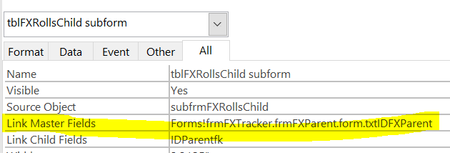
- Apr 23, 2022
=[Forms]![frmFXTracker].[frmFXParent].[Form].[txtIDFXParent]
seems close, but I think, in the control source property of the hidden form, though, it should probably be:
=[frmFXParent].[Form]![txtIDFXParent]

You have a main form that is not bound to a recordsource.
You have two separate subforms, each bound to a separate recordsource.
You want to coordinate records in the two subforms, based on the value in a field called "txtIDFXParent", which is NOT on the main form, rather it is on one of the the two subforms.
This won't work.
Both subforms must be linked to the main form, or rather to a control on the main form.
Place a hidden control on the main form and populate it with the value you need, i.e. whatever field the control called "txtIDFXParent" is bound to in the subform.
Now, you can use that new, hidden control, to link the second subform's master/child linking.

George,
Outstanding answer. I have a main form with subformA and subformB. SubformA is a summary of account names and numbers. SubformB is details of transactions for any vendor selected in subformA.
Following your advice, I created a text box on the main form and referenced the value of the account number in subformA. Then in the data tab of subformB I linked the master field to the new text box, and linked the child field to the account number in subformB.
Thank You!