Forum Discussion

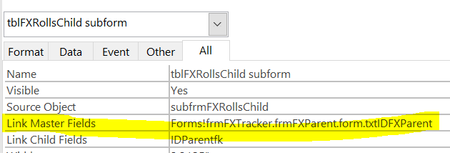
Link Master and Child
- Apr 23, 2022
=[Forms]![frmFXTracker].[frmFXParent].[Form].[txtIDFXParent]
seems close, but I think, in the control source property of the hidden form, though, it should probably be:
=[frmFXParent].[Form]![txtIDFXParent]

You have a main form that is not bound to a recordsource.
You have two separate subforms, each bound to a separate recordsource.
You want to coordinate records in the two subforms, based on the value in a field called "txtIDFXParent", which is NOT on the main form, rather it is on one of the the two subforms.
This won't work.
Both subforms must be linked to the main form, or rather to a control on the main form.
Place a hidden control on the main form and populate it with the value you need, i.e. whatever field the control called "txtIDFXParent" is bound to in the subform.
Now, you can use that new, hidden control, to link the second subform's master/child linking.

Hi George,
I think I understand conceptually. How do I set the value in the hidden field? I thought maybe by =[Forms]![frmFXTracker].[frmFXParent].[Form].[txtIDFXParent] (or something like that) but I dont think that is the solution. I need to set that hidden field to the value that is found in frmFXParent.txtIDFXParent.
Maybe using the On Current Event of the unbound form?
I tried it but doesnt work. Get an error of "invalid reference to the parent property":
Private Sub Form_Current()
Me.Parent.txtIDLink = Me.Parent.txtIDFXParent
End Sub
Me.Parent.txtIDLink = the hidden field
thank you for the help!
- George_HepworthApr 23, 2022Silver Contributor
=[Forms]![frmFXTracker].[frmFXParent].[Form].[txtIDFXParent]
seems close, but I think, in the control source property of the hidden form, though, it should probably be:
=[frmFXParent].[Form]![txtIDFXParent]
- Tony2021Apr 23, 2022Steel ContributorPerfect! thank you very much. It works great!
- George_HepworthApr 23, 2022Silver ContributorCongratulations on solving the problem.