Forum Discussion

KevvieMetal
Mar 21, 2023Tin Contributor
Is it possible to have 1:M:1 and 1:M:M forms
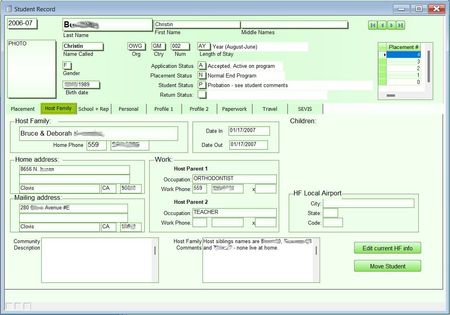
I'm hoping it's possible to create 1:M:1 and 1:M:M forms. Simple version is I have three tables, Students, HostFamilies, and Placements. While most students stay in the same placement over the course...

loufab
Mar 22, 2023Tin Contributor
Hi,
If you don't create a "placement" you should use a list instead of a subform.
Otherwise :
In form create an independent textbox named HF_ID. No link field !
In subform placement on current_form event use this code :
if not isnull(me.HF_ID.value) then
    'copy placement number in new HF_ID textbox in form
    me.parent.HF_ID.value = me.HF_ID.value
endif
In form select container of subform hostfamily, in properties LinkMasterFields and LinkChildrenFields write 2 fields of the (new) relation :
LinkMasterFields : Sdt_ID;HF_ID
LinkChildrenFields : Sdt_ID:HF_ID
If you are refresh problem on host_family subform add this before the Endif instruction.
Me.Parent.Controls("sfHostFamily").Requery
sfHostFamily is the name of CONTAINER of subform and not name of subform.

KevvieMetal
Mar 22, 2023Tin Contributor
I must be doing something wrong because I can't get it to work. While I know table relationships and such from database work long ago, I'm a total noob to Access. I'm sorry I'm not catching on too well.