Forum Discussion

KevvieMetal
Mar 21, 2023Tin Contributor
Is it possible to have 1:M:1 and 1:M:M forms
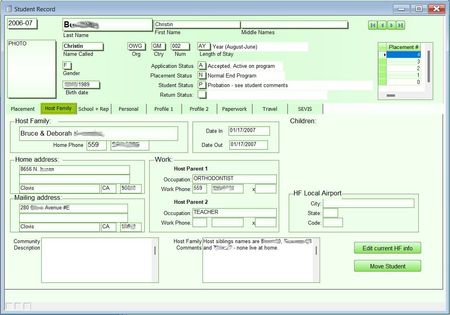
I'm hoping it's possible to create 1:M:1 and 1:M:M forms. Simple version is I have three tables, Students, HostFamilies, and Placements. While most students stay in the same placement over the course...

loufab
Mar 22, 2023Tin Contributor
Hi,
If you don't create a "placement" you should use a list instead of a subform.
Otherwise :
In form create an independent textbox named HF_ID. No link field !
In subform placement on current_form event use this code :
if not isnull(me.HF_ID.value) then
    'copy placement number in new HF_ID textbox in form
    me.parent.HF_ID.value = me.HF_ID.value
endif
In form select container of subform hostfamily, in properties LinkMasterFields and LinkChildrenFields write 2 fields of the (new) relation :
LinkMasterFields : Sdt_ID;HF_ID
LinkChildrenFields : Sdt_ID:HF_ID
If you are refresh problem on host_family subform add this before the Endif instruction.
Me.Parent.Controls("sfHostFamily").Requery
sfHostFamily is the name of CONTAINER of subform and not name of subform.

KevvieMetal
Mar 22, 2023Tin Contributor
loufab
Thanks. So it's not possible natively, but can be achieved with just a bit of code and proper form design. I'm new to Access so I'll need to get familiar with the coding. I appreciate your help.
Thanks. So it's not possible natively, but can be achieved with just a bit of code and proper form design. I'm new to Access so I'll need to get familiar with the coding. I appreciate your help.