Forum Discussion

annevaes
Jul 30, 2024Copper Contributor
I only want to show the active projects in this report
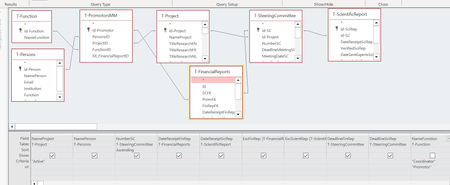
- Jul 30, 2024Your screenshot doesn't show that. It shows the word "active" under the field NameProject, which one would assume is the name of the project, not its status. The clipped view of the Query Design Grid also doesn't show a field called "Status".
In addition, your screenshot shows two criteria for "NameFunction". If that is the criteria, you'll also have to repeat "active" on both lines to accomplish the filtering required.

George_Hepworth
Jul 30, 2024Silver Contributor
How do you identify projects which are active? Surely the name of a project itself is not "active", is it?
Please provide the details needed to understand the process.

annevaes
Jul 30, 2024Copper Contributor
Hello,
The status of a project is active or closed. So I put "active" in the criteria for the status but the report still gives all project, also the closed ones
The status of a project is active or closed. So I put "active" in the criteria for the status but the report still gives all project, also the closed ones
- George_HepworthJul 30, 2024Silver ContributorYour screenshot doesn't show that. It shows the word "active" under the field NameProject, which one would assume is the name of the project, not its status. The clipped view of the Query Design Grid also doesn't show a field called "Status".
In addition, your screenshot shows two criteria for "NameFunction". If that is the criteria, you'll also have to repeat "active" on both lines to accomplish the filtering required.- annevaesJul 30, 2024Copper ContributorThank you, the problem has been solved and I learned a lot