Forum Discussion

Christophernector2013
Oct 16, 2021Copper Contributor
How to populate all the selected label controls into the menu in Ms Access Form
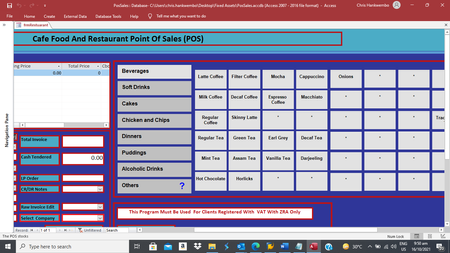
I need help my mathematics with vba code is missing some fields called onions and traditional tea as part of the main menu available for the restaurant cashier’s selection. The menu is made of labels...

George_Hepworth
Oct 16, 2021Silver Contributor
I don't see an attachment. Can you try again?
Also, please clarify. The problem is that two products are not properly displayed in the menu?
Green tea should be displayed with other beverages? and Onions should be displayed with .....?
Also, please clarify. The problem is that two products are not properly displayed in the menu?
Green tea should be displayed with other beverages? and Onions should be displayed with .....?
 Christophernector2013Oct 16, 2021Copper Contributor
I have a data sheet called sfrmrestuarantdetails where if I click any label I'm able to enter the label name in the data sheet by calling an append query via the the onclick mouse event, except the onions and tradition tea that is where I want help locate where I'm missing it. I hope you will be able to see the small database attached.
- George_HepworthOct 16, 2021Silver ContributorThis is a bald guess, in the absence of any substantive details to work with, but it's quite possible there is a problem in your data. When part of a process does work as expected, and other parts don't, it can often be traced to problems in the data. Of course, without seeing your data, the best we can do is guess.
- isladogsOct 17, 2021MVP
Crossposted with several responses at https://www.access-programmers.co.uk/forums/threads/how-to-populate-label-controls-on-a-form-to-act-as-a-restaurant-menu.319940/#post-1790200
- George_HepworthOct 16, 2021Silver ContributorNo I do not see a database attached. All I see is a screenshot of one form.
