Forum Discussion

anasfsilva
Jan 25, 2022Copper Contributor
How to keep combo box data from change between forms?
Hello, When I input new data in a form in the combo boxes, that data is saved on the respective table. However, in the form view, when I go back to previous records, the saved data does not show ...
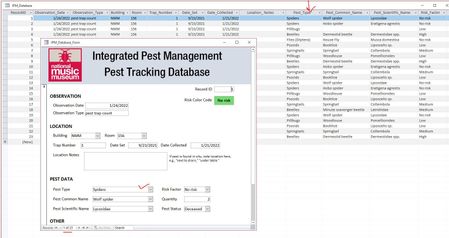
- Jan 25, 2022Are these by any chance "cascading combo boxes" where the list of records in one box is filtered by the choice in another? For example, if you pick a state in Box1 then you'll see only a list of cities from that state in Box2. If that's the case, then that would explain why you're not seeing any values. They're not in the list of options that combo box has because it's filtered. You'll need to requery the combo boxes in the OnCurrent event. https://599cd.com/OnCurrent

ComputerLearningZone
Jan 25, 2022Brass Contributor
Are these by any chance "cascading combo boxes" where the list of records in one box is filtered by the choice in another? For example, if you pick a state in Box1 then you'll see only a list of cities from that state in Box2. If that's the case, then that would explain why you're not seeing any values. They're not in the list of options that combo box has because it's filtered. You'll need to requery the combo boxes in the OnCurrent event. https://599cd.com/OnCurrent

anasfsilva
Jan 25, 2022Copper Contributor
Like I said, your tutorial videos are a must! Indeed these are cascading combo boxes and following you example, I just copied the requery scripts for those combo boxes into the OnCurrent event on the form and it is now working and showing just fine! Thank you!
I think I will have to do the same to the combo boxes of "building" and "room" because these are working just the same way, and so far I only worked in the same room. I bet that when I change the room, if the requery is not done on the form, then they won't show up either.
All best!