Forum Discussion

create Appointment Item in MS Outlook Calendar from Button in MS Access
 Jun 08, 2021Hello Julie,
I have done this in Access with Visual Basic for Applications (VBA), but that probably exceeds your scope as you are pretty new to Access. Nevertheless, let me know if you would try to set this up with VBA.
Best regards,
Tieme
Hello Julie,
I created an Access application for this, but I can not send Access files through this community. Do you have a regular mail address where I can send the Access file to? Maybe you can send the mail address to me in a direct message.
Short explanation
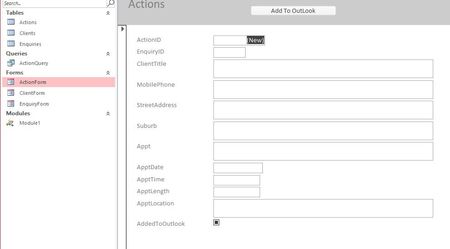
The application creates an Outlook-appointment on clicking the Add To Outlook button. Below an example of the form:
After filling the form and clicking the button the appointment appears in Outlook:
And if you open the appointment you see the details:
I hope you can incorporate the VBA-code and form functionality of my application into your application. The VBA-code is in the module modAppointment. And in the form you need to connect the click-event of the button to the cmdAddToOutlook_Click subroutine in the VBA-form module (Form_Action).
If this does not work out for you, maybe you could send me your application and I will incorporate the functionality. But that depends on the security policies of your organization.
Good luck and feel free to contact me for any further questions.
Best regards,
Tieme

Woldman
Hi Tieme,
I would love to see that code as well. It would be very helpful. I have been getting a Run-time error of 438 with the code I have been using.
Thank you,
Sammy
email address removed for privacy reasons