Forum Discussion

Conditional Format form - between date and 30 days
- Apr 29, 2022
you can simplify your Criteria:
[txtDate] Between DateSerial(Year(Date()), Month(Date()), 1) And DateAdd("d",30,Date())Note i remove the equal (=) symbol.


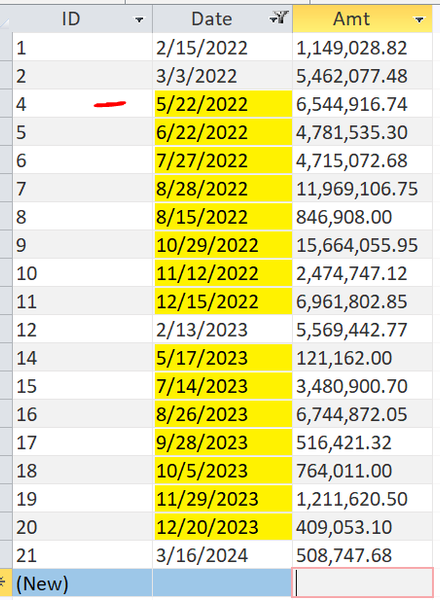
First, to be clear, the screen shot shows TWO sections with yellow highlights, one for the coming month of May, 2022 and the other for dates between May, 2023 and December, 2023. That doesn't square up with what your description seems to specify.
Please clarify that. Why is the second section highlighted?
In any event, this is not going to be an easy to implement requirement, I don't think, because conditional formatting only applies to the current instance of a control on a form, whereas you seem to need to compare both the current value of any given control, and the values of all other controls to be sure none of them match the "current month" criteria.
Actually, it might help if you could also elaborate on why this needs to be done. Sometimes context is king, well, actually, context is nearly always critical to understanding a request for a solution.

thanks for the response. The screen grab is not correct since the formula is not correct.
What I need to do is highlight any transactions in the current month but if there are none then highlight the next closest.
Let me know if not clear. thank you