Forum Discussion

Calculated Dates (taking into Account Holidays)
- Mar 11, 2022
im too lazy to follow the thread.
but i get the idea based on the worksheet to attached.
see your demo.


HI George,
thank you. I am trying to get it working.
I dont know if this is what I am after since it returns a count between 2 dates and I am not looking for the count but rather a date based on the count but possibly could get it working. Also the holidays in the codes are only Federal Holidays but I need to include dates on top of those dates and modifying the fixed dates in the codes is not easy due to the way the count is.
I have an error on "Throw"
Assume a reference needs to be added
Do you happen to know what reference it could be?
I have the following references:

Agreed. It will take some work to implement any of the common sources in a way that meets your needs.
I have a whole module devoted to this kind of date related calculations, but I hesitated to offer it because it is pretty complicated. I recommended Mike's blog because I admire his work and it's usually pretty straightforward.
As you noted, you will have to maintain the holidays table with any dates your organization observes as holidays. That is going to vary by organization.
I don't see anything in that screenshot that tells me what the problem is, unfortunately.
I have a module for many kinds of date calculations, but I'm not sure it has anything in it that meets your needs directly. Check it out. Import the two files in this attached zip into your VBE environment.
I'll poke around some more, I know I've seen similar functions; it's just a matter of the right search words in Google.
- Tony2021Feb 27, 2022Steel Contributor
thank you George. I poked around in those modules. Interesting. I saw something named "tlkpHoliday" (below pic). I assume that is a table and maybe I could change my holiday table to that name. I see also a dProposedDate, dStartDate and dEndDate and not certain how I can assign them in my case. I have not read all of it though. Probabaly wouldnt make much of a difference if I did since most of it I unfortunately dont understand, which you hinted that I might not be able to. I will keep poking around in it. thank you for the assistance.
- George_HepworthFeb 27, 2022Silver Contributor
I modified some of the existing codes to produce two functions that should return the date X business days after a specified date and the date X business days before the specified date. It appears to be returning valid dates in my tests so far.
Public Function BusinessDay(ByVal dProposedDate As Date) As Boolean
'Is the proposed Business Day on the holiday calendar or a weekend?
10 BusinessDay = False
20 If CountHolidaysDCount(dProposedDate, dProposedDate) > 0 Then
30 BusinessDay = False
40 ElseIf Weekday(dProposedDate) <> 1 And Weekday(dProposedDate) <> 7 Then
50 BusinessDay = True60 End If
End Function
Public Function BusinessDayBeforeDate(ByVal dStartDate As Date, ByVal iDayTarget As Integer) As Date
'Calculate the Business day "iDayTarget" number of day before the start date
'Requires the starting date and number of days prior as arguments.Dim iDayTest As Integer
Dim dProposedDate As Date
10 iDayTarget = Abs(iDayTarget)
20 iDayTest = 0
30 dProposedDate = dStartDate
40 Do While iDayTest < iDayTarget
50 If iDayTest < iDayTarget Then
60 dProposedDate = dProposedDate - 1
70 End If
80 If Not BusinessDay(dProposedDate) Then
90 iDayTest = iDayTest
100 Else
110 iDayTest = iDayTest + 1
120 End If
130 Loop
140 BusinessDayBeforeDate = dProposedDate
End FunctionPublic Function BusinessDayAfterDate(ByVal dStartDate As Date, ByVal iDayTarget As Integer) As Date
'Calculate the Business day "iDayTarget" number of day After the start date
'Requires the starting date and number of days after as arguments.Dim iDayTest As Integer
Dim dProposedDate As Date
10 iDayTarget = Abs(iDayTarget) * -1
20 iDayTest = 030 dProposedDate = dStartDate
40 Do While iDayTest > iDayTarget
50 If iDayTest > iDayTarget Then
60 dProposedDate = dProposedDate + 1
70 End If80 If Not BusinessDay(dProposedDate) Then
90 iDayTest = iDayTest
100 Else
110 iDayTest = iDayTest - 1
120 End If130 Loop
140 BusinessDayAfterDate = dProposedDate
End FunctionPublic Function CountHolidaysDCount(ByVal dStartDate As Date, ByVal dEndDate As Date) As Integer
CountHolidaysDCount = DCount("Holiday", "tlkpHoliday", "tlkpHoliday.Holiday Between #" & dStartDate & "# AND #" & dEndDate & "#")
End Function- Tony2021Feb 28, 2022Steel Contributor
Hi George, thats interesting. Are the 10,20,30...n ==> are the numbers the days prior or something else? Are you using a tblHolidays like I am using the the attached db above? I only need to return a date that is PRIOR to a date that I enter.
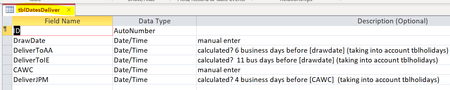
This table tblDatesDeliver is what I would want to populate.
If I enter DrawDate then
DeliverToAA is 6 business days prior
DeliverToIE is 11 business days prior
If I enter a date into CAWC then the
DeliverToJPM is 4 business days prior
Could you kindly show me how to use it? I guess a form built off of tblDatesDeliver but I am not sure how to call the functions. Thank you very much. Looking forward to your response.
- George_HepworthFeb 27, 2022Silver Contributor
Back when I first created most of that code, I used a naming convention that included "tbl" prefixes for standard tables, "tlkp" for lookup tables, and "tjx" for junction tables. I got away from that because it's a bit of overkill for the most part. Your naming convention only needs to be consistent with what you otherwise do, although the VBA does have to line up with it.
I don't think it's so much a case of not understanding as it is wading through unfamiliar code for the first time and learning how someone else does things. Concentrate on the parts that do calculations of days between two dates to see if you can decompose the logic involved. At some point, you'll be able to reverse engineer that logic to create a calculated future date.
We all started somewhere, and jumping into the pool at the deep end isn't always the worst way to do that.