Forum Discussion

Add Parameters to a Macro

Tony2021 This is hard to explain via this environment, so use your imagination a bit in looking for answers.
Apparently there is another macro involved. That macro is associated with the report and that is where the parameters should be defined. Look in the report and see what you can find. If you find such a macro, show it here and we'll see if we can pursue it.
- Tony2021Nov 17, 2021Steel Contributor
George,
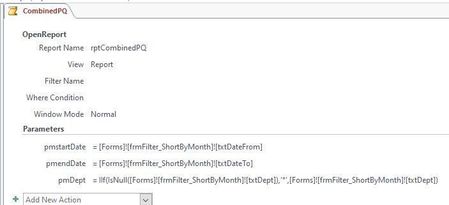
I see one saved macro and within the report are the parameters.
I see I can add an action but there are many options.Do you know which action it would be?
- George_HepworthNov 17, 2021Silver Contributor
I had to review macros. I almost never use them and it had been a long time since I did.
Open the query that provides records to the report. It should have three parameters already, the ones shown in your screenshot. Add the fourth there. Now, when you edit the macro and click on the "update parameters" link, it should add the fourth parameter.
Hopefully that'll do it.- Tony2021Nov 18, 2021Steel ContributorHello George,
yes, I have the query open as in screen shot above.
I have to add an ACTION it appears.
I dont know which ACTION I would choose since there are so many.
I think I need to choose an action?
