Forum Discussion

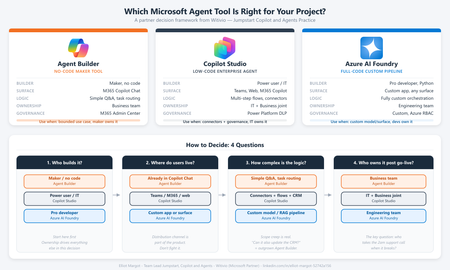
Agent Builder, Copilot Studio, or Azure AI Foundry: How We Decide for Every Client
 May 28, 2026
I have my solution. I want to implement Copilot here.
A Power Platform solution that automatically monitors Dataverse security role assignments across environments, detects policy violations, remediates unauthorized access, and notifies the CoE/Admin team through consolidated email alerts.
What the solution handles well
Reads Dataverse audit logs — avoids expensive full table scans on large environments
Covers both direct role assignments and team-inherited roles in a single run
Exception table allows business-approved exemptions without changing flow logic
Separate parent/child flow design supports multi-environment governance cleanly
Consolidated alerting reduces notification noise — one email per run, not per violation
Role Audit Logs table provides a full traceable history of violations and remediations
One audit record per team change avoids redundant log entries
What the solution does — current process
Step 1
Scheduled trigger
Runs automatically once daily. Can also be triggered manually by an administrator.
Step 2
Loop environments
Parent flow reads Environment Config and iterates through each monitored environment (Dev, Sandbox, Prod).
Step 3
Read audit logs
Child flow reads the last 24 hours of Dataverse audit logs and filters for role assignment change events.
Step 4
Detect violations
Compares each user's current roles (direct and via team) against the approved role list for that environment.
Step 5
Apply exceptions
Checks the Exception Config table — approved exemptions for specific users, teams, or roles are excluded from violations.
Step 6
Log & remediate
Writes violations to Role Audit Logs, then removes unauthorized roles automatically where remediation is enabled.
Step 7
Send alert
Builds a conditional consolidated email covering direct and team violations, and sends it to the CoE/Admin team.
4. Recommendations
- Add try-catch scopes in Power Automate for each Dataverse operation
- Implement exponential backoff retry (3 attempts) for transient failures
- Create a 'Flow Health' monitoring flow that alerts if the parent flow does not complete within SLA
- Add a 'Remediation Failed' status in the Role Audit Logs table and send targeted alerts
- Log all failures with full error details to a separate Error Log table
6. Data Model Review
6.1 Table Design Assessment
The five Dataverse tables defined in the solution document are well-structured. The following observations and recommendations apply:
Table
Assessment
Concern
Recommendation
Env Monitor Config
Good
Audit Enabled column is vague
Rename to IsAuditMonitoringEnabled for clarity
Env Approved Roles
Good
Approved Roles stored as list — format undefined
Document format: comma-separated GUIDs or JSON array
Role Exception Config
Good
No expiry date for exceptions
Add ExpiryDate and ReviewedBy columns
Role Audit Logs
Comprehensive
Alert deduplication not supported by schema
Add FirstAlertSentOn, AlertSuppressionUntil columns
Dataverse System Tables
Dependent
Audit log schema changes with platform updates
Document tested API version; pin in solution
6.2 Recommended Additional Columns
- Role Exception Config: ExpiryDate (DateTime), ReviewedBy (User), ReviewedOn (DateTime)
- Role Audit Logs: FirstAlertSentOn (DateTime), AlertSuppressionUntil (DateTime), ErrorDetails (Multiline Text)
- Env Monitor Config: LastSuccessfulRunOn (DateTime), LastRunStatus (Choice: Success/Failed/Partial)
I have my solution. I want to implement Copilot here.
A Power Platform solution that automatically monitors Dataverse security role assignments across environments, detects policy violations, remediates unauthorized access, and notifies the CoE/Admin team through consolidated email alerts.
What the solution handles well
Reads Dataverse audit logs — avoids expensive full table scans on large environments
Covers both direct role assignments and team-inherited roles in a single run
Exception table allows business-approved exemptions without changing flow logic
Separate parent/child flow design supports multi-environment governance cleanly
Consolidated alerting reduces notification noise — one email per run, not per violation
Role Audit Logs table provides a full traceable history of violations and remediations
One audit record per team change avoids redundant log entries
What the solution does — current process
Step 1
Scheduled trigger
Runs automatically once daily. Can also be triggered manually by an administrator.
Step 2
Loop environments
Parent flow reads Environment Config and iterates through each monitored environment (Dev, Sandbox, Prod).
Step 3
Read audit logs
Child flow reads the last 24 hours of Dataverse audit logs and filters for role assignment change events.
Step 4
Detect violations
Compares each user's current roles (direct and via team) against the approved role list for that environment.
Step 5
Apply exceptions
Checks the Exception Config table — approved exemptions for specific users, teams, or roles are excluded from violations.
Step 6
Log & remediate
Writes violations to Role Audit Logs, then removes unauthorized roles automatically where remediation is enabled.
Step 7
Send alert
Builds a conditional consolidated email covering direct and team violations, and sends it to the CoE/Admin team.
4. Recommendations
- Add try-catch scopes in Power Automate for each Dataverse operation
- Implement exponential backoff retry (3 attempts) for transient failures
- Create a 'Flow Health' monitoring flow that alerts if the parent flow does not complete within SLA
- Add a 'Remediation Failed' status in the Role Audit Logs table and send targeted alerts
- Log all failures with full error details to a separate Error Log table
6. Data Model Review
6.1 Table Design Assessment
The five Dataverse tables defined in the solution document are well-structured. The following observations and recommendations apply:
Table | Assessment | Concern | Recommendation |
Env Monitor Config | Good | Audit Enabled column is vague | Rename to IsAuditMonitoringEnabled for clarity |
Env Approved Roles | Good | Approved Roles stored as list — format undefined | Document format: comma-separated GUIDs or JSON array |
Role Exception Config | Good | No expiry date for exceptions | Add ExpiryDate and ReviewedBy columns |
Role Audit Logs | Comprehensive | Alert deduplication not supported by schema | Add FirstAlertSentOn, AlertSuppressionUntil columns |
Dataverse System Tables | Dependent | Audit log schema changes with platform updates | Document tested API version; pin in solution |
6.2 Recommended Additional Columns
- Role Exception Config: ExpiryDate (DateTime), ReviewedBy (User), ReviewedOn (DateTime)
- Role Audit Logs: FirstAlertSentOn (DateTime), AlertSuppressionUntil (DateTime), ErrorDetails (Multiline Text)
- Env Monitor Config: LastSuccessfulRunOn (DateTime), LastRunStatus (Choice: Success/Failed/Partial)