Recent Discussions

How to exclude Blocked sender's form End user quarantine notification/Digest
@All We have end user notification policy in place. Whenever user blocks a sender from Quarantine notification/Digest and next day if we receive email from same sender, it's in quarantine then again quarantine notification/digest will say same stating email from xyz is in quarantine eventhought it was blocked yesterday by same user. This seems to be by design: https://learn.microsoft.com/en-us/microsoft-365/security/office-365-security/quarantine-quarantine-notifications?view=o365-worldwide As article say to create a Transport Rule. I created one with Condition as header matches following keywords or phrases Header x-forefrontAntispamreport & Value = SFV:SKN. How this not work, I am not sure if transport rule does not accept this header feild( Because some rule works when I say header = From) or its something to do with priority. Oall am trying to achieve here is once sender is blocked by user in Enduser quarantine notification then onwards that sender should not be shown again in notification. I think we need to some how delete/emails from blocked senders in quarantine However i only can think of transport rule as of now but that's not working. Any suggestions/thoughts are appreciated, Thank you.3.1KViews4likes2CommentsLimit access to Quarantine (and only quarantine)
The enduser quarantine is reachable at https://security.microsoft.com/quarantine Based on our security policies, we have limited access using Conditional Access and the cloud app “Microsoft Admin Portals.” Consequently, no user can directly access the quarantine. We have made the necessary exceptions to ensure the quarantine functions properly. However, there is an issue: Users without proper permissions can still navigate extensively within the portal. For example: On the left-side navigation, they can click on “Start.” Within the “Next steps” section, there is a link to “Advanced Hunting.” Although they cannot perform any actions there, the link remains accessible. Additionally, under “Additional Resources,” users can click on any admin center, albeit with limited functionality. Is there anyone with an idea on how to restrict users to the quarantine area only, preventing access to other sections of the portal?2.5KViews3likes8Comments
Anti Phishing - Impersonation protection
Hey, I know that these types of protection are often black boxes to make it more difficult to bypass attacks. But with the best will in the world I don't understand the point of this function. I'm trying to harden the anti-phishing policies in Defender for O365. https://learn.microsoft.com/en-us/microsoft-365/security/office-365-security/anti-phishing-policies-about?view=o365-worldwide Now here are three different protection options: User Impersonation Domain Impersonation Mailbox intelligence impersonation protection So far so clear. Now the purple box for user impersonation states that it only works if the persons have had no previous contact. (User impersonation protection does not work if the sender and recipient have previously communicated via email. If the sender and recipient have never communicated via email, the message can be identified as an impersonation attempt). Mailbox Intelligence Impersonation Protection states that it compares emails from protected persons with previous contact and lets the emails through accordingly. (For example: Gabriela Laureano (email address removed for privacy reasons) is the managing director of your company. You therefore add her as a protected sender in the settings of the Enable users for protection policy. However, some of the recipients in the policy regularly communicate with a supplier who is also called Gabriela Laureano (email address removed for privacy reasons). Since these recipients have a communication history with email address removed for privacy reasons, the mailbox intelligence does not recognize messages from email address removed for privacy reasons for these recipients as an attempt to impersonate email address removed for privacy reasons.) It would make sense if the mailbox intelligence impersonation protection would recognize if the email address of an existing contact were to change or be impersonated and this contact is not defined as a protected sender. However, the example refers to a user who is already set as "protected sender". What is Mailbox Intelligence Impersonation Protection for now? This is exactly what User impersonation already does when it recognizes previous contact.3.1KViews3likes0Comments
Possible major problem with MS Defender scanning/clicking links??
Our organization has a process that emails users "magic links" to approve/reject various workflows. All of our troubleshooting points to something systematically "clicking" the first link in the email and I think it's Microsoft Defender for O365 somehow validating/exploring links? Is this a possibility and what would be the best way to prove/disprove/fix? As of a few days ago, these workflows are getting approved from the "magic link" immediately as the email is received. The first link in the email is "Approve" and "Reject" is the second link. I swapped the order and now they're getting automatically rejected as soon as the email is received.7.7KViews3likes3Comments
Enable per‑user language selection for phishing simulation emails and landing pages
We use Attack Simulation Training to deliver phishing simulations to a global, multilingual user base. While Microsoft Defender supports multi‑language content, phishing simulation emails and landing pages are currently delivered in a single selected language per campaign. We are requesting a feature that allows phishing simulation emails and associated landing pages (including credential‑harvest pages) to automatically render in each user’s preferred language, based on: Outlook mailbox language settings, and/or Microsoft Entra ID user language preferences This capability would: Improve realism and accuracy of phishing simulations Ensure users experience simulations in the same language they normally work in Improve behavioral measurement in global organizations Reduce the need to create and manage multiple parallel simulations by language Providing consistent, per‑user language alignment across simulation emails, landing pages, and follow‑up training would significantly enhance the effectiveness of Attack Simulation Training for large, multilingual enterprises.287Views2likes2Comments
Configure Quarantine Notifications to Admins when the any Email is quarantined
Hi All, Good morning, I would like to understand the possible options in EOP and defender for O365 to send an alert or notification mail to the E-mail administrator as soon as any mail is quarantined for any user mailbox in Exchange online. I searched most of the options, but I don't see any solid solution for this. Please share your thoughts and experience on this. Thanks in advance.4.5KViews2likes4Comments
ZAP/Post-delivery reporting for Teams, Sharepoint & OneDrive
It seems that the email & collaboration report for 'post-delivery activities' only covers ZAP activity for emails. While in other E&C reports, a pivot by workload is supported, this doesn't seem to be the case. Are there ZAP/Post-delivery reports available for Teams, SPO & ODB?305Views2likes0Comments
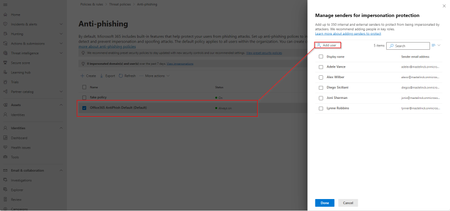
Automate adding users to impersonation protection
Hi All, Impersonation protection allows you mark 350 VIP users to have them additionally protected from attacks who try to impersonate them. You can add them individually to your policies. But it contains a painful process of having to individually click all the users you want to add... So I automated this in a script so you don't have it manually: https://github.com/LouisMastelinck/set-TargetedUsersToProtect-bulk-script/tree/main More info about the functions used: https://www.lousec.be/mdo/user-impersonation-protected-user-upload-script/ Hope it has a use for anybody who might need it. Kind Regards Louis1.5KViews2likes0Comments
Microsoft Defender (GCC) - User Submitted "Mark and Notify" for Third Party Phishing Simulations
Our Microsoft 365 tenant is in the GCC environment, and we use a third party phishing simulation platform along with the built in Outlook Report Message button (not a third party reporting add in). When a user correctly reports one of our simulated phishing emails, the message appears in Microsoft Defender > User Submitted as expected. The problem is what happens next. When we select Mark and notify, the only available options are: Phishing Spam No threat found There is no option to notify the user that the email was actually part of a phishing simulation. This creates a difficult situation: If we choose No threat found, Defender tells the user the message was safe, making it appear they incorrectly reported the email even though they did exactly what we trained them to do. If we choose Phishing, the user receives the correct feedback, but the message is counted as a real phishing event, affecting our Defender metrics and potentially generating false incidents and reporting. It feels like we're stuck in a design loop where neither option provides the desired outcome. My questions are: Is there a supported way in Microsoft Defender (particularly GCC) to notify users that a reported message was a simulated phishing email when using the native Outlook Report Message button? Is this capability available in Commercial tenants but not GCC, or is it unavailable across all environments? If this functionality does not exist, what is the recommended process for submitting a feature request specifically for the GCC version of Microsoft Defender? This seems like a valuable enhancement for organizations that use third party phishing simulation platforms while relying on Microsoft's native reporting experience. Has anyone else found a good workflow for this scenario?64Views1like0Comments
No way to automate restoring user‑reported emails after “no threats found”
When a user reports an email as phishing in Defender, the message gets moved to Deleted Items. After we triage it, if we mark it as “no threats found,” there’s no way to push it back to the user’s inbox as part of that workflow. That creates a bit of a broken experience: User is told the email is safe with our customized email response, but has to go find it themselves In a lot of cases they don’t (Outlook search won’t find it) We end up with follow‑ups like “where did it go?” Technically we could restore the email as part of our triage process, but that just shifts the effort onto the SOC. It doesn’t scale, and it’s not really the right place for that work. We have tried to create an automation to do this, but we have not been able to create an advanced hunting query based on our triage result that can then trigger an action to restore it to the mailbox. So we end up choosing between: Users having a bad experience, or Analysts doing manual mailbox work Neither is ideal. Other platforms (like Proofpoint) handle this end‑to‑end — once something is confirmed clean, it can be returned to the user automatically. Right now Defender stops at classification instead of completing the workflow. Is there a reason this isn’t wired in, or anything on the roadmap to address it?268Views1like1CommentDefender for iOS: “This account has reached its devices limit” even though no devices are listed
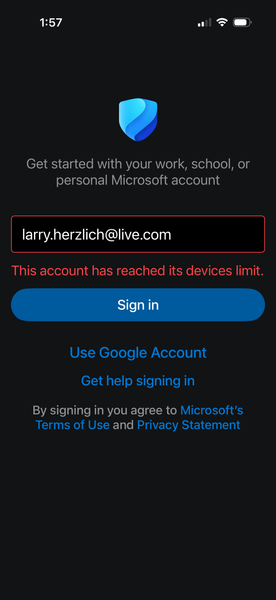
I am using all 5 devices available (2 PC's, 1 Mac, 2 IOS devices) I was trying to install Microsoft Defender for IOS on a new iPhone created by copying from the old phone (iPhone 11) to the new phone (iPhone 17). I erased my old iPhone 11 while Defender was still installed My Microsoft account shows zero mobile devices (none were linked to my MS account) Defender on the new iPhone never completed sign‑in with my MS account “Sign out everywhere” and app removal didn’t help (also app removal, restart IOS device, reinstall Defender for IOS) You suspect a stuck Defender mobile enrollment token You need Microsoft to reset the backend mobile device slot From Office Copilot: What to tell the agent (so you don’t get bounced) Use this exact wording: “Microsoft Defender for iOS says ‘This account has reached its devices limit’ even though no devices appear in my Microsoft account. My old iPhone was erased while Defender was still signed in. I need my Defender mobile device enrollment reset.” This sends them straight to the backend reset tool. Why this works when everything else doesn’t The issue isn’t on your devices or in your account UI — it’s a server-side Defender mobile quota flag that only Microsoft support can clear. The consumer Defender team (under Microsoft 365 support) is the only group with access to that system.267Views1like1CommentSecure Score rec. out of date - Entra consent settings
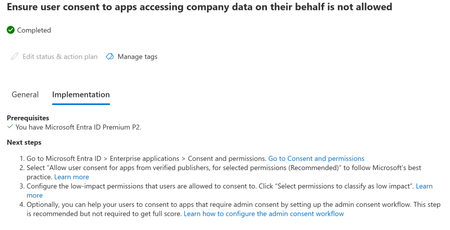
TLDR: 1. SecureScore recommendation for user consent settings does not match the User Consent settings recommendation. 2. Also, the recommendation on User Consent page is not described in a sensible way. This recommendation - Ensure user consent to apps accessing company data on their behalf is not allowed - instructs people to set the Consent Settings to 'Allow users to consent to low-level permissions', and select the low-level permissions. Optionally, to also set up admin workflow. This is the SecureScore recommended process we've been using. It was bugged, so we'd set it to 'Resolved by ____' usually once completed. It looks like this is fixed and now properly shows Completed (from testing, the manual resolve statuses aren't overwritten by the automatic completion - it'll wait until those are set to something else to update it to completed. Anyway,, that's not the issue. Recently noticed on the actual Consent blade, it shows that the recommendation is Microsoft-managed. I've never noticed this before - i believe it's new. So now it's kinda unclear what's ACTUALLY recommended. Reading the associated KB, it is described currently as 'end users can consent for any user consentable delegated permissions EXCEPT: Files.Read.All, Files.ReadWrite.All, Sites.Read.All, Sites.ReadWrite.All.'. But it doesn't actually describe what are 'user consentable' is... is that whatever 'low impact' permissions you set? is it something completely different? So the options are 1. Users can't consent 2. Users can consent to permissions you deem low-risk 3. Users can consent to permissions users can consent to, but not these x There isn't a feedback button on SecureScore.144Views1like0CommentsAll Excel Macro Files Suddenly Flagged as Malware (X97M/Slacker.gen!A) Across M365 Starting April 16
Starting around 8 PM GMT+8 on April 16, 2025, macro-enabled Excel files with extensions such as .xlsm, .xlsb, or .xls began being automatically flagged as malware, specifically identified as X97M/Slacker.gen!A—when opened or edited in SharePoint, OneDrive, or Teams. Before this, the same files were not flagged as malicious, even when opened or edited, and this behavior had remained consistent for several months. This issue affects our entire tenant, with over 800 files being flagged as malware under the name X97M/Slacker.gen!A. These files are located across various locations and have been modified by different users. We are a Cloud-only tenant, and we have not done any configuration changes in Threat Policies for the past few months.1.7KViews1like0CommentsAutomated Investigation and Response
Upgraded to Defender for 365 P2 based on the idea of setting automated responses to certain alerts. That's how it was described. Now I'm trying to enable and configure it. The documentation has bounced me around 20 different articles for XDR, Defender Enterprise, Defender for Business... I do not see anywhere to configure the automation in Defender. One doc points me here for making sure it's enabled. when I open this, and go down to Automation, it's simply an empty list of device groups. We don't use Device groups - we don't use Defender Endpoint. Has anyone configured this in a non-XDR environment? What I'm encountering and what was advertised seem very different...325Views1like2CommentsSetting up Admin Quarantine
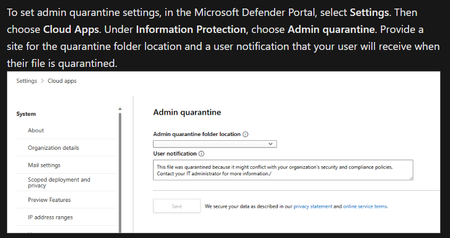
Hi, We are looking to set up admin quarantine as per the instructions in here: https://learn.microsoft.com/en-us/defender-cloud-apps/use-case-admin-quarantine We have followed this step by setting up a location for admin quarantine: However, when editing the 'Malware Detection' rule in Defender we do not get an option for 'Put in admin quarantine', only 'Put in user quarantine': Does anyone have any idea how to resolve this? Thank you.293Views1like0Comments
Anti-malware policy doesn't block files
Hello Microsoft Community, We have recently found that Anti-malware policy doesn't block files that are set to be blocked by the policy. For example, when we send an *.ics file with a cmd/exe/jse/rdp and other files inside of the ics, the email is not blocked and is delivered to users. We did several tests with external security vendor by sending real malwares, ransomwares and exploits attached to the ics and all of them passed the filtering system. Is anyone aware of the issue? Doesn't MDO scans nested files?! This has happened with a few tenants. Those tenants have Microsoft E5 licenses.292Views1like1CommentTenant Allow/Block Lists not working as expected
The following is stated on Microsoft's docs related to adding an allow entry in a tenant's Allow/Block lists: When you submit a blocked message as I've confirmed it's clean and then select Allow this message, an allow entry for the sender is added to the Domains & email addresses tab on the Tenant Allow/Block Lists page. ref: https://learn.microsoft.com/en-us/defender-office-365/tenant-allow-block-list-email-spoof-configure#create-allow-entries-for-domains-and-email-addresses I've been submitting quarantined messages for a while now with the specified verdict, both directly from quarantine queue while also using https://security.microsoft.com/reportsubmission . Either way, none of these result in an email address allow entry to be added in Tenant Allow list page. What am I missing?1.9KViews1like2CommentsMS 365 Defender - What permissions are needed to move and delete emails in Explorer?
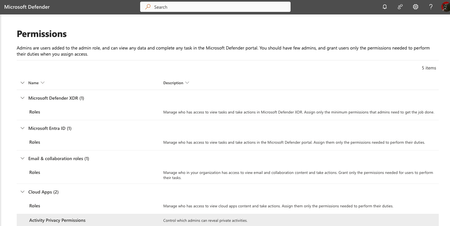
I need a tech with limited permissions to be able to https://learn.microsoft.com/en-us/defender-office-365/remediate-malicious-email-delivered-office-365 These are the options I have in Admin. I tried a bunch of recommended actions, yet I don't seem to have the correct Admin portals as shown https://learn.microsoft.com/en-us/defender-xdr/manage-rbac. For example, I don't have MS 365 Defender Permissions Group shown in the video:5.3KViews1like4Comments



Events
Recent Blogs
- AI assistants are quickly becoming part of everyday work—summarizing emails, drafting responses, triaging requests, and even potentially acting across connected business systems. As email becomes an ...Jul 08, 20264.5KViews2likes0Comments
- 3 MIN READStarting today, Microsoft Defender for Office 365 Plan 1 is rolling out to customers with Microsoft 365 E3/G3 and Office 365 E3/G3 licenses, with rollout expected to complete by Fall 2026. For securi...Jun 17, 202612KViews2likes2Comments