
Forum Widgets
Latest Discussions

WDSI Submission Review Has Been Pending for 10 Days
I submitted the application I developed to WDSI for review because the Microsoft Defender SmartScreen warning appears when running it. I would like the application to be added to the virus database so that this warning no longer appears, but the review has still not been completed after 10 days. Could you please help me? Submission ID: 61955163-f60b-4141-aafa-cd4afe171996 Link: https://www.microsoft.com/en-us/wdsi/submission/61955163-f60b-4141-aafa-cd4afe171996OrxanAug 24, 2026Copper Contributor80Views0likes1Comment
Device* tables missing from Advanced Hunting schema despite M365 E5 license
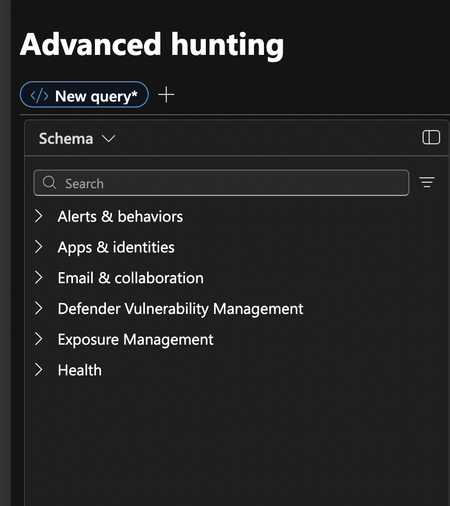
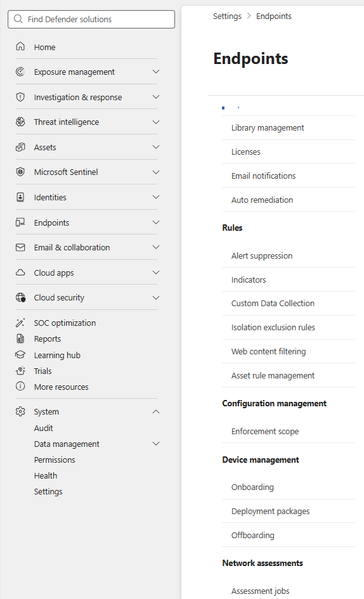
We have an M365 E5 trial (with Microsoft Defender for Endpoint service plan enabled) and a standalone Defender for Cloud Apps trial on the same tenant. Two devices are onboarded and show as Active in Device Inventory. one Windows 11 VM hosted on mac m4 and one Windows Server 2019 Azure VM. The issue: the entire Devices section is missing from the Advanced Hunting schema. No DeviceInfo, DeviceNetworkEvents, DeviceEvents, DeviceProcessEvents, etc. The schema only shows Alerts & behaviors, Apps & identities, Email & collaboration, Defender Vulnerability Management, and Exposure Management. Additionally: - The device Timeline tab does not appear on device pages (not in visible tabs or overflow menu) - "Go hunt" from a device page only generates a query against IdentityLogonEvents, not any Device* tables - Settings → Microsoft Defender XDR does not show an "Advanced hunting" option for managing data sources - The MDE Client Analyzer on the Azure VM passes all EDR cloud connectivity checks (CnC, Cyber, AutoIR, SampleUpload, MdeConfigMgr all Succeeded 200) - Settings → Endpoints → Optional features loads with all toggles including the Defender for Cloud Apps integration - Cloud Discovery via MDA works (discovered apps visible on the device page) - The Tenant ID and Org ID shown in XDR settings are different values The tenant originally had only the Defender for Cloud Apps standalone trial. The E5 trial was added afterward. It appears the MDE data source was never deployed/activated in Defender XDR despite the license and onboarding being in place. I've opened a support case but wanted to ask here as well, has anyone resolved this issue? I've found several older posts describing the same problem but none with a confirmed fix. Any guidance would be appreciated.rahman973Aug 11, 2026Copper Contributor73Views0likes0Comments
How to send false positive?
Hi, I coded a small program which Microsoft treats as malicous. Unfortunately the Microsoft false positive submission site is not working. How can I alternatively send a false positive to Microsoft? Any help is appreciated.Joerg4Aug 06, 2026Copper Contributor109Views0likes1Comment
EnableConvertWarnToBlock will not enable - stays False
We have a GPO applied to Windows 11 Pro machine - fully patched and onboarded to MDE. The GPO enables "EnableConvertWarnToBlock" as follows: The GPO is applied to the machine and the following registry key is populated: But when I check the status on the client - it will not enable: I have enabled troubleshooting mode and disabled tamper protection in case this is blocking but nothing seems to work. Its as if MDAV/MDE is not even looking/reading that registry key. Anyone else have the same issue or ideas on resolution?Warren212Aug 04, 2026Brass Contributor276Views0likes5Comments
Location of Defender for Identity Entry in Defender Tables
Our GRC group wants an automated report on windows servers and workstations over 7 days old not onboarded for Defender for Endpoint. A change in our environment (not sure if it was MS or us) has caused an additional entry in a column named "DiscoverySources" for Defender for Identity. It's my understanding that D4I is only used on domain controllers, but we get entries on non-DCs as well. This identifier does not appear on the device dashboard, nor can I add it in with the custom column tab. Furthermore, if a machine requires onboarding for D4E, it will show them both in the same column, it separates them with a comma in the same field. Right now, I have to do this process manually and with the overhead involved, it takes me about 30 minutes to run the reports, filter out the false positives and forward them to the appropriate staff. They want this every day, and I can't do this operationally. I'd welcome the opportunity to create a Logic App based on a query to perform this function and route it. Can someone point me in the direction of the table which contains the DiscoverSources column? I haven't been able to find it. That would help me to perform the necessary KQL and Logic App to automate this process. Long time listener. First time publisher. ThanksMichaelMichalkoAug 03, 2026Copper Contributor89Views0likes1CommentDefender Device Groups
Hello everyone, I need some help creating a device group in Defender. I can't find anything related to Groups inside Microsoft Security. I'd read that it's possible to create one inside the Permissions tab, but I can't figure out how. Someone can explain what's the process?alexcolombariJul 30, 2026Copper Contributor175Views0likes4CommentsInconsistent Microsoft Defender Behaviour
Hi everyone, We have an issue whereby across several intune managed devices with identical defender AV policy, signature version, and platform version, we've found inconsistent detection/remediation behaviour. Some devices block malicious files instantly on download (expected and correct). Others only detect on open rather than on write, or log a successful detection/remediation action without the file actually being removed from disk, it remains fully accessible indefinitely. Since this occurs despite identical config, we're concerned this is a genuine gap in automatic remediation reliability that could affect real threats, not just our test files. Troubleshooting completed, issue persists: - Ruled out exclusions (path/extension/process) - Confirmed PUA protection, real-time protection, tamper protection, and all granular protection flags enabled/healthy - Removed orphaned third-party AV registrations from WSC (previously caused Defender to show as "snoozed") - Confirmed filter driver (WdFilter) loaded correctly, no conflicts - Cleared stuck "detected but not remediated" threat entries - Ruled out file locks preventing remediation - Cleared cached signature state, forced fresh signature pull - Attempted full platform reset - Confirmed cloud protection/MAPS enabled and reachable - Increased CloudBlockLevel to test enforcement aggressiveness Does anyone have any idea what could be happening here? ThanksOllieHay1Jul 20, 2026Copper Contributor125Views0likes2Comments
MDVM - Patch Publication Date
Dear Microsoft MDVM Development Team, Please could you as quickly as possible implement the "Patch Publication Date" for the vulnerabilities you report on. Any major Vulnerability management platform has this simple field/record please advise you are implementing this and the timeframe for it? Kind Regards, GraemecipherdellJul 16, 2026Copper Contributor93Views0likes1Comment
DVM Certificate Inventory Shows No Data Despite Healthy Endpoints in Defender for Endpoint
Hi Team, I'm testing Microsoft Defender Vulnerability Management. Current status: - Defender Vulnerability Management Add-on enabled - Certificates inventory tab is visible - Software Inventory populated - Security Recommendations populated - Windows and Linux devices onboarded - Linux mdatp health = healthy:true, licensed:true, cloud_enabled:true - Devices have local certificates installed - Certificate Inventory page shows "No data" The DVM Add-on was enabled more than 36 hours ago. Has anyone experienced a delay in Certificate Inventory population or are there additional prerequisites beyond DVM licensing and device onboarding? Thanks.vijaysethiyaJul 07, 2026Copper Contributor65Views0likes1CommentMicrosoft Defender false positive and WDSI submission details page bug
Hello, I am the developer and publisher of Pulse Launcher, a legitimate signed Windows application / Minecraft mod launcher. I already submitted this through Microsoft Security Intelligence and also opened a Microsoft Q&A thread, but I am posting here because the WDSI submission portal itself appears to be broken for these submissions. Related Microsoft Q&A thread: https://learn.microsoft.com/en-us/answers/questions/5929545/microsoft-defender-false-positive-and-wdsi-submiss There are two related issues: 1. Microsoft Defender cloud ML false positives keep appearing on public multi-engine scan results for the same signed application/product family. The Microsoft detection name changes across rescans and equivalent builds, including: - PUA:Win32/Puwaders.C!ml - Program:Win32/Wacapew.C!ml - Trojan:Win32/Wacatac.B!ml - Trojan:Win32/Wacatac.C!ml - Trojan:Win32/Sabsik.EN.A!ml 2. Microsoft Security Intelligence submissions are visible in Submission history and show status "In progress", but opening the submission details page returns: "The details for the submission were not found or the submission has expired." Affected submission IDs: - dd476efa-fc04-4f13-82cf-631bbfd145a6 - efc6514c-d700-4d6a-a7e2-67a9a83334a2 - ff8d04b7-c5fc-4a05-bd53-ee7ac5981284 File details: - File name: pulse_launcher.exe - SHA-256: def6059c07c3e1f4a8c5649a1bbf190d4f355ee8e8b88c55c5b404edee99ecc8 - Signer: FOP Haponiuk Mykola Viktorovych - Certificate: GlobalSign EV Code Signing certificate The executable is not VMProtect-packed or obfuscated. It is EV-signed. A previous Microsoft analyst response stated that the file did not meet Microsoft criteria for malware or PUA, but Microsoft cloud detections continue to appear. Could someone route this to Microsoft Defender Security Intelligence / malware analysis, or advise how to escalate WDSI submissions that exist in history but whose details endpoint returns "not found or expired"? Thank you.MykolaHaponiukJun 24, 2026Copper Contributor115Views0likes1Comment

Tags
- microsoft defender for iot80 Topics
- threat intelligence35 Topics
- IoT security17 Topics
- threat protection15 Topics
- defender14 Topics
- MDATP13 Topics
- Defender for Endpoint13 Topics
- security13 Topics
- ATP10 Topics
- defender atp10 Topics