security
13 Topics
Microsoft Defender for IoT new sensor release (22.2.7)
We are happy to announce a new release of Microsoft Defender for IoT sensor (version 22.2.7) What’s new? Improved network devices visualization to include multiple interfaces based on network protocols. Improved alert timeline indications, which now includes detection time and last seen time. A new column named “First Detection time” reflects the first time the alert was detected, to get more context if it was raised more than once. To download sensor 22.2.7 software from Azure portal here1.1KViews1like0CommentsPublic Preview | IoT Entity Page in Sentinel
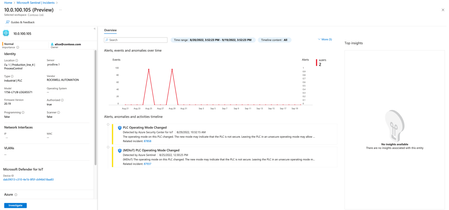
Enhance IoT/OT Threat Monitoring in Your SOC with Sentinel and Defender for IoT See more in our new Blog: IoT Entity Page - Enhance IoT/OT Threat Monitoring in Your SOC With Sentinel and Defender for IoT Defender for IoT's integration with Microsoft Sentinel now supports an IoT device entity page. When investigating incidents and monitoring IoT security in Microsoft Sentinel, you can now identify your most sensitive devices and jump directly to more details on each device entity page. The IoT device entity page provides: Contextual device information about an IoT device, with basic device details and device owner contact information. Device owners are defined by site in the Sites and sensors page in Defender for IoT. Can help prioritize remediation based on device importance and business impact, as per each alert's site, zone, and sensor. For more information, see Investigation enhancements with IOT device entities1.2KViews0likes0CommentsNew Blog Post | Stream Microsoft Defender for IoT alerts to a 3rd party SIEM
Learn how to send Microsoft Defender for IoT alerts to third-party SIEMs such as Splunk, QRadar: Stream Microsoft Defender for IoT alerts to a 3rd party SIEM Customer engagements have taught us that sometimes customers prefer to maintain their existing SIEM, alongside Microsoft Sentinel, or as a standalone SIEM. In this blog, we’ll introduce a solution that sends Microsoft Defender for IoT alerts to an Event Hub that can be consumed by a 3 rd party SIEMs. You can use this solution with Splunk, QRadar, or any other SIEM that supports Event Hub ingestion.927Views0likes0CommentsDefender for IoT public webinars
These webinars will be held at 08:00-09:00 AM, PST. Sign-up at the links below! FEB 23 Microsoft Defender for IoT | Cloud Capabilities and Security Advantages In this session we will discuss the benefits of connecting Defender for IoT for OT/ICS environments to the cloud. Covering both security and manageability aspects and features and cross platform integrations MAR 24 Better Together | Microsoft Sentinel - IT/OT Threat Monitoring with Defender for IoT Solution In this session we will discuss how Microsoft Sentinel and Microsoft Defender for IoT are driving together a convergence of OT and Corporate cybersecurity disciplines in defense of critical infrastructure. This solution provides the foundation for building a SOC geared towards IoT/ OT monitoring. and is globally applicable for organizations defending both IT/OT-based networks APR 6 Microsoft Defender for IoT | How to Discover and Secure IoT Devices in the Enterprise Environment In this session we will share how Microsoft Defender for IoT is leveraging multiple data sources (including an agentless solution and Microsoft Defender for Endpoints) to discover and secure IoT devices in enterprise networks. Printers, cameras, VoIP phones and other unmanaged devices are posing an increasing risk to enterprises, and the need to identify and protect them becomes a cardinal priority for security teams. We will present our integrated solution and how it complements our OT security offering. Original Post: Defender for IoT public webinars - Microsoft Tech CommunityInvitation | Join the Microsoft Defender for IoT community to influence and earn swag!
Defender for IoT Customer - Join Defender for IoT private community! Access exclusive Defender for IoT content and best practices Be first to try our private previews and influence our features before they become GA Earn digital badges based on your level of contribution Live events To join, please fill out the form at https://aka.ms/SecurityPrP and select “ongoing program” NDA is required Cool swag for the first 50 members who sign up! make sure to fill in your shipping address in the form Are you already a member of our cloud security community? https://aka.ms/SecurityCommunity, Discussion group on LinkedIn1.6KViews2likes0CommentsWebinar: Sentinel IT/OT Threat Monitoring
Join us on Thursday 28.7 for a webinar on Sentinel IT/OT Threat Monitoring with Defender for IoT solution. Learn how Defender for IoT's built-in integration with Sentinel helps bridge the gap between IT and OT security. Registration is now open , for July 28 There has been a long-standing split between ICS/SCADA (OT) and Corporate (IT) cybersecurity. This split was often driven by significant differences in technology/tooling. Microsoft Defender for IoT's integration with Microsoft Sentinel drives convergency by providing a single pane for coverage of both D4IOT (OT) and Microsoft Sentinel (IT) alerting. This solution includes Workbooks and Analytics rules providing a guide OT detection and Analysis.3.7KViews0likes8CommentsMDM Security Baseline vs Intune Profile
Hi all, I am testing currently the 2 profiles in the Security Baselines in default configuration. As they are now checked against the endpoint there is one Error in the Per-settings status: Type of system scan to perform Problem is now - I cannot see anything configured in the MDM Security Baseline for May 2019 the setting itself in the Intune profile is configured. Any idea? Best regards Miguel6.5KViews2likes5CommentsMicrosoft Defender ATP and Microsoft Flow Integration
Hi Community, I want to share with you the latest about Microsoft Defender ATP and Microsoft Flow integration, not only from technical side, but show you a real-scenario on how to use this feature, to detect and respond to emerging threats with one click from your mobile device. With the help of fellow MVPs, I created a demo that ensures your security teams are alerted by email at all times about threats across your organization, and they can take actions from within that email whether they are at work, traveling and from their mobile devices. Here is a link to the full demo in a https://blog.ahasayen.com/ms-flow-and-ms-defender-atp-integration/ and on a https://youtu.be/uT2RQf_uPKA Please let me know if you have any questions regarding this integration by connecting to me on Twitter @ammarhasayen. Bonus Demo: You can also watch a real scenario demo showing how to https://blog.ahasayen.com/protect-your-ceo-machine-with-microsoft-flow-microsoft-defender-atp/
Microsoft Security Client - Log off Network
We have an issue with a 3rd-party application freezing after about 6min of inactivity - the only evidence in the Event Viewer is in the Application Log: Log Name: Application Source: Microsoft Security Client Date: 10/04/2021 6:30:54 PM Event ID: 5000 Task Category: None Level: Error Keywords: Classic User: N/A Computer: SOLVit-LOAN-01 Description: Log off network Event Xml: <Event xmlns="http://schemas.microsoft.com/win/2004/08/events/event"> <System> <Provider Name="Microsoft Security Client" /> <EventID Qualifiers="0">5000</EventID> <Version>0</Version> <Level>2</Level> <Task>0</Task> <Opcode>0</Opcode> <Keywords>0x80000000000000</Keywords> <TimeCreated SystemTime="2021-04-10T08:30:54.5764042Z" /> <EventRecordID>4819</EventRecordID> <Correlation /> <Execution ProcessID="0" ThreadID="0" /> <Channel>Application</Channel> <Computer>SOLVit-LOAN-01</Computer> <Security /> </System> <EventData> <Data>0x1</Data> <Data>ProtectionManagement</Data> </EventData> </Event> We run Malwarebytes Endpoint which is registered in 'Virus & threat protection', so unsure if we need to be registering this application as an exception in things like AppGuard or Tamper Protection or somewhere in Defender?11KViews0likes1CommentPay for Enterprise Mobility + Security with our Microsoft account balance
I want to be able to pay for Enterprise Mobility + Security E3/E5 with my Microsoft account. not part of an organization, just for personal use. I can pay for Microsoft 365 personal and family with my Microsoft account balance, from Microsoft store, so why am I not able to pay for E3/E5 as a recurring payment with my Microsoft account balance? https://www.microsoft.com/en-gb/microsoft-365/enterprise-mobility-security/compare-plans-and-pricing2.7KViews1like10Comments