Forum Widgets
Latest Discussions

Trim feature removed in new Stream?
Has the trim feature been removed in both the new (SharePoint) Stream and tradtional Stream interface? I discovered this today when attempting to trim a video recorded from a Teams meeting. The trim feature was available recently when video recordings of Teams meetings were accessed in OneDrive.SolvedBHBrookfieldSep 20, 2022Iron Contributor135KViews38likes118Comments
Editing a video saved to OneDrive/SharePoint
Once we begin saving all TMRs to OneDrive - how will we edit those videos to trim, set a title, description or new thumbnail? Will we have to upload the video to Stream? If we do that, once the changes are made, do we then have to save back to OneDrive in order to be able to share? How do we make someone else an owner of a video besides the recorder or organizer of the Teams Meeting? Seems like the change to OneDrive is going to make working with videos way more complicated. Is there any how-to guidance/training from Microsoft for end-users on how to work with videos now that they will be saved to OneDrive/SharePoint first? Thank you,kpoquetteNov 23, 2020Brass Contributor93KViews3likes36CommentsCaption/transcription generation issues?
The option to generate captions/transcriptions for videos stored in SharePoint/OneDrive has been working fine in our tenant for months, but yesterday users started reporting an error message. When attempting to generate captions, the message indicated that the request could not be completed. By late evening (10 PM EST), the request process was working, but as of 9:30 this morning, no captions have been generated, even for very short videos. There's nothing in the Service Health section of the admin center, so not sure what's going on. EDIT: I just tried requesting captions in another tenant and am getting the same message as yesterday We're having trouble generating a transcript and captions right now. Try again in a bit.Chad_V_KealeyOct 21, 2022Steel Contributor18KViews6likes34CommentsInsert Stream (SharePoint) Link in PowerPoint
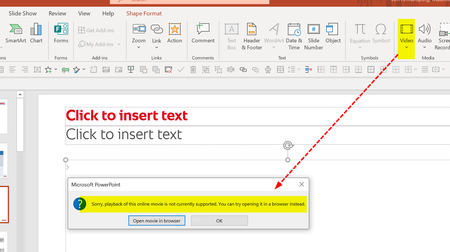
Good Morning everyone, and a Happy New Year, first of all! We have recently started using MS Teams for Webinars we conduct with external customers. As we are using PowerPoint Live for sharing slides, we would love to insert Stream (SharePoint) video links into our PowerPoints. However, inserting Online Videos with a SharePoint link is currently not supported (see error message below). We can only insert Stream (Classic) video links - the drawback of that solution is that it does not work for external webinar attendees. Are there any plans to allow the insertion of Stream (SharePoint) videos? Will those videos be accessible then to external users that do not have a Stream account within our own organization? Thanks and best regards, Max von Armansperg These newMax_von_ArmanspergJan 07, 2022Tin Contributor52KViews3likes32CommentsRolling out - Custom thumbnails & title & description metadata
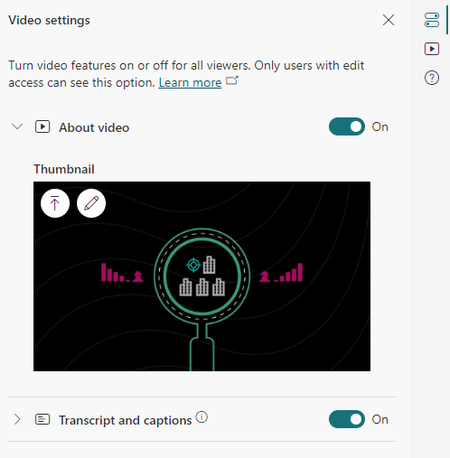
We started rollout of new capabilities to video and audio files stored in SharePoint, OneDrive, Yammer, and Teams allowing you to set a custom thumbnail for a video as well as set the title and description of the video. The description is rich text so you can add bold, italics, underline, bullets, and hyperlinks. Currently as of June 2, 2022 these features are enabled to 50% of normal worldwide users. To set a custom thumbnail... Play a video, open the side pane "Video settings" Under "Thumbnail" Upload an image or scrub to a time in the video and use that as the thumbnail To set the title and description for a video... Play a video, open the side pane "About video" Set the title and/or description of the video (including rich text and hyperlinks) Click saveMarc MrozApr 04, 2022Microsoft12KViews3likes29Comments
Embedding Stream videos outside Office environment
In Stream (Classic), users have the ability to generate embed (iframe) code. This enables users to embed the videos in environments outside the Office suite - such as in blogs and web sites. As an HE institution, we encourage our instructors to use this feature to embed the videos in their online courses. This is so students do not need to leave the LMS environment to view the videos. Has anyone seen whether or not an embed feature will be added to SharePoint and OneDrive for Business to replace the feature as it exists currently in Stream (Classic)?williamdwFeb 24, 2022Tin Contributor10KViews2likes28Comments
Embed SharePoint Video on External Sites
Is it possible to embed a Stream on SharePoint video on an external/public site? The technique described in this article, of updating the embed code with a link you set to public, did not work for me: https://answers.microsoft.com/en-us/msoffice/forum/all/onedrive-embed-links-dont-allow-public-viewing/251ddb80-467e-44f7-b7a8-3182e19bf671 The embed code I got was very different from the one in the article.SolvedstuartmcgarrityOct 24, 2022Brass Contributor11KViews1like22CommentsArrange videos in a Playlist (Stream on Sharepoint)
Hi all please can anyone tell me if the new Stream (on Sharepoint) features the ability to arrange videos in a playlist or at least is it in the roadmap. If not I would like to log a feature request as this was lacking on the Stream (Classic) environment. ThanksSolvedwazdarocsta470Jul 26, 2022Copper Contributor16KViews0likes22CommentsNew Stream Web Part - Source > Folder > From Sites > Only shows recent shared libraries
The new Stream (on SharePoint) web part just hit my org's tenant. When you add the web part to the SharePoint page, there are several source options: Videos on this site, Folder, and Single Video. When you select Folder as the source and the Select Folder button, it gives you the option to select Your Organization, OneDrive, Site, and From sites. Here's the problem I'm running into: When you select From sites, it only allows you to see the Shared (Doc) Libraries you have accessed most recently and is limited to 12. If the Shared (Doc) Library you need is not shown, you have to: Stop editing the SharePoint page Navigate too and open the Shared (Doc) Library where the video file(s) live Wait a few minutes Go back to the SharePoint page you were editing and hope the Shared (Doc) Library shows up when you select From sites. The workaround "works" but it isn't a great experience for the end user. Is there any other way to get the ability to search for the Shared Library?KatherineS-QSep 07, 2023Brass Contributor4.8KViews3likes20CommentsAudio problems for professional created videos
Hi everyone, i am working for an IT department and received the following incident. I wanted to bring up an issue we've been experiencing with the audio quality of board videos when played on SharePoint. Locally, the videos play perfectly fine, but once uploaded to the SPO, we notice frequent clicking sounds that significantly affect the audio quality. Details: The audio issues seem to occur randomly and are not consistent across all videos. We are following the rules for encoding - Video formats you can play on Microsoft 365 - Microsoft Support MP4 1080p - 5Mbps, Audio AAC 192Kbps - Encoder is Adobe Premiere If you download the file locally there is no clicking - it is only in the Streaming web player Has anyone else experienced similar issues with the web player and .mp4 files? We would appreciate any insights or suggestions on how to resolve this issue. Looking forward to any advice from the community. Best regards StephanStephanGeeMar 31, 2025Steel Contributor2KViews7likes19Comments



Tags
- Stream13 Topics
- microsoft stream8 Topics
- Stream (on SharePoint)7 Topics
- stream on sharepoint5 Topics
- transcript generation3 Topics
- Captions3 Topics
- Permissions2 Topics
- Classic Stream2 Topics
- audio2 Topics
- transcripts2 Topics