Create, upload, edit, and publish HTML pages in SharePoint
Updated Oct 22, 2026
Version 2.0
Nicole Woon Microsoft
MicrosoftMicrosoft
Hi Nicole Woon
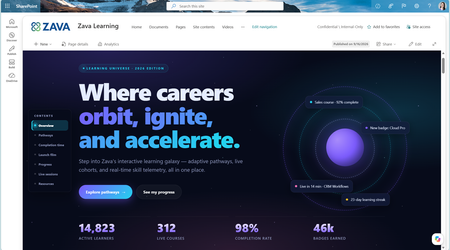
We can see a lot of potential value in the new HTML page capabilities, particularly for creating richer, more interactive and dynamic experiences that can bring together content from SharePoint sites, lists, libraries, files and other sources.
However, we also have some significant questions about how Microsoft sees HTML pages fitting alongside traditional SharePoint pages, particularly for large global enterprise customers with established governance, branding, accessibility, multilingual and support requirements.
There are several areas where we'd appreciate further guidance from Microsoft:
Governance and control
What administrative controls will be available to govern the creation and use of HTML pages? Organizations need to be able to establish where these pages are appropriate, who can create them, and how they fit within existing SharePoint governance models.
HTML pages are currently enabled by default. For enterprise environments, we believe this model should be reversed, with HTML pages disabled by default and Site Owners explicitly enabling the capability where it's appropriate for their site.
The governance consideration also extends beyond HTML pages created through Copilot. Microsoft supports users with the appropriate permissions uploading existing HTML files or HTML folders into the Site Pages library, and a Microsoft 365 Copilot licence isn't required to upload or move that content.
Given the broader considerations around branding, accessibility, multilingual publishing, responsive design, supportability and ongoing management, an opt-in approach would allow Site Owners to assess whether HTML pages are appropriate before introducing the capability.
This is particularly important for organisations managing tens of thousands of SharePoint sites, where enabling a new publishing model by default can have a significant governance impact at scale.
Branding and consistency
Traditional SharePoint pages provide organisations with a relatively consistent experience through standard sections, web parts, themes and other SharePoint capabilities. HTML pages introduce considerably more flexibility, but that also creates challenges around maintaining consistent corporate branding, design and user experience.
There is also an important ongoing management consideration. If a Site Owner subsequently changes the SharePoint site theme, traditional SharePoint pages will reflect the updated theme, whereas existing HTML pages may retain the colours, styling and design contained within their HTML/CSS. This could result in HTML pages becoming visually inconsistent with the rest of the site over time and potentially require individual HTML pages to be updated separately.
For enterprise customers with centrally managed branding standards, it would be useful for Microsoft to provide guidance on how HTML pages are expected to inherit or remain aligned with SharePoint site themes and organisational branding as these change over time.
Ongoing management and ownership
We're particularly interested in the longer-term management model. If an HTML page is created using Copilot, how is that page subsequently maintained, particularly if the person responsible for it doesn't have the appropriate Copilot Premium licence? Enterprise content often changes ownership over time, so maintainability can't necessarily depend on the original creator or their licensing.
Multilingual publishing
Based on our testing, there currently appears to be no support for SharePoint's multilingual page and publishing capabilities with HTML pages. This is a significant consideration for global organisations that rely on SharePoint's existing multilingual publishing model to maintain content across multiple languages. It would be useful for Microsoft to clarify whether multilingual support for HTML pages is planned and, if so, how this is expected to work alongside the existing SharePoint multilingual publishing experience.
SharePoint web parts
Based on our testing, there doesn't currently appear to be a way to embed standard out-of-the-box SharePoint web parts directly within an HTML page. This creates an important distinction from traditional SharePoint pages and potentially limits how HTML pages can be integrated with existing SharePoint functionality. It would be useful to understand whether Microsoft plans to support SharePoint web parts within these experiences or how Microsoft recommends customers approach scenarios that require them.
Accessibility
What guidance and controls will be available to ensure HTML pages meet organisational accessibility requirements? The additional flexibility provided by HTML makes it particularly important that accessibility can be consistently managed rather than becoming dependent on individual page authors.
Responsive design and mobile experience
Traditional SharePoint pages provide a responsive experience across different screen sizes and devices as part of the standard SharePoint page framework. With HTML pages, we're concerned that significantly more responsibility for responsive behaviour sits within the generated HTML/CSS itself.
Based on our testing, this introduces the potential for pages to work well on a desktop browser but provide a very different or degraded experience on smaller screens and mobile devices.
For enterprise organisations, responsive design can't realistically become something that individual page authors need to understand, test and maintain themselves. It would be useful for Microsoft to clarify what guarantees, standards or guidance will apply to responsive behaviour for HTML pages, including how these experiences are expected to work across desktop, tablet and mobile compared with traditional SharePoint pages.
Supportability and future compatibility
We're also interested in the long-term support model. Greater flexibility through HTML, CSS and JavaScript introduces questions around what happens as SharePoint itself evolves. How will organisations ensure HTML experiences created today continue to function correctly following future SharePoint platform changes?
Publishing and collaboration capabilities
HTML pages currently don't have parity with several capabilities available within the broader SharePoint page and publishing experience. Microsoft currently documents no support for co-authoring, scheduling, promotion to a News post, amplification to Teams and Viva Engage, saving as a template, private drafts, comments or reactions.
For enterprise publishing scenarios, some of these are important capabilities rather than simply optional enhancements. It would be useful to understand which of these limitations are temporary and which reflect the intended long-term role of HTML pages alongside traditional SharePoint pages.
Summary
Overall, we can see considerable value in HTML pages, and there are scenarios where they could provide rich, interactive and dynamic experiences that would be difficult to achieve using traditional SharePoint pages.
However, that additional flexibility also introduces significant governance, consistency, branding, accessibility, responsive design, multilingual, supportability and lifecycle considerations for enterprise customers.
It would be great if Microsoft could provide guidance on these areas and how HTML pages are expected to fit within the broader SharePoint page and publishing model for enterprise customers.
 Microsoft
Hi Grant - thank you for your thorough feedback.
Governance: At this time, HTML pages will remain enabled by default with the site level control. We acknowledge your feedback here and in other comments you've left on this blog post.
Branding: You are correct that HTML pages do not automatically update their branding if a site owner changes the SharePoint site theme. This is something we are investigating on our backlog, but no commitment to support at this time. Similar to HTML that is uploaded to a site and may not match the site's branding, you can ask Copilot to update the page to match the site.
Ongoing management: If an HTML page was created using Copilot, site owners and authors/editors on the site can make on-canvas edits and Copilot edits to it going forward. This should provide flexibility if ownership and licensing changes over time.
Multilingual: This is something we are investigating on our backlog, but no commitment to support at this time.
Web parts: There are no plans to support SharePoint web parts on HTML at this time.
Accessibility: HTML pages created by Copilot automatically adhere to accessibility requirements. For any organization-specific needs or further alignment, you can also prompt Copilot to ensure a given HTML page meets accessibility requirements.
Responsiveness: Our team actively considered both desktop and mobile scenarios in the development of this feature. HTML pages created by Copilot are automatically built with responsiveness in mind. You can also prompt Copilot to ensure a given HTML page meets responsiveness requirements.
Supportability: HTML is currently supported across M365 and we plan to continue supporting it within SharePoint in the future.
Publishing and collaboration capabilities: We are continually adding capabilities for HTML pages to bring them to parity with modern pages, including some of those that you've outlined here. We appreciate you calling out certain ones that are most impactful for you and your customers. For example, we recently added scheduling support for HTML pages. We will continue to update the main support documentation as capabilities are added.