First: I know that the more then average user, the power user and above, will benefit greatly from this all. Persons and companies that use the total integration of Office as 1 big package and use Outlook together with Excel, Word, and so on.
But, Microsoft, please remember that Outlook is used by SO many. From simple users like me, the old grandmother trying to find the mail from her grandson, the (small) offices that are trying to find a simple search, the house man/wife that is using it simply to mail the grocery list, the companies that are using Outlook just as a basic mail program, and so on. Because for countless people/companies that is what Outlook is: a mail program with a contact list and calendar. That's it. No integration with Word or whatever.
So please, make the advanced search an option. Or make a Outlook Pro and Outlook Basic version. But not the complicated, non-logical, counter-intuitive and user unfriendly thing it slowly is becoming now.
And I know that I did comment already earlier but I did read the blog again, but carefully now. And although some points are valid and well thought, other things are just (a sort of hollow) phrases to justify the changes. It's just sounding like propaganda .....
We recognize that a powerful search tool is a key to getting things done quickly and efficiently. Productivity is at the core of Outlook and therefore we’re rolling out updates to accelerate and simplify how Search helps you find contextually relevant information, get things done and connect with people.
This couldn't be further away from reality then it is now. For the average user (at home but also offices) the new Outlook Search just causes the complete opposite: non-productive, more complicated, more actions to be taken, weird position on top, and so on.
It seems that Microsoft thinks that everybody is using Outlook to it's full potential. This, of course, is not true. And how can it be? Outlook is a powerful program but the average user is maybe using 25% of that potential. The average user did benefit greatly of the easy and logical use of the old Search and the more then average user could use the advanced Search ribbon.
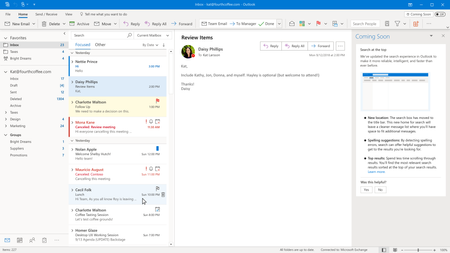
Last year, we introduced a new “Coming Soon” feature that offered customers a way to preview significant, new updates planned for Outlook for Windows.
Eh, what, where? I never did see that and reading comments here on this site, on the MS Support sites and other non-MS sites, it is clear that the "Coming soon" feature is basically unknown but also considered as an irritating thing sitting in the way. This, of course, benefits MS in a way since they get way less comments then.
When Search is at the top of your Outlook app you’ll also get the personalized experience of Search Suggestions before you enter your search query. Just one tap into the Search box will show your most recent searches in a drop down menu (people often search for the same things time and again) as well as suggested people and emails addresses of those you communication or meet with most often. These no-query suggestions are only relevant to you.
Sorry, but this just made me laugh: "the personalized experience of Search Suggestions" ... okay, an experience it is but again the total opposite as described.
And this: people are searching for the same things time and time again? If that is the case, we are are brain damaged or something like that? Sure, there will be searches that will be repeated but not the way described here.
And those non-query suggestions are not relevant at all, they have nothing to with a search in an e-mail or sender.
Again, all this from the viewpoint of the average (home) Outlook user. I am sure that for many it is relevant.
Additionally, when you enter a key words search query, we’ll provide Search Suggestions that will continue to change and update as you type more letters. Our plan is to gradually add suggestions such as emails, calendar events, files and commands as potential matches.
Okay, again: the average user uses non or maybe just a bit of all that. Of course it all can be useful but it only gives confusion, irritation, makes a search way harder. Simply (way) too much information for a simple search.
Similar to other Microsoft Search experiences in Office 365, Outlook for Windows commands or Actions will be also be included in your Search suggestions. For example if you type “sign” in the Search box you’ll start to see Actions in the Search suggestions that align with Outlook commands that include “sign” such as signature and design. No need to use “Tell me what you want to do” to find the right command when the new Search box includes the answers in one place. When Search moves to the top of Outlook for Windows, “Tell me what you want to do” will no longer be in your simplified or classic ribbon.
“Tell me what you want to do”-feature? What is that? Is that the same as the utterly failure of the dancing paperclip decades ago? I for one never used that. To be honest: I didn't even know about that feature, even never heard of it before now.
But why Suggested Actions in a Search? I am looking for the phrase "thunder" in a mail and the suggested action Ruler is given and also COM-apps. Yep, very logical and helpful and not confusing at all .....
Okay, last phrase as the icing on the cake:
Thank you to everyone who has provided feedback here, through Coming Soon in Outlook for Windows and other communication channels. With your feedback in mind, we’re adding functionality to further accelerate and simplify how Search in Outlook helps you find contextually relevant information quickly and efficiently. As the default experience moves Search to the top of the Outlook for Windows app in the coming weeks, we’re rolling out the following updates ....
Ehr .... with our feedback in mind? You mean the feedback that this new Outlook Search is confusing, non-productive, counter intuitive and user unfriendly? That feedback? Sorry, but that statement is simply nonsense. I am even tempted to call it a lie ....
Oh, and I did see a typo: finding info quickly and efficiently was with the old Search. The new Search is slowing searches down and is certainly anything but efficient.

 Microsoft