In the past, if I had an email with the following text in it, "gibberish 200530", I could search "gibberish 2005", and Outlook would find it. Now, I need to type the whole query,"gibberish 200530." This is VERY bad. Outlook should be smart enough to return partial matches.
The other problem is that Outlook used to return my search results as I typed. So, sometimes, I'd only have to type a few characters such as "gibberi" and by then my result already appeared. Now, I have to decide when I think I've typed enough and press Enter to execute my query. More often than not, I find that I haven't been specific enough, so I need to add more to my query and press "Enter" again. This slows the process of searching way down. Ugh!
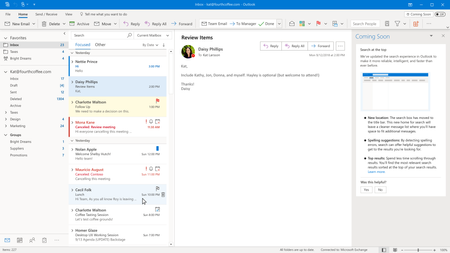
@Eugenie Burrage of Microsoft who wrote this article said, "The telemetry data shows that by turning off the experience of automatically changing search results as you type, users were 28% more successful finding what they need in the search suggestions. By waiting until the users finish their typing and pressing enter, the results were more accurate, the experience felt less distracting and we improved accessibility of the feature." The important piece of data that she left out is what percentage of users were 28% more successful in finding what they need. In other words, for the percentage of users that are distracted by results as they type, let them keep "search as you type" off. For users like me, let me keep "search as you type" on. For me, I can find what I want WAY faster by having the search results appear as I type. It takes me way longer to keep returning to the search box to add more criteria and press Enter again just to re-run the search when I need to narrow my results.
Oh, by the way, PLEASE put the Titles back on the Title Bars of each window. Right now, I have Outlook open, and I can't readily tell which folder I'm in. I have to scroll up and down my folder list to see which one is highlighted or I have to look at my Task Bar and try and figure out which window is active. Please put the window titles back. If they can't fit with the Search bar there, then that's yet another reason why the search bar does not belong on the title bar. Guess what? Every millimetre of space does not need to be filled with controls and data. There can be a little unused space to help us breathe. The title bar already had great function. It informed us where we were in Outlook, and it let us easily grab it for window movement or click on it to make the window active.
Thanking you for considering my suggestions. It helps to vent because I am just so frustrated and infuriated by these changes.

 Microsoft