euburrag, my company teaches users how to use Outlook more efficiently. We've been trying to figure out how to spin the search update since it was released to our Insiders a few months back. We've always taught our clients to add fields below the search bar to remind them that they can filter their search and to make it more easily accessible.
A few versions back, 2016 and before I believe, you would click in the search bar and the recent searches would drop down in front of all of the filters. It was clunky and very frustrating for our clients to have to double click in the search bar just to see their filters. However, at least they could still see the refine buttons in the ribbon easily. Once that issue was resolved and the recent searches dropped below the added filters, it was so much easier to demonstrate the usefulness of the feature. Explaining how to refine searches in Outlook has been fantastic and TRULY life changing (their words, not ours) for many of our clients.
However, moving the search bar up to the top was a decision made based on the assumption that most users will use the simplified ribbon. We teach our clients to stay with the "classic" ribbon to allow them easy, one-click access to wonderful Outlook features that improve their efficiency (ie quick steps). The search bar feels like it's a mile away compared to its old location, but movement is fine. Change is hard, but as long as the change is good its worth going through the transition phase.
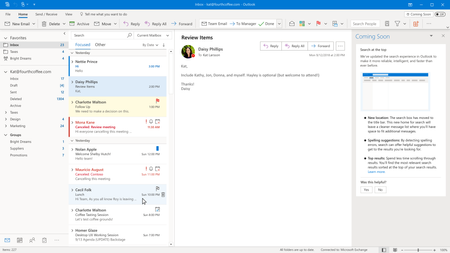
This change has not been useful, though. I haven't found any added benefit to the way the search suggestions were built in, the new layout of the search bar, or the recently used/suggested actions section. I would consider myself a power user of Outlook search and I do not see ever regularly using any of those sections at the bottom of the drop down, despite taking the time to explore each one. My first go-to when this changed was the ribbon - I tried to click the green +More button and add my filters back to the search drop down. No luck. It took a while to figure out that clicking the Current Mailbox ("search scope?") drop down would give me filter options. That is the most un-intuitive thing I've ever seen added to something that, according to the hundreds of people we've trained, is already a very un-intuitive process. We also noticed that when using those advanced filters, you have to go back to the mouse to press Search?? You can't just press Enter? I'm assuming that's a bug, but come on. This was a major update that deserved a little more, maybe more diverse, UI testing.
Please consider moving the advanced filters to the initial drop down. The visual updates to the search filters (mostly the expanded section where you can select/deselect check boxes you want to display) were an improvement. I would love to be able to demonstrate this feature to my clients without having to take them through the cumbersome process of hitting the +More button like we do now, but telling them to click the Current Mailbox drop down every time they want to filter is going to fall on deaf ears.
Again, change is worth the clunky transition, as long as it's worth it. The placement of the search bar is something everyone will get over. Making an already stressful process (searching for emails) even more stressful is the real problem here. One simple change -moving the advanced filters to the main drop down- will resolve a lot of users' qualms with this update.
I would love to discuss this update and its impact on us and our clients, since we work with such a diverse group of Outlook users across multiple industries, with someone from Microsoft. Please let me know if I can assist in any way. Thank you for constantly trying to improve!

 Microsoft