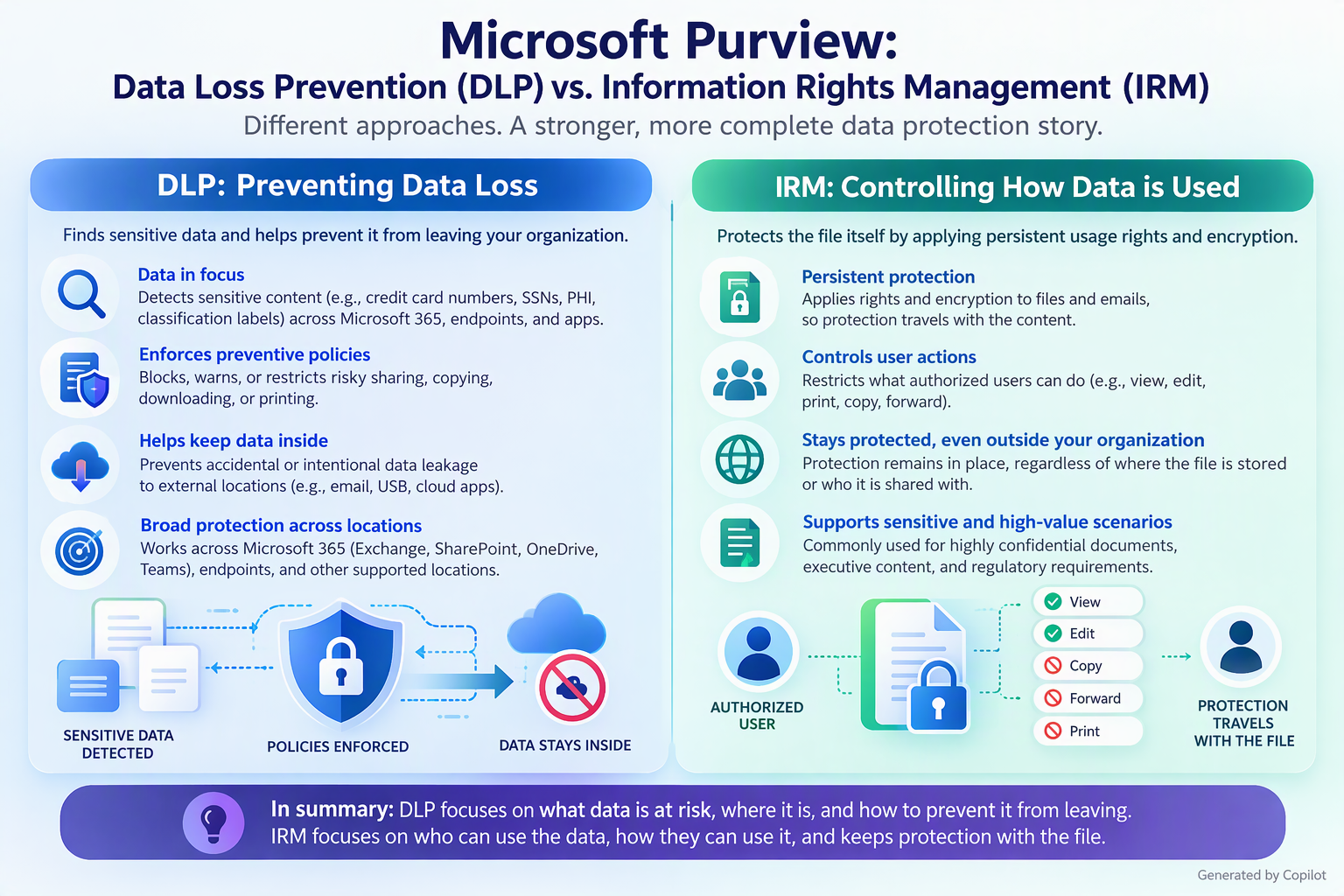
Navigating the Microsoft Purview compliance suite often leads to a common question: what sets Data Loss Prevention (DLP) apart from Insider Risk Management (IRM)? Although these two solutions frequently overlap in organizational security strategies, they address entirely different challenges. In this article, we will explore the core distinctions between them, highlighting how DLP safeguards your sensitive data, while IRM detects and manages risky user behavior before it leads to an incident.
The fundamental difference is that DLP focuses on protecting sensitive data, while Insider Risk Management focuses on identifying and managing risky user behavior.
Both are Microsoft Purview security and compliance capabilities, but they address different dimensions of data security.
- Data Loss Prevention (DLP): Determines whether sensitive information is being shared, transferred, or used in ways that violate organizational policies and can automatically prevent those actions.
- Insider Risk Management (IRM): Analyzes patterns of user activity and contextual signals to identify potential insider threats, including accidental data exposure, intellectual property theft, and other security violations.
Side-by-side comparison
|
Capability |
Purview DLP |
Purview Insider Risk Management |
|
Primary objective |
Prevent unauthorized disclosure of sensitive data |
Detect, investigate, and mitigate insider risks |
|
Primary focus |
Data and how it is handled |
User activities, behavioral patterns, and risk context |
|
Key question |
Is sensitive information leaving the organization or being shared inappropriately? |
Is a user exhibiting potentially risky behavior? |
|
Detection approach |
Content inspection, sensitivity labels, sensitive information types, and policy conditions |
Correlation of user activities, risk indicators, and contextual signals |
|
Typical triggers |
Sensitive data emailed externally, copied to USB, uploaded to unauthorized destinations |
Unusual downloads, repeated data exfiltration activities, or risky actions associated with departing employees |
|
Prevention capabilities |
Directly blocks, restricts, audits, or warns about policy violations |
Primarily detects and investigates; can initiate mitigation and integrate with DLP for preventive controls |
|
Risk analysis |
Evaluates data and activities against configured policies |
Correlates activities and indicators to identify potential insider risk |
|
Investigation |
DLP alerts, activity details, and incident reports |
Risk alerts, user activity timelines, investigation cases, and escalation workflows |
|
User awareness |
Policy tips, warnings, and notifications |
Primarily analyst-facing; privacy-preserving investigation workflows |
|
Privacy controls |
Role-based access and compliance controls |
Pseudonymization by default, role-based access, and auditing |
|
Typical stakeholders |
Security, compliance, and data protection teams |
Insider risk, security investigations, compliance, and authorized HR/legal stakeholders |
Practical example: An employee downloading confidential customer information
Consider a financial services organization where an employee downloads confidential customer records and attempts to transfer them to a personal cloud storage account.
Scenario A: Using Purview DLP
The organization has configured DLP policies to protect customer information.
What happens?
- An employee accesses an Excel file containing customer financial information.
- The employee attempts to upload the file to an unauthorized cloud storage service.
- DLP evaluates the content and activity against the configured policies.
- If the file contains protected information and the policy conditions match, DLP can block the upload.
- A policy notification or alert may be generated.
Outcome: Sensitive customer information is prevented from leaving through the restricted channel.
Important: DLP does not need to determine whether the employee has malicious intentions. It enforces the configured data protection policy.
Scenario B: Using Purview Insider Risk Management
Now consider the same employee, but with additional activities:
- Downloads unusually large amounts of confidential information.
- Copies files from multiple sensitive SharePoint locations.
- Attempts to transfer information to personal storage.
- Repeatedly performs activities associated with potential data exfiltration.
What happens?
- IRM collects relevant activity signals from supported sources.
- It correlates those signals using configured insider risk policies.
- It identifies potentially risky patterns across activities.
- It generates risk alerts when the configured detection criteria are met.
- Authorized investigators can review the activity context, investigate, and determine appropriate next steps.
Outcome: The organization can investigate whether the employee's behavior represents a potential insider threat.
Important: IRM identifies potential risk, not proven malicious intent. An alert is not evidence that an employee has committed wrongdoing.
IRM supports risk investigation and escalation workflows, including integration with Microsoft Purview eDiscovery.
The biggest architectural difference: Data-centric vs. user-centric security
This is probably the most important distinction when explaining these capabilities to enterprise customers.
Purview DLP: Data-centric protection
DLP essentially evaluates:
Data sensitivity + Activity + Destination + Policy = Enforcement decision
For example:
- Is the document classified as confidential?
- Does it contain credit card numbers?
- Is it being shared externally?
- Is the destination permitted?
- Should the activity be allowed, audited, or blocked?
DLP focuses on whether a particular action involving data violates a protection policy.
Purview IRM: User-centric risk detection
IRM evaluates:
User activities + Risk indicators + Context + Correlation = Potential insider risk
For example:
- Is the user performing multiple potentially risky activities?
- Are there unusual patterns of sensitive data access or transfer?
- Are activities associated with a configured risk scenario?
- Does the combination of signals warrant investigation?
IRM provides broader context around potential insider risk rather than evaluating only an individual data-sharing transaction.
Can DLP and Insider Risk Management work together?
Absolutely. In fact, Microsoft provides an integration called Adaptive Protection that combines their strengths.
Adaptive Protection uses Insider Risk Management signals to dynamically adjust DLP enforcement based on the risk level associated with a user.
This is particularly valuable because traditional DLP policies can apply consistent restrictions, while Adaptive Protection enables more context-aware enforcement.
Example: Adaptive Protection
Imagine an organization with three insider risk levels.
|
User risk level |
IRM assessment |
Example DLP enforcement |
|
Minor |
Limited indicators of potential risk |
Monitor activity and generate alerts |
|
Moderate |
More significant indicators of potential risk |
Increase monitoring and notify users |
|
Elevated |
Significant indicators warranting stronger controls |
Block specified external sharing activities |
These are illustrative policy choices, not mandatory Microsoft defaults.
How it works:
- IRM evaluates relevant user activity and assigns a risk level.
- Adaptive Protection makes that risk level available to supported enforcement policies.
- DLP evaluates the risk level alongside its other policy conditions.
- DLP applies the configured controls.
- As the risk level changes, applicable enforcement can change dynamically.
For example, an employee at an elevated insider risk level could be prevented from sharing certain content externally, while users at lower risk levels continue working with fewer restrictions.
This is where the two solutions become particularly powerful together.
Does Insider Risk Management replace DLP?
No. They are complementary, not competing solutions.
Consider these customer requirements:
|
Customer requirement |
Recommended capability |
|
Prevent employees from emailing credit card numbers externally |
DLP |
|
Block confidential files from being copied to USB drives |
DLP |
|
Prevent sensitive information from being uploaded to unauthorized cloud applications |
DLP |
|
Identify potential intellectual property theft |
IRM |
|
Investigate suspicious patterns of employee data access and transfer |
IRM |
|
Identify potential data exfiltration associated with departing employees |
IRM |
|
Apply stricter DLP restrictions to users exhibiting elevated insider risk |
IRM + DLP with Adaptive Protection |
|
Protect sensitive data while investigating suspicious user activity |
DLP + IRM |
One important nuance: DLP can detect and report risky activities, and IRM can contribute to mitigation. The distinction is their primary purpose and operating model, not an absolute separation between detection and prevention.
Which capability should customers implement first?
For customers beginning their Microsoft Purview data security journey, I would generally recommend the following sequence.
Phase 1: Establish data protection with DLP
Start by identifying sensitive information and understanding where it resides.
- Define sensitive information types and classification requirements.
- Implement sensitivity labels where appropriate.
- Configure DLP policies for Microsoft 365 workloads.
- Extend protection to endpoints and other supported locations.
- Initially use audit or simulation capabilities to assess impact before enabling blocking.
Business outcome: Reduce accidental and unauthorized sensitive data exposure.
Phase 2: Introduce Insider Risk Management
Once the organization has foundational visibility and protection, introduce insider risk detection.
- Identify relevant insider risk scenarios.
- Establish investigation ownership and privacy safeguards.
- Configure appropriate risk indicators and policies.
- Develop alert triage and investigation workflows.
- Integrate with existing security and compliance processes.
Business outcome: Improve the ability to detect and investigate potentially harmful insider activities.
Phase 3: Enable Adaptive Protection
Connect the two capabilities to establish risk-based enforcement.
- Configure insider risk levels.
- Map risk levels to DLP policy conditions.
- Apply proportionate restrictions based on risk.
- Continuously tune detection and enforcement.
Business outcome: Stronger security controls where risk is elevated, with less disruption for lower-risk users.
The actual deployment order should depend on the customer's highest-priority risks, licensing, regulatory obligations, and organizational readiness.
How I would position this to a customer
For your CAIP and Security cross-solution conversations, I would use this positioning:
Microsoft Purview DLP protects sensitive information from inappropriate sharing or movement, while Microsoft Purview Insider Risk Management identifies potentially risky user activities that could lead to data loss, intellectual property theft, or security incidents.
Together, through Adaptive Protection, they enable organizations to move from static data protection policies toward dynamic, risk-aware security controls.
Executive-level analogy
Think of these solutions as two different security mechanisms:
- DLP is the security checkpoint: It examines what information is moving and determines whether that movement should be permitted.
- IRM is the security intelligence function: It analyzes patterns of activity to identify potential insider threats that warrant investigation.
- Adaptive Protection connects them: It enables the checkpoint to adjust restrictions based on the risk intelligence available.
My recommendation
When discussing Microsoft Purview with enterprise customers, I would avoid positioning DLP and IRM as alternative products.
Instead, position them as three layers of a comprehensive data security strategy:
- Understand the data: Discover, classify, and label sensitive information.
- Protect the data: Use DLP to prevent unauthorized exposure.
- Understand and respond to insider risk: Use IRM and Adaptive Protection to identify potential threats and dynamically strengthen enforcement.
Bottom line: DLP answers, "How do we prevent sensitive data from leaking?" IRM answers, "How do we identify potentially risky insider activity?" Adaptive Protection answers, "How do we automatically adjust protection based on that risk?"
References:
- https://learn.microsoft.com/en-us/purview/dlp-learn-about-dlp
- https://learn.microsoft.com/en-us/purview/insider-risk-management
- https://learn.microsoft.com/en-us/purview/insider-risk-management-adaptive-protection
- https://learn.microsoft.com/en-us/purview/insider-risk-management-adaptive-protection-guide

 Microsoft