enterprise security
51 TopicsMicrosoft Security Community Spotlight: Marcel Graewer
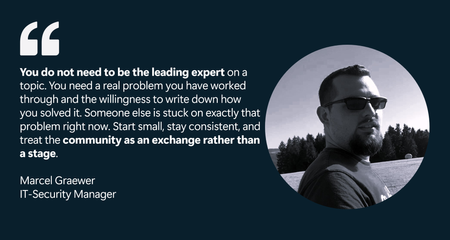
Globally, Marcel shares practical detection engineering insights on Microsoft Sentinel and Microsoft Defender XDR through forums and blog posts. Locally, he represents his employer in the IT-Security group of the Microsoft Business User Forum, where German companies using Microsoft technologies exchange real-world experience and expertise. The work Marcel values most is helping people enter the IT field. In Germany, "Fachinformatiker" is a recognized IT profession learned through a multi-year apprenticeship, and he is proud to have trained apprentices. He also serves as an examiner for the IHK (the German Chamber of Industry and Commerce), evaluating the final exams of these IT apprentices. This commitment also led him to support younger learners by teaching school cybersecurity classes and participating in Girls’ Day, where he introduced female students to the field. “I do this because most people don’t get an honest view of security work until much later in their education—if they see it at all. Showing someone early that this field is creative, varied, and genuinely interesting can change their path. Being part of that, even for a few people, means more to me than anything that fits neatly on a CV.” Let’s hear more from Marcel about his Microsoft Security Community and product paths. All responses to questions are direct quotes from Marcel. What do you find most rewarding about being a member of the Microsoft Security Community? The most rewarding part for me is how practical the exchange is. Microsoft security tooling moves fast - Microsoft Sentinel, Microsoft Defender XDR and Microsoft Security Copilot all change month to month- and no single person keeps up with all of it alone. The community is where that gap gets closed. When I read how someone else tuned a detection in their environment, or when someone responds to something I posted with a problem I hadn't considered, my own work gets better. It's a feedback loop you don't get from documentation. The other part I value is that it works in both directions: I started as a reader, learning from people more experienced than me, and now I'm at a point where I can give some of that back. Watching that shift happen has been genuinely motivating. How long have you been working with Microsoft Security Products? Over ten years! My way into Microsoft security ran through infrastructure rather than security itself. I started out administering Active Directory and VMware environments, the on-premises world, and that is where I first understood identity, endpoints and the quiet attack surface they create. At the time, security was something layered on top of infrastructure. What changed everything was the shift to the cloud. As the environments I worked in moved into Microsoft Azure and Microsoft 365, the old separation between "running things" and "securing things" stopped making sense. In a cloud-first world, the identity is the perimeter, the sign-in log is the crime scene, and the telemetry that used to be scattered across servers suddenly lives in one place you could actually query. That was the moment Microsoft's security stack became less of a product set and more of a working environment for me. As I moved from running infrastructure into roles centered on defending it, first leading IT infrastructure and security as a team lead, then as an IT Security Expert, and now as IT Security Manager focused on architecture and incident response in an Azure and M365 environment, Sentinel and Defender XDR went from tools I knew of to tools I work in every day. The infrastructure background turned out to be an advantage rather than a detour. Detection engineering makes far more sense once you have run the Active Directory and the endpoints that generate the very signals you are now writing detections against, and cloud security makes far more sense once you have felt the limits of the on-premises model it replaced. The part that keeps me engaged is that none of this stands still. The cloud security landscape changes constantly, the work is never quite finished, and that is exactly what I like about it. What Microsoft Security features or products have provided the most impact? The single biggest impact for me comes from Microsoft Sentinel as a cloud-native SIEM and SOAR platform. The move away from a self-hosted SIEM matters more than it first appears. A traditional SIEM is itself a piece of infrastructure that has to be sized, hosted, patched, and scaled, and that effort constantly competes with the actual security work. Microsoft Sentinel removes that layer. There is no platform estate to keep alive and no capacity planning for the SIEM itself, which frees attention for what actually matters: getting the right telemetry in and getting detection and response right. What I value most is how naturally Sentinel fits into modern, cloud-first environments. When the landscape you are protecting already lives in Azure and Microsoft 365, a security platform that lives in the same place removes an entire class of integration friction. The other strength is the breadth of data onboarding. With a traditional SIEM, connecting a new log source was often a small project of its own, with connectors to build and parsers to maintain. With Sentinel, that friction is largely gone. Whether a source sits on-premises, in another cloud or in a third-party product, getting it in is straightforward, and the platform still provides the integration depth that genuinely matters rather than a shallow connection. Microsoft Sentinel handles almost anything you point it at. Equally important is that SIEM and SOAR are not two separate platforms here. The orchestration and automation layer is built into the same solution, so response playbooks run on the same data that the detections are built on. For architecture, that is a real advantage: detection and response are designed as one system rather than stitched together afterwards. The central telemetry layer is one of the few decisions that is genuinely hard to reverse later, and Sentinel makes that an easy one to defend. What advice do you have for others who would like to get involved in the Microsoft Community? My advice is to start before you feel ready. I read Microsoft Tech Community (forums) for years before I posted anything myself, always with the feeling that I needed more experience first, that I would just be adding noise. That was the wrong instinct. The moment I actually started contributing, the feedback I got back made my own work better, and I realised the bar for being useful is far lower than it looks from the outside. You do not need to be the leading expert on a topic. You need a real problem you have worked through and the willingness to write down how you solved it. Someone else is stuck on exactly that problem right now. Start small, stay consistent, and treat the community as an exchange rather than a stage. Consistency matters more than any single brilliant post. Alles rund um sein Buch (All About His Book) Last year, I published "Die neue Realität der Cybersecurity" (2025). It tackles a question every security team is dealing with right now: “Where does AI genuinely strengthen security architecture and incident response, and where is it just noise?” Rather than staying abstract, the book takes the practitioner's side of that question, looking at how AI actually changes the work of designing defensible systems and responding to incidents, and where the limits and risks really are. It is written for the people doing the work, security architects, IR practitioners and the leaders who have to make decisions about AI without the marketing gloss. If that question is on your desk too, it is worth a look. Connect with Marcel Microsoft Tech Community: @marcel_graewer Linkedin: https://www.linkedin.com/in/mgraewer/ Github: https://github.com/bifrost0x Blogs: graewer.com and magra-sec.de Book: Die neue Realität der Cybersecurity (ISBN: 9783695708833) Marcel Graewer is currently an IT-Security Manager at Festool Group and holds the CISSP certification. Outside of work, he is happiest when experimenting with technology on his own terms. He runs a Proxmox-based homelab with a range of self-hosted services and Docker containers, using it as both a playground and a testing ground. It gives him space to break things, learn, and explore without the constraints of formal change processes. He also spends time on Hack The Box and TryHackMe, believing that staying sharp on the offensive side makes him a stronger defender. Away from the keyboard, his life is refreshingly analog. He and his family, including two children, live in an old house that always seems to have one more project waiting. Between the homelab and the house, there is never a shortage of things to fix, and that suits him just fine. Learn and Engage with the Microsoft Security Community Log in and follow this Microsoft Security Community Blog. Follow = Click the heart in the upper right when you're logged in 🤍. Join the Microsoft Security Community and be notified of upcoming events, product feedback surveys, and more. Get early access to Microsoft Security products and provide feedback to engineers by joining the Microsoft Security Advisors. Join the Microsoft Security Community LinkedIn Group and follow the Microsoft Entra Community on LinkedInSafeguarding Sensitive Data in Microsoft 365 Copilot Interactions: DLP for Microsoft 365 Copilot
Microsoft 365 Copilot is redefining how organizations work, bringing the power of generative AI directly into our secure productivity tools. As Copilot adoption accelerates, we’ve heard that you want more control over how your sensitive data can be used in interactions with Copilot. At Ignite 2025, Microsoft announced a major enhancement: Microsoft Purview Data Loss Prevention for Microsoft 365 Copilot to safeguard Microsoft 365 Copilot and Copilot Chat prompts, now entering General Availability. Even better, this capability is included for all users of Microsoft 365 Copilot and Copilot Chat. Why DLP for Copilot Prompts Is a Game-Changer As organizations adopt Copilot, their ways of sharing, creating, and interacting with data expand. With just a prompt, users can have Copilot summarize documents, analyze spreadsheets, or help brainstorm presentations. However, it raises an important question: what if the prompt includes sensitive information, like project code names, financial account numbers, health records, or other sensitive data? Over the last 2 years, Microsoft has been building a set of Data Loss Prevention (DLP) controls specifically designed for Copilot. Below is a quick overview of these related capabilities — ranging from already available to newly in preview — before we dive deep into today's GA announcement: Prevent Copilot processing of files & emails based on sensitivity labels In November 2024, Microsoft introduced the ability to create a DLP policy to restrict Microsoft 365 Copilot and Copilot Chat from processing sensitive files and emails using Sensitivity Labels for grounding data. This capability gives you control over whether content with the sensitivity labels you specify is restricted from being used in Microsoft 365 Copilot and Copilot Chat to generate summaries and responses. Prevent web searches for prompts containing Sensitive Information Types (SITs) The latest feature entering Public Preview is DLP for Microsoft 365 Copilot and Copilot Chat to prevent web searches for prompts containing sensitive data. This real-time control helps organizations mitigate data leakage and oversharing risks by preventing Microsoft 365 Copilot and agents from using sensitive data for external web searches. If a sensitive information type (SIT) is detected in a user prompt, Copilot can still leverage your enterprise data to form a response without sending the sensitive data to external search engines for web grounding. This capability extends to Microsoft 365 Copilot and agents built in Copilot Studio that are published to Microsoft 365 Copilot. DLP to Safeguard Copilot Prompts with Sensitive Information Types (SITs) The rest of this blog focuses on a key addition to this capability set: DLP for Microsoft 365 Copilot + Copilot Chat prompts to prevent processing of prompts containing sensitive information, now entering General Availability. Unlike the web search capability above, which prevents sensitive data from being sent externally during a web query, this capability evaluates the user’s text input directly, before processing occurs, to determine whether both enterprise data and web grounding can proceed. This feature uses Sensitive Information Types (SITs) as a condition within a Purview DLP policy to assess whether a user prompt sent to Copilot contains sensitive data, even if the data is unlabeled. With DLP for Copilot prompts, a user’s text input is scanned in real time for SITs, whether built-in (like Social Security Numbers, credit card numbers, etc.) or custom-defined by your organization (such as confidential terms or project names). If a text prompt contains one of the SITs you specify, Copilot restricts processing, halts any Graph or web grounding, and displays a clear message to the end user that the request cannot be completed. A user enters a prompt in Microsoft 365 Copilot Chat containing sensitive information. How DLP for Copilot Protects Prompts: Real-Time, Intelligent Protection The new DLP capability integrates seamlessly with Microsoft Purview, leveraging its powerful data classification & detection engine for sensitive information types. Here’s how it works: Input: When a user submits a prompt, Copilot checks the prompt for sensitive information using built-in or organization-defined sensitive information types (SITs). Immediate Action: If a SIT is detected, Copilot restricts the prompt from being processed. No AI response is generated, and no data is sent for Graph or web grounding. Output: Users receive a clear notification that their request cannot be completed due to company policies. This real-time protection ensures that sensitive data is not leaked or overshared, even as users explore new ways to work with AI. Setting Up DLP for Copilot Prompts: Data Security Admin Experience The easiest way to get started is through the new Microsoft Purview Data Security Posture Management (DSPM) portal, which provides a guided, one-click setup experience: 1. In Purview, go to Solutions > DSPM (preview) 2. Select the "Prevent data exposure in Microsoft 365 Copilot and Microsoft Copilot interactions" objective. 3. Follow the guided workflow and apply the recommended one-click DLP policy. The policy starts in simulation mode so you can review activity before enforcing it. Alternatively, you can configure and customize this policy directly from the Purview DLP portal Policies page or enable it from the Microsoft 365 Admin Center. view the remediation plan. view policy details and review. Then click the button, create a custom policy in DLP simulation mode to protect sensitive data referenced in Microsoft 365 Copilot and Microsoft Copilot. the confidence level and instance count. Practical Scenarios: Protecting What Matters Most Protect PII, financial data, and intellectual property: Financial institutions can block prompts containing deal terms, account numbers, or other sensitive data, preventing leaks through AI interactions. Similarly, healthcare organizations can safeguard patient information, and manufacturers can secure intellectual property and trade secrets from exposure, along with many other practical use cases. Once the prompt is detected and blocked, Microsoft Graph grounding and Bing web grounding is restricted. Safeguard sensitive non-public information: Imagine an organization involved in a confidential merger. By using DLP for Copilot prompts, administrators can set up a custom SIT that includes the project’s code name. If a user asks Copilot about the merger using the project’s code name, their request will be blocked, keeping sensitive information secure and protected. Visibility into DLP for M365 Copilot Prompts When a user’s prompt triggers a DLP policy, notifications and alerts are surfaced directly in the Microsoft Purview and Defender portals for security administrators. These alerts provide detailed information about which policy was activated, the type of sensitive information detected, and the context of the attempted Copilot interaction. Using these alert queues in Purview and Defender XDR, administrators can efficiently track policy activity, investigate potential incidents, and refine DLP rules to better align with organizational needs. The ability to review historical alerts and track ongoing enforcement empowers admins to maintain strong data security and proactively safeguard sensitive information. Defender XDR portal investigation of prompt DLP based incident. Takeaways The introduction of this latest enhancement to DLP for Copilot represents a key advancement in secure Copilot deployment and adoption. By empowering organizations to block sensitive data at the prompt level, Microsoft is helping customers unlock the full potential of Copilot, without compromising security or compliance. This innovation reflects Microsoft’s commitment to responsible AI, continuous improvement, and customer-driven development. As Copilot evolves, so will the tools to protect your data, ensuring that productivity and security go hand in hand. For more details, stay tuned for updates to the Product Roadmap and Learn documentation. Learn about using DLP to protect interactions with Microsoft 365 Copilot and Copilot Chat Learn about the default DLP policy for Microsoft 365 Copilot location | Microsoft Learn Permissions to create or edit a DLP policy to safeguard Microsoft 365 Copilot and Copilot Chat Learn about the new Microsoft Purview Data Security Posture Management (DSPM) | Microsoft Learn Roadmap Item: DLP for Microsoft 365 Copilot to safeguard prompts Roadmap Item: DLP to safeguard web search in Microsoft 365 CopilotState Explosion Security Problem in AI-Era Software Supply Chains
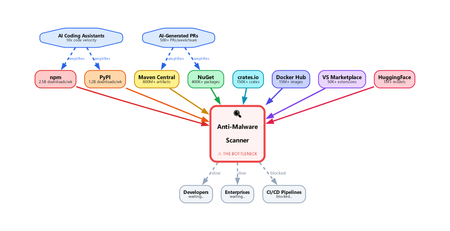
Introduction To see why this problem scales so quickly, start with the smallest possible change: a single line of code. In modern software, even a tiny edit is rarely just a local modification. It can change execution flow, introduce a new dependency, expose sensitive data, or quietly shift the purpose of the package itself. What looks trivial in a diff can create a materially different security outcome. That is why supply chain defenders cannot afford to treat small code changes as small security events. How a Single Line Changes Package Intent Every software package exists in a particular state at a particular moment in time. Imagine a benign version — State X — that behaves exactly as intended. Now add one line of code. That small edit can shift the package into a new state with different behavior and, potentially, a very different risk profile. The security issue is not the added line by itself. It is the fact that the package now has to be interpreted differently. A tiny diff can change the role of the entire component, which means defenders have to reason about the resulting behavior, not just the textual change. That is why file-level scanning breaks down so quickly. A change in one file can alter the behavior of the entire package because software semantics emerge from how components interact. Security systems therefore need to analyze packages as composed systems, not as a series of isolated file edits. Why the whole package matters This matters even more in modern supply chain attacks, where malicious intent is rarely concentrated in one obvious file. More often, the behavior is distributed across several files that look harmless when viewed independently. File A defines an encoded string constant. Looks like a config value. File B provides a decode function. Looks like a utility. File C (setup.py / postinstall) imports both, decodes, and executes. Viewed independently, each file may appear benign. No single file has to trigger a clear signature, rule, or heuristic. The malicious behavior only becomes visible when you reconstruct how the files interact as a system. Any scanner that evaluates files one by one without rebuilding that interaction is likely to miss the real behavior. Why every change demands re-analysis Every meaningful state change — a commit, pull request, version bump, or package publish — can alter the semantics of the software. That means defenders cannot stop at diff inspection or lightweight pattern matching. The real question is not only what changed, but what the software now does. Quantifying the problem The scale of the problem becomes clearer when you look at how many software state changes occur across the ecosystem every day: GitHub alone recorded nearly 1 billion commits in 2025, merged an average of 43.2 million pull requests per month, and now hosts roughly 630 million repositories. In 2026, GitHub was projected to reach roughly 38 million commits per day. npm has grown to well over 2 million packages, making JavaScript one of the largest public package ecosystems. PyPI published more than 130,000 new projects in 2025 and more than 3.9 million new files in the same year. NuGet serves package downloads at massive operational scale, with recent weekly totals in the 5 to 6 billion range. Maven Central indexed more than 20 million packages and published more than 3.2 million packages in 2025. Taken together, these ecosystems are generating an enormous stream of new software states. Some numbers describe repositories, some describe publishes, and some describe downloads, but they all point to the same reality: the scale of software movement is already massive before you even account for the acceleration from AI-assisted development. The number of state changes is already enormous, and AI-assisted development is increasing it even further. The result is not just more code, but more package states that may require meaningful security interpretation. Why the math breaks traditional scanning Assume a single semantic package analysis takes 30 seconds, which is a reasonable range for LLM-based inference. Scanning 50,000 packages would require roughly 1.5 million seconds of compute time per day — about 417 hours. But the ecosystem only gives defenders 24 hours before the next wave of packages arrives. Without aggressive parallelism and purpose-built infrastructure, backlog becomes inevitable. The scanning bottleneck This leaves modern scanning systems with a fundamental bottleneck: Heuristic and signature-based scanners are fast. They can match known patterns in milliseconds and work well for familiar malware families or repeated behaviors. Some systems also use emulation or detonation, but these approaches still struggle to deliver deep reasoning at ecosystem scale. That makes them easier to bypass with novel, well-structured, or AI-generated code that behaves maliciously without resembling previously known samples. LLM-based semantic analysis can reason about intent. It can follow behavior across files, recognize obfuscated exfiltration paths, and explain why a package is suspicious even when the code appears ordinary at first glance. The tradeoff is cost, latency, and trust: inference takes seconds rather than milliseconds, and a single package may require multiple reasoning passes. At ecosystem scale, that becomes a serious infrastructure challenge. Neither approach is sufficient on its own. Heuristics provide speed without deep understanding, while semantic models provide understanding without inherent scale. Closing the gap requires systems that combine both: package-level reasoning with the latency and throughput needed for production supply chains. Heuristics often miss novel attacks, while LLM-based approaches remain too slow to apply inline at large scale. That gap between understanding and throughput is where supply chain malware can persist. What needs to change Closing that gap will require a different class of supply chain security systems. Detonation can help in some cases, but it is too slow and expensive to apply inline to every package state change. What is needed is a system that can: Analyze entire packages as a unit — not individual files. The intent lives in the interaction between files, not within any single one. Run semantic analysis at data-plane speed — every package, every version, on the hot path, with latency low enough for inline enforcement. Not async advisories. Not CI-time checks. Inline, before delivery. Handle the state explosion — millions of state changes per day, each requiring full re-analysis. This is an infrastructure problem as much as a security problem: rate limiting, backpressure, connection pooling, regional failover, model versioning — the same hard distributed systems problems, with security stakes. Maintain high accuracy under evasion — attackers deliberately use encoding, string splitting, dynamic imports, polyglot files, and similar techniques to reduce detection quality. The scanner must continue to classify packages accurately even when the code is designed to obscure intent. The Latency-Accuracy Tradeoff: Malware Detection as an ML Problem At cloud scale, malware detection is governed by a hard tradeoff between latency, accuracy, throughput, and cost. The fastest detectors are typically shallow: signatures, heuristics, and lightweight models can make decisions in milliseconds, but they often miss novel, compositional, or intent-level attacks. Deeper semantic analysis can improve recall and resilience against evasion, but it also increases inference time, compute cost, and operational complexity. As a result, defenders cannot optimize for accuracy in isolation; they must deliver strong detection quality within strict performance constraints. This makes malware detection not just a cybersecurity problem, but a machine learning and distributed systems problem. In modern software supply chains, AI-assisted development increases the number of package states and enables attackers to generate variants at high speed, expanding the space defenders must reason over. The challenge is therefore to build detection architectures that preserve semantic depth while remaining fast enough for inline use at global scale. The gap between the rate of software change and the capacity to analyze it is widening. That gap is the attack surface. If defenders cannot inspect software at the speed it is being produced and published, attackers will continue to exploit the delay. What the industry needs now is a cloud-scale malware analysis capability that can deliver low latency, low cost, high accuracy, and the flexibility to meet different operational requirements , such as SLAs, false-positive tolerance, and enforcement policies , without compromising on package-level semantic analysis.Security Dashboard for AI: 3 Ways CISOs Drive Impact Today
AI is reshaping the enterprise and, with it, the threat landscape. Today's organizations face new threats with AI agents that modify configurations, execute workflows, and access data without direct human oversight. As a result, the gap between AI adoption and AI governance is widening, and CISOs face growing challenges to maintain visibility, control, and compliance across an increasingly complex ecosystem. As AI becomes embedded across the enterprise, CISOs face four key challenges: Scale without visibility: Over 75% of enterprises surveyed by PWC report they are already adopting AI agents. ¹ At the same time, over 80% of security teams surveyed by Nokod report visibility gaps into the applications and AI agents created within their organization. ² Rapid AI proliferation and evolving regulations make unified visibility across AI platforms, apps, and agents critical for CISOs. Fragmentation: Organizations rely on multiple siloed tools for AI asset visibility, making oversight fragmented and inefficient. According to Gartner’s 2024 survey of 162 enterprises, organizations use 45 cybersecurity tools on average. Expanding AI risk: AI proliferation is rapidly increasing the attack and risk surface, with the surge of AI-generated identities. By 2027, 4 out of 5 organizations will face phishing attacks powered by AI-generated synthetic identities, according to IDC. ³ This makes it harder for CISOs to track emerging threats, unmanaged assets, and shifting risk patterns. Overload: Alert fatigue is now a top challenge, with organizations now receiving an average of 2,992 security alerts daily, yet 63% go unaddressed. ⁴ Increasing AI risk without a way to prioritize what matters most compounds pressure on CISOs. In conversations between Microsoft and CISOs, one common need emerged: a single place to view integrated AI risk across the enterprise. To address these growing challenges, we are excited to provide CISOs with the Security Dashboard for AI, which recently became generally available. This unified dashboard aggregates posture and real-time risk signals from Microsoft Defender, Entra, and Purview into one unified, executive-level view of AI posture, risk, and inventory across agents, apps, and platforms. The Security Dashboard for AI helps CISOs: Gain unified AI risk visibility: Discover AI agents and applications and continuously monitor posture across the environment Prioritize critical risks: Correlate signals across identity, data, and threat protection to surface the most urgent issues Drive risk mitigations: Investigate activity and take action to help reduce exposure across the AI ecosystem The dashboard is capable of aggregating and surfacing AI risks from across Microsoft Defender, Entra, Purview - including Microsoft 365 Copilot, Microsoft Copilot Studio agents, and Microsoft Foundry applications and agents as well as cross-platform AI risks with Microsoft network-based or SDK-enabled integrations, and MCP servers. This supports comprehensive visibility and control, regardless of where applications and agents are built. As you activate Microsoft Security for AI capabilities, you can gain richer visibility into different aspects of your AI risk posture. Figure 1: Security Dashboard for AI in browser Getting Started with the Security Dashboard for AI The Security Dashboard for AI is provided at no additional cost to customers already using Defender, Entra, and/or Purview to protect their AI innovation. Based on how early adopter CISOs are using the dashboard, here are three ways you can start leveraging the dashboard today. 1. Manage Daily AI Risk Beyond reporting, you must stay hands-on with AI risks, scanning for emerging issues, verifying asset governance, and delegating remediations. The Security Dashboard for AI consolidates daily operations into a single pane of glass, surfacing critical alerts, unmanaged assets, and emerging risks. Use the dashboard as a daily AI risk radar, enabling rapid triage and ensuring you focus on the most urgent threats. Scan and triage daily AI risk: Start each day by identifying and prioritizing the highest-risk AI exposures. Risks are prioritized on severity reported by underlying security tools, helping you focus on the most critical exposures. Track AI asset inventory and monitor agent sprawl: Use the Inventory page to gain comprehensive visibility into all AI assets. Identify newly registered assets to mitigate the risk of shadow or unmanaged IT and surface inactive agents to proactively monitor and control agent sprawl. Delegate tasks for remediation: Move from insight to action by delegating tasks to your security team with easy click delegation. Delegation routes ownership via email or Microsoft Teams with notifications, due date, and ownership tracking. Delegate actions to specific roles such as global admin and AI administrator, without granting full access to underlying tools. Figure 2: Security Dashboard for AI risk page 2. Guide Briefings with Security Teams You require up-to-date intelligence to guide conversations with Security Teams about what is happening across the AI estate. The Security Dashboard for AI helps you anchor discussions in specific risks, trends, and ownership gaps surfaced in the data. The dashboard becomes a conversation driver, helping you ask the right questions about risk and security posture, to help ensure you and your team are triaging the right priorities. Because the dashboard consolidates signals from Defender, Entra, and Purview, both CISO and security teams operate from the same facts, enabling more outcome-driven discussions and faster prioritization, so you can shift the conversations from status updates to targeted action planning. Prioritize top AI Risk: Use the dashboard to help you prioritize the AI risk that matters the most. In preparation for team meetings, use Microsoft Security Copilot to explore AI risks, agent activity, and security recommendations via prompts to strengthen your AI security posture. With your team, take a closer look at risk vectors like data leakage, oversharing and unethical behavior, and discuss what actions need to be taken. Review Security Recommendations: Create a routine with your security team to review the recommended Microsoft security actions and track your progress over time. Across regular team check‑ins, review what has been addressed, what remains open, and which actions require follow‑up so you are prepared to respond to regulatory, audit, or executive questions with up‑to‑date metrics. Figure 3: Security Dashboard for AI inventory page Figure 4: Security Dashboard for AI delegation 3. Executive Reporting Reporting to the board on AI security posture has historically meant weeks of manual data gathering across multiple tools. The Security Dashboard for AI streamlines the data collection process with a single source of truth for AI risk, enabling confident, data-backed insights for your board presentations and conversations. Early adopters confirm the value and are using it for quarterly executive briefings. Prepare for Board Discussions: Use the dashboard to help get the right insights at the right altitude to help you prepare for discussions with your board. The Overview page aggregates identity, data security, and threat protection signals from Defender, Entra, and Purview into an AI risk scorecard with risk factors. The embedded Security Copilot AI-powered insights provide suggested prompts with risk assessments, summaries, and recommendations to help you prioritize what matters most. Extend Observability to Executive Stakeholders: Authorize AI risk follow‑ups to the appropriate security, identity, or governance owners using Microsoft Teams or email. Distribute visibility across GRC lead, AI governance, and IT leaders, while maintaining executive‑level oversight. Figure 5: Security Dashboard for AI Copilot prompt gallery Next Steps The Security Dashboard for AI helps CISOs manage AI risk faster, more confidently and more collaboratively with their team. Defender, Entra, and Purview signals are surfaced in a single pane of glass, providing observability across your AI estate. Drive faster triage, use data to support board-level discussions about AI risk, and enable coordinated action with integrated insights, recommendations, and delegation to help accelerate remediation across existing security workflows. The Security Dashboard for AI is generally available now. If your organization uses Microsoft Defender, Entra, and/or Purview, you already have access, no additional licensing is required. Visit ai.security.microsoft.com to access the dashboard directly, or navigate to it from the Defender, Entra, or Purview portals. Learn more about the Security Dashboard for AI on the MS Learn page and the Security Dashboard for AI Security Blog. Discover new features in the Security Dashboard for AI such as the Security Reader role, new delegation flow, and new identity risk section here. ¹AI agent survey. PwC, May 2025 ²Security Teams Taking on Expanded AI Data Responsibilities. Bedrock Data, March 2025 ³IDC FutureScape: Worldwide Security and Trust 2026 Predictions, November 2025 ⁴2026 State of Threat Detection and Response Report. Vectra AI, February 2026Security Dashboard for AI - Now Generally Available
AI proliferation in the enterprise, combined with the emergence of AI governance committees and evolving AI regulations, leaves CISOs and AI risk leaders needing a clear view of their AI risks, such as data leaks, model vulnerabilities, misconfigurations, and unethical agent actions across their entire AI estate, spanning AI platforms, apps, and agents. 53% of security professionals say their current AI risk management needs improvement, presenting an opportunity to better identify, assess and manage risk effectively. 1 At the same time, 86% of leaders prefer integrated platforms over fragmented tools, citing better visibility, fewer alerts and improved efficiency. 2 To address these needs, we are excited to announce the Security Dashboard for AI, previously announced at Microsoft Ignite, is now generally available. This unified dashboard aggregates posture and real-time risk signals from Microsoft Defender, Microsoft Entra, and Microsoft Purview - enabling users to see left-to-right across purpose-built security tools from within a single pane of glass. The dashboard equips CISOs and AI risk leaders with a governance tool to discover agents and AI apps, track AI posture and drift, and correlate risk signals to investigate and act across their entire AI ecosystem. Security teams can continue using the tools they trust while empowering security leaders to govern and collaborate effectively. Gain Unified AI Risk Visibility Consolidating risk signals from across purpose-built tools can simplify AI asset visibility and oversight, increase security teams’ efficiency, and reduce the opportunity for human error. The Security Dashboard for AI provides leaders with unified AI risk visibility by aggregating security, identity, and data risk across Defender, Entra, Purview into a single interactive dashboard experience. The Overview tab of the dashboard provides users with an AI risk scorecard, providing immediate visibility to where there may be risks for security teams to address. It also assesses an organization's implementation of Microsoft security for AI capabilities and provides recommendations for improving AI security posture. The dashboard also features an AI inventory with comprehensive views to support AI assets discovery, risk assessments, and remediation actions for broad coverage of AI agents, models, MCP servers, and applications. The dashboard provides coverage for all Microsoft AI solutions supported by Entra, Defender and Purview—including Microsoft 365 Copilot, Microsoft Copilot Studio agents, and Microsoft Foundry applications and agents—as well as third-party AI models, applications, and agents, such as Google Gemini, OpenAI ChatGPT, and MCP servers. This supports comprehensive visibility and control, regardless of where applications and agents are built. Prioritize Critical Risk with Security Copilots AI-Powered Insights Risk leaders must do more than just recognize existing risks—they also need to determine which ones pose the greatest threat to their business. The dashboard provides a consolidated view of AI-related security risks and leverages Security Copilot’s AI-powered insights to help find the most critical risks within an environment. For example, Security Copilot natural language interaction improves agent discovery and categorization, helping leaders identify unmanaged and shadow AI agents to enhance security posture. Furthermore, Security Copilot allows leaders to investigate AI risks and agent activities through prompt-based exploration, putting them in the driver’s seat for additional risk investigation. Drive Risk Mitigation By streamlining risk mitigation recommendations and automated task delegation, organizations can significantly improve the efficiency of their AI risk management processes. This approach can reduce the potential hidden AI risk and accelerate compliance efforts, helping to ensure that risk mitigation is timely and accurate. To address this, the Security Dashboard for AI evaluates how organizations put Microsoft’s AI security features into practice and offers tailored suggestions to strengthen AI security posture. It leverages Microsoft’s productivity tools for immediate action within the practitioner portal, making it easy for administrators to delegate recommendation tasks to designated users. With the Security Dashboard for AI, CISOs and risk leaders gain a clear, consolidated view of AI risks across agents, apps, and platforms—eliminating fragmented visibility, disconnected posture insights, and governance gaps as AI adoption scales. Best of all, the Security Dashboard for AI is included with eligible Microsoft security products customers already use. If an organization is already using Microsoft security products to secure AI, they are already a Security Dashboard for AI customer. Getting Started Existing Microsoft Security customers can start using Security Dashboard for AI today. It is included when a customer has the Microsoft Security products—Defender, Entra and Purview—with no additional licensing required. To begin using the Security Dashboard for AI, visit http://ai.security.microsoft.com or access the dashboard from the Defender, Entra or Purview portals. Learn more about the Security Dashboard for AI at Microsoft Security MS Learn. 1AuditBoard & Ascend2 Research. The Connected Risk Report: Uniting Teams and Insights to Drive Organizational Resilience. AuditBoard, October 2024. 2Microsoft. 2026 Data Security Index: Unifying Data Protection and AI Innovation. Microsoft Security, 2026Step by Step: 2-Tier PKI Lab
Purpose of this blog Public Key Infrastructure (PKI) is the backbone of secure digital identity management, enabling encryption, digital signatures, and certificate-based authentication. However, neither setting up a PKI nor management of certificates is something most IT pros do on a regular basis and given the complexity and vastness of the subject it only makes sense to revisit the topic from time to time. What I have found works best for me is to just set up a lab and get my hands dirty with the topic that I want to revisit. One such topic that I keep coming back to is PKI - be it for creating certificate templates, enrolling clients, or flat out creating a new PKI itself. But every time I start deploying a lab or start planning a PKI setup, I end up spending too much time sifting through the documentations and trying to figure out why my issuing certificate authority won't come online! To make my life easier I decided to create a cheatsheet to deploy a simple but secure 2-tier PKI lab based on industry best practices that I thought would be beneficial for others like me, so I decided to polish it and make it into a blog. This blog walks through deploying a two-tier PKI hierarchy using Active Directory Certificate Services (AD CS) on Windows Server: an offline Root Certification Authority (Root CA) and an online Issuing Certification Authority (Issuing CA). We’ll cover step-by-step deployment and best practices for securing the root CA, conducting key ceremonies, and maintaining Certificate Revocation Lists (CRLs). Overview: Two-Tier PKI Architecture and Components In a two-tier PKI, the Root CA sits at the top of the trust hierarchy and issues a certificate only to the subordinate Issuing CA. The Root CA is kept offline (disconnected from networks) to protect its private key and is typically a standalone CA (not domain-joined). The Issuing CA (sometimes called a subordinate or intermediate CA) is kept online to issue certificates to end-entities (users, computers, services) and is usually an enterprise CA integrated with Active Directory for automation and certificate template support. Key components: Offline Root CA: A standalone CA, often on a workgroup server, powered on only when necessary (initial setup, subordinate CA certificate signing, or periodic CRL publishing). By staying offline, it is insulated from network threats. Its self-signed certificate serves as the trust anchor for the entire PKI. The Root CA’s private key must be rigorously protected (ideally by a Hardware Security Module) because if the root is compromised, all certificates in the hierarchy are compromised. Online Issuing CA: An enterprise subordinate CA (domain-joined) that handles day-to-day certificate issuance for the organization. It trusts the Root CA (via the root’s certificate) and is the one actually responding to certificate requests. Being online, it must also be secured, but its key is kept online for operations. Typically, the Issuing CA publishes certificates and CRLs to Active Directory and/or HTTP locations for clients to download. The following diagram shows the simplified view of this implementations: The table below summarizes the roles and differences: Aspect Offline Root CA Online Issuing CA Role Standalone Root CA (workgroup) Enterprise Subordinate CA (domain member) Network Connectivity Kept offline (powered off or disconnected when not issuing) Online (running continuously to serve requests) Usage Signs only one certificate (the subordinate CA’s cert) and CRLs Issues end-entity certificates (users, computers, services) Active Directory Not a member of AD domain; doesn’t use templates or auto-enrollment Integrated with AD DS; uses certificate templates for streamlined issuance Security Extremely high: physically secured, limited access, often protected by HSM Very High: server hardened, but accessible on network; HSM recommended for private key CRL Publication Manual. Admin must periodically connect, generate, and distribute CRL. Delta CRLs usually disabled. Automatic. Publishes CRLs to configured CDP locations (AD DS, HTTP) at scheduled intervals. Validity Period Longer (e.g. 5-10+ years for the CA certificate) to reduce frequency of renewal. Shorter (e.g. 2 years) to align with organizational policy; renewed under the root when needed. In this lab setup, we will create a Contoso Root CA (offline) and a Contoso Issuing CA (online) as an example. This mirrors real-world best practices which is to "deploy a standalone offline root CA and an online enterprise subordinate CA”. Deploying the Offline Root CA Setting up the offline Root CA involves preparing a dedicated server, installing AD CS, configuring it as a root CA, and then securing it. We’ll also configure certificate CDP/AIA (CRL Distribution Point and Authority Information Access) locations so that issued certificates will point clients to the correct locations to fetch the CA’s certificate and revocation list. Step 1: Prepare the Root CA Server (Offline) Provision an isolated server: Install a Windows Server OS (e.g., Windows Server 2022) on the machine designated to be the Root CA. Preferably on a portable enterprise grade physical server that can be stored in a safe. Do not join this server to any domain – it should function in a Workgroup to remain independent of your AD forest. System configuration: Give the server a descriptive name (e.g., ROOTCA) and assign a static IP (even though it will be offline, a static IP helps when connecting it temporarily for management). Install the latest updates and security patches while it’s still able to go online. Lock down network access: Once setup is complete, disable or unplug network connections. If the server must remain powered on for any reason, ensure all unnecessary services/ports are disabled to minimize exposure. In practice, you will keep this server shut down or physically disconnected except when performing CA maintenance. Step 2: Install the AD CS Role on the Root CA Add the Certification Authority role: On the Root CA server, open Server Manager and add the Active Directory Certificate Services role. During the wizard, select the Certification Authority role service (no need for web enrollment or others on the root). Proceed through the wizard and complete the installation. You can also install the CA role and management tools via PowerShell: Install-WindowsFeature AD-Certificate -IncludeManagementToolsThis Role Services: Choose Certification Authority. Setup Type: Select Standalone CA (since this root CA is not domain-joined). CA Type: Select Root CA. Private Key: Choose “Create a new private key.” Cryptography: If using an HSM, select the HSM’s Cryptographic Service Provider (CSP) here; otherwise use default. Choose a strong key length (e.g., 2048 or 4096 bits) and a secure hash algorithm (SHA-256 or higher). CA Name: Provide a common name for the CA (e.g., “Contoso Root CA”). This name will appear in issued certificates as the Issuer. Avoid using a machine DNS name here for security – pick a name without revealing the server’s actual hostname. Validity Period: Set a long validity (e.g., 10 years) for the root CA’s self-signed certificate. A decade is common for enterprise roots, reducing how often you must touch the offline CA for renewal. Database: Specify locations for the CA database and logs (the defaults are fine for a lab). Review settings and complete the configuration. This process will generate the root CA’s key pair and self-signed certificate, establishing the Root CA.Post-install configuration: After the binary installation, click Configure Active Directory Certificate Services (a notification in Server Manager). In the configuration wizard: You can also perform this configuration via PowerShell in one line: Install-AdcsCertificationAuthority ` -CAType StandaloneRootCA ` -CryptoProviderName "YourHSMProvider" ` -HashAlgorithmName SHA256 -KeyLength 2048 ` -CACommonName "Contoso Root CA" ` -ValidityPeriod Years -ValidityPeriodUnits 10 This would set up a standalone Root CA named "Contoso Root CA" with a 2048-bit key on an HSM provider, valid for 10 years. Step 3: Integrate an HSM (Optional but Recommended) If your lab has a Hardware Security Module, use it to secure the Root CA’s keys. Using an HSM provides a dedicated, tamper-resistant storage for CA private keys and can further protect against key compromise. To integrate: Install the HSM vendor’s software and drivers on the Root CA server. Initialize the HSM and create a security world or partition as per the vendor instructions. Before or during the CA configuration (Step 2 above), ensure the HSM is ready to generate/store the key. When running the AD CS configuration, select the HSM’s CSP/KSP for the cryptographic provider so that the CA’s private key is generated on the HSM. Secure any HSM admin tokens or smartcards. For a root CA, you might employ M of N key splits – requiring multiple key custodians to collaborate to activate the HSM or key – as part of the key ceremony (discussed later). (If an HSM is not available, the root key will be stored on the server’s disk. At minimum, protect it with a strong admin passphrase when prompted, and consider enabling the option to require administrator interaction (e.g., a password) whenever the key is accessed.) Step 4: Configure CA Extensions (CDP/AIA) It’s critical to configure how the Root CA publishes its certificate and revocation list, since the root is offline and cannot use Active Directory auto-publishing. Open the Certification Authority management console (certsrv.msc), right-click the CA name > Properties, and go to the Extensions tab. We will set the CRL Distribution Points (CDP) and Authority Information Access (AIA) URLs: CRL Distribution Point (CDP): This is where certificates will tell clients to fetch the CRL for the Root CA. By default, a standalone CA might have a file:// path or no HTTP URL. Click Add and specify an HTTP URL that will be accessible to all network clients, such as: http://<IssuingCA_Server>/CertEnroll/<CaName><CRLNameSuffix><DeltaCRLAllowed>.crl For example, if your issuing CA’s server name is ISSUINGCA.contoso.local, the URL might be http://issuingca.contoso.local/CertEnroll/Contoso%20Root%20CA.crl This assumes the Issuing CA (or another web server) will host the Root CA’s CRL in the CertEnroll directory. Check the boxes for “Include in the CDP extension of issued certificates” and “Include in all CRLs. Clients use this to find Delta CRLs” (you can uncheck the delta CRL publication on the root, as we won’t use delta CRLs on an offline root). Since the root CA won’t often revoke its single issued cert (the subordinate CA), delta CRLs aren’t necessary. Note: If your Active Directory is in use and you want to publish the Root CA’s CRL to AD, you can also add an ldap:///CN=... path and check “Publish in Active Directory”. However, publishing to AD from an offline CA must be done manually using the following command when the root is temporarily connected. certutil -dspublish Many setups skip LDAP for offline roots and rely on HTTP distribution. Authority Information Access (AIA): This is where the Root CA’s certificate will be published for clients to download (to build certificate chains). Add an HTTP URL similarly, for example: http://<IssuingCA_Server>/CertEnroll/<ServerDNSName>_<CaName><CertificateName>.crt This would point to a copy of the Root CA’s certificate that will be hosted on the issuing CA web server. Check “Include in the AIA extension of issued certificates”. This way, any certificate signed by the Root CA (like your subordinate CA’s cert) contains a URL where clients can fetch the Root CA’s cert if they don’t already have it. After adding these, remove any default entries that are not applicable (e.g., LDAP if the root isn’t going to publish to AD, or file paths that won’t be used by clients). These settings ensure that certificates issued by the Root CA (in practice, just the subordinate CA’s certificate) will carry the correct URLs for chain building and revocation checking. Step 5: Back Up the Root CA and Issue the Subordinate Certificate With the Root CA configured, we need to issue a certificate for the Issuing CA (subordinate). We’ll perform that in the next section from the Issuing CA’s side via a request file. Before taking the root offline, ensure you: Back up the CA’s private key and certificate: In the Certification Authority console, or via the CA Backup wizard, export the Root CA’s key pair and CA certificate. Protect this backup (store it offline in a secure location, e.g., on encrypted removable media in a safe). This backup is crucial for disaster recovery or if the Root CA needs to be migrated or restored. Save the Root CA Certificate: You will need the Root CA’s public certificate (*.crt) to distribute to other systems. Have it exported (Base-64 or DER format) for use on the Issuing CA and for clients. Initial CRL publication: Manually publish the first CRL so that it can be distributed. Open an elevated Command Prompt on the Root CA and run: certutil -crl This generates a new CRL file (in the CA’s configured CRL folder, typically %windir%\system32\CertSrv\CertEnroll). Take that CRL file and copy it to the designated distribution point (for example, to the CertEnroll directory on the Issuing CA’s web server, as per the HTTP URL configured). If using Active Directory for CRL distribution, you would also publish it to AD now (e.g., certutil -dspublish -f RootCA.crl on a domain-connected machine). In most lab setups, copying to an HTTP share is sufficient. With these tasks done, the Root CA is ready. At this point, disconnect or power off the Root CA and store it securely – it should remain offline except when it’s absolutely needed (like publishing a new CRL or renewing the subordinate CA’s certificate in the far future). Keeping the root CA offline maximizes its security by minimizing exposure to compromise. Best Practices for Securing the Root CA: The Root CA is the trust anchor, so apply stringent security practices: Physical security: Store the Root CA machine in a locked, secure location. If it’s a virtual machine, consider storing it on a disconnected hypervisor or a USB drive locked in a safe. Only authorized PKI team members should have access. An offline CA should be treated like crown jewels – offline CAs should be stored in secure locations. Minimal exposure: Keep the Root CA powered off and disconnected when not in use. It should not be left running or connected to any network. Routine operations (like issuing end-entity certs) should never involve the root. Admin access control: Limit administrative access on the Root CA server. Use dedicated accounts for PKI administration. Enable auditing on the CA for any changes or issuance events. No additional roles or software: Do not use the Root CA server for any other function (no web browsing, no email, etc.). Fewer installed components means fewer potential vulnerabilities. Protect the private key: Use an HSM if possible; if not, ensure the key is at least protected by a strong password and consider splitting knowledge of that password among multiple people (so no single person can activate the CA). Many organizations opt for an offline root key ceremony (see below) to generate and handle the root key with multiple witnesses and strict procedures. Keep system time and settings consistent: If the Root CA is powered off for long periods, ensure its clock is accurate whenever it is started (to avoid issuing a CRL or certificate with a wrong date). Don’t change the server name or CA name after installation (doing so invalidates issued certs). Periodic health checks: Even though offline, plan to turn on the Root CA at a secure interval (e.g., semi-annually or annually) to perform tasks like CRL publishing and system updates. Make sure to apply OS security updates during these maintenance windows, as offline does not mean immune to vulnerabilities (especially if it ever connects to a network for CRL publication or uses removable media). Deploying the Online Issuing CA Next, set up the Issuing CA server which will actually issue certificates to end entities in the lab. This server will be domain-joined (if using AD integration) and will obtain its CA certificate from the Root CA we just configured. Step 1: Prepare the Issuing CA Server Provision the server: Install Windows Server on a new machine (or VM) that will be the Issuing CA. Join this server to the Active Directory domain (e.g., Contoso.local). Being an enterprise CA, it needs domain membership to publish templates and integrate with AD security groups. Rename the server to something descriptive like ISSUINGCA for clarity. Assign a static IP and ensure it can communicate on the network. IIS for web enrollment (optional): If you plan to use the Web Enrollment or Certificate Enrollment Web Services, ensure IIS is installed. (The AD CS installation wizard can add it if you include those role services.) For this guide, we will include the Web Enrollment role so that the CertEnroll directory is set up for hosting certificate and CRL files. Step 2: Install AD CS Role on Issuing CA On the Issuing CA server, add the Active Directory Certificate Services role via Server Manager or PowerShell. This time, select both Certification Authority and Certification Authority Web Enrollment role services (Web Enrollment will set up the HTTP endpoints for certificate requests if needed). For example, using PowerShell: Install-WindowsFeature AD-Certificate, ADCS-Web-Enrollment -IncludeManagementTools After installation, launch the AD CS configuration wizard: Role Services: Choose Certification Authority (and Web Enrollment if prompted). Setup Type: Select Enterprise CA (since this CA will integrate with AD DS). CA Type: Select Subordinate CA (this indicates it will get its cert from an existing root CA). Private Key: Choose “Create a new private key” (we’ll generate a new key pair for this CA). Cryptography: If using an HSM here as well, select the HSM’s CSP/KSP for the issuing CA’s key. Otherwise, choose a strong key length (2048+ bits, SHA256 or better for hash). CA Name: Provide a name (e.g., “Contoso Issuing CA”). This name will appear as the Issuer on certificates it issues. Certificate Request: The wizard will ask how you want to get the subordinate CA’s certificate. Choose “Save a certificate request to file”. Specify a path, e.g., C:\CertRequest\issuingCA.req. The wizard will generate a request file that we need to take to the Root CA for signing. (Since our Root CA is offline, this file transfer might be via secure USB or a network share when the root is temporarily online.) CA Database: Choose locations or accept defaults for the certificate DB and logs. Finish the configuration wizard, which will complete pending because the CA doesn’t have a certificate yet. The AD CS service on this server won’t start until we import the issued cert from the root. Step 3: Integrate HSM on Issuing CA (Optional) If available, repeat the HSM setup on the Issuing CA: install HSM drivers, initialize it, and generate/secure the key for the subordinate CA on the HSM. Ensure you chose the HSM provider during the above configuration so that the issuing CA’s private key is stored in the HSM. Even though this CA is online, an HSM still greatly enhances security by protecting the private key from extraction. The issuing CA’s HSM may not require multiple custodians to activate (as it needs to run continuously), but should still be physically secured. Step 4: Obtain the Issuing CA’s Certificate from the Root CA Now we have a pending request (issuingCA.req) for the subordinate CA. To get its certificate: Transport the request to the Root CA: Copy the request file to the offline Root CA (via secure means – e.g., formatted new USB stick). Start up the Root CA (in a secure, offline setting) and open the Certification Authority console. Submit the request on Root CA: Right-click the Root CA in the CA console -> All Tasks -> Submit new request, and select the .req file. The request will appear in the Pending Requests on the root. Issue the subordinate CA certificate: Find the pending request (it will list the Issuing CA’s name). Right-click and choose All Tasks > Issue. The subordinate CA’s certificate is now issued by the Root CA. Export the issued certificate: Still on the Root CA, go to Issued Certificates, find the newly issued subordinate CA cert (you can identify it by the Request ID or by the name). Right-click it and choose Open or All Tasks > Export to get the certificate in a file form. If using the console’s built-in “Export” it might only allow binary; alternatively use the certutil command: certutil -dup <RequestID> .\ContosoIssuingCA.cer or simply open and copy to file. Save the certificate as issuingCA.cer. Also make sure you have a copy of the Root CA’s certificate (if not already done). Publish Root CA cert and CRL as needed: Before leaving the Root CA, you may also want to ensure the Root’s own certificate and latest CRL are available to the issuing CA and clients. If not already done in Step 5 of root deployment, export the Root CA cert (DER format) and copy the CRL file. You might use certutil -crl again if some time has passed since initial CRL. Now take the issuingCA.cer file (and root cert/CRL files) and move them back to the Issuing CA server. Step 5: Install the Issuing CA’s Certificate and Complete Configuration On the Issuing CA server (which is still waiting for its CA cert): Install the subordinate CA certificate: In Server Manager or the Certification Authority console on the Issuing CA, there should be an option to “Install CA Certificate” (if the AD CS configuration wizard is still open, it will prompt for the file; or otherwise, in the CA console right-click the CA name > All Tasks > Install CA Certificate). Provide the issuingCA.cer file obtained from the root. This will install the CA’s own certificate and start the CA service. The Issuing CA is now operational as a subordinate CA. Alternatively, use PowerShell: certutil -installcert C:\CertRequest\issuingCA.cer This installs the cert and associates it with the pending key. Trust the Root CA certificate: Because the Issuing CA is domain-joined, when you install the subordinate cert, it might automatically place the Root CA’s certificate in the Trusted Root Certification Authorities store on that server (and possibly publish it to AD). If not, you should manually install the Root CA’s certificate into the Trusted Root CA store on the Issuing CA machine (using the Certificates MMC or certutil -addstore -f Root rootCA.cer). This step prevents any “chain not trusted” warnings on the Issuing CA and ensures it trusts its parent. In an enterprise environment, you would also distribute the root certificate to all client machines (e.g., via Group Policy) so that they trust the whole chain. Import Root CRL: Copy the Root CA’s CRL (*.crl file) to the Issuing CA’s CRL distribution point location (e.g., C:\Windows\System32\CertSrv\CertEnroll\ if that’s the directory served by the web server). This matches the HTTP URL we configured on the root. Place the CRL file there and ensure it is accessible (the Issuing CA’s IIS might need to serve static .crl files; often, if Web Enrollment is installed, the CertEnroll folder is under C:\Inetpub\wwwroot\CertEnroll). At this point, the subordinate CA and any client hitting the HTTP URL can retrieve the root’s CRL. The subordinate CA is now fully established. It holds a certificate issued by the Root CA (forming a complete chain of trust), and it’s ready to issue end-entity certificates. Step 6: Configure Issuing CA Settings and Start Services Start the Certificate Services: If the CA service (CertSvc) isn’t started automatically, start or restart it. On PowerShell: Restart-Service certsvc The CA should show as running in the CA console with the name “Contoso Issuing CA” (or your chosen name). Configure Certificate Templates: Because this is an Enterprise CA, it can utilize certificate templates stored in Active Directory to simplify issuing common cert types (user auth, computer auth, web server SSL, etc.). By default, some templates (e.g., User, Computer) are available but not issued. In the Certification Authority console under Certificate Templates, you can choose which templates to issue (e.g., right-click > New > Certificate Template to Issue, then select templates like “User” or “Computer”). This lab guide doesn’t require specific templates but know that only Enterprise CAs can use templates. Templates define the policies and settings (cryptography, enrollment permissions, etc.) for issued certificates. Ensure you enable only the templates needed and configure their permissions appropriately (e.g., allow the appropriate groups to enroll). Set CRL publishing schedule: The Issuing CA will automatically publish its own CRL (for certificates it issues) at intervals. You can adjust the CRL and Delta CRL publication interval in the CA’s Properties > CRL Period. A common practice is a small base CRL period (e.g., 1 week or 2 weeks) for issuing CAs, because they may revoke user certs more frequently; and enable Delta CRLs (published daily) for timely revocation information. Make sure the CDP/AIA for the Issuing CA itself are properly configured too (the wizard usually sets LDAP and HTTP locations, but verify in the Extensions tab). In a lab, the default settings are fine. Web Enrollment (if installed): You can verify the web enrollment by browsing to http://<IssuingCA>/certsrv. This web UI allows browser-based certificate requests. It’s a legacy interface mostly, but for testing it can be used if your clients aren’t domain-joined or if you want a manual request method. In modern use, the Certificate Enrollment Web Service/Policy roles or auto-enrollment via Group Policy are preferred for remote and automated enrollment. At this stage, your PKI is operational: the Issuing CA trusts the offline Root CA and can issue certificates. The Root CA can be kept offline with confidence that the subordinate will handle all regular work. Validation and Testing of the PKI It’s important to verify that the PKI is configured correctly: Check CA status: On the Issuing CA, open the Certification Authority console and ensure no errors. Verify that the Issuing CA’s certificate shows OK (no red X). On the Root CA (offline most of the time), you can use the Pkiview.msc snap-in (Microsoft PKI Health Tool) on a domain-connected machine to check the health of the PKI. This tool will show if the CDPs/AIA are reachable and if certificates are properly published. Trust chain on clients: On a domain-joined client PC, the Root CA certificate should be present in the Trusted Root Certification Authorities store (if the Issuing CA was installed as Enterprise CA, it likely published the root cert to AD automatically; you can also distribute it via Group Policy or manually). The Issuing CA’s certificate should appear in the Intermediate Certification Authorities store. This establishes the chain of trust. If not, import the root cert into the domain’s Group Policy for Trusted Roots. A quick test: on a client, run certutil -config "ISSUINGCA\\Contoso Issuing CA" -ping to see if it can contact the CA (or use the Certification Authority MMC targeting the issuing CA). Enroll a test certificate: Try to enroll for a certificate from the Issuing CA. For instance, from a domain-joined client, use the Certificates MMC (in Current User or Computer context) and initiate a certificate request for a User or Computer certificate (depending on templates issued). If auto-enrollment is configured via Group Policy for a template, you can simply log on a client and see if it automatically receives a certificate. Alternatively, use the web enrollment page or certreq command to submit a request. The request should be approved and a certificate issued by "Contoso Issuing CA". After enrollment, inspect the issued certificate: it should chain up to "Contoso Root CA" without errors. Ensure that the certificate’s CDP points to the URL we set (and try to browse that URL to see the CRL file), and that the AIA points to the root cert location. Revocation test (optional): To test CRL behavior, you could revoke a test certificate on the Issuing CA (using the CA console) and publish a new CRL. On the client, after updating the CRL, the revoked certificate should show as revoked. For the Root CA, since it shouldn’t issue end-entity certs, you wouldn’t normally revoke anything except potentially the subordinate CA’s certificate (which would be a drastic action in case of compromise). By issuing a test certificate and validating the chain and revocation, you confirm that your two-tier PKI lab is functioning correctly. Maintaining the PKI: CRLs, Key Ceremonies, and Security Procedures Deploying the PKI is only the beginning. Proper maintenance and operational procedures are crucial to ensure the PKI remains secure and reliable over time. Periodic CRL Updates for the Offline Root: The Root CA’s CRL has a defined validity period (set during configuration, often 6 or 12 months for offline roots). Before the CRL expires, the Root CA must be brought online (in a secure environment) to issue a new CRL. It’s recommended to schedule CRL updates periodically (e.g., semi-annually) to prevent the CRL from expiring. An expired CRL can cause certificate chain validation to fail, potentially disrupting services. Typically, organizations set the offline root CRL validity so that publishing 1-2 times a year is sufficient. When the time comes: Start the Root CA (ensuring the system clock is correct). Run certutil -crl to issue a fresh CRL. Distribute the new CRL: copy it to the HTTP CDP location (overwrite the old file) and, if applicable, use certutil -dspublish -f RootCA.crl to update it in Active Directory. Verify that the new CRL’s next update date is extended appropriately (e.g., another 6 months out). Clients and the Issuing CA will automatically pick up the new CRL when checking for revocation. (The Issuing CA, if configured, might cache the root CRL and need a restart or certutil -setreg ca\CRLFlags +CRLF_REVCHECK_IGNORE_OFFLINE tweak if the root CRL expires unexpectedly. Keeping the schedule prevents such issues.) Issuing CA CRL and OCSP: The Issuing CA’s CRLs are published automatically as it is online. Ensure the IIS or file share hosting the CRL is accessible. Optionally, consider setting up an Online Responder (OCSP) for real-time status checking, especially if CRLs are large or you need faster revocation information. OCSP is another AD CS role service that can be configured on the issuing CA or another server to answer certificate status queries. This might be beyond a simple lab, but it’s worth mentioning for completeness. Key Ceremonies and Documentation: For production environments (and good practice even in labs), formalize the process of handling CA keys in a Key Ceremony. A key ceremony is a carefully controlled process for activities like generating the Root CA’s key pair, installing the CA, and signing subordinate certificates. It often involves multiple people to ensure no single person has unilateral control (principle of dual control) and to witness the process. Best practices for a Root CA key ceremony include: Advance Planning: Create a step-by-step script of the ceremony tasks. Include who will do what, what materials are needed (HSMs, installation media, backup devices, etc.), and the order of operations. Multiple trusted individuals present: Roles might include a Ceremony Administrator (leads the process), a Security Officer (responsible for HSM or key material handling), an Auditor (to observe and record), etc. This prevents any one person from manipulating the process and increases trust. Secure environment: Conduct the ceremony in a secure location (e.g., a locked room) free of recording devices or unauthorized personnel. Ensure the Root CA machine is isolated (no network), and ideally that BIOS/USB access controls are in place to prevent any malware. Generate keys with proper controls: If using an HSM, initialize and generate the key with the required number of key custodians each providing part of the activation material (e.g., smartcards or passphrases). Immediately back up the HSM partition or key to secure media (requiring the same custodians to restore). Sign subordinate CA certificate: As part of the ceremony, once the root key is ready, sign the subordinate’s request. This might also be a witnessed step. Document every action: Write down each command run, each key generated, serial numbers of devices used, and have all participants sign an acknowledgment of the outcomes. Also record the fingerprints of the generated Root CA certificate and any subordinate certificate to ensure they are exactly as expected. Secure storage: After the ceremony, store the Root CA machine (if it’s a laptop or VM) and HSM tokens in a tamper-evident bag or safe. The idea is to make it evident if someone tries to access the root outside of an authorized ceremony. While a full key ceremony might be overkill for a small lab, understanding these practices is important. Even in a lab, you can simulate some aspects (for learning), like documenting the procedure of taking the root online to sign the request and then locking it away. These practices greatly increase the trust in a production PKI by ensuring transparency and accountability for critical operations. Backup and Recovery Plans: Both CAs’ data should be regularly backed up: For the Root CA: since it’s rarely online, backup after any change. Typically, you’d back up the CA’s private key and certificate once (right after setup or any renewal). Store this securely offline (separate from the server itself). Also back up the CA database if it ever issues more than one cert (for root it might not issue many). For the Issuing CA: schedule automated backups of the CA database and private key. You can use the built-in certutil -backup or Windows Server Backup (which is aware of the AD CS database). Keep backups secure and test restoration procedures. Having a documented recovery procedure for the CA is crucial for continuity. Also consider backup of templates and any scripts. Maintain spare hardware or VMs in case you need to restore the CA on new hardware (especially for the root, having a procedure to restore on a new machine if the original is destroyed). Security maintenance: Apply OS updates to the CAs carefully. For the offline root, patch it offline if possible (offline servicing or connecting it briefly to a management network). For the issuing CA, treat it as a critical infrastructure server: limit its exposure (firewall it so only required services are reachable), monitor its event logs (enable auditing for Certificate Services events, which can log each issuance and revocation), and employ anti-malware tools with caution (whitelisting the CA processes to avoid interference). Also, periodically review the CA’s configuration and certificate templates to ensure they meet current security standards (for example, deprecate any weak cryptography or adjust validity periods if needed). By following these maintenance steps and best practices, your two-tier PKI will remain secure and trustworthy over time. Remember that PKI is not “set and forget” – it requires operational diligence, but the payoff is a robust trust infrastructure for your organization’s security. Additional AD CS Features and References Active Directory Certificate Services provides more capabilities than covered in this basic lab. Depending on your needs, you might explore: Certificate Templates: We touched on templates; they are a powerful feature on Enterprise CAs to enforce standardized certificate settings. Administrators can create custom templates for various use cases (SSL, S/MIME email, code signing) and control enrollment permissions. Understanding template versions and permissions is key for enterprise deployments. (Refer to Microsoft’s documentation on Certificate template concepts in Windows Server for details on how templates work and can be customized.) Web Services for Enrollment: In scenarios with remote or non-domain clients, AD CS offers the Certificate Enrollment Web Service (CES) and Certificate Enrollment Policy Web Service (CEP) role services. These allow clients to fetch enrollment policy information and request certificates over HTTP or HTTPS, even when not connected directly to the domain. They work with the certificate templates to enable similar auto-enrollment experiences over the web. See Microsoft’s guides on the Certificate Enrollment Web Service overview and Certificate Enrollment Policy Web Service overview for when to use these. Network Device Enrollment Service (NDES): This AD CS role service implements the Simple Certificate Enrollment Protocol (SCEP) to allow devices like routers, switches, and mobile devices to obtain certificates from the CA without domain credentials. NDES acts as a proxy (Registration Authority) between devices and the CA, using one-time passwords for authentication. If you need to issue certificates to network equipment or MDM-managed mobile devices, NDES is the solution. Microsoft Docs provide a Network Device Enrollment Service(NDES) overview and even details on using a policy module with NDES for advanced scenarios (like customizing how requests are processed or integrating with custom policies). Online Responders (OCSP): As mentioned, an Online Responder can be configured to answer revocation status queries more efficiently than CRLs, especially useful if your CRLs grow large or you have high-volume certificate validation (VPNs, etc.). AD CS’s Online Responder role service can be installed on a member server and configured with the OCSP Response Signing certificate from your Issuing CA. Monitoring and Auditing: Windows Servers have options to audit CA events. Enabling auditing can log events such as certificate issuance, revocation, or changes to the CA configuration. These logs are important in enterprise PKI to track who did what (for compliance and security forensics). Also, tools like the PKI Health Tool (pkiview.msc) and PowerShell cmdlets (like Get-CertificationAuthority, Get-CertificationAuthorityCertificate) can help monitor the health and configuration of your CAs. Conclusion By following this guide, you have set up a secure two-tier PKI environment consisting of an offline Root CA and an online Issuing CA. This design, which uses an offline root, is considered a security best practice for enterprise PKI deployments because it reduces the risk of your root key being compromised. With the offline Root CA acting as a hardened trust anchor and the enterprise Issuing CA handling day-to-day certificate issuance, your lab PKI can issue certificates for various purposes (HTTPS, code signing, user authentication, etc.) in a way that models real-world deployments. As you expand this lab or move to production, always remember that PKI security is as much about process as technology. Applying strict controls to protect CA keys, keeping software up to date, and monitoring your PKI’s health are all part of the journey. For further reading and official guidance, refer to these Microsoft documentation resources: 📖 AD CS PKI Design Considerations: PKI design considerations using Active Directory Certificate Services in Windows Server helps in planning a PKI deployment (number of CAs, hierarchy depth, naming, key lengths, validity periods, etc.). This is useful to read when adapting this lab design to a production environment. It also covers configuring CDP/AIA and why offline roots usually don’t need delta CRLs. 📖 AD CS Step-by-Step Guides: Microsoft’s Test Lab Guide Test Lab Guide: Deploying an AD CS Two-Tier PKI Hierarchy walk through a similar scenario.Why UK Enterprise Cybersecurity Is Failing in 2026 (And What Leaders Must Change)
Enterprise cybersecurity in large organisations has always been an asymmetric game. But with the rise of AI‑enabled cyber attacks, that imbalance has widened dramatically - particularly for UK and EMEA enterprises operating complex cloud, SaaS, and identity‑driven environments. Microsoft Threat Intelligence and Microsoft Defender Security Research have publicly reported a clear shift in how attackers operate: AI is now embedded across the entire attack lifecycle. Threat actors use AI to accelerate reconnaissance, generate highly targeted phishing at scale, automate infrastructure, and adapt tactics in real time - dramatically reducing the time required to move from initial access to business impact. In recent months, Microsoft has documented AI‑enabled phishing campaigns abusing legitimate authentication mechanisms, including OAuth and device‑code flows, to compromise enterprise accounts at scale. These attacks rely on automation, dynamic code generation, and highly personalised lures - not on exploiting traditional vulnerabilities or stealing passwords. The Reality Gap: Adaptive Attackers vs. Static Enterprise Defences Meanwhile, many UK enterprises still rely on legacy cybersecurity controls designed for a very different threat model - one rooted in a far more predictable world. This creates a dangerous "Resilience Gap." Here is why your current stack is failing- and the C-Suite strategy required to fix it. 1. The Failure of Traditional Antivirus in the AI Era Traditional antivirus (AV) relies on static signatures and hashes. It assumes malicious code remains identical across different targets. AI has rendered this assumption obsolete. Modern malware now uses automated mutation to generate unique code variants at execution time, and adapts behaviour based on its environment. Microsoft Threat Intelligence has observed threat actors using AI‑assisted tooling to rapidly rewrite payload components, ensuring that every deployment looks subtly different. In this model, there is no reliable signature to detect. By the time a pattern exists, the attacker has already moved on. Signature‑based detection is not just slow - it is structurally misaligned with AI‑driven attacks. The Risk: If your security relies on "recognising" a threat, you are already breached. By the time a signature exists, the attacker has evolved. The C-Suite Pivot: Shift investment from artifact detection to EDR/XDR (Extended Detection and Response). We must prioritise behavioural analytics and machine learning models that identify intent rather than file names. 2. Why Perimeter Firewalls Fail in a Cloud-First World Many UK enterprise still rely on firewalls enforcing static allow/deny rules based on IP addresses and ports. This model worked when applications were predictable and networks clearly segmented. Today, enterprise traffic is encrypted, cloud‑hosted, API‑driven, and deeply integrated with SaaS and identity services. AI‑assisted phishing campaigns abusing OAuth and device‑code flows demonstrate this clearly. From a network perspective, everything looks legitimate: HTTPS traffic to trusted identity providers. No suspicious port. No malicious domain. Yet the attacker successfully compromises identity. The Risk: Traditional firewalls are "blind" to identity-based breaches in cloud environments. The C-Suite Pivot: Move to Identity-First Security. Treat Identity as the new Control Plane, integrating signals like user risk, device health, and geolocation into every access decision. 3. The Critical Weakness of Single-Factor Authentication Despite clear NCSC guidance, single-factor passwords remain a common vulnerability in legacy applications and VPNs. AI-driven credential abuse has changed the economics of these attacks. Threat actors now deploy adaptive phishing campaigns that evolve in real-time. Microsoft has observed attackers using AI to hyper-target high-value UK identities- specifically CEOs, Finance Directors, and Procurement leads. The Risk: Static passwords are now the primary weak link in UK supply chain security. The C-Suite Pivot: Mandate Phishing‑resistant MFA (Passkeys or hardware security keys). Implement Conditional Access policies that evaluate risk dynamically at the moment of access, not just at login. Legacy Security vs. AI‑Era Reality 4. The Inherent Risk of VPN-Centric Security VPNs were built on a flawed assumption: that anyone "inside" the network is trustworthy. In 2026, this logic is a liability. AI-assisted attackers now use automation to map internal networks and identify escalation paths the moment they gain VPN access. Furthermore, Microsoft has tracked nation-state actors using AI to create synthetic employee identities- complete with fake resumes and deepfake communication. In these scenarios, VPN access isn't "hacked"; it is legally granted to a fraudster. The Risk: A compromised VPN gives an attacker the "keys to the kingdom." The C-Suite Pivot: Transition to Zero Trust Architecture (ZTA). Access must be explicit, scoped to the specific application, and continuously re‑evaluated using behavioural signals. 5. Data: The High-Velocity Target Sensitive data sitting unencrypted in legacy databases or backups is a ticking time bomb. In the AI era, data discovery is no longer a slow, manual process for a hacker. Attackers now use AI to instantly analyse your directory structures, classify your files, and prioritise high-value data for theft. Unencrypted data significantly increases your "blast radius," turning a containable incident into a catastrophic board-level crisis. The Risk: Beyond the technical breach, unencrypted data leads to massive UK GDPR fines and irreparable brand damage. The C-Suite Pivot: Adopt Data-Centric Security. Implement encryption by default, classify data while adding sensitivity labels and start board-level discussions regarding post‑quantum cryptography (PQC) to future-proof your most sensitive assets. 6. The Failure of Static IDS Traditional Intrusion Detection Systems (IDS) rely on known indicators of compromise - assuming attackers reuse the same tools and techniques. AI‑driven attacks deliberately avoid that assumption. Threat actors are now using Large Language Models (LLMs) to weaponize newly disclosed vulnerabilities within hours. While your team waits for a "known pattern" to be updated in your system, the attacker is already using a custom, AI-generated exploit. The Risk: Your team is defending against yesterday's news while the attacker is moving at machine speed. The C-Suite Pivot: Invest in Adaptive Threat Detection. Move toward Graph‑based XDR platforms that correlate signals across email, endpoint, and cloud to automate investigation and response before the damage spreads. From Static Security to Continuous Security Closing Thought: Security Is a Journey, Not a Destination For UK enterprises, the shift toward adaptive cybersecurity is no longer optional - it is increasingly driven by regulatory expectation, board oversight, and accountability for operational resilience. Recent UK cyber resilience reforms and evolving regulatory frameworks signal a clear direction of travel: cybersecurity is now a board‑level responsibility, not a back‑office technical concern. Directors and executive leaders are expected to demonstrate effective governance, risk ownership, and preparedness for cyber disruption - particularly as AI reshapes the threat landscape. AI is not a future cybersecurity problem. It is a current force multiplier for attackers, exposing the limits of legacy enterprise security architectures faster than many organisations are willing to admit. The uncomfortable truth for boards in 2026 is that no enterprise is 100% secure. Intrusions are inevitable. Credentials will be compromised. Controls will be tested. The difference between a resilient enterprise and a vulnerable one is not the absence of incidents, but how risk is managed when they occur. In mature organisations, this means assuming breach and designing for containment: Access controls that limit blast radius Least privilege and conditional access restricting attackers to the smallest possible scope if an identity is compromised Data‑centric security using automated classification and encryption, ensuring that even when access is misused, sensitive data cannot be freely exfiltrated As a Senior Enterprise Cybersecurity Architect, I see this moment as a unique opportunity. AI adoption does not have to repeat the mistakes of earlier technology waves, where innovation moved fast and security followed years later. We now have a rare chance to embed security from day one - designing identity controls, data boundaries, automated monitoring, and governance before AI systems become business‑critical. When security is built in upfront, enterprises don’t just reduce risk - they gain the confidence to move faster and unlock AI’s value safely. Security is no longer a “department”. In the age of AI, it is a continuous business function - essential to preserving trust and maintaining operational continuity as attackers move at machine speed. References: Inside an AI‑enabled device code phishing campaign | Microsoft Security Blog AI as tradecraft: How threat actors operationalize AI | Microsoft Security Blog Detecting and analyzing prompt abuse in AI tools | Microsoft Security Blog Post-Quantum Cryptography | CSRC Microsoft Digital Defense Report 2025 | Microsoft https://www.ncsc.gov.uk/news/government-adopt-passkey-technology-digital-servicesAuthorization and Governance for AI Agents: Runtime Authorization Beyond Identity at Scale
Designing Authorization‑Aware AI Agents at Scale Enforcing Runtime RBAC + ABAC with Approval Injection (JIT) Microsoft Entra Agent Identity enables organizations to govern and manage AI agent identities in Copilot Studio, improving visibility and identity-level control. However, as enterprises deploy multiple autonomous AI agents, identity and OAuth permissions alone cannot answer a more critical question: “Should this action be executed now, by this agent, for this user, under the current business and regulatory context?” This post introduces a reusable Authorization Fabric—combining a Policy Enforcement Point (PEP) and Policy Decision Point (PDP)—implemented as a Microsoft Entra‑protected endpoint using Azure Functions/App Service authentication. Every AI agent (Copilot Studio or AI Foundry/Semantic Kernel) calls this fabric before tool execution, receiving a deterministic runtime decision: ALLOW / DENY / REQUIRE_APPROVAL / MASK Who this is for Anyone building AI agents (Copilot Studio, AI Foundry/Semantic Kernel) that call tools, workflows, or APIs Organizations scaling to multiple agents and needing consistent runtime controls Teams operating in regulated or security‑sensitive environments, where decisions must be deterministic and auditable Why a V2? Identity is necessary—runtime authorization is missing Entra Agent Identity (preview) integrates Copilot Studio agents with Microsoft Entra so that newly created agents automatically get an Entra agent identity, manageable in the Entra admin center, and identity activity is logged in Entra. That solves who the agent is and improves identity governance visibility. But multi-agent deployments introduce a new risk class: Autonomous execution sprawl — many agents, operating with delegated privileges, invoking the same backends independently. OAuth and API permissions answer “can the agent call this API?” They do not answer “should the agent execute this action under business policy, compliance constraints, data boundaries, and approval thresholds?” This is where a runtime authorization decision plane becomes essential. The pattern: Microsoft Entra‑Protected Authorization Fabric (PEP + PDP) Instead of embedding RBAC logic independently inside every agent, use a shared fabric: PEP (Policy Enforcement Point): Gatekeeper invoked before any tool/action PDP (Policy Decision Point): Evaluates RBAC + ABAC + approval policies Decision output: ALLOW / DENY / REQUIRE_APPROVAL / MASK This Authorization Fabric functions as a shared enterprise control plane, decoupling authorization logic from individual agents and enforcing policies consistently across all autonomous execution paths. Architecture (POC reference architecture) Use a single runtime decision plane that sits between agents and tools. What’s important here Every agent (Copilot Studio or AI Foundry/SK) calls the Authorization Fabric API first The fabric is a protected endpoint (Microsoft Entra‑protected endpoint required) Tools (Graph/ERP/CRM/custom APIs) are invoked only after an ALLOW decision (or approval) Trust boundaries enforced by this architecture Agents never call business tools directly without a prior authorization decision The Authorization Fabric validates caller identity via Microsoft Entra Authorization decisions are centralized, consistent, and auditable Approval workflows act as a runtime “break-glass” control for high-impact actions This ensures identity, intent, and execution are independently enforced, rather than implicitly trusted. Runtime flow (Decision → Approval → Execution) Here is the runtime sequence as a simple flow (you can keep your Mermaid diagram too). ```mermaid flowchart TD START(["START"]) --> S1["[1] User Request"] S1 --> S2["[2] Agent Extracts Intent\n(action, resource, attributes)"] S2 --> S3["[3] Call /authorize\n(Entra protected)"] S3 --> S4 subgraph S4["[4] PDP Evaluation"] ABAC["ABAC: Tenant · Region · Data Sensitivity"] RBAC["RBAC: Entitlement Check"] Threshold["Approval Threshold"] ABAC --> RBAC --> Threshold end S4 --> Decision{"[5] Decision?"} Decision -->|"ALLOW"| Exec["Execute Tool / API"] Decision -->|"MASK"| Masked["Execute with Masked Data"] Decision -->|"DENY"| Block["Block Request"] Decision -->|"REQUIRE_APPROVAL"| Approve{"[6] Approval Flow"} Approve -->|"Approved"| Exec Approve -->|"Rejected"| Block Exec --> Audit["[7] Audit & Telemetry"] Masked --> Audit Block --> Audit Audit --> ENDNODE(["END"]) style START fill:#4A90D9,stroke:#333,color:#fff style ENDNODE fill:#4A90D9,stroke:#333,color:#fff style S1 fill:#5B5FC7,stroke:#333,color:#fff style S2 fill:#5B5FC7,stroke:#333,color:#fff style S3 fill:#E8A838,stroke:#333,color:#fff style S4 fill:#FFF3E0,stroke:#E8A838,stroke-width:2px style ABAC fill:#FCE4B2,stroke:#999 style RBAC fill:#FCE4B2,stroke:#999 style Threshold fill:#FCE4B2,stroke:#999 style Decision fill:#fff,stroke:#333 style Exec fill:#2ECC71,stroke:#333,color:#fff style Masked fill:#27AE60,stroke:#333,color:#fff style Block fill:#C0392B,stroke:#333,color:#fff style Approve fill:#F39C12,stroke:#333,color:#fff style Audit fill:#3498DB,stroke:#333,color:#fff ``` Design principle: No tool execution occurs until the Authorization Fabric returns ALLOW or REQUIRE_APPROVAL is satisfied via an approval workflow. Where Power Automate fits (important for readers) In most Copilot Studio implementations, Agents calls Power Automate (agent flows), is the practical integration layer that calls enterprise services and APIs. Copilot Studio supports “agent flows” as a way to extend agent capabilities with low-code workflows. For this pattern, Power Automate typically: acquires/uses the right identity context for the call (depending on your tenant setup), and calls the /authorize endpoint of the Authorization Fabric, returns the decision payload to the agent for branching. Copilot Studio also supports calling REST endpoints directly using the HTTP Request node, including passing headers such as Authorization: Bearer <token>. Protected endpoint only: Securing the Authorization Fabric with Microsoft Entra For this V2 pattern, the Authorization Fabric must be protected using Microsoft Entra‑protected endpoint on Azure Functions/App Service (built‑in auth). Microsoft Learn provides the configuration guidance for enabling Microsoft Entra as the authentication provider for Azure App Service / Azure Functions. Step 1 — Create the Authorization Fabric API (Azure Function) Expose an authorization endpoint: HTTP Step 2 — Enable Microsoft Entra‑protected endpoint on the Function App In Azure Portal: Function App → Authentication Add identity provider → Microsoft Choose Workforce configuration (enterprise tenant) Set Require authentication for all requests This ensures the Authorization Fabric is not callable without a valid Entra token. Step 3 — Optional hardening (recommended) Depending on enterprise posture, layer: IP restrictions / Private endpoints APIM in front of the Function for rate limiting, request normalization, centralized logging (For a POC, keep it minimal—add hardening incrementally.) Externalizing policy (so governance scales) To make this pattern reusable across multiple agents, policies should not be hardcoded inside each agent. Instead, store policy definitions in a central policy store such as Cosmos DB (or equivalent configuration store), and have the PDP load/evaluate policies at runtime. Why this matters: Policy changes apply across all agents instantly (no agent republish) Central governance + versioning + rollback becomes possible Audit and reporting become consistent across environments (For the POC, a single JSON document per policy pack in Cosmos DB is sufficient. For production, add versioning and staged rollout.) Store one PolicyPack JSON document per environment (dev/test/prod). Include version, effectiveFrom, priority for safe rollout/rollback. Minimal decision contract (standard request / response) To keep the fabric reusable across agents, standardize the request payload. Request payload (example) Decision response (deterministic) Example scenario (1 minute to understand) Scenario: A user asks a Finance agent to create a Purchase Order for 70,000. Even if the user has API permission and the agent can technically call the ERP API, runtime policy should return: REQUIRE_APPROVAL (threshold exceeded) trigger an approval workflow execute only after approval is granted This is the difference between API access and authorized business execution. Sample Policy Model (RBAC + ABAC + Approval) This POC policy model intentionally stays simple while demonstrating both coarse and fine-grained governance. 1) Coarse‑grained RBAC (roles → actions) FinanceAnalyst CreatePO up to 50,000 ViewVendor FinanceManager CreatePO up to 100,000 and/or approve higher spend 2) Fine‑grained ABAC (conditions at runtime) ABAC evaluates context such as region, classification, tenant boundary, and risk: 3) Approval injection (Agent‑level JIT execution) For higher-risk/high-impact actions, the fabric returns REQUIRE_APPROVAL rather than hard deny (when appropriate): How policies should be evaluated (deterministic order) To ensure predictable and auditable behavior, evaluate in a deterministic order: Tenant isolation & residency (ABAC hard deny first) Classification rules (deny or mask) RBAC entitlement validation Threshold/risk evaluation Approval injection (JIT step-up) This prevents approval workflows from bypassing foundational security boundaries such as tenant isolation or data sovereignty. Copilot Studio integration (enforcing runtime authorization) Copilot Studio can call external REST APIs using the HTTP Request node, including passing headers such as Authorization: Bearer <token> and binding response schema for branching logic. Copilot Studio also supports using flows with agents (“agent flows”) to extend capabilities and orchestrate actions. Option A (Recommended): Copilot Studio → Agent Flow (Power Automate) → Authorization Fabric Why: Flows are a practical place to handle token acquisition patterns, approval orchestration, and standardized logging. Topic flow: Extract user intent + parameters Call an agent flow that: calls /authorize returns decision payload Branch in the topic: If ALLOW → proceed to tool call If REQUIRE_APPROVAL → trigger approval flow; proceed only if approved If DENY → stop and explain policy reason Important: Tool execution must never be reachable through an alternate topic path that bypasses the authorization check. Option B: Direct HTTP Request node to Authorization Fabric Use the Send HTTP request node to call the authorization endpoint and branch using the response schema. This approach is clean, but token acquisition and secure secretless authentication are often simpler when handled via a managed integration layer (flow + connector). AI Foundry / Semantic Kernel integration (tool invocation gate) For Foundry/SK agents, the integration point is before tool execution. Semantic Kernel supports Azure AI agent patterns and tool integration, making it a natural place to enforce a pre-tool authorization check. Pseudo-pattern: Agent extracts intent + context Calls Authorization Fabric Enforces decision Executes tool only when allowed (or after approval) Telemetry & audit (what Security Architects will ask for) Even the best policy engine is incomplete without audit trails. At minimum, log: agentId, userUPN, action, resource decision + reason + policyIds approval outcome (if any) correlationId for downstream tool execution Why it matters: you now have a defensible answer to: “Why did an autonomous agent execute this action?” Security signal bonus: Denials, unusual approval rates, and repeated policy mismatches can also indicate prompt injection attempts, mis-scoped agents, or governance drift. What this enables (and why it scales) With a shared Authorization Fabric: Avoid duplicating authorization logic across agents Standardize decisions across Copilot Studio + Foundry agents Update governance once (policy change) and apply everywhere Make autonomy safer without blocking productivity Closing: Identity gets you who. Runtime authorization gets you whether/when/how. Copilot Studio can automatically create Entra agent identities (preview), improving identity governance and visibility for agents. But safe autonomy requires a runtime decision plane. Securing that plane as an Entra-protected endpoint is foundational for enterprise deployments. In enterprise environments, autonomous execution without runtime authorization is equivalent to privileged access without PIM—powerful, fast, and operationally risky.