enterprise security
54 Topics
Large OS Disk Encryption is now generally available for Azure Confidential VM migrations
Today, we are excited to announce the General Availability of Large OS Disk Encryption (LOSDE) for Azure Confidential VM migration scenarios. This capability removes a key adoption barrier for customers migrating sensitive workloads to Azure Confidential Virtual Machines by enabling encryption for operating system disks larger than 127 GB. With LOSDE, organizations can securely migrate larger, more complex workloads to Azure to enable the confidentiality protections provided by Azure Confidential Computing. Why this matters For many enterprises, migrating existing workloads to the cloud is not simply a matter of redeployment. Business-critical applications often rely on large operating system disks and established operational configurations that must be preserved during migration. Until now, customers migrating workloads with operating system disks larger than 127 GB faced limitations when attempting to bring those workloads into Azure Confidential VMs while preserving confidential computing guarantees. This created an adoption challenge for organizations operating highly regulated or security-sensitive environments. Large OS Disk Encryption addresses this gap by extending encryption support to larger operating system disks during migration workflows. With LOSDE, customers can: Enable upgrading virtual machines to Azure Confidential VMs through the migration process. Migrate workloads with OS disks larger than 127 GB to Azure Confidential VMs. Continue to use customer-managed keys (CMKs) aligned with their security and compliance requirements. Support migration scenarios for Windows, Ubuntu, Red Hat Enterprise Linux, and Rocky Linux. Check the Azure Migrate documentation for the support list. Accelerate adoption of Azure Confidential Computing for existing enterprise environments. Simplifying secure migration to Azure Confidential VMs The Large OS Disk Encryption feature integrates seamlessly into Azure migration workflows, enabling customers to move existing workloads into Azure Confidential VMs while continuing to benefit from hardware-backed protections and the trusted execution environment capabilities of Azure Confidential Computing. LOSDE helps close that gap by enabling customers to bring existing workloads into Azure Confidential Computing environments while preserving the confidentiality guarantees required for regulated, critical, and sensitive applications. The solution offers automation with Azure Migrate , enabling Windows, Ubuntu, RHEL, and Rocky Linux workloads to be encrypted while preserving the confidentiality guarantees of Azure Confidential Computing and supporting customer-managed keys (CMKs). The result is a simpler path to cloud modernization, stronger protection for data in use, and expanded adoption opportunities for Azure Confidential Virtual Machines . This work reflects Microsoft's ongoing commitment to making advanced security capabilities easier to adopt without increasing operational complexity.Strengthening Semiconductor Supply Chain Trust with Microsoft’s Artifact Signing and Transparency
As enterprises expand their use of Confidential Computing in the cloud and in AI infrastructure, the security of the underlying hardware is more critical than ever. Organizations and their customers need confidence not only in the software they deploy, but also in the silicon and firmware executing their most sensitive workloads. AMD and Microsoft are collaborating to demonstrate how signing and transparency can strengthen trust in the semiconductor supply chain. By combining AMD Device Provenance with Microsoft’s Artifact Signing and Signing Transparency, we are exploring how device provenance, signing, and transparency could work together to support independently verifiable hardware evidence. Why Hardware Provenance Needs Transparency Provenance evidence is most useful when it can be independently verified and evaluated alongside related supply chain evidence. Semiconductor manufacturers generate evidence across selected manufacturing and lifecycle stages, which may describe relevant device attributes, manufacturing events, and validation activities. A digitally signed record establishes who issued information and its integrity. Individual signatures alone do not provide a durable and independently verifiable record of the order in which they were issued, whether they were recorded consistently, or whether unexpected activity occurred in the interval. Transparency addresses this gap. Microsoft's Signing Transparency leverages confidential computing to create a verified, tamper-evident record of signing events, allowing customers and auditors to confirm that evidence was recorded and has not been silently changed or been removed. It applies the Zero Trust principle of “trust but Verify” by giving relying parties cryptographic proof they can evaluate directly. Extending Transparency from Software to Silicon Microsoft's Signing Transparency was designed to address software supply chain threats that traditional code signing alone cannot fully prevent. The same principles can be applied to firmware, hardware provenance, and other evidence generated across the physical supply chain. AMD Device Provenance is designed to provide visibility into the manufacturing and lifecycle of data center components. Through our collaboration, AMD and Microsoft are demonstrating how this evidence can be signed, made transparent, and independently validated. This approach provides several important benefits: Transparent provenance: Changes to signed hardware evidence can be detected rather than silently accepted. Independent validation: Customers can independently validate the integrity, signing history, and transparency records associated with provenance evidence while still applying their own trust requirements to the evidence issuer. Stronger accountability: Transparency creates a durable record of signing events, providing evidence that can help identify unexpected patterns or unauthorized signatures. Audit and compliance evidence: Verifiable records may help inform supplier assessments, regulatory inquiries, and internal due diligence. Standards-based portability: Evidence can be validated across organizational boundaries using interoperable IETF specifications, including RFC 9943, An Architecture for Trustworthy and Transparent Digital Supply Chains, RFC 9942, CBOR Object Signing and Encryption Receipts, and RFC 9995, CBOR Object Signing and Encryption Hash Envelope, rather than proprietary trust mechanisms. Together, these capabilities allow relying parties to verify the origin, integrity, registration, and device binding of manufacturer-issued provenance evidence. Learn More at OCP Global Summit At OCP Global Summit 2026, AMD and Microsoft will present a proof-of-concept demonstration that prototypes how these components could operate together. Visit the AMD (#C61) booth to see the demonstration and learn how AMD and Microsoft are advancing semiconductor supply chain security. To dive deeper into the demo details read AMD’s blog Advancing Semiconductor Supply Chain Assurance. Organizations interested in applying Artifact Signing and Signing Transparency to software, firmware, or hardware can also join the Artifact Signing with Signing Transparency preview community to learn more and help shape the future of the service.Authorization and Governance for AI Agents: Runtime Authorization Beyond Identity at Scale
Designing Authorization‑Aware AI Agents at Scale Enforcing Runtime RBAC + ABAC with Approval Injection (JIT) Microsoft Entra Agent Identity enables organizations to govern and manage AI agent identities in Copilot Studio, improving visibility and identity-level control. However, as enterprises deploy multiple autonomous AI agents, identity and OAuth permissions alone cannot answer a more critical question: “Should this action be executed now, by this agent, for this user, under the current business and regulatory context?” This post introduces a reusable Authorization Fabric—combining a Policy Enforcement Point (PEP) and Policy Decision Point (PDP)—implemented as a Microsoft Entra‑protected endpoint using Azure Functions/App Service authentication. Every AI agent (Copilot Studio or AI Foundry/Semantic Kernel) calls this fabric before tool execution, receiving a deterministic runtime decision: ALLOW / DENY / REQUIRE_APPROVAL / MASK Who this is for Anyone building AI agents (Copilot Studio, AI Foundry/Semantic Kernel) that call tools, workflows, or APIs Organizations scaling to multiple agents and needing consistent runtime controls Teams operating in regulated or security‑sensitive environments, where decisions must be deterministic and auditable Why a V2? Identity is necessary—runtime authorization is missing Entra Agent Identity (preview) integrates Copilot Studio agents with Microsoft Entra so that newly created agents automatically get an Entra agent identity, manageable in the Entra admin center, and identity activity is logged in Entra. That solves who the agent is and improves identity governance visibility. But multi-agent deployments introduce a new risk class: Autonomous execution sprawl — many agents, operating with delegated privileges, invoking the same backends independently. OAuth and API permissions answer “can the agent call this API?” They do not answer “should the agent execute this action under business policy, compliance constraints, data boundaries, and approval thresholds?” This is where a runtime authorization decision plane becomes essential. The pattern: Microsoft Entra‑Protected Authorization Fabric (PEP + PDP) Instead of embedding RBAC logic independently inside every agent, use a shared fabric: PEP (Policy Enforcement Point): Gatekeeper invoked before any tool/action PDP (Policy Decision Point): Evaluates RBAC + ABAC + approval policies Decision output: ALLOW / DENY / REQUIRE_APPROVAL / MASK This Authorization Fabric functions as a shared enterprise control plane, decoupling authorization logic from individual agents and enforcing policies consistently across all autonomous execution paths. Architecture (POC reference architecture) Use a single runtime decision plane that sits between agents and tools. What’s important here Every agent (Copilot Studio or AI Foundry/SK) calls the Authorization Fabric API first The fabric is a protected endpoint (Microsoft Entra‑protected endpoint required) Tools (Graph/ERP/CRM/custom APIs) are invoked only after an ALLOW decision (or approval) Trust boundaries enforced by this architecture Agents never call business tools directly without a prior authorization decision The Authorization Fabric validates caller identity via Microsoft Entra Authorization decisions are centralized, consistent, and auditable Approval workflows act as a runtime “break-glass” control for high-impact actions This ensures identity, intent, and execution are independently enforced, rather than implicitly trusted. Runtime flow (Decision → Approval → Execution) Here is the runtime sequence as a simple flow (you can keep your Mermaid diagram too). ```mermaid flowchart TD START(["START"]) --> S1["[1] User Request"] S1 --> S2["[2] Agent Extracts Intent\n(action, resource, attributes)"] S2 --> S3["[3] Call /authorize\n(Entra protected)"] S3 --> S4 subgraph S4["[4] PDP Evaluation"] ABAC["ABAC: Tenant · Region · Data Sensitivity"] RBAC["RBAC: Entitlement Check"] Threshold["Approval Threshold"] ABAC --> RBAC --> Threshold end S4 --> Decision{"[5] Decision?"} Decision -->|"ALLOW"| Exec["Execute Tool / API"] Decision -->|"MASK"| Masked["Execute with Masked Data"] Decision -->|"DENY"| Block["Block Request"] Decision -->|"REQUIRE_APPROVAL"| Approve{"[6] Approval Flow"} Approve -->|"Approved"| Exec Approve -->|"Rejected"| Block Exec --> Audit["[7] Audit & Telemetry"] Masked --> Audit Block --> Audit Audit --> ENDNODE(["END"]) style START fill:#4A90D9,stroke:#333,color:#fff style ENDNODE fill:#4A90D9,stroke:#333,color:#fff style S1 fill:#5B5FC7,stroke:#333,color:#fff style S2 fill:#5B5FC7,stroke:#333,color:#fff style S3 fill:#E8A838,stroke:#333,color:#fff style S4 fill:#FFF3E0,stroke:#E8A838,stroke-width:2px style ABAC fill:#FCE4B2,stroke:#999 style RBAC fill:#FCE4B2,stroke:#999 style Threshold fill:#FCE4B2,stroke:#999 style Decision fill:#fff,stroke:#333 style Exec fill:#2ECC71,stroke:#333,color:#fff style Masked fill:#27AE60,stroke:#333,color:#fff style Block fill:#C0392B,stroke:#333,color:#fff style Approve fill:#F39C12,stroke:#333,color:#fff style Audit fill:#3498DB,stroke:#333,color:#fff ``` Design principle: No tool execution occurs until the Authorization Fabric returns ALLOW or REQUIRE_APPROVAL is satisfied via an approval workflow. Where Power Automate fits (important for readers) In most Copilot Studio implementations, Agents calls Power Automate (agent flows), is the practical integration layer that calls enterprise services and APIs. Copilot Studio supports “agent flows” as a way to extend agent capabilities with low-code workflows. For this pattern, Power Automate typically: acquires/uses the right identity context for the call (depending on your tenant setup), and calls the /authorize endpoint of the Authorization Fabric, returns the decision payload to the agent for branching. Copilot Studio also supports calling REST endpoints directly using the HTTP Request node, including passing headers such as Authorization: Bearer <token>. Protected endpoint only: Securing the Authorization Fabric with Microsoft Entra For this V2 pattern, the Authorization Fabric must be protected using Microsoft Entra‑protected endpoint on Azure Functions/App Service (built‑in auth). Microsoft Learn provides the configuration guidance for enabling Microsoft Entra as the authentication provider for Azure App Service / Azure Functions. Step 1 — Create the Authorization Fabric API (Azure Function) Expose an authorization endpoint: HTTP Step 2 — Enable Microsoft Entra‑protected endpoint on the Function App In Azure Portal: Function App → Authentication Add identity provider → Microsoft Choose Workforce configuration (enterprise tenant) Set Require authentication for all requests This ensures the Authorization Fabric is not callable without a valid Entra token. Step 3 — Optional hardening (recommended) Depending on enterprise posture, layer: IP restrictions / Private endpoints APIM in front of the Function for rate limiting, request normalization, centralized logging (For a POC, keep it minimal—add hardening incrementally.) Externalizing policy (so governance scales) To make this pattern reusable across multiple agents, policies should not be hardcoded inside each agent. Instead, store policy definitions in a central policy store such as Cosmos DB (or equivalent configuration store), and have the PDP load/evaluate policies at runtime. Why this matters: Policy changes apply across all agents instantly (no agent republish) Central governance + versioning + rollback becomes possible Audit and reporting become consistent across environments (For the POC, a single JSON document per policy pack in Cosmos DB is sufficient. For production, add versioning and staged rollout.) Store one PolicyPack JSON document per environment (dev/test/prod). Include version, effectiveFrom, priority for safe rollout/rollback. Minimal decision contract (standard request / response) To keep the fabric reusable across agents, standardize the request payload. Request payload (example) Decision response (deterministic) Example scenario (1 minute to understand) Scenario: A user asks a Finance agent to create a Purchase Order for 70,000. Even if the user has API permission and the agent can technically call the ERP API, runtime policy should return: REQUIRE_APPROVAL (threshold exceeded) trigger an approval workflow execute only after approval is granted This is the difference between API access and authorized business execution. Sample Policy Model (RBAC + ABAC + Approval) This POC policy model intentionally stays simple while demonstrating both coarse and fine-grained governance. 1) Coarse‑grained RBAC (roles → actions) FinanceAnalyst CreatePO up to 50,000 ViewVendor FinanceManager CreatePO up to 100,000 and/or approve higher spend 2) Fine‑grained ABAC (conditions at runtime) ABAC evaluates context such as region, classification, tenant boundary, and risk: 3) Approval injection (Agent‑level JIT execution) For higher-risk/high-impact actions, the fabric returns REQUIRE_APPROVAL rather than hard deny (when appropriate): How policies should be evaluated (deterministic order) To ensure predictable and auditable behavior, evaluate in a deterministic order: Tenant isolation & residency (ABAC hard deny first) Classification rules (deny or mask) RBAC entitlement validation Threshold/risk evaluation Approval injection (JIT step-up) This prevents approval workflows from bypassing foundational security boundaries such as tenant isolation or data sovereignty. Copilot Studio integration (enforcing runtime authorization) Copilot Studio can call external REST APIs using the HTTP Request node, including passing headers such as Authorization: Bearer <token> and binding response schema for branching logic. Copilot Studio also supports using flows with agents (“agent flows”) to extend capabilities and orchestrate actions. Option A (Recommended): Copilot Studio → Agent Flow (Power Automate) → Authorization Fabric Why: Flows are a practical place to handle token acquisition patterns, approval orchestration, and standardized logging. Topic flow: Extract user intent + parameters Call an agent flow that: calls /authorize returns decision payload Branch in the topic: If ALLOW → proceed to tool call If REQUIRE_APPROVAL → trigger approval flow; proceed only if approved If DENY → stop and explain policy reason Important: Tool execution must never be reachable through an alternate topic path that bypasses the authorization check. Option B: Direct HTTP Request node to Authorization Fabric Use the Send HTTP request node to call the authorization endpoint and branch using the response schema. This approach is clean, but token acquisition and secure secretless authentication are often simpler when handled via a managed integration layer (flow + connector). AI Foundry / Semantic Kernel integration (tool invocation gate) For Foundry/SK agents, the integration point is before tool execution. Semantic Kernel supports Azure AI agent patterns and tool integration, making it a natural place to enforce a pre-tool authorization check. Pseudo-pattern: Agent extracts intent + context Calls Authorization Fabric Enforces decision Executes tool only when allowed (or after approval) Telemetry & audit (what Security Architects will ask for) Even the best policy engine is incomplete without audit trails. At minimum, log: agentId, userUPN, action, resource decision + reason + policyIds approval outcome (if any) correlationId for downstream tool execution Why it matters: you now have a defensible answer to: “Why did an autonomous agent execute this action?” Security signal bonus: Denials, unusual approval rates, and repeated policy mismatches can also indicate prompt injection attempts, mis-scoped agents, or governance drift. What this enables (and why it scales) With a shared Authorization Fabric: Avoid duplicating authorization logic across agents Standardize decisions across Copilot Studio + Foundry agents Update governance once (policy change) and apply everywhere Make autonomy safer without blocking productivity Closing: Identity gets you who. Runtime authorization gets you whether/when/how. Copilot Studio can automatically create Entra agent identities (preview), improving identity governance and visibility for agents. But safe autonomy requires a runtime decision plane. Securing that plane as an Entra-protected endpoint is foundational for enterprise deployments. In enterprise environments, autonomous execution without runtime authorization is equivalent to privileged access without PIM—powerful, fast, and operationally risky.Securing AI Agents at Runtime: Real-Time Protection and Threat Detection for Microsoft Agent 365
Organizations are rapidly adopting AI agents to automate workflows, access enterprise data, invoke tools, and take actions on behalf of users. This autonomy creates a fundamentally new security challenge. Unlike traditional AI applications, agents operate across dynamic execution flows, interacting with external content, calling tools, and accessing sensitive resources. These interactions create new attack paths that traditional security controls were not designed to address. Today, we're announcing two major milestones for Security for AI in Microsoft Defender for Microsoft Agent 365: Threat detection for Microsoft Agent 365 agents — now in public preview. Real-time protection for Microsoft Agent 365 tooling servers — now generally available. Together, these capabilities help security teams detect, investigate, and block attacks targeting AI agents, extending Microsoft Defender's threat protection capabilities into the agent runtime. Threat detection for Microsoft Agent 365 Agents (Public Preview) Threat detection provides SOC teams with detailed visibility into attacks and suspicious activity targeting AI agents. By analyzing runtime signals across agent interactions, tool usage, and execution patterns, Microsoft Defender identifies suspicious and malicious behavior throughout the agent execution lifecycle and surfaces actionable security alerts for SOC teams. Threat detection supports cloud agent types that emit observability logs to Microsoft Agent 365, including: Microsoft Copilot Studio Microsoft Foundry Microsoft 365 Copilot Agent Builder Agents integrated through the Microsoft Agent 365 SDK This provides consistent threat visibility across supported Microsoft Agent 365 agent experiences, regardless of how the agent was built. Fig. 1. Microsoft Security for AI alerts in Microsoft Defender XDR (Preview) Microsoft Defender identifies a broad range of AI-specific threats, including: Indirect prompt injection (XPIA) — malicious instructions embedded in external content designed to manipulate agent behavior. Evasion techniques — attempts to bypass agent instructions or security controls. Malicious content propagation — attempts to use agents to generate or distribute malicious content. Secret leakage — exposure of credentials, API keys, or other sensitive information through agent interactions. LLM reconnaissance — attempts to probe agent capabilities, instructions, or security boundaries. Suspicious IP access — agent access originating from anonymized or suspicious IP addresses. Alerts are surfaced directly in Microsoft Defender, enabling SOC analysts to investigate and respond using familiar workflows, Advanced Hunting queries, and the Defender XDR investigation experience. Real-time protection for WorkIQ and Custom MCP servers (General Availability) Real-time protection moves beyond detection by blocking threats inline when AI agents interact with WorkIQ and custom MCP servers (see Microsoft Agent 365 tooling servers). When an agent invokes a registered tool or receives a tool response, Defender evaluates the interaction against configured security policies and determines whether to allow or block it directly within the agent's execution flow. This helps prevent malicious actions and data leakage in real time, without requiring agent developers to implement custom security logic. Fig. 2. Microsoft Security for AI Real-Time Protection policy in Defender Real-time protection currently guards against high-impact threats, including: Evasion techniques — attempts to bypass agent guardrails or security controls. Malicious content propagation — preventing agents from spreading malicious content through tool actions. Secret leakage — blocking agents from inadvertently exposing credentials or sensitive data through tool calls. Communication with untrusted domains — preventing agents from sending email or data to high-risk or untrusted email domains. Better Together: Detection and Protection Threat detection and real-time protection address complementary parts of the agent security lifecycle. Real-time protection provides inline enforcement to block malicious interactions during execution, while threat detection gives SOC teams the visibility and investigation context needed to identify attack patterns, assess impact, and respond to suspicious activity. Together, they provide a defense-in-depth approach that combines runtime enforcement with SOC-driven detection and investigation, purpose-built for AI agents. Getting Started Both capabilities are available through Microsoft Defender, using a dedicated Security for AI workload experience that brings together AI threat detections, investigations, and runtime protection policies. To learn more: Enable security for AI agents using Microsoft Defender Detect and investigate threats to AI agents using Microsoft Defender (Preview) Protect AI agents in real time using Microsoft Defender As AI agents become more autonomous and gain access to enterprise data and tools, securing their runtime behavior becomes critical. With Threat Detection and Real-Time Protection, Microsoft Defender helps organizations adopt AI agents with security controls designed for how agents actually operate—detecting attacks, enabling SOC investigation, and blocking malicious interactions at runtime.1.9KViews1like0CommentsMicrosoft Security Community Spotlight: Marcel Graewer
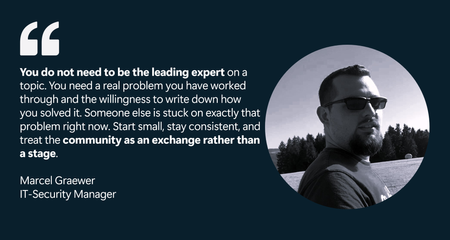
Globally, Marcel shares practical detection engineering insights on Microsoft Sentinel and Microsoft Defender XDR through forums and blog posts. Locally, he represents his employer in the IT-Security group of the Microsoft Business User Forum, where German companies using Microsoft technologies exchange real-world experience and expertise. The work Marcel values most is helping people enter the IT field. In Germany, "Fachinformatiker" is a recognized IT profession learned through a multi-year apprenticeship, and he is proud to have trained apprentices. He also serves as an examiner for the IHK (the German Chamber of Industry and Commerce), evaluating the final exams of these IT apprentices. This commitment also led him to support younger learners by teaching school cybersecurity classes and participating in Girls’ Day, where he introduced female students to the field. “I do this because most people don’t get an honest view of security work until much later in their education—if they see it at all. Showing someone early that this field is creative, varied, and genuinely interesting can change their path. Being part of that, even for a few people, means more to me than anything that fits neatly on a CV.” Let’s hear more from Marcel about his Microsoft Security Community and product paths. All responses to questions are direct quotes from Marcel. What do you find most rewarding about being a member of the Microsoft Security Community? The most rewarding part for me is how practical the exchange is. Microsoft security tooling moves fast - Microsoft Sentinel, Microsoft Defender XDR and Microsoft Security Copilot all change month to month- and no single person keeps up with all of it alone. The community is where that gap gets closed. When I read how someone else tuned a detection in their environment, or when someone responds to something I posted with a problem I hadn't considered, my own work gets better. It's a feedback loop you don't get from documentation. The other part I value is that it works in both directions: I started as a reader, learning from people more experienced than me, and now I'm at a point where I can give some of that back. Watching that shift happen has been genuinely motivating. How long have you been working with Microsoft Security Products? Over ten years! My way into Microsoft security ran through infrastructure rather than security itself. I started out administering Active Directory and VMware environments, the on-premises world, and that is where I first understood identity, endpoints and the quiet attack surface they create. At the time, security was something layered on top of infrastructure. What changed everything was the shift to the cloud. As the environments I worked in moved into Microsoft Azure and Microsoft 365, the old separation between "running things" and "securing things" stopped making sense. In a cloud-first world, the identity is the perimeter, the sign-in log is the crime scene, and the telemetry that used to be scattered across servers suddenly lives in one place you could actually query. That was the moment Microsoft's security stack became less of a product set and more of a working environment for me. As I moved from running infrastructure into roles centered on defending it, first leading IT infrastructure and security as a team lead, then as an IT Security Expert, and now as IT Security Manager focused on architecture and incident response in an Azure and M365 environment, Sentinel and Defender XDR went from tools I knew of to tools I work in every day. The infrastructure background turned out to be an advantage rather than a detour. Detection engineering makes far more sense once you have run the Active Directory and the endpoints that generate the very signals you are now writing detections against, and cloud security makes far more sense once you have felt the limits of the on-premises model it replaced. The part that keeps me engaged is that none of this stands still. The cloud security landscape changes constantly, the work is never quite finished, and that is exactly what I like about it. What Microsoft Security features or products have provided the most impact? The single biggest impact for me comes from Microsoft Sentinel as a cloud-native SIEM and SOAR platform. The move away from a self-hosted SIEM matters more than it first appears. A traditional SIEM is itself a piece of infrastructure that has to be sized, hosted, patched, and scaled, and that effort constantly competes with the actual security work. Microsoft Sentinel removes that layer. There is no platform estate to keep alive and no capacity planning for the SIEM itself, which frees attention for what actually matters: getting the right telemetry in and getting detection and response right. What I value most is how naturally Sentinel fits into modern, cloud-first environments. When the landscape you are protecting already lives in Azure and Microsoft 365, a security platform that lives in the same place removes an entire class of integration friction. The other strength is the breadth of data onboarding. With a traditional SIEM, connecting a new log source was often a small project of its own, with connectors to build and parsers to maintain. With Sentinel, that friction is largely gone. Whether a source sits on-premises, in another cloud or in a third-party product, getting it in is straightforward, and the platform still provides the integration depth that genuinely matters rather than a shallow connection. Microsoft Sentinel handles almost anything you point it at. Equally important is that SIEM and SOAR are not two separate platforms here. The orchestration and automation layer is built into the same solution, so response playbooks run on the same data that the detections are built on. For architecture, that is a real advantage: detection and response are designed as one system rather than stitched together afterwards. The central telemetry layer is one of the few decisions that is genuinely hard to reverse later, and Sentinel makes that an easy one to defend. What advice do you have for others who would like to get involved in the Microsoft Community? My advice is to start before you feel ready. I read Microsoft Tech Community (forums) for years before I posted anything myself, always with the feeling that I needed more experience first, that I would just be adding noise. That was the wrong instinct. The moment I actually started contributing, the feedback I got back made my own work better, and I realised the bar for being useful is far lower than it looks from the outside. You do not need to be the leading expert on a topic. You need a real problem you have worked through and the willingness to write down how you solved it. Someone else is stuck on exactly that problem right now. Start small, stay consistent, and treat the community as an exchange rather than a stage. Consistency matters more than any single brilliant post. Alles rund um sein Buch (All About His Book) Last year, I published "Die neue Realität der Cybersecurity" (2025). It tackles a question every security team is dealing with right now: “Where does AI genuinely strengthen security architecture and incident response, and where is it just noise?” Rather than staying abstract, the book takes the practitioner's side of that question, looking at how AI actually changes the work of designing defensible systems and responding to incidents, and where the limits and risks really are. It is written for the people doing the work, security architects, IR practitioners and the leaders who have to make decisions about AI without the marketing gloss. If that question is on your desk too, it is worth a look. Connect with Marcel Microsoft Tech Community: @marcel_graewer Linkedin: https://www.linkedin.com/in/mgraewer/ Github: https://github.com/bifrost0x Blogs: graewer.com and magra-sec.de Book: Die neue Realität der Cybersecurity (ISBN: 9783695708833) Marcel Graewer is currently an IT-Security Manager at Festool Group and holds the CISSP certification. Outside of work, he is happiest when experimenting with technology on his own terms. He runs a Proxmox-based homelab with a range of self-hosted services and Docker containers, using it as both a playground and a testing ground. It gives him space to break things, learn, and explore without the constraints of formal change processes. He also spends time on Hack The Box and TryHackMe, believing that staying sharp on the offensive side makes him a stronger defender. Away from the keyboard, his life is refreshingly analog. He and his family, including two children, live in an old house that always seems to have one more project waiting. Between the homelab and the house, there is never a shortage of things to fix, and that suits him just fine. Learn and Engage with the Microsoft Security Community Log in and follow this Microsoft Security Community Blog. Follow = Click the heart in the upper right when you're logged in 🤍. Join the Microsoft Security Community and be notified of upcoming events, product feedback surveys, and more. Get early access to Microsoft Security products and provide feedback to engineers by joining the Microsoft Security Advisors. Join the Microsoft Security Community LinkedIn Group and follow the Microsoft Entra Community on LinkedInSafeguarding Sensitive Data in Microsoft 365 Copilot Interactions: DLP for Microsoft 365 Copilot
Microsoft 365 Copilot is redefining how organizations work, bringing the power of generative AI directly into our secure productivity tools. As Copilot adoption accelerates, we’ve heard that you want more control over how your sensitive data can be used in interactions with Copilot. At Ignite 2025, Microsoft announced a major enhancement: Microsoft Purview Data Loss Prevention for Microsoft 365 Copilot to safeguard Microsoft 365 Copilot and Copilot Chat prompts, now entering General Availability. Even better, this capability is included for all users of Microsoft 365 Copilot and Copilot Chat. Why DLP for Copilot Prompts Is a Game-Changer As organizations adopt Copilot, their ways of sharing, creating, and interacting with data expand. With just a prompt, users can have Copilot summarize documents, analyze spreadsheets, or help brainstorm presentations. However, it raises an important question: what if the prompt includes sensitive information, like project code names, financial account numbers, health records, or other sensitive data? Over the last 2 years, Microsoft has been building a set of Data Loss Prevention (DLP) controls specifically designed for Copilot. Below is a quick overview of these related capabilities — ranging from already available to newly in preview — before we dive deep into today's GA announcement: Prevent Copilot processing of files & emails based on sensitivity labels In November 2024, Microsoft introduced the ability to create a DLP policy to restrict Microsoft 365 Copilot and Copilot Chat from processing sensitive files and emails using Sensitivity Labels for grounding data. This capability gives you control over whether content with the sensitivity labels you specify is restricted from being used in Microsoft 365 Copilot and Copilot Chat to generate summaries and responses. Prevent web searches for prompts containing Sensitive Information Types (SITs) The latest feature entering Public Preview is DLP for Microsoft 365 Copilot and Copilot Chat to prevent web searches for prompts containing sensitive data. This real-time control helps organizations mitigate data leakage and oversharing risks by preventing Microsoft 365 Copilot and agents from using sensitive data for external web searches. If a sensitive information type (SIT) is detected in a user prompt, Copilot can still leverage your enterprise data to form a response without sending the sensitive data to external search engines for web grounding. This capability extends to Microsoft 365 Copilot and agents built in Copilot Studio that are published to Microsoft 365 Copilot. DLP to Safeguard Copilot Prompts with Sensitive Information Types (SITs) The rest of this blog focuses on a key addition to this capability set: DLP for Microsoft 365 Copilot + Copilot Chat prompts to prevent processing of prompts containing sensitive information, now entering General Availability. Unlike the web search capability above, which prevents sensitive data from being sent externally during a web query, this capability evaluates the user’s text input directly, before processing occurs, to determine whether both enterprise data and web grounding can proceed. This feature uses Sensitive Information Types (SITs) as a condition within a Purview DLP policy to assess whether a user prompt sent to Copilot contains sensitive data, even if the data is unlabeled. With DLP for Copilot prompts, a user’s text input is scanned in real time for SITs, whether built-in (like Social Security Numbers, credit card numbers, etc.) or custom-defined by your organization (such as confidential terms or project names). If a text prompt contains one of the SITs you specify, Copilot restricts processing, halts any Graph or web grounding, and displays a clear message to the end user that the request cannot be completed. A user enters a prompt in Microsoft 365 Copilot Chat containing sensitive information. How DLP for Copilot Protects Prompts: Real-Time, Intelligent Protection The new DLP capability integrates seamlessly with Microsoft Purview, leveraging its powerful data classification & detection engine for sensitive information types. Here’s how it works: Input: When a user submits a prompt, Copilot checks the prompt for sensitive information using built-in or organization-defined sensitive information types (SITs). Immediate Action: If a SIT is detected, Copilot restricts the prompt from being processed. No AI response is generated, and no data is sent for Graph or web grounding. Output: Users receive a clear notification that their request cannot be completed due to company policies. This real-time protection ensures that sensitive data is not leaked or overshared, even as users explore new ways to work with AI. Setting Up DLP for Copilot Prompts: Data Security Admin Experience The easiest way to get started is through the new Microsoft Purview Data Security Posture Management (DSPM) portal, which provides a guided, one-click setup experience: 1. In Purview, go to Solutions > DSPM (preview) 2. Select the "Prevent data exposure in Microsoft 365 Copilot and Microsoft Copilot interactions" objective. 3. Follow the guided workflow and apply the recommended one-click DLP policy. The policy starts in simulation mode so you can review activity before enforcing it. Alternatively, you can configure and customize this policy directly from the Purview DLP portal Policies page or enable it from the Microsoft 365 Admin Center. view the remediation plan. view policy details and review. Then click the button, create a custom policy in DLP simulation mode to protect sensitive data referenced in Microsoft 365 Copilot and Microsoft Copilot. the confidence level and instance count. Practical Scenarios: Protecting What Matters Most Protect PII, financial data, and intellectual property: Financial institutions can block prompts containing deal terms, account numbers, or other sensitive data, preventing leaks through AI interactions. Similarly, healthcare organizations can safeguard patient information, and manufacturers can secure intellectual property and trade secrets from exposure, along with many other practical use cases. Once the prompt is detected and blocked, Microsoft Graph grounding and Bing web grounding is restricted. Safeguard sensitive non-public information: Imagine an organization involved in a confidential merger. By using DLP for Copilot prompts, administrators can set up a custom SIT that includes the project’s code name. If a user asks Copilot about the merger using the project’s code name, their request will be blocked, keeping sensitive information secure and protected. Visibility into DLP for M365 Copilot Prompts When a user’s prompt triggers a DLP policy, notifications and alerts are surfaced directly in the Microsoft Purview and Defender portals for security administrators. These alerts provide detailed information about which policy was activated, the type of sensitive information detected, and the context of the attempted Copilot interaction. Using these alert queues in Purview and Defender XDR, administrators can efficiently track policy activity, investigate potential incidents, and refine DLP rules to better align with organizational needs. The ability to review historical alerts and track ongoing enforcement empowers admins to maintain strong data security and proactively safeguard sensitive information. Defender XDR portal investigation of prompt DLP based incident. Takeaways The introduction of this latest enhancement to DLP for Copilot represents a key advancement in secure Copilot deployment and adoption. By empowering organizations to block sensitive data at the prompt level, Microsoft is helping customers unlock the full potential of Copilot, without compromising security or compliance. This innovation reflects Microsoft’s commitment to responsible AI, continuous improvement, and customer-driven development. As Copilot evolves, so will the tools to protect your data, ensuring that productivity and security go hand in hand. For more details, stay tuned for updates to the Product Roadmap and Learn documentation. Learn about using DLP to protect interactions with Microsoft 365 Copilot and Copilot Chat Learn about the default DLP policy for Microsoft 365 Copilot location | Microsoft Learn Permissions to create or edit a DLP policy to safeguard Microsoft 365 Copilot and Copilot Chat Learn about the new Microsoft Purview Data Security Posture Management (DSPM) | Microsoft Learn Roadmap Item: DLP for Microsoft 365 Copilot to safeguard prompts Roadmap Item: DLP to safeguard web search in Microsoft 365 CopilotState Explosion Security Problem in AI-Era Software Supply Chains
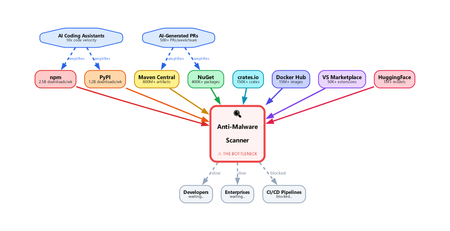
Introduction To see why this problem scales so quickly, start with the smallest possible change: a single line of code. In modern software, even a tiny edit is rarely just a local modification. It can change execution flow, introduce a new dependency, expose sensitive data, or quietly shift the purpose of the package itself. What looks trivial in a diff can create a materially different security outcome. That is why supply chain defenders cannot afford to treat small code changes as small security events. How a Single Line Changes Package Intent Every software package exists in a particular state at a particular moment in time. Imagine a benign version — State X — that behaves exactly as intended. Now add one line of code. That small edit can shift the package into a new state with different behavior and, potentially, a very different risk profile. The security issue is not the added line by itself. It is the fact that the package now has to be interpreted differently. A tiny diff can change the role of the entire component, which means defenders have to reason about the resulting behavior, not just the textual change. That is why file-level scanning breaks down so quickly. A change in one file can alter the behavior of the entire package because software semantics emerge from how components interact. Security systems therefore need to analyze packages as composed systems, not as a series of isolated file edits. Why the whole package matters This matters even more in modern supply chain attacks, where malicious intent is rarely concentrated in one obvious file. More often, the behavior is distributed across several files that look harmless when viewed independently. File A defines an encoded string constant. Looks like a config value. File B provides a decode function. Looks like a utility. File C (setup.py / postinstall) imports both, decodes, and executes. Viewed independently, each file may appear benign. No single file has to trigger a clear signature, rule, or heuristic. The malicious behavior only becomes visible when you reconstruct how the files interact as a system. Any scanner that evaluates files one by one without rebuilding that interaction is likely to miss the real behavior. Why every change demands re-analysis Every meaningful state change — a commit, pull request, version bump, or package publish — can alter the semantics of the software. That means defenders cannot stop at diff inspection or lightweight pattern matching. The real question is not only what changed, but what the software now does. Quantifying the problem The scale of the problem becomes clearer when you look at how many software state changes occur across the ecosystem every day: GitHub alone recorded nearly 1 billion commits in 2025, merged an average of 43.2 million pull requests per month, and now hosts roughly 630 million repositories. In 2026, GitHub was projected to reach roughly 38 million commits per day. npm has grown to well over 2 million packages, making JavaScript one of the largest public package ecosystems. PyPI published more than 130,000 new projects in 2025 and more than 3.9 million new files in the same year. NuGet serves package downloads at massive operational scale, with recent weekly totals in the 5 to 6 billion range. Maven Central indexed more than 20 million packages and published more than 3.2 million packages in 2025. Taken together, these ecosystems are generating an enormous stream of new software states. Some numbers describe repositories, some describe publishes, and some describe downloads, but they all point to the same reality: the scale of software movement is already massive before you even account for the acceleration from AI-assisted development. The number of state changes is already enormous, and AI-assisted development is increasing it even further. The result is not just more code, but more package states that may require meaningful security interpretation. Why the math breaks traditional scanning Assume a single semantic package analysis takes 30 seconds, which is a reasonable range for LLM-based inference. Scanning 50,000 packages would require roughly 1.5 million seconds of compute time per day — about 417 hours. But the ecosystem only gives defenders 24 hours before the next wave of packages arrives. Without aggressive parallelism and purpose-built infrastructure, backlog becomes inevitable. The scanning bottleneck This leaves modern scanning systems with a fundamental bottleneck: Heuristic and signature-based scanners are fast. They can match known patterns in milliseconds and work well for familiar malware families or repeated behaviors. Some systems also use emulation or detonation, but these approaches still struggle to deliver deep reasoning at ecosystem scale. That makes them easier to bypass with novel, well-structured, or AI-generated code that behaves maliciously without resembling previously known samples. LLM-based semantic analysis can reason about intent. It can follow behavior across files, recognize obfuscated exfiltration paths, and explain why a package is suspicious even when the code appears ordinary at first glance. The tradeoff is cost, latency, and trust: inference takes seconds rather than milliseconds, and a single package may require multiple reasoning passes. At ecosystem scale, that becomes a serious infrastructure challenge. Neither approach is sufficient on its own. Heuristics provide speed without deep understanding, while semantic models provide understanding without inherent scale. Closing the gap requires systems that combine both: package-level reasoning with the latency and throughput needed for production supply chains. Heuristics often miss novel attacks, while LLM-based approaches remain too slow to apply inline at large scale. That gap between understanding and throughput is where supply chain malware can persist. What needs to change Closing that gap will require a different class of supply chain security systems. Detonation can help in some cases, but it is too slow and expensive to apply inline to every package state change. What is needed is a system that can: Analyze entire packages as a unit — not individual files. The intent lives in the interaction between files, not within any single one. Run semantic analysis at data-plane speed — every package, every version, on the hot path, with latency low enough for inline enforcement. Not async advisories. Not CI-time checks. Inline, before delivery. Handle the state explosion — millions of state changes per day, each requiring full re-analysis. This is an infrastructure problem as much as a security problem: rate limiting, backpressure, connection pooling, regional failover, model versioning — the same hard distributed systems problems, with security stakes. Maintain high accuracy under evasion — attackers deliberately use encoding, string splitting, dynamic imports, polyglot files, and similar techniques to reduce detection quality. The scanner must continue to classify packages accurately even when the code is designed to obscure intent. The Latency-Accuracy Tradeoff: Malware Detection as an ML Problem At cloud scale, malware detection is governed by a hard tradeoff between latency, accuracy, throughput, and cost. The fastest detectors are typically shallow: signatures, heuristics, and lightweight models can make decisions in milliseconds, but they often miss novel, compositional, or intent-level attacks. Deeper semantic analysis can improve recall and resilience against evasion, but it also increases inference time, compute cost, and operational complexity. As a result, defenders cannot optimize for accuracy in isolation; they must deliver strong detection quality within strict performance constraints. This makes malware detection not just a cybersecurity problem, but a machine learning and distributed systems problem. In modern software supply chains, AI-assisted development increases the number of package states and enables attackers to generate variants at high speed, expanding the space defenders must reason over. The challenge is therefore to build detection architectures that preserve semantic depth while remaining fast enough for inline use at global scale. The gap between the rate of software change and the capacity to analyze it is widening. That gap is the attack surface. If defenders cannot inspect software at the speed it is being produced and published, attackers will continue to exploit the delay. What the industry needs now is a cloud-scale malware analysis capability that can deliver low latency, low cost, high accuracy, and the flexibility to meet different operational requirements , such as SLAs, false-positive tolerance, and enforcement policies , without compromising on package-level semantic analysis.Security Dashboard for AI: 3 Ways CISOs Drive Impact Today
AI is reshaping the enterprise and, with it, the threat landscape. Today's organizations face new threats with AI agents that modify configurations, execute workflows, and access data without direct human oversight. As a result, the gap between AI adoption and AI governance is widening, and CISOs face growing challenges to maintain visibility, control, and compliance across an increasingly complex ecosystem. As AI becomes embedded across the enterprise, CISOs face four key challenges: Scale without visibility: Over 75% of enterprises surveyed by PWC report they are already adopting AI agents. ¹ At the same time, over 80% of security teams surveyed by Nokod report visibility gaps into the applications and AI agents created within their organization. ² Rapid AI proliferation and evolving regulations make unified visibility across AI platforms, apps, and agents critical for CISOs. Fragmentation: Organizations rely on multiple siloed tools for AI asset visibility, making oversight fragmented and inefficient. According to Gartner’s 2024 survey of 162 enterprises, organizations use 45 cybersecurity tools on average. Expanding AI risk: AI proliferation is rapidly increasing the attack and risk surface, with the surge of AI-generated identities. By 2027, 4 out of 5 organizations will face phishing attacks powered by AI-generated synthetic identities, according to IDC. ³ This makes it harder for CISOs to track emerging threats, unmanaged assets, and shifting risk patterns. Overload: Alert fatigue is now a top challenge, with organizations now receiving an average of 2,992 security alerts daily, yet 63% go unaddressed. ⁴ Increasing AI risk without a way to prioritize what matters most compounds pressure on CISOs. In conversations between Microsoft and CISOs, one common need emerged: a single place to view integrated AI risk across the enterprise. To address these growing challenges, we are excited to provide CISOs with the Security Dashboard for AI, which recently became generally available. This unified dashboard aggregates posture and real-time risk signals from Microsoft Defender, Entra, and Purview into one unified, executive-level view of AI posture, risk, and inventory across agents, apps, and platforms. The Security Dashboard for AI helps CISOs: Gain unified AI risk visibility: Discover AI agents and applications and continuously monitor posture across the environment Prioritize critical risks: Correlate signals across identity, data, and threat protection to surface the most urgent issues Drive risk mitigations: Investigate activity and take action to help reduce exposure across the AI ecosystem The dashboard is capable of aggregating and surfacing AI risks from across Microsoft Defender, Entra, Purview - including Microsoft 365 Copilot, Microsoft Copilot Studio agents, and Microsoft Foundry applications and agents as well as cross-platform AI risks with Microsoft network-based or SDK-enabled integrations, and MCP servers. This supports comprehensive visibility and control, regardless of where applications and agents are built. As you activate Microsoft Security for AI capabilities, you can gain richer visibility into different aspects of your AI risk posture. Figure 1: Security Dashboard for AI in browser Getting Started with the Security Dashboard for AI The Security Dashboard for AI is provided at no additional cost to customers already using Defender, Entra, and/or Purview to protect their AI innovation. Based on how early adopter CISOs are using the dashboard, here are three ways you can start leveraging the dashboard today. 1. Manage Daily AI Risk Beyond reporting, you must stay hands-on with AI risks, scanning for emerging issues, verifying asset governance, and delegating remediations. The Security Dashboard for AI consolidates daily operations into a single pane of glass, surfacing critical alerts, unmanaged assets, and emerging risks. Use the dashboard as a daily AI risk radar, enabling rapid triage and ensuring you focus on the most urgent threats. Scan and triage daily AI risk: Start each day by identifying and prioritizing the highest-risk AI exposures. Risks are prioritized on severity reported by underlying security tools, helping you focus on the most critical exposures. Track AI asset inventory and monitor agent sprawl: Use the Inventory page to gain comprehensive visibility into all AI assets. Identify newly registered assets to mitigate the risk of shadow or unmanaged IT and surface inactive agents to proactively monitor and control agent sprawl. Delegate tasks for remediation: Move from insight to action by delegating tasks to your security team with easy click delegation. Delegation routes ownership via email or Microsoft Teams with notifications, due date, and ownership tracking. Delegate actions to specific roles such as global admin and AI administrator, without granting full access to underlying tools. Figure 2: Security Dashboard for AI risk page 2. Guide Briefings with Security Teams You require up-to-date intelligence to guide conversations with Security Teams about what is happening across the AI estate. The Security Dashboard for AI helps you anchor discussions in specific risks, trends, and ownership gaps surfaced in the data. The dashboard becomes a conversation driver, helping you ask the right questions about risk and security posture, to help ensure you and your team are triaging the right priorities. Because the dashboard consolidates signals from Defender, Entra, and Purview, both CISO and security teams operate from the same facts, enabling more outcome-driven discussions and faster prioritization, so you can shift the conversations from status updates to targeted action planning. Prioritize top AI Risk: Use the dashboard to help you prioritize the AI risk that matters the most. In preparation for team meetings, use Microsoft Security Copilot to explore AI risks, agent activity, and security recommendations via prompts to strengthen your AI security posture. With your team, take a closer look at risk vectors like data leakage, oversharing and unethical behavior, and discuss what actions need to be taken. Review Security Recommendations: Create a routine with your security team to review the recommended Microsoft security actions and track your progress over time. Across regular team check‑ins, review what has been addressed, what remains open, and which actions require follow‑up so you are prepared to respond to regulatory, audit, or executive questions with up‑to‑date metrics. Figure 3: Security Dashboard for AI inventory page Figure 4: Security Dashboard for AI delegation 3. Executive Reporting Reporting to the board on AI security posture has historically meant weeks of manual data gathering across multiple tools. The Security Dashboard for AI streamlines the data collection process with a single source of truth for AI risk, enabling confident, data-backed insights for your board presentations and conversations. Early adopters confirm the value and are using it for quarterly executive briefings. Prepare for Board Discussions: Use the dashboard to help get the right insights at the right altitude to help you prepare for discussions with your board. The Overview page aggregates identity, data security, and threat protection signals from Defender, Entra, and Purview into an AI risk scorecard with risk factors. The embedded Security Copilot AI-powered insights provide suggested prompts with risk assessments, summaries, and recommendations to help you prioritize what matters most. Extend Observability to Executive Stakeholders: Authorize AI risk follow‑ups to the appropriate security, identity, or governance owners using Microsoft Teams or email. Distribute visibility across GRC lead, AI governance, and IT leaders, while maintaining executive‑level oversight. Figure 5: Security Dashboard for AI Copilot prompt gallery Next Steps The Security Dashboard for AI helps CISOs manage AI risk faster, more confidently and more collaboratively with their team. Defender, Entra, and Purview signals are surfaced in a single pane of glass, providing observability across your AI estate. Drive faster triage, use data to support board-level discussions about AI risk, and enable coordinated action with integrated insights, recommendations, and delegation to help accelerate remediation across existing security workflows. The Security Dashboard for AI is generally available now. If your organization uses Microsoft Defender, Entra, and/or Purview, you already have access, no additional licensing is required. Visit ai.security.microsoft.com to access the dashboard directly, or navigate to it from the Defender, Entra, or Purview portals. Learn more about the Security Dashboard for AI on the MS Learn page and the Security Dashboard for AI Security Blog. Discover new features in the Security Dashboard for AI such as the Security Reader role, new delegation flow, and new identity risk section here. ¹AI agent survey. PwC, May 2025 ²Security Teams Taking on Expanded AI Data Responsibilities. Bedrock Data, March 2025 ³IDC FutureScape: Worldwide Security and Trust 2026 Predictions, November 2025 ⁴2026 State of Threat Detection and Response Report. Vectra AI, February 2026