By: Premkumar N – Security Customer Experience Engineer | Microsoft Intune
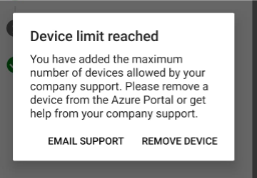
When Microsoft Entra or Intune device limits are reached, users will encounter an error when enrolling their device in...
followed the whole KB but when i try running the command getting an error as shown below. Any suggestion as we have many Local IT who build devices for normal users and they have reached the device cap error.
"Remove-mgdeviceregisteredownerDirectoryObjectByRef : Could not load file or assembly 'Microsoft.Graph.Authentication, Version=2.34.0.0, Culture=neutral, PublicKeyToken=31bf3856ad364e35' or one of its dependencies. The system cannot find the file specified. At line:1 char:1 + Remove-mgdeviceregisteredownerDirectoryObjectByRef –DeviceId aad16b3e ... + ~~~~~~~~~~~~~~~~~~~~~~~~~~~~~~~~~~~~~~~~~~~~~~~~~~~~~~~~~~~~~~~~~~~~~ + CategoryInfo : NotSpecified: (:) [Remove-MgDevice...ectByRef_Delete], FileNotFoundException + FullyQualifiedErrorId : Microsoft.Graph.PowerShell.Cmdlets.RemoveMgDeviceRegisteredOwnerDirectoryObjectByRef_Delete