Another way into the cloud: Test Intune management for eligible Windows Servers alongside your PCs.
Updated Nov 16, 2026
Version 1.0
Arnab Biswas Microsoft
MicrosoftMicrosoft
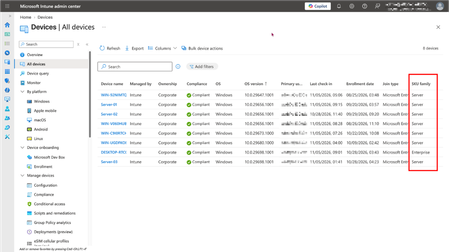
Enrolled servers appear under the Windows platform and in All devices alongside PCs.
Why though? Got a ton of "All Devices" deployments out there. I feel like if you silently renamed existing "All Devices" to something like "All Devices (except servers)" and then "All Servers" is a new pseudogroup that would be a much better and more predictable experience for everyone.
Use groups and assignment filters - including the operatingSystemSKU property - to include or exclude servers.
Sure, I'll just add filters to exclude server SKUs from my All Devices deployments then, no problem... but I still can't apply multiple filters to an assignment. So now I've gotta go edit allllll of my Windows filters and add SKU criteria to them?
Feel like this could have been handled a lot better - why not separate Windows "Workstation" from Windows "Server" in the same way that iOS / Android are completely separate from each other? If that had happened, there wouldn't be any issue with "All Devices" deployments at all, because the config profiles / apps etc wouldn't cross over that boundary.
This - Intune either needs to add multiple filter support or some other way to safely and easily exclude servers from All Devices scope. Massive blocker for existing intune deployments to go through and update all of our scripts, config polices, apps, etc.