Microsoft's Customer Zero blog series gives an insider view of how Microsoft builds and operates Microsoft using our trusted, enterprise-grade IQ platform. Learn best practices from our engineering teams with real-world lessons, architectural patterns, and operational strategies for pressure-tested solutions in building, operating, and scaling AI apps and agent fleets across the organization.
On the Azure Functions team, we have been exploring how AI can help with investigating customer-reported incidents, root-cause analysis, and incident mitigation. This post shares our journey from early RCA agents to coding-agent-assisted investigations and cloud-hosted automation, and the lessons we learned along the way.
Microsoft Engineering teams like Azure Functions work on production live site issues alongside customer reported issues, and these are one of the most important and rewarding parts of the job.
On the Azure Functions team, complex customer incidents often require deep investigation. Engineers review Azure Data Explorer (Kusto) query results, source code, GitHub issues, previous incidents, public documentation, internal troubleshooting guides, and service-specific operational knowledge. The goal is always to mitigate customer impact quickly, identify the root cause, and feed what we learn back into the platform, and log improvement work items where needed.
This work is valuable, but it is also time-consuming. As AI capabilities improved, we started asking a practical question: could AI help us reduce the operational burden of incident investigation while preserving the learning and engineering judgment that make those investigations useful?
This is the story of how our approach evolved—from early RCA agents, to coding-agent-based workflows, and finally to cloud-hosted automation.
Starting with AI-Assisted RCA
Around May 2024, we began experimenting with an internal RCA agent together with a colleague from Microsoft Research. The first version was an informal approach towards the development of a formal service. It was a personal tool to help with our own investigations.
The early experiments were very useful. We could give the agent an incident, let it run for several minutes, and then review the analysis. It did not always produce a perfect root cause, but it could run multiple queries, explore different hypotheses, and narrow the solution space enough to save time.
Later, Azure SRE Agent emerged as a formal internal service. We contributed to it based on what We had learned from our earlier experiments. At that point, using AI to help resolve customer-reported incidents became a major focus for our team.
What We Learned from Agentic Workflows
The first generation of AI-assisted incident workflows were highly structured. The early experiments with the available models required careful design—especially for generating complex Kusto—we often needed to expose fixed Kusto queries as tools and let the model call them through well-defined parameters.
Fig. 1 kusto query tool
This made execution more predictable and reproducible, but it also revealed limitations. Detailed agentic workflows could work well when the incident matched the predefined path. Outside those paths, they were less flexible. Engineers also found it expensive to define and maintain those workflows, especially when the output felt only modestly better than a dashboard.
Fig2. Agentic Workflow
That experience taught us an important lesson: for complex operational investigations, flexibility matters as much as structure.
The Shift to Coding Agents
Near the end of 2025, we started using an internal tool using GitHub Copilot and skills, which made it possible to define and share VS Code workspaces. A workspace could include agent definitions, instructions, prompts, skills, MCP configuration, and repositories.
Fig 3. GitHub Copilot internal tool
The quality difference was significant. Combined with newer models, coding agents could investigate incidents much more flexibly. They could run Kusto queries, inspect code, use CLI and MCP tools, and iterate quickly by trying different paths.
The team quickly adopted this model. With earlier workflow-based systems, engineers were reluctant to onboard because defining detailed workflows took effort, and the payoff was limited. With this internal tool, engineers started contributing agent definitions and skills because the system was easy to extend. Over time, the Azure Functions team accumulated a growing set of AI-ready materials which consisted of agent definitions, skills, MCP tools, instructions and repositories
A number of lessons stood out.
Lessons from Building AI-Ready Materials
-
Prefer guidance over over-specification
Modern coding agents are capable enough that they do not need every step spelled out. In fact, too many instructions can make the system brittle or stale. We found it better to provide concise guidance and point the agent to maintained sources of truth rather than embedding large amounts of detail directly into prompts.
-
Manage context deliberately
Instructions, tool definitions, conversation history, and tool outputs all compete for model context. Irrelevant or contradictory information can reduce quality. Tool design matters too: if a tool returns a large payload directly to the model, it can consume many tokens and confuse the agent. For large outputs, writing results to files and returning concise pointers often works better.
-
Use files as durable memory
Long-running investigations benefit from a simple pattern: create a plan and checklist file, update it as work progresses, and let the agent re-read it when needed. This helps the agent recover from context compaction and gives the investigation a durable state inside the workspace.
-
Prefer references over inline knowledge
Agent Definition and skills includes domain knowledge. Internal troubleshooting guides, product behavior, operational history, and expert judgment. Instead of placing all that information directly in prompts, we found it more effective to provide references to where the knowledge lives and guidance on when to use it.
-
Make the right repositories visible
Coding agents are strong at reading code. For our scenarios, multi-repository workspaces were especially powerful. When the agent could see related repositories together, it could trace behavior across components, understand dependencies, and produce better analysis.
-
Domain knowledge matters most
The best agent assets were often created by engineers with deep product and operational experience, not necessarily by AI specialists. The key skill was turning expert knowledge into instructions, references, and repository layouts that an agent could use.
-
Facilitate and streamline domain knowledge updates
Every incident not fully handled by an agent is a learning opportunity. Feed the context engineering flywheel: investigate, find gaps, update agent guidance, then re-test. It's important to keep this cycle quick and easy.
Why We Moved Toward Cloud Automation
Coding agents were extremely helpful, but they were still interactive tools. An engineer had to start the investigation and often guide it.
For incident response, we wanted to go further. If an incident entered a specific feature area, the system should be able to start the investigation automatically, run the relevant analysis, and post useful results back to the incident. Even if the analysis was not perfect, narrowing the problem space early could reduce mitigation time. Some scenarios could eventually support automatic mitigation or automatic transfer to the right team.
A local coding-agent workflow has advantages, especially because it can authenticate as the user. But as a foundation for reliable automation, it also had important limitations.
First, it still depended on human involvement. AI dramatically improved individual productivity, but in incident response the bottleneck is often human attention and time. Even when starting an agent is simple, requiring an engineer to initiate the run introduces a context switch and consumes a scarce resource.
Second, it depended on user credentials. Coding agents run with the user’s permissions, which can be overly broad for automation, and they inherit human-oriented flows such as browser-based reauthentication. For durable automation, we wanted an identity model better suited to unattended execution, such as managed identity.
Third, there were execution-environment and security concerns. A local environment is powerful, but it does not naturally provide the sandboxing we wanted for safe automation. Because it runs with user access, it may also reach a much wider set of files and resources than is desirable for an automated incident workflow. Local and dev-box environments also have operational drawbacks. They can require restarts, contend with other workloads, and are not ideal for durable execution, failure recovery, or failover. For automation, we wanted a dedicated execution environment rather than something tied to an engineer’s machine.
Finally, token management became an operational concern. User-linked token consumption can create instability when limits are reached, and automation can skew usage patterns so that one user appears to consume a disproportionate share of AI capacity. That adds noise to operational analysis and makes governance harder.
For all of these reasons, cloud execution looked like the right direction. We wanted managed identity, a secure sandbox, durable execution, and a system that would not depend on someone’s local machine.
Requirements for Cloud Automation
Many of us had become strong supporters of coding agents and wanted to keep using them. Just as importantly, we had already accumulated assets that had been proven to work well: agent definitions, instructions, prompts, skills, MCP configuration, and repository layouts that the team had gradually built up and refined.
That meant our move toward cloud automation was not about replacing coding agents with something entirely different. We wanted to preserve and reuse the assets that had made coding agents successful, while moving to an execution model that was better suited to automation.
At the same time, coding agents had set a high quality bar. Because they worked so well in practice, we were not willing to assume that a cloud service would automatically deliver the same level of quality. So we defined two concrete goals for the cloud path.
- Achieve the same level of quality we were seeing from our existing coding-agent workflows when run in a focused, one-shot investigation.
- Ensure the assets we had already built could continue to be used and improved.
In other words, we were not looking for just another cloud AI system. We were looking for a cloud automation path that could inherit the strengths of coding agents while providing the operational properties automation required.
Comparing Headless coding-agent execution service and Azure SRE Agent
To evaluate which approach could meet those requirements, we ran a side-by-side comparison.
One path was a prototype headless coding agent execution service. It reused the same the internal tool’s workspace definitions that engineers used locally, but ran them without a human in the loop. When an incident entered a target loop, the system created an agent workspace, prepared repositories, started GitHub Copilot CLI with an initial prompt, collected the analysis, and posted the result back to the incident. It also preserved session artifacts so that an engineer could later review or resume the investigation.
Fig 4. Agent Helped Trend – It shows people use Coding Agent, the introduction of headless coding agent execution service and SRE Agent increases the percentage of usefulness.
The other path used Azure SRE Agent, which had improved with preview customer feedback and was nearing general availability, since our earlier experiments. It now supported newer models, stronger custom-agent behavior, MCP and built-in tools, repository access, and incident-triggered execution. We’ve performed a one-time migration from the Coding Agent asset to the Azure SRE Agent asset. This was achieved in one day using GitHub Copilot CLI and our existing coding agents.
The comparison was deliberately practical. We already knew that our internal coding-agent environment produced results engineers trusted and liked. That became our quality bar. If Azure SRE Agent could meet or exceed that bar while also satisfying the operational requirements of cloud automation, it would be the stronger long-term path.
Results and Feedback Loop
The first Headless coding-agent execution service results were very encouraging. In its first set of incidents, the RCA matched the SME conclusion in cases where the agent could safely process the incident. That showed that the assets we had built for local coding agents could transfer effectively into a headless scenario.
Azure SRE Agent also performed strongly from the beginning. Headless coding-agent execution service initially had slightly better analysis in some areas, but Azure SRE Agent was already good enough to be operationally useful.
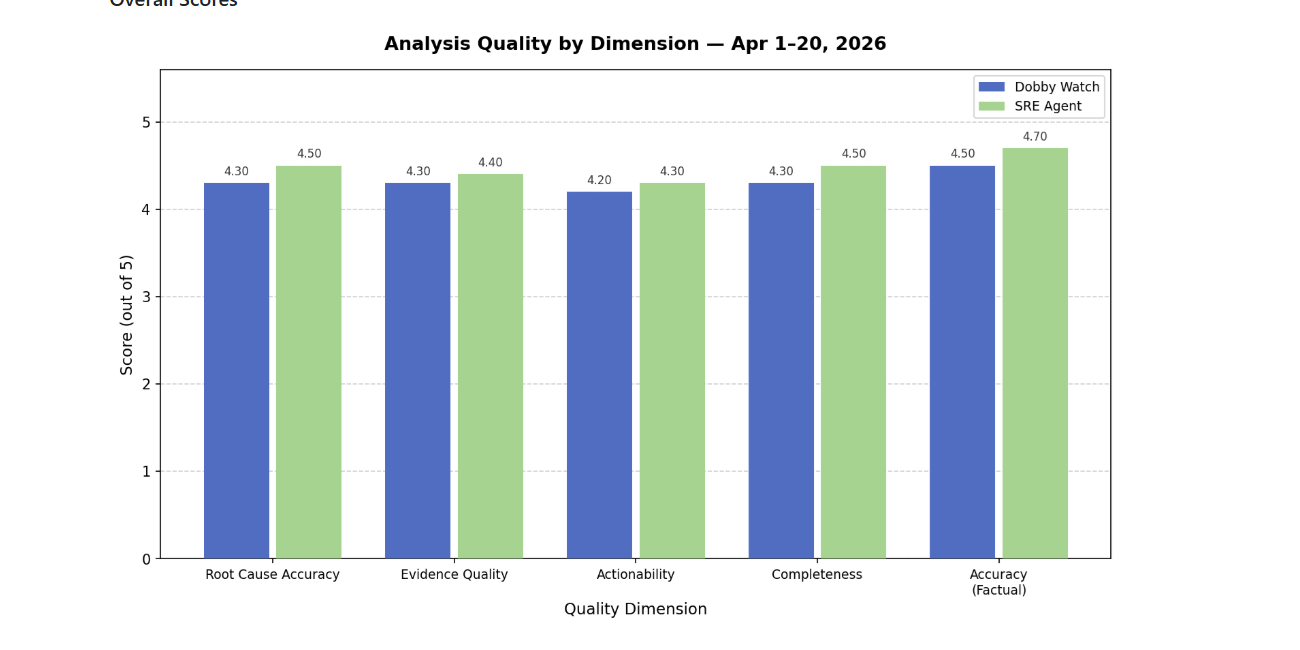
We then built an evaluation framework that compared:
- Each agent’s RCA, confidence score, and mitigation steps
- The RCA and mitigation reason later provided by a human
- Auto-mitigation recommendations
- Path to auto-mitigation
- Auto-transfer recommendations
- Session-level execution issues
This evaluation became a feedback loop. Engineers reviewed interesting incidents, identified weaknesses, improved agent definitions and skills, and submitted pull requests. We also used agent assistance to generate improvement PRs from comparison reports.
Fig 5. LLM as Judge side-by-side eval for headless coding-agent execution service (blue) vs Azure SRE Agent (green)
Within a few weeks, Azure SRE Agent’s quality consistently exceeded the headless coding-agent execution service baseline. At that point, we stopped posting headless results back to incidents and focused on improving the Azure SRE Agent path instead. We also automated synchronization from the internal coding-agent assets so improvements could continue to flow through pull requests.
That shift was important. It meant Azure SRE Agent was no longer just an interesting alternative—it had become the cloud path that could inherit what worked in coding agents while providing a better foundation for automation.
Why Cloud AI Started to Work Better
A common reaction to coding agents is that they feel much improved than the previous cloud AI experiences. Our experience suggests two main reasons: stronger models and improved access to the right context.
A coding agent sees a workspace. It can use instructions, skills, tools, repositories, and files. Traditional cloud AI systems often did not have access to the same set of resources. Once Azure SRE Agent could see similar assets - the right repositories, the right tools, and the right domain-specific knowledge - it could reach comparable or better quality.
The details of context compaction, tool execution, and orchestration matter. But the core principle is simpler: the agent needs to reach the right knowledge at the right time without carrying unnecessary context all the time.
That means the most important work is not only choosing a model or building a tool. It creates high-quality AI-ready assets: concise instructions, useful skills, accurate references, well-structured repository access, and domain knowledge that was previously locked in people’s heads.
The cloud hosted automation path instantly provided an exciting benefit, which is that the issue analysis is stored in the cloud and not only on the developer's machine. This means that the conclusions and investigations are stored for perusal and human interaction is possible via the chat interface.
Fig 6. An Example of the Chat Interface for Azure SRE Agent
Conclusion
Our journey started with a personal RCA assistant, moved through structured agentic workflows, accelerated with coding agents, and eventually led us back to a cloud-hosted automation path.
The lesson is not that coding agents or cloud agents are universally better. The lesson is that agent quality depends heavily on what the agent can see, how much irrelevant context it avoids, and whether domain experts have translated their knowledge into usable assets.
For us, the key was not abandoning coding agents. It was carrying their strengths forward into Azure SRE Agent and a cloud execution model that was better suited to automation.
Modern agents are now capable enough to make that work worthwhile. For incident response, that opens the door to faster investigation, safer automation, and ultimately lower incident mitigation time for customers.
The Azure Functions team hope this experience is useful to other teams exploring how to apply AI to complex engineering operations.
In the next post, we plan to go deeper into the evaluation framework and how we automated the feedback loop behind these improvements.

 Microsoft
