customer zero
13 Topics
How Microsoft Intune team upgraded a .NET service with GitHub Copilot modernization
Microsoft's Customer Zero blog series gives an insider view of how Microsoft builds and operates Microsoft using our trusted, enterprise-grade platform. Learn best practices from our engineering teams through real-world lessons, architectural patterns, and operational strategies for building, operating, and scaling AI-powered systems across the organization. A hosting platform transition gave our team an opportunity to modernize a Microsoft Intune enrollment service to .NET 8. I used GitHub Copilot modernization to assist with that work while retaining responsibility for design decisions and validation. Using GitHub Copilot modernization, I saved more than four weeks on the first library alone. The more durable outcome was the working method built around the agent: three working files that I kept alongside the code and owned myself, rather than leaving that state to the model, that let a months-long migration be paused, corrected and resumed without re-deriving the analysis every time. What follows is how that worked in practice, including where the agent stopped helping. The Challenge: retiring a hosting platform without carrying the framework forward My team owns a Platform as-a Service (PaaS) service that supports devices enrolling into Intune at the start of their enrollment journey. Microsoft Intune is a cloud-based endpoint management service that secures and manages an organization's devices and apps. It lets a company’s IT team manage and secure employees’ laptops, phones, tablets, apps, and company data from one central service. It supports Android, iOS/iPadOS, Linux, macOS, tvOS, visionOS, and Windows devices. This Service was running on .NET Framework 4.7.2, hosted on a non-AKS hosting platform. I moved it to Azure Kubernetes Service (AKS) hosting environment which is what started the work. The modernization combined two related but distinct changes: moving the workload to AKS and modernizing the application code to .NET. 8. The heaviest part was dependency mapping. A key part of the migration was mapping dependencies across shared libraries, namespaces, and APIs, including Intune owned and even team-owned libraries, some of which also needed modern .NET-compatible packages. The service had a substantial codebase with dependencies across multiple libraries, namespaces, and APIs. Some APIs were unchanged, some were renamed, and some had no direct replacement and required a design decision. These APIs were most often from internal Intune libraries. Without reusable mappings, those questions recur across projects and files. To maintain continuity across the migration as this was a long-term project, I kept an explicit record of decisions, completed work, and the next steps. The service spans several libraries and multiple endpoints that support about 20 plus different enrollment flows across Windows, Linux, Android, iOS, and macOS platforms. A single pull request covering the full migration was not possible, so I divided the work into increments small enough to review, test, and merge, or to isolate by enrollment flow, with a way to stop one day and pick up the next without paying the analysis cost twice. The Solution: a modernization agent with engineer-owned working content I started the side-by-side .NET framework service to .NET 8 service migration by hand, then brought in GitHub Copilot. In my early tests, I needed .NET migration-specific domain context beyond what I had established in my copilot session. The limitation was missing domain context, not an inability to generate code, and that is the gap a purpose-built tool closes. GitHub Copilot modernization is an agent built on GitHub Copilot, with Microsoft's language teams supplying domain knowledge. For .NET, its recommendations draw on current assembly and NuGet package analysis rather than relying only on patterns learned during model training. GitHub Copilot modernization is now available in Visual Studio, Visual Studio Code, GitHub Copilot CLI, GitHub Copilot app, and GitHub.com. When I did this migration, it was available only in Visual Studio and Visual Studio Code. For this migration, I chose GitHub Copilot modernization in Visual Studio through GitHub Copilot Chat in agent mode. I tested the modernization agent against work it could already check, running it over the same project and classes that I had migrated by hand and comparing the two. They were very close. That comparison, rather than anything in the tool's description, is what established enough confidence to point it at code nobody had migrated or analyzed manually yet. Once I started using the modernization agent, I realized that it was able to map .NET specific and global libraries as well as the API calls efficiently. The agent analyzed well but did not reliably retain migration state across sessions. Returning to the work could trigger a new assessment that overwrote prior artifacts. To avoid this, the more transferable part of my approach was the working context I built around the agent: a migration plan (migrationplan.md), a progress record (progress.md), and context notes. The agent generated a migrationPlan.md and progress.md at my request; I added the context from my notes from my previous sessions and manual migration and kept all three current in my local repository. The context preserved mappings I had already established by hand, so the agent could reuse settled decisions instead of researching them again. I kept them in my local repository rather than checking them in. The migrationplan.md broke the work into phases and day-sized tasks, and the progress.md file was updated after each increment. The next session could resume the recorded task instead of reassessing the codebase. When a migration increment surfaced a build issue, fixing it meant a side conversation, and the thread of the main work got lost in it. To avoid this, I started recording each failure under that day's task: what failed, what was tried, and what was ruled out. That gave the investigation somewhere to live without overwriting the main work. The current agents experience records task failures in progress-details.md. The Migrationplan.md is an editable markdown file, not opaque internal state, and I edited it when needed. Where a generated step was wrong for the service, or I wanted smaller increments of work per pull request, or to migrate a scenario before another, or to focus on one API path per pull request, or even to change the ordering, I updated the file with the correct information and the agent picked up the revision and carried on rather than reverting to its own plan. That made the editable plan especially useful when the migration approach changed. Plan granularity is also how I controlled pull request size. I used the plan to constrain each increment: for example, three model files and a view file, or one small end-to-end enrollment flow at a time, or one controller at a time, or sometimes not even a whole controller, just one API path, I made this judgement depending on the complexity of the scenario I wanted to migrate. Small increments stayed reviewable, and a broken build left a smaller surface to investigate. Supplying the build error and asking the agent to re-examine that increment produced a focused follow-up change. I began using the .NET modernize agent with an internal library, that supports Windows client calls made over Simple Object Access Protocol (SOAP). Before discovering the tool, I had already side-by-side migrated the .NET framework version of that library into another .NET8 successor library and had updated portions of the service’s windows enrollment flow. I used the mapping I had made between framework and .NET 8 libraries and APIs during this migration as a context for the tool, allowing each migration pass to reuse and add to the mappings established in previous one. The tool’s recommendations closely aligned with my manual migration approach on redo of the first library, which built my confidence in its output. I then used it for my next two internal library migrations, and the remaining Apple and Android enrollment flows in the service. The Impact: what the approach saved, and what it did not The internal library that handles Windows enrollment calls was estimated and took roughly six weeks of work but the tool completed it in one and a half weeks, a 75% schedule reduction, and on the second internal library dependency, also estimated at six weeks, I saved time again. I was able to reapply those savings to the remaining enrollment flows as I continued the service migration. The saving came from work that did not have to happen twice. Mappings settled in one phase were reused in the next rather than rediscovered. Project file conversion and NuGet package resolution, which is mechanical but voluminous, moved to the agent. What stayed with me was review, integration, the decisions, and the containerization and move to AKS itself. Without the agent, I would have needed to prioritize the migration more exclusively, which would have cut into the other project work I was delivering at the same time. Where the agent stopped helping In my experience, public libraries and Microsoft-wide libraries mapped well. Intune-internal libraries did not. In a subsequent internal prototype, I tested the agent on another service with different migration dependencies. For Intune-internal libraries, it could not identify which modern NuGet package or API replaced each dependency because those mappings were not available in its context. It still removed some of the mechanical work, but the mappings themselves stayed manual. During the prototype, I also built skills that work as a wrapper for the modernization agent that provides this internal migration context. I checked those skills into our internal repository so other Microsoft Intune engineering teams can use them internally through a plugin. What another team should take from this Validate it against work already done by hand to gain confidence. Running the agent over classes you have already migrated manually and comparing the output is cheap, and it gives you evidence for deciding whether to use the agent on code it has not yet migrated. Own the plan, not just the prompt. The agent writes its own plan and progress files to the repository. Read them and correct them, and it will follow your edits. For what it can't know, such as internal library mappings or your team's coding conventions, add a custom skill to the repository, and the agent will follow that too. Control pull request size through the plan rather than after the fact. Break pull requests into small increments. Scoping an increment to one controller, one API path, or a small end-to-end scenario keeps the change reviewable and testable, with a clear boundary for investigating migration issues. Reuse dependency mapping instead of rediscovering them. A large part of time savings come from carrying mappings established in previous phases into subsequent ones, even across libraries and services. Mechanical work like project conversion and NuGet package resolution can be handed off to the agent while you retained responsibility for integration, review and design decisions. Looking ahead The application-layer modernization is finished, while parity validation and the AKS traffic rollout continues. The reusable skills are checked into an internal repository and available to Intune engineering teams through an internal plugin, so another library or service can reuse established dependency-mapping work as well as Intune internal guidelines. I also shared the method and its measured time savings through Intune learning sessions, show and tell, Teams posts, and a newsletter. Learn more about GitHub Copilot modernization for .NET at https://dotnet.microsoft.com/platform/modernize and about Microsoft Intune at What is Microsoft Intune? - Microsoft Intune | Microsoft Learn.455Views0likes0CommentsAzure Container Apps Express is now Generally Available
For many web apps and APIs, a container image should be enough to get started. Developers should not have to choose and configure an environment before the first deployment. Today, Azure Container Apps Express reaches general availability. It is the fastest way to go from a container image to a production-ready app on Azure, with instant provisioning, startup optimized for sub-second performance, and scale-from-zero. Customers created many thousands of Express apps during public preview and told us, clearly and often, what was missing. That feedback set the priorities for general availability, and it continues to guide what comes next. From container image to running app Express starts with the application. Bring a container image, choose a region, add the configuration your app needs, and deploy. In the Express experience, there is no environment to stand up first. Azure provisions the underlying compute, ingress, and scaling. That shorter path matters when you are shipping a web app or API. It matters even more when the thing doing the shipping is an agent: AI-assisted workflows can create and update apps far faster than anyone can configure infrastructure by hand. Speed continues after deployment. Express apps can scale to zero when idle and are optimized for sub-second startup when traffic returns. For a measured look at that experience, see Express scale from zero. Broad regional availability At general availability, Express is available in more than 40 Azure regions, covering almost every public region where Azure Container Apps is offered. You get the same direct deployment experience while placing applications close to users and data. See the current list in the Express region availability documentation. Built on Azure Container Apps Sandboxes Azure Container Apps Express runs on Azure Container Apps Sandboxes, the isolated compute layer behind its provisioning and startup speed. Developers can also use Sandboxes directly to build agent platforms, secure code-execution services, and other systems that need isolated compute on demand. The Azure Container Apps Sandboxes announcement covers the compute platform underneath Express. Where Express goes next We launched Express in public preview while its focused feature set was still taking shape. That gave customers access sooner and let real usage shape the work that followed. Since preview, we have expanded regional availability, strengthened Express for production workloads, and added capabilities that fit its direct application model. General availability makes Express ready for production use. We will continue adding features while preserving its focus on fast, simple deployment. Express offers a focused subset of Azure Container Apps capabilities. Choose Express when speed and simplicity matter most. Choose a standard Container Apps environment when you need greater control over networking, GPU compute, advanced configuration, or environment-level capabilities such as Dapr. Deploy your first Express app Ready to try it? Create an Azure Container Apps Express app. Then read the Express documentation, see Express scale from zero, or learn about Azure Container Apps Sandboxes.1.6KViews0likes0CommentsHow Azure uses AI to turn feedback into improved customer experience
Authors: eshaanbhattad, jenniferjhan, lakshminarasimha, bharadwajr The Challenge: Synthesizing fragmented feedback signals, to improve Azure's experience quality at scale Customers experience products and services end to end, but product experiences are often structured around individual service. One team may only know its top issues, while another may see only its own slice of experience. That structure makes it difficult to identify cross-cutting friction across the broader product experience. The feedback signals themselves are also fragmented. Customers share feedback through in-product surveys, support cases, field conversations, and social channels. Most product teams can see only part of that picture, making it hard to distinguish isolated comments from meaningful trends, understand which issues were having the greatest impact, and avoid missing critical feedback. For the Azure team, the challenges of fragmentation were amplified by scale. The team processed roughly 10,000 to 15,000 customer feedback reports each month, and synthesizing that feedback required 80 to 100 hours of expert analysis. Additional effort was needed to translate findings into consistent engineering work items. As feedback volume grew, manual analysis became increasingly unsustainable creating delays in identifying and addressing customer priorities. Compounding the challenge was the absence of an effective feedback loop to measure the impact of quality improvements. Teams struggled to justify investments in quality over new features because the return on those investments was difficult to quantify. The absence of a closed-loop measurement system made it difficult to consistently assess the customer impact of quality improvements. The team needed a system that could operate across organizational boundaries and across the product development lifecycle: Identify the most critical customer issues across fragmented feedback channels and product areas. Convert those insights into actionable engineering work, help teams address issues effectively, and measure outcomes to close the loop. The solution needed to preserve team-specific context, maintain auditability, continuously improve through feedback, and keep human experts in control of decisions that require judgment. To address these challenges, Microsoft launched the Great Experiences Matter (GEM) initiative. GEM is designed to analyze feedback signals in aggregate, with access controls and privacy safeguards designed to limit exposure of customer-identifiable information while helping teams identify patterns across channels. The Solution: an agentic feedback-to-fix loop with humans in control GEM created an AI-enabled feedback-to-fix workflow that connects customer listening, engineering action, and impact measurement across the product development lifecycle. The workflow uses Microsoft Foundry, Azure Data Explorer, Microsoft Fabric, Azure DevOps, and a set of custom agents to transform large volumes of qualitative feedback into prioritized insights and actionable engineering work. Fig 1. GEM AI-enabled automation workflow The system closes the loop through two connected motions. Find. Agentic workflows remove noise and duplicate reports, assess relevance and actionability, classify feedback against known issues from UX research, cluster related issues, and surface likely root causes. GEM builds on years of deep end-to-end UX research that has identified systemic friction across customer journeys and product boundaries. By continuously triangulating GEM signals with ongoing research, we combine broad, scalable listening with deep human insight to inform a more cohesive Azure experience. The results are surfaced through global scorecards for cross-cutting Azure issues and vertical scorecards tailored to individual product teams. Fig 2. GEM Global scorecard of top issues with Azure, data has been fictionalized to protect intellectual property Fix. The workflow creates Azure DevOps work items with the customer context, likely reproduction steps, recommended next actions, and an auditable trace of the supporting analysis. To date, 42% of the identified issues have been addressed through engineering action. The team is also extending an AI-assisted engineering workflow, using GitHub Copilot cloud agent, that can generate proposed fixes for straightforward issues. Engineers remain responsible for reviewing, refining, approving, and shipping any changes. The architecture is designed for inspection rather than blind automation. The recommendations include an auditable evidence trail allowing reviewers to inspect the source feedback, classifications, supporting references, confidence indicators, and recommendation actions. Human expertise enters the system at several points. Researchers shape the issue taxonomies and qualitative grounding. Product teams define ownership boundaries, business priorities, domain-specific vocabulary, and trusted sources that guide agent analysis. Engineers review and act on resulting work items, while leaders use scorecards to inform investment decisions. This context is captured in configuration files that evolve alongside the products they support. Teams can add new issue categories, refine keywords, clarify ownership boundaries, or identify trusted research sources. The next analysis cycle automatically incorporates the updated context without requiring changes to the underlying agents. That design creates a "feedback loop for the feedback loop". Teams review the root-cause analyses and work-item quality, identify gaps, and refine their configurations. This enables teams to continuously embed domain expertise into the workflow, improving how feedback is interpreted and prioritized without requiring changes to the underlying infrastructure. Their input improves subsequent runs, helping the system become more precise while preserving local product knowledge. The agent also maintains access to reports from previous runs and uses tools such as Web IQ and MCP servers to assess whether previously identified issues are improving, still require attention, or can be confidently closed. Fig 3. Example of the vertical feedback agent reasoning through customer feedback to find new work items One demonstrated example surfaced customer reports that a networking tool lacked IPv6 validation and support. The workflow generated an engineering work item describing the issue, customer impact, likely reproduction path, and recommended actions. The networking team reproduced the issue, validated the finding, and added it to its backlog. The goal is not to remove people from the process. Agents assume much of the cognitive load associated with sorting, clustering, tracing, and drafting, allowing experts to focus on judgment, prioritization, and implementation. Teams remain accountable for what is fixed, what is funded, and what is allowed to ship. The Impact: measurable experience gains at Microsoft production scale GEM began with manual interventions and is now scaling through AI-enabled workflows. The combined approach has produced measurable results across the Azure Portal and individual product experiences: The workflow aggregates and analyzes approximately 10,000 to 15,000 feedback reports each month across in-product, support, and social channels. Automated analysis reduced manual synthesis time by over 95 percent, turning a process that required 110 to 160 hours each month into a workflow that runs in under 60 minutes. Between October 2025 and April 2026, Azure Portal feedback rates declined by 30%. During that same period, GEM helped teams identify and prioritize experience improvements, creating a clearer link between customer feedback, engineering action, and outcome measurement. Service-level outcomes also demonstrate how better signals can drive business impact. For example, improvements to VM Connect experiences reduced overall Core Compute support volume by 1-2% per month, resulting in proportionate cost savings. The Azure Growth team increased subscription conversion by 9.1 percent after prioritizing issues highlighted through GEM. The value goes beyond speed. Leaders gain a more consistent basis for prioritization, and engineering teams receive work that is already connected to customer evidence and impact signals. Most importantly, every completed cycle creates new learning. Teams can measure changes in customer feedback and support volumes following improvements, incorporate partner input into future analyses, and continuously refine both the system and the products it helps improve. Key learnings and transferable practices The GEM experience offers several lessons for teams building agentic systems around complex, qualitative business processes: Start with real problems, not AI - Value comes from understanding the genuine business needs and applying AI where it is demonstrably better than existing approaches. Applying AI without a clearly defined problem often adds complexity without delivering meaningful value. Design for the end-to-end workflow - Value comes from connecting insights to the broader business process, including grounding in prior knowledge, prioritization, engineering action, post-fix measurement and reporting. Standalone AI output creates limited value, while an integrated workflow drives outcomes. Design for human judgment and accountability - Agents can reduce toil and cognitive load, but researchers, product managers, engineers, and leaders remain responsible for validating insights and determining appropriate actions. Ground agents in the knowledge of the teams they serve - Shared models require local context. Editable configuration files allow teams to define ownership, business priorities, releases, examples, and trusted sources without modifying underlying agents. Build observability and feedback mechanisms into the agentic system itself - Making analysis inspectable through reasoning traces, source context, and recommendations enables experts to identify gaps, improve outputs, and build trust over time. Build feedback mechanisms directly into the flow of work, making it effortless for users to provide input on the system. Tailor outputs to the people making decisions - Executives need trends and investment signals. Researchers need evidence and themes. Engineers need reproducible, actionable work. Effective systems deliver the right information to the right audience. Start small and iterate quickly - The AI landscape continues to evolve rapidly. Begin with a well-defined problem, measure outcomes, learn from feedback, and iterate as capabilities mature. Looking forward GEM continues to scale across the Azure Portal ecosystem. In addition to the global scorecard, vertical scorecards are now live with seven teams, expanding to the top 20 portal extensions representing more than 80% of portal traffic and feedback, with longer-term plans to extend coverage across the entire ecosystem. The roadmap includes expanded feedback ingestion, streamlined work-item tracking, AI-assisted remediation workflows, stronger evaluation, and a self-improving architecture. Proposed fixes would remain subject to engineer review, approval, and standard release controls before deployment. GEM is also developing AI-assisted pre-release governance workflows for production code that help identify potential quality issues during development. We will share more about these pre-release workflows in a future post. New tools and models will continue to evolve, but the enduring principle remains the same: combine enterprise-scale automation with clear ownership, trusted grounding, and human control. For Microsoft, Customer Zero means deploying these systems in real production environments, learning from the complexities, and sharing those lessons broadly. GEM shows what becomes possible when AI does more than summarize feedback. It helps an organization listen, act, measure outcomes, and continuously learn at customer scale. Microsoft's Customer Zero blog series gives an insider view of how Microsoft builds and operates Microsoft using our trusted, enterprise-grade agentic platform. Learn best practices from our engineering teams through real-world lessons, architectural patterns, and operational strategies for building, operating, and scaling AI-powered systems across the organization.1.2KViews2likes0CommentsStop restricting the agent. Start restricting its environment.
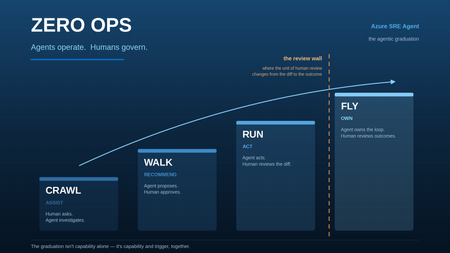
Human review improves safety but limits autonomy. Standing credentials preserve autonomy but increase risk. With Azure SRE Agent, we found a safer middle by moving control out of the model and into the runtime around it.1.3KViews1like1Comment
Azure SRE Agent: Introducing Live Reports
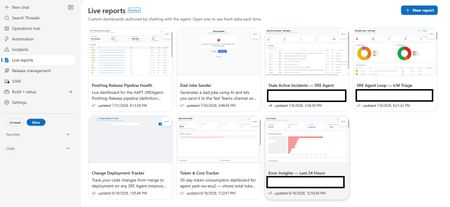
Today we're introducing Live Reports in Azure SRE Agent, now in public preview. You describe a dashboard in chat; the agent builds it, and it refreshes every time you open it. Ops teams ask the same handful of questions every morning: What's burning right now? What landed overnight? Who's on call? The answers usually live across multiple browser tabs, a one-off script only one person can run, or a chat prompt retyped daily and re-read as a fresh wall of text. Live Reports provides the missing piece: somewhere to author a view once and consume it many times. Frozen structure, live data This is the core design decision: the layout is deterministic, and the data is live. The agent authors the page once, then freezes it. Charts, thresholds, column order, and styling stay put. What refreshes on every open are the tool calls embedded in the page, so the shape is identical each morning, and the numbers are up to date. That's what separates a Live Report from a dashboard an LLM regenerates on every view. The chart looks consistent every day, and the page loads like a standard web page rather than a streaming chat response because there's no model in the render path. This leads to a key operational benefit: you only spend tokens when authoring the report. Opening a report built purely on tool calls uses no additional model tokens, no matter how many times you open it. (Reports that opt into AI-powered interpretation are the exception, as explained below.) This makes it practical for your entire team to open the report every morning without incurring ongoing LLM costs. When you want changes, simply ask the agent. It will edit the page in place and save a new version, preserving earlier revisions so you can always reference previous configurations. What you can build Report data sources include the connectors your agent already has access to: any connected MCP server, logs and metrics, source control, work items, and internal services. Charts are real visualizations. Reports pull vetted charting and grid libraries from a CDN, giving you interactive, sortable tables and graphics rather than static markdown tables. Reports can also reason at view time. Alongside tool calls, a report can send a focused prompt to a fast, lightweight model as it renders: classify alerts by severity, group issues by likely root cause, or summarize a discussion thread into a single line. Every reload re-fetches and re-interprets the data, keeping real-time judgment aligned with the latest telemetry. Note: AI-powered interpretation consumes tokens each time the report loads, which is why it is strictly opt-in per report. Reports can also take actions, but only the ones you wired in. A button invokes a write tool from a connector your agent is already connected to: acknowledge an incident, post to a discussion thread, assign an owner, open a work item. It cannot call an arbitrary URL or API of its own. Every button is limited to the exact tool names saved with that version of the report, and any tool that would ask for your approval in chat asks the same way when a button fires it. That's what turns a dashboard into something you operate from, without turning it into an open shell. The security model A model-authored page capable of calling production tools requires strict guardrails. It is constrained across four layers: Sandboxed origin: Reports render in an iframe with sandbox="allow-scripts" and deliberately omit allow-same-origin, ensuring the page runs at an opaque origin with no access to session tokens or cookies. Restricted network access: Report scripts cannot make direct API calls to arbitrary endpoints. All data requests route through the Live Reports runtime, which validates each call against the approved tool manifest for that specific report version. Per-version allowlists: A report can only invoke the exact tools it was configured with. Any unapproved call is rejected server-side at runtime, rather than relying on prompt-level instructions. Explicit human approval: When saving a report with connector access, the agent presents the exact tool descriptions provided by each connector. Nothing executes until you explicitly approve the configuration. Reports remain strictly bound to your agent's existing permission boundary. Exports are sanitized to a static, offline-safe file, which is safe to attach to a postmortem. Getting started Open the Live Reports tab and select New report. Describe your scenario in chat. The agent will inspect your available connectors, ask clarifying questions if needed, and generate the layout. Review and approve the tool permissions to add the report to your gallery. What's next We're continuing to expand connector support, build richer visualization primitives, and tighten the loop between observability and automated remediation. The best reports are often the ones we didn't anticipate. What is the operational view your team finds itself rebuilding by hand? Let us know in the comments. 👉 Try Live Reports in Azure SRE Agent1.4KViews1like0CommentsZero Ops: Agents Operate, Humans Govern
How to design, build, and grow an agentic operations practice — and what becomes possible once you do. A note on scope: the patterns in this guide apply to any agentic operations platform. The specifics — the pricing model, the built-in capabilities, the primitives named throughout — are Azure SRE Agent. Where something is a property of the product rather than a universal truth, it’s called out. Remember when? Remember the 3am page? The one where you sat on the edge of the bed with a laptop balanced on your knees, hunting through six dashboards to work out whether the thing that woke you was even real. Half the time it wasn’t. Remember the cost review? Somebody exports a month of billing to a spreadsheet, three engineers spend a fortnight arguing about which resources are actually orphaned, and by the time you’ve agreed on a plan the next month’s bill has already landed. Remember the zero-day? The all-hands marathon. Two days of people cancelling everything, tracing which services pulled the affected package, hand-patching in an order nobody had time to write down. And remember the CVE backlog — the one everyone knows about, the one that only ever grows, because triaging it properly would take a team you don’t have? None of that was a failure of effort. It was the operating model. For decades it looked like this: humans operated, software assisted. We built dashboards, alerts, runbooks, automation scripts, and eventually copilots — and through every one of those advances, the human was still the operator. That’s the part that’s changing. And it’s genuinely good news. Agents operate. Humans govern. That’s Zero Ops. And the best part is you don’t have to invent it — the path is already well-worn. The five things worth knowing before you start Everything below comes from building and running agentic operations at scale. If you read nothing else, read these. 1. Zero Ops is the destination — and it doesn’t mean zero humans. It means removing operations from humans. People don’t disappear; they move up the stack. They set the intent, govern the system, and validate outcomes. Nobody’s job becomes “watch the dashboard” ever again. 2. The model is not the moat. This was the biggest surprise. The model matters less every year. You can swap models. What you cannot swap is the context and governance wrapped around them. That’s the durable asset you’re building. 3. Context creates intelligence. Agents become genuinely useful the moment they’re grounded in reality — your source code, your live telemetry, your institutional knowledge, your incident history, and the skills and tools to act on all of it. Swap the model and the system still works. Swap the context and it stops being useful. 4. Governance creates trust. Enterprises don’t trust intelligence. Enterprises trust controls. Identity, audit, evals, rollback, evidence. Governance is what earns the right to automate — and it’s liberating rather than restricting, because it’s what lets you say yes. 5. Metrics create permission. Nobody should trust an agent because a demo looked impressive. Trust comes from numbers you can run yourself. If only the vendor can produce the number, it’s marketing. If you can query it, it’s a metric. The climb, and the one thing that changes at each rung Here’s the elegant part. As an agent matures, the thing that changes isn’t how clever it is. It’s what the human reviews. Rung What the agent does What the human reviews Crawl Suggests. A human still does the work. Their own work Walk Does the work one step at a time, asking before each action. Every step Run Completes whole tasks and hands back a change to approve. The diff Fly Fixes, deploys to test, validates the outcome itself, posts the evidence. The outcome And between Run and Fly sits the review wall. When an agent produces hundreds of changes a month, reviewing someone else’s diff is nearly as hard as writing it yourself. That’s where teams plateau — not because the agent isn’t capable, but because the humans became the bottleneck. Fly is how you get past it: you move the unit of human review from the diff to the outcome. Hold that thought — we’ll come back to it, because it’s the most exciting part of the whole journey. Getting there is a design problem before it’s a technology one. Agents that climb were built to climb. So let’s start where every one of them starts — how you scope it, what you teach it, and what you connect it to. Part One — Designing your agent Before you start: what you’ll want in place The good news is that this list is short, and you almost certainly have most of it already. There’s no platform to stand up first. Diagnostic logs turned on for the services you care about. An agent can only reason about what your system actually emits. Telemetry the agent can query. It doesn’t need to live in one place — most estates have it spread across several platforms, and that’s completely fine. What matters is that each of those places is reachable and queryable. This is what turns “something is wrong” into “here’s why.” Read access to the sources that hold the answers — your subscriptions, your repositories, your incident history, your ticketing system. An identity for the agent, with permissions scoped the way you’d scope a new team member’s on day one. A repository for agent artifacts. Skills, custom agents and tool definitions are production code. They deserve version control from the first one. That’s it. Nothing here is agent-specific — it’s the same hygiene that makes a system operable by humans. If your on-call engineer can answer a question at 3am, your agent can too. Step 1: Scope it — how many agents do you actually need? Good news first: fewer than you think. Teams often assume one agent per team, and that’s usually wrong. Five considerations decide it: 1. Fixed cost. Every Azure SRE Agent carries a small baseline charge just for existing — think of it as keeping the lights on so the agent is ready the instant something happens. That means consolidating where you can is genuinely good hygiene: fewer agents, each with a clear job, means every dollar goes toward outcomes rather than idle capacity. 2. Context. This is the big one. An agent is powerful because it holds a complete picture of a system. Split one application’s context across two agents and you’ve halved what each of them knows — usually the half that mattered. Don’t split an app’s context. 3. Data residency at rest. If data legally cannot leave a geography, that’s a boundary, and it’s a real one. Separate agent, separate region. 4. Team and organisational access boundaries. Genuinely different permission sets and genuinely different blast radius deserve genuinely different agents — each with its own identity, so least-privilege actually means something. 5. At least one dev agent. Always keep a non-production agent to test changes before they touch prod. Same reason you have a staging environment. That’s the whole list. Everything else, consolidate. Ideally, this is what it looks like. A single agent per application or product module — never splitting one across two. Explicit production and test agents. A regional agent wherever residency genuinely demands one. Every split maps to one of the five considerations above. The one thing to protect in every split decision is context. When two agents need to reason about the same problem, each one only has half the picture. If you absolutely must split context — say your org structure or access boundaries require it — plan for those agents to talk to each other so the full context is still reachable. Multiple patterns work. A dedicated infrastructure team that manages AKS clusters and only cares about the upkeep of that infrastructure? A single agent scoped to those resources makes perfect sense — they have a clear domain, a clear boundary, and a clear job. An application team whose service depends on a database? Give that application’s agent access to the database rather than standing up a second agent and splitting the problem’s context across two. There’s no single right layout — the principle is: keep the context of the problems you’re trying to solve together. Step 2: Teach it — context is king This is where the magic actually comes from, and it’s the step most worth over-investing in. Your agent needs five kinds of context: Source code — what the system actually does Production telemetry — what it’s doing right now Institutional knowledge — how your team really operates Previous incidents — what broke before, and why Skills and tools — how to act on any of it Connect the first two and you have a competent log reader. Add the middle two and it starts sounding like someone who’s worked on your team for a year. How you actually bring context in: Connect the real sources — subscriptions and their telemetry, your repositories, your incident history, your ticketing system. Knowledge as markdown in a repo. This is the pattern that works best. LLMs are exceptionally good with markdown files, and putting your knowledge in a connected repository means it’s version-controlled, reviewable, and — critically — updatable by the agent itself. Your scheduled tasks can automatically improve these files as the agent learns, closing the loop between insight and artifact. Connect external knowledge via MCP. If your team’s knowledge lives in Confluence, SharePoint, or another platform, connect it as an MCP server rather than migrating it. The agent queries it at runtime. Upload documents. Architecture diagrams, architecture decision records, design docs, onboarding guides. It reads all of it. Just talk to it. This is the underrated one. Tell it how your system works. Explain that “the blue cluster” means the EU stamp, that Tuesday deploys are riskier, that this alert is always noise before 8am. Ask it to summarise your architecture back to you — where it’s wrong, you’ve found a context gap, and you can fill it on the spot. One thing to be deliberate about: don’t dump everything. If you’ve accumulated years of documentation, runbooks, and tribal knowledge, resist the urge to pour all of it in on day one. Garbage in, garbage out. The agent will work with whatever you give it, and outdated or contradictory knowledge makes it worse, not better. Curate intentionally. Start with the knowledge that matters for the scenarios you’re tackling first, make sure it’s current, and grow from there. Teaching an agent feels remarkably like onboarding a sharp new hire. The difference is it reads everything you give it, overnight, and never forgets. And you don’t have to teach it everything at once. This is the part worth saying plainly, because the size of an estate can feel paralysing. You are not trying to pour your entire organisation into an agent before it becomes useful. You teach it the parts that matter, and you do it organically — one solution at a time. Start from your toil. Write down the things that actually wake your engineers up, the tasks your team does over and over, the investigation everyone dreads because it takes four hours and always ends the same way. Pick the top one. Coach the agent through that single scenario the way you’d coach a new engineer through their first on-call shift — the context it needs, the sources it should check, the judgement calls that aren’t written down anywhere. Then do the next one. Each scenario you teach is narrow, which means it’s cheap and fast to get right. And each one compounds: the context you gave it for scenario one is already there when you start scenario three. Six weeks in, you’ll notice it knows your system well enough to help with things you never explicitly taught it. Don’t boil the ocean. Boil the thing that’s burning you. Step 3: Create the artifacts — understand the primitives, then build Before you build anything, it helps to understand the three primitives you’re building with — because the difference between them is what gives you consistency. The meta agent is your agent out of the box. It has the LLM’s world knowledge plus all the context you’ve connected — your code, your telemetry, your documents, your memory. It’s versatile: it can investigate, reason, plan, and act. But it’s non-deterministic. Ask it the same question twice and it might take different steps, in a different order, and format its findings differently. That’s fine for exploration. It’s not fine for the 3am incident that needs to run the same way every time. Custom agents give you that consistency. A custom agent is a specialist with its own instructions, its own tools, and its own scope. Think of it as the what — the plan. The Zava learning lab’s learning-ops agent is a good example: it tells the agent exactly how to handle an incident — what to check, in what order, what to post, how to format the report. Every run follows that plan. Custom agents are scoped — they’re only invoked when you specifically ask for them (via /agent in chat, or via a response plan or scheduled task). That scoping is itself a governance lever, which we’ll come back to in Step 5. Skills are the how. They’re reusable procedures that teach the agent how to do a specific thing — query your Kusto cluster, restart a container app, read an IcM incident, run a particular diagnostic sequence. Skills are universal: both the meta agent and any custom agent can use them. A single skill written once is available everywhere. The key insight: the meta agent alone will get you far, but it won’t do the same ten steps next time, or in the same order, or produce the same kind of report. Custom agents and skills give you that repeatability — and repeatability is what you need for automation you trust. Now — how you actually create them. There are exactly two on-ramps, and which one you take depends on whether you already know the answer. Path A — you have a runbook (a known problem). Throw the runbook at the agent and ask it to build the artifacts: the skill, the custom agent, the tool definitions. Review what it produces, refine it, and have it cut a pull request into your repository. A procedure you’d have hand-written over a week arrives in an afternoon. Path B — you don’t (a complex or unknown problem). Work it interactively. Hand the agent the live problem and investigate together. Let it dig, watch it waver, correct its wrong turns, point it at the source it didn’t know about. When you finally crack it — that’s the moment. Ask it to turn what just happened into a custom agent, a skill, a tool. The next time that problem appears, it’s automatic. Path B is the one people don’t expect, and it’s the more valuable of the two. Your best artifacts aren’t written at a desk. They’re precipitated out of real investigations that worked. Every hard incident you solve together becomes an incident you never have to solve again. This isn’t unusual, either — teams everywhere now run skill-creating skills, agent-building skills, and MCP-server-building skills. Using the agent to build more of the agent is simply how this works now. Step 4: Test it — playground first, then non-prod Treat agent artifacts like code, because they are. Start in the playground — a safe space to exercise a skill against realistic inputs without touching anything. Then promote to a non-production system where the agent can act for real against resources that don’t matter. You won’t get everything right before production, and you don’t need to. Get the critical parts right — the core logic, the safety boundaries, the happy path — and then put it on real work. That’s where you find out what it’s actually like. From there, use evals to improve continuously. Every real run produces one, and reading them is how you find out whether the artifact holds up outside the playground. Part Two covers what to do with that signal — including how to wire it back into the artifacts automatically. And because these are production artifacts, they belong in source control from the beginning — with review, diffs, and rollback. Step 5: Govern it — earn the right to automate Remember principle four: governance creates trust. This is where you make it concrete. Before anything touches production, you decide who the agent is, what it’s allowed to do, what rules gate its actions, and what checks run in context. These controls layer on top of each other, and together they’re what lets you say yes to autonomy with confidence. Identity and access Your agent authenticates as a managed identity — system-assigned or user-assigned — and you scope it with normal Azure RBAC at the subscription, resource group, or management group level. Out of the box, Azure SRE Agent offers two access tiers: Reader — read-only access to your resources. This is all your agent needs for investigation, root-cause analysis, and reporting. It’s the right starting point. Privileged — adds resource-type-specific contributor roles (like Container App Contributor) based on what’s detected in your environment. This is what the agent needs for actions: restart, scale, rollback, configuration changes. Most teams start with Reader and add Privileged only on the resource groups where they want the agent to act. If neither tier fits — maybe you want the agent to restart App Services but never touch network rules — create a custom RBAC role with exactly the permissions you need and assign it to the agent’s managed identity. The agent’s identity is its security boundary; treat it the way you’d treat any other service principal. Run mode This is the single biggest lever. In Review mode, the agent proposes actions and waits for a human to approve each one. In Autonomous mode, it acts on its own within the bounds you’ve set. Most teams start every scenario in Review, watch it work for a few weeks, and then selectively move well-understood scenarios to Autonomous. That graduation is the Crawl-to-Run climb in practice. There’s a third thing worth understanding: what happens when the agent doesn’t have the privileges to act. If the agent’s managed identity lacks the RBAC permission for an action, it doesn’t fail silently — it asks. An Administrator can grant temporary elevation via on-behalf-of (OBO), which lets the action execute using the human’s credentials rather than the agent’s identity. This is the human-in-the-loop pattern at its most precise: the agent does the investigation, proposes the action, and a human with the right privileges authorises it in context. The agent never accumulates permissions it doesn’t need permanently, and the audit trail shows exactly who approved what. Tool controls Every tool the agent has access to can be set to one of three states: Allow — the tool executes without asking. Good for safe read operations you’re confident about. Ask — the tool pauses for human approval before running. Good for actions you trust but want to see before they happen. Off — the tool is completely disabled. The agent can’t use it at all. This is the first governance layer — simple, per-tool toggles. Need the agent to query your Kusto cluster but never write to it? Allow the read tool, turn the write tool off. Need it to restart an App Service but never delete one? Allow the restart, turn delete off. This is how you define the agent’s basic operational envelope. Some actions — like restarting a healthy service or scaling up a container app — may not need any gating at all. Others — like modifying a network security group or changing a database configuration — absolutely do. The right setting depends on how much autonomy you want the agent to have and how much you want a human involved. There’s no single right answer; there’s the answer that fits your comfort level today, and it can change tomorrow. Tool access policies Tool controls are per-tool on/off switches. Tool access policies go deeper: they let you write pattern-based rules that match tool names and even command arguments. Examples: - “Deny any command containing delete “ — bash(az * delete *) matches any az ... delete ... command regardless of which tool executes it. - “Allow all monitoring queries without approval” — so your read-only investigation flow runs uninterrupted. - “Ask before any deployment command” — so deploys always pause for a human. Policies apply at three scopes: Scope Who sets it What it can do Global Admin Allow, Ask, or Deny — across the entire agent Custom agent Admin or author Allow only — widen access within global boundaries for a specific custom agent Thread Any user Allow only — temporary override for one conversation The key principle: a global deny cannot be overridden by a lower scope. A custom agent or thread can widen access but never weaken a global deny. This means an admin can set a floor — “nobody, human or agent, can run a delete command” — and know it holds. Hooks Policies match patterns. Hooks evaluate context. This is the layer that handles the cases patterns can’t express. Four hook events: Event When it fires What you’d use it for Start A new thread begins Seed context, validate the trigger, tag the conversation PreToolUse The agent is about to call a tool Inspect the arguments, allow/deny/ask based on what you see PostToolUse A tool just returned Audit the result, flag sensitive output, trigger follow-up Stop The agent is about to finish Validate that the work is complete, reject and keep the loop running if it’s not Hooks can be prompt-based (an LLM judge evaluates the situation) or command-based (a bash or Python script runs deterministically). They sit at the highest priority in the decision chain — a hook allow overrides everything below it, and a hook deny blocks immediately. Here’s where it gets practical. Say the agent is investigating a performance issue and discovers a corrupt database index. It decides to drop and rebuild the index — exactly what a DBA would do. But you don’t want the agent to ever drop a table. How do you allow one and prevent the other? Three layers, working together: Tool access policy: a global deny on any command matching *DROP TABLE* . Pattern-based, unconditional, always enforced. Custom agent scoping: create a database-maintenance custom agent with instructions that explicitly say “you may drop and rebuild indexes; you may never drop tables.” The custom agent only has the database tools it needs — nothing else. The blast radius is contained by design. PreToolUse hook: a script that inspects the actual SQL command. It allows DROP INDEX , denies DROP TABLE , and can require approval for any DDL command above a risk threshold you define. The policy catches the obvious pattern. The custom agent constrains the scope. The hook handles the edge cases that patterns miss. This is the full stack working together. Scoping automations to a custom agent is one of the most powerful governance levers you have. Instead of giving the meta agent broad database access, you create a specialist with its own tools, its own instructions, its own tool access policies, and its own hooks. The meta agent can investigate and recommend. Actual database changes only happen through the custom agent, with guardrails purpose-built for that domain. Who can configure the agent RBAC extends to the agent itself. Four built-in roles govern who can do what: Role What they can do Administrator Full control — approve actions, manage connectors, configure hooks and policies, change run mode, deploy artifacts Author Create custom agents and tools, upload knowledge, author response plans and incident configurations, manage connectors Standard User Chat, run diagnostics, request actions, create scheduled tasks Reader View conversations and configuration — read-only Separation of duties applies here the same way it applies everywhere else: the person who builds a skill shouldn’t necessarily be the person who promotes it to Autonomous. Only Administrators can approve infrastructure actions — Standard Users and Authors cannot. And only Administrators can create hooks and tool access policies, because those controls govern what every other role can do. How it all fits together These controls layer: identity sets the boundary, run mode sets the default posture, tool controls set the envelope, policies set the rules, and hooks handle the judgement calls. They’re not restrictions — they’re what lets you say yes to progressively more autonomy, with evidence that each step is safe. A useful mental model: governance isn’t a gate you pass through once. It’s the dial you turn up gradually, scenario by scenario, as each one proves itself. The agent that’s fully autonomous for certificate renewals and fully gated for database changes isn’t half-governed — it’s precisely governed. Step 6: Promote to production — your agent configuration is code This is the step that turns your dev agent into a repeatable, auditable production system. Your dev agent is your workshop — the place where you experiment, teach, build artifacts, and iterate until things work. Once they do, the configuration you’ve built there becomes your golden state: the skills, custom agents, tool definitions, knowledge base, response plans, scheduled tasks, and memory that together define how this agent operates. All of it can be declared, versioned, and deployed programmatically: Infrastructure as Code — define agents and their configuration in Bicep or Terraform, same as any other Azure resource. Your agent’s entire shape lives in a template. CLI and REST API — create, update, and configure agents with az commands or direct API calls. Useful for CI/CD pipelines that promote artifacts from dev to prod as part of a normal release. Artifact repositories — skills, custom agents, and tool definitions are files in your repo. Push them to your production agent the same way you push code: through a pipeline, with review, with rollback. This means everything your dev agent learned can flow to production through your existing change process. A new skill gets built and tested in dev, reviewed in a PR, merged, and deployed to the production agent by the pipeline — no portal clicking, no manual replication, no drift. It also means consistency across a fleet. If you run multiple agents — per module, per region, per environment — they can all be powered from the same artifact repository. Update the skill once, deploy it everywhere. The agent-per-module pattern from Step 1 works precisely because IaC makes it cheap to keep them consistent. And when something goes wrong, you roll back the same way you roll back anything else: revert the commit, redeploy the template, and the agent is back to its last known-good state. Step 7: Wire it up — an artifact does nothing until something calls it A skill sitting in your repository doesn’t do anything until it’s bound to a trigger — something in your world that fires it without a human deciding to. It’s an easy step to skip, and worth not skipping. There are three you’ll use constantly: Incident response plans. Attach the artifact to an alert class, so that when that alert fires, that skill runs. This is the single highest-value wiring you can do. Scheduled tasks. For work that should happen on a rhythm rather than in response to a signal — the nightly sweep, the weekly review, the monthly audit. HTTP triggers. For everything else in your ecosystem that wants to start agent work: a pipeline stage, a webhook, a work item transitioning to Ready. Here’s why this matters more than it looks. Remember the climb — Crawl, Walk, Run, Fly. Teams often assume they’ll graduate by making the agent smarter. They won’t. A brilliantly capable agent that only ever runs when someone opens a chat window is still at Walk, permanently, because a human is still initiating every piece of work. Capability doesn’t promote you. Triggers do. Wiring is the actual line between Walk and Run. Cross it deliberately. Step 8: Mimic your production process Here’s the step that turns a clever assistant into an operations teammate: the agent should follow the process your humans already follow. Not a parallel workflow. The workflow. An incident arrives → the agent acknowledges it, so everyone can see it’s owned → it investigates, pulling telemetry, correlating recent deploys, checking dependencies → it posts its findings to the incident, where the on-call already lives → it proposes or applies the mitigation → it updates status → it documents the root cause → it resolves. That’s end-to-end incident investigation and remediation, in the same lifecycle, the same ticket, the same channel your team already watches. No new tool to learn. The on-call engineer just notices the work is already done. And this covers more ground than people expect. Most teams think of incidents in three flavours: outages, where something is down; performance issues, where something is slow or degrading; and manual errors — the config change somebody made by hand at the end of a long day, the setting that got flipped in the portal and never made it back into source control. That third category is the one teams under-count and the one agents are unusually good at, because catching it is mostly a matter of comparing what’s running against what was declared — patient, unglamorous work that nobody wants to do at 2am. A worked example. The Zava learning lab agent runs exactly this loop — incident-triggered investigation and remediation across a live estate. Looking at its real runs: a typical end-to-end run takes about 32 tool calls and lands in a 5-to-12-minute band, with a median around 8.6 minutes from signal to finished work. Roughly five minutes to a mitigation, ten to a full resolution. Compare that with what it replaces: a page, someone waking up, ten minutes to orient, a scramble across dashboards, a colleague pulled in for a second opinion. Ninety minutes and two engineers, on a good night. A second example, from the other end of the lifecycle. A large software vendor running a multi-region estate — dozens of subscriptions, tens of thousands of resources — wired their agents into delivery rather than just incidents. A work item moves to Ready, and that’s the trigger. A custom agent picks it up, writes the code, opens the pull request, deploys the change to a test environment, and runs the validation suite against it — synthetic checks and browser-driven tests, the same ones a human would have run. Then it posts the result on the original work item. The engineer’s first involvement is reading an outcome that already has evidence attached. Same five design considerations from Step 1 govern their fleet: one agent per product module, explicit prod and test agents, and one extra agent in-region purely for data residency. These two examples bookend the same idea. One agent closes incidents; the other closes work items. Both were built the same way — context first, artifacts second, triggers third. Beyond incidents — the agent as a proactive partner It’s easy to think of agents as incident responders, because that’s where the value is most visible. But the best teams use them just as heavily when nothing is broken. Understand your system better. Ask the agent to explain your architecture back to you. Ask it what depends on what. Ask it to map the blast radius of a change you haven’t made yet. Ask it to find every resource in your estate that hasn’t been touched in six months, or every configuration that drifts from what’s declared in code. These aren’t investigations — they’re conversations. And the answers come grounded in your actual telemetry and source code, not a wiki page that was last updated in 2023. Get recommendations you didn’t ask for. Set up a scheduled task that reviews your infrastructure weekly and surfaces opportunities: resources that could be right-sized, SKUs that could be downgraded, replicas that could be consolidated, regions where you’re paying for redundancy you’re not using. The same task can check for reliability gaps: services without health probes configured, storage accounts without soft-delete enabled, deployments running without a rollback path. The agent sees all of it because it already has the context — it just needs a reason to look. Run proactive reliability reviews. Ask the agent to evaluate your service against the Azure Well-Architected Framework, or against your own best practices checklist. Ask it to compare your production configuration against your staging configuration and tell you what’s different — and whether the difference is intentional. Ask it to trace a customer-facing flow end to end and identify the single points of failure. Shift from reactive to preventive. This is the compounding value of the platform. Every incident the agent resolves teaches it something about your system. Over time, the agent that started as an incident responder becomes the thing that prevents incidents — because it’s seen enough of your system to spot the preconditions before they become symptoms. The cost analysis that catches the runaway resource before finance does. The capacity check that raises the quota before the 429s start. The configuration audit that catches the drift before it becomes an outage. The agent that only responds to incidents is useful. The agent that also prevents them is transformative. Part Two — Running it well Two loops, not one queue Once agents are working real incidents, the question stops being can it and becomes which ones. Make that a routing decision rather than a judgement call. Run two loops: an agent loop and a human loop. Every incident class is registered to one of them, so where an incident lands is a property of the class, decided in advance — not something someone works out at 3am. Promotion between loops is deliberate. Moving a class into the agent loop is a reviewable change with a written gate, and a written demotion trigger for when it stops earning its place. The safety net belongs to the incident system, not the agent. Define the conditions your process cares about — not acknowledged within x minutes, not mitigated, not handed off — and let the incident system escalate to the human loop when they’re breached. An agent that has stalled can’t be relied on to report that it has stalled; something outside it has to notice. And escalation should carry the work with it, so the human arrives to evidence already gathered rather than a blank page. Cost: know what an outcome costs One of the quietly wonderful things about agentic operations is that you can finally price an outcome. Agents consume metered units, and every unit maps to work. So instead of “what does our on-call cost?” — a question nobody has ever answered honestly — you get: this incident, end to end, cost this much. For the loop above: an entire incident investigated, mitigated, documented and resolved, in minutes, for under $30. Now price the alternative. Two engineers, ninety minutes, out of hours, plus the context-switch tax on whatever they were doing, plus the meeting the next morning to explain what happened. You’re comparing tens of dollars against hundreds — and that’s before you count the ninety minutes of customer impact that didn’t happen because the fix landed in eight minutes instead of an hour and a half. Multiply by your monthly incident volume and it stops being a cost conversation and starts being a capacity one. The question isn’t “can we afford this?” — it’s “what do we do with the engineering time we just got back?” But be careful not to measure the return only in money and minutes, because the larger part of it never shows up on an invoice. It’s the engineer who slept through the night. It’s the on-call rotation people stop quietly dreading, and the weekend that stayed a weekend. It’s the postmortem that never had to be written — and with it, the whole uncomfortable ritual of working out whose change it was — because the problem was caught and fixed while it was still one degraded instance rather than a customer-visible outage. Teams feel that long before finance notices the bill. Morale has always been a reliability metric; it just never had a dashboard. A few practical habits: - Set a consumption budget deliberately, and know who can raise it and how fast before you need them. - Watch cost per resolved outcome, not total spend. Total spend rising while cost-per-outcome falls is exactly what success looks like. - Use the right trigger for the job. Incident response plans and HTTP triggers bring the work to the agent the instant it matters. Scheduled tasks handle the work that belongs on a rhythm — the nightly sweep, the weekly review. Both have a place; the key is matching each scenario to the trigger that fits it. Live Reports — the UI beyond chat Most people first encounter their agent in a chat window, and chat is genuinely good for investigation and conversation. But it’s not the only surface — and for a lot of operational work, it’s not the best one. Live Reports are interactive HTML applications built by the agent and hosted on the platform. They call the same tools the agent uses — Kusto queries, Azure CLI, incident APIs, connector tools — and render the results as charts, tables, grids, and interactive controls. They’re not screenshots of a past conversation. They’re live applications that re-fetch data every time you open them. Here’s the part worth understanding from a cost perspective: the agent spends tokens when it builds the report — the conversation where you describe what you want. After that, opening the report calls the tools directly. No LLM is involved, so there’s no ongoing token consumption. Build it once, open it a hundred times, share it with your team — the investment is in the creation, and it pays off every time someone opens it. Think of Live Reports as the place where your agent’s intelligence becomes a permanent, shareable surface rather than a conversation that scrolls away. Scenarios where Live Reports shine: Morning triage view. What happened overnight? Which incidents are open, which were resolved autonomously, which need human attention? A single page your on-call opens at the start of every shift — always current, no queries to run. Agent fleet health. Across all your agents: which are healthy, which have degraded tool reliability, which haven’t run in a week? Per-tool success rates, outcome counts, cost-per-resolution trending. The monitoring dashboard you’d otherwise build in Grafana, except it’s already wired to the data. Governance and compliance. NSG audit results, CVE exposure by service, resource compliance against your policy baseline. The report that used to take two engineers a day to compile — now it’s a page that’s always current. Cost analysis. Per-agent spend, per-outcome cost, consumption trending with visual charts. The data that makes the cost conversation in Part Two actually work. On-call handover. A shift handoff report: what happened during this rotation, what’s still pending, what to watch. Built once, regenerated for every handover. Stakeholder status pages. Service health for leadership or customers — uptime, incident summary, SLA adherence — without exposing the underlying tools or conversations. Interactive explorers. Not just viewing data but acting on it. A compliance report where you can drill into a finding and ask the agent to open a remediation PR, right from the report surface. The pattern is the same every time: you tell the agent what you want to see, it builds the report, and from that point forward the report is a zero-cost, always-current application that anyone on your team can open. It’s the agent’s intelligence crystallised into a surface that doesn’t need the agent to be running. Monitor the agent You’ll want a few different lenses, because each sees something the others can’t: Layer What it gives you Live reports Your measurement dashboard — autonomy by scenario, throughput, tool reliability — refreshed from your own connectors every time you open it Scheduled tasks The agent reporting on itself: a weekly health narrative, and the loops that keep artifacts current Your own observability platform Independent health and reliability monitoring outside the agent — the layer that still works when the agent doesn’t Foundry Control Plane Auto-discovers your SRE agents across the subscription: status, error rate, run counts, plus start/stop/block lifecycle control, governed by normal Azure RBAC Agent 365 Organisation-wide registry, governance and security posture across every agent platform you run. Agent 365 is generally available; SRE Agent integration into it is on the roadmap One field-tested tip: track tool failure rate per tool, not in aggregate. The overall success rate in large estates typically sits above 98%, which is reassuring — but it can mask a single connector that needs a configuration fix. Watching each tool individually lets you catch those early, and the fix is usually straightforward: a stale token, a permission gap, a connector that needs reconnecting. Knowledge, evals and learning — insist on these Context isn’t a one-time setup. It’s a living asset, and it’s the thing that compounds — but only if your platform is built to let it. This is the section where what you’re running starts to matter a great deal, so it’s worth being direct about what to demand. Insist on an agent that learns without being told to. The common failure mode of agentic tooling is that all the good material stays in the chat thread. Someone works a hard problem with the agent at midnight, finally cracks it, and the reasoning evaporates when the tab closes. What you want instead is derived learning: the agent distils what it just worked out — the query that got there, the dead end worth avoiding, the service that behaves nothing like its documentation — and files it as durable, structured knowledge on its own, without anyone remembering to write it down. Azure SRE Agent does this automatically. Every investigation deposits something. What still needs your attention is the round trip to the original source of truth. Derived learning lives with the agent. Your runbook, your architecture note, your alert definition lives in your repository — and that’s the copy your humans read. Wire the automation that pushes a learning back into the original artifact as a pull request, so the knowledge doesn’t quietly fork into two versions. This is the single most valuable piece of plumbing most teams haven’t built yet. Insist on evals that run forever, not once. Evals get widely misread as a pre-production gate: test the skill, it passes, it ships, done. That’s the smaller half of the value. The bigger half is relentless — continuously evaluating the agent’s real runs in production. Did it stay in scope? Did it reach the right conclusion? Did it stop and ask when it should have? Did that skill quietly start failing at step four last Tuesday? Real traffic finds things no test suite will, and it finds them on your actual estate rather than on a fixture. Then close the loop, so eval results become work rather than a report nobody opens. Azure SRE Agent ships this as a first-class loop: scheduled tasks that watch the eval signal, notice the degradation, and act on it. Self-improvement — where it gets fun Which is where something rather lovely happens: the agent starts improving itself. It notices a runbook is out of date and updates it. It sees a skill failing at the same step and rewrites that step. It spots a recurring investigation and proposes a new custom agent to own it. It watches its own eval scores and opens a pull request against the artifact that slipped. Teams run learning-loop agents alongside their fleets, and watchdog agents that review other agents’ work. Every completed task should make the next task easier. That’s the flywheel — and it only turns when all three pieces are present: knowledge that accumulates by itself, evals that keep scoring real work, and automation wired to act on both. Put them together and the system stops being something you maintain and starts being something that maintains itself. Part Three — The Zero Ops journey: the art of the possible Now the fun part. Here’s what each rung actually feels like, across the scenarios teams really run. Crawl — the agent suggests, you do the work You’ve connected context and you’re asking questions. It’s already useful: “Which of these 40 alerts overnight actually mattered?” — and it tells you, with reasoning. At this rung the governance sweep produces its first report: here are your idle resources, here are the network rules that don’t match policy, here are the CVEs you’re exposed to. Just a list — but it’s a list nobody had time to produce before, and it took four minutes. The certificate scan tells you what expires in the next 90 days. The cost analysis names your top ten spenders and why they moved. The change reviewer reads an incoming change request and tells you, in plain language, what it actually touches and what depends on it — the blast-radius analysis somebody used to do by hand in a change advisory board meeting. You still do all the work. But for the first time, you can see everything. Walk — the agent does the work, one step at a time Now it acts, asking before each step. This is where investigation and root-cause analysis come alive. An alert fires and the agent has already pulled the telemetry, correlated the recent deployment, checked the dependency, and posted a probable cause on the incident — before the on-call has finished reading the title. The question responder starts answering “is the EU region healthy?” in your team channel, with evidence. The governance sweep grows a spine: it doesn’t just list the orphaned resources, it recommends what to do about each. The CVE report becomes a prioritised remediation plan. The change reviewer stops describing the change and starts drafting it — the implementation plan, the validation steps, and the rollback procedure, written before anyone approves anything. You approve every step. It feels slow. It is also where you discover exactly what your agent is good at — and every gap you find becomes tomorrow’s artifact. Run — the agent completes whole tasks; you review the change Triggers are wired now — incidents, webhooks, schedules — and work starts without you. This is the rung where the 3am page stops arriving. The alert-class handler takes a whole class end to end: fires on arrival, investigates, applies the safe mitigation — restart, scale up, roll back the release — documents it, resolves it. You read about it in the morning. This is the rung where the word self-healing finally earns its place. It’s worth being precise about what it means, because it’s a phrase that gets stretched: self-healing is when the agent detects a known failure class, decides on the response, and acts on it within bounds you pre-approved. Not “the agent does whatever it thinks best.” The class is chosen by you. The safe actions are enumerated by you. The agent’s contribution is that it does the work at 3am, correctly, without waking anyone — and tells you exactly what it did. And notice that this is granted per alert class, never per service. It’s completely normal for one fleet to run some classes at near-total autonomy while other classes sit at a deliberate zero, because nobody’s ready yet. That’s not inconsistency. That’s the control working. The capacity agent sees the quota curve heading for a wall and raises it before anything breaks. The certificate agent opens the renewal PR on schedule. The maintenance agent handles the planned work that used to eat somebody’s weekend — the scheduled patching round, the index rebuild, the node pool rotation — running it in the window, verifying it landed, and reporting on it. The change agent executes the approved change in non-production, validates it, and raises the pull request and the change record together. The governance sweep stops recommending and starts acting — opening pull requests against your infrastructure-as-code to close the findings it used to just report. The CVE backlog that only ever grew? It starts going down, because something is working it every single day. And the work-item loop appears: a backlog item goes in, a custom agent writes the code and opens a pull request. You review the diff. Which is exactly when you meet the review wall. Fly — the agent proves the outcome, and improves the system Fly is not “the agent can execute.” It’s two much better things. Fly, part one: the agent can prove the outcome is correct. It builds the fix. It deploys it to a test environment. It runs the validation itself — synthetic checks, browser tests, the full suite. Then it posts the evidence. You stop reviewing the diff and start reviewing the outcome. That’s how the wall comes down. Now the work-item loop closes completely: backlog item → code → deploy → tested → evidence posted. The release-safety agent doesn’t just roll back after an incident, it gates the deploy beforehand — validating in test and blocking the bad one. The governance sweep pushes its own fix to production, having proven in test that it works. And your standard changes — the well-understood, pre-approved, thousand-times-executed ones — get carried out in production end to end, validated, and the change record closed with the evidence attached. The change advisory board stops reviewing procedure and starts reviewing outcomes, which is what it always wanted to be doing. Fly, part two: the agent improves the system. It learns from every incident. It improves knowledge, artifacts, runbooks, skills — and its own custom agents. The alert-quality loop turns inward: it notices which of your alerts are chronic false positives and opens PRs to fix the alert rules themselves. Your monitoring gets better while you sleep. The system gets better without a human editing it. And back to where we started That 3am page? A whole class of them doesn’t reach a person anymore. The fortnight-long cost review? A standing job that finds the waste and opens the PR. The zero-day marathon? The agent maps exposure across every service in minutes, patches in test, proves it works, and hands you evidence. The CVE backlog that only grew? Something works it every day, and it shrinks. That’s Zero Ops. Not zero humans — zero operations for humans. Your people set intent, govern the system, and validate outcomes. Everything below that line takes care of itself. The proof We run Microsoft this way. Every number here is queryable — these aren’t product metrics, they’re trust metrics. Today: - 2,500+ Microsoft engineering teams - 5,400+ agents running in production - Median time from alert to mitigation: 4 minutes To date: - 1.47M incidents processed - 221K mitigated autonomously - 1.25M enriched for the on-call engineer - ~1M developer hours saved* In the last month alone: - 480K incidents handled - 91K mitigated autonomously - 32M agent actions executed - 60K deploy-and-validate runs - 97.9% of agent work ran autonomously That last number is the one worth sitting with. Ninety-eight percent of the work happens with no human in the conversation — and the two percent that does reach a person is the two percent that genuinely needs judgement. In closing It isn’t about building a better agent. It’s about building a system that deserves autonomy. Context makes it intelligent. Governance makes it trustworthy. Metrics make it provable. When those three come together — agents operate, and humans govern. And the best news: you don’t have to build this from the ground up. Azure SRE Agent already carries these learnings — the context, the governance, the evidence, and the metrics — so your team can start today. Pick one scenario. Give it context. Teach it your system. Work a real problem with it, and turn what you learn into something that persists. Then do it again next week. Start your Zero Ops journey: aka.ms/sreagent · Resources and community: aka.ms/sreagent/links *AI-calculated estimate, based on a conservative earlier baseline.3.2KViews7likes0Comments
How Microsoft 365 built a platform engineering layer on AKS to ship faster at global scale
This Customer Zero story explains how Microsoft 365 built COSMIC, a platform engineering layer on top of Azure Kubernetes Service (AKS), to standardize how cloud services are deployed and operated at global scale. The goal was to eliminate repetitive infrastructure work for service teams, embed security and compliance by default, and enable developers to focus on delivering customer value instead of managing platform complexity.5KViews4likes0CommentsThe Agent that investigates itself
Azure SRE Agent handles tens of thousands of incident investigations each week for internal Microsoft services and external teams running it for their own systems. Last month, one of those incidents was about the agent itself. Our KV cache hit rate alert started firing. Cached token percentage was dropping across the fleet. We didn't open dashboards. We simply asked the agent. It spawned parallel subagents, searched logs, read through its own source code, and produced the analysis. First finding: Claude Haiku at 0% cache hits. The agent checked the input distribution and found that the average call was ~180 tokens, well below Anthropic’s 4,096-token minimum for Haiku prompt caching. Structurally, these requests could never be cached. They were false positives. The real regression was in Claude Opus: cache hit rate fell from ~70% to ~48% over a week. The agent correlated the drop against the deployment history and traced it to a single PR that restructured prompt ordering, breaking the common prefix that caching relies on. It submitted two fixes: one to exclude all uncacheable requests from the alert, and the other to restore prefix stability in the prompt pipeline. That investigation is how we develop now. We rarely start with dashboards or manual log queries. We start by asking the agent. Three months earlier, it could not have done any of this. The breakthrough was not building better playbooks. It was harness engineering: enabling the agent to discover context as the investigation unfolded. This post is about the architecture decisions that made it possible. Where we started In our last post, Context Engineering for Reliable AI Agents: Lessons from Building Azure SRE Agent, we described how moving to a single generalist agent unlocked more complex investigations. The resolution rates were climbing, and for many internal teams, the agent could now autonomously investigate and mitigate roughly 50% of incidents. We were moving in the right direction. But the scores weren't uniform, and when we dug into why, the pattern was uncomfortable. The high-performing scenarios shared a trait: they'd been built with heavy human scaffolding. They relied on custom response plans for specific incident types, hand-built subagents for known failure modes, and pre-written log queries exposed as opaque tools. We weren’t measuring the agent’s reasoning – we were measuring how much engineering had gone into the scenario beforehand. On anything new, the agent had nowhere to start. We found these gaps through manual review. Every week, engineers read through lower-scored investigation threads and pushed fixes: tighten a prompt, fix a tool schema, add a guardrail. Each fix was real. But we could only review fifty threads a week. The agent was handling ten thousand. We were debugging at human speed. The gap between those two numbers was where our blind spots lived. We needed an agent powerful enough to take this toil off us. An agent which could investigate itself. Dogfooding wasn't a philosophy - it was the only way to scale. The Inversion: Three bets The problem we faced was structural - and the KV cache investigation shows it clearly. The cache rate drop was visible in telemetry, but the cause was not. The agent had to correlate telemetry with deployment history, inspect the relevant code, and reason over the diff that broke prefix stability. We kept hitting the same gap in different forms: logs pointing in multiple directions, failure modes in uninstrumented paths, regressions that only made sense at the commit level. Telemetry showed symptoms, but not what actually changed. We'd been building the agent to reason over telemetry. We needed it to reason over the system itself. The instinct when agents fail is to restrict them: pre-write the queries, pre-fetch the context, pre-curate the tools. It feels like control. In practice, it creates a ceiling. The agent can only handle what engineers anticipated in advance. The answer is an agent that can discover what it needs as the investigation unfolds. In the KV cache incident, each step, from metric anomaly to deployment history to a specific diff, followed from what the previous step revealed. It was not a pre-scripted path. Navigating towards the right context with progressive discovery is key to creating deep agents which can handle novel scenarios. Three architectural decisions made this possible – and each one compounded on the last. Bet 1: The Filesystem as the Agent's World Our first bet was to give the agent a filesystem as its workspace instead of a custom API layer. Everything it reasons over – source code, runbooks, query schemas, past investigation notes – is exposed as files. It interacts with that world using read_file, grep, find, and shell. No SearchCodebase API. No RetrieveMemory endpoint. This is an old Unix idea: reduce heterogeneous resources to a single interface. Coding agents already work this way. It turns out the same pattern works for an SRE agent. Frontier models are trained on developer workflows: navigating repositories, grepping logs, patching files, running commands. The filesystem is not an abstraction layered on top of that prior. It matches it. When we materialized the agent’s world as a repo-like workspace, our human "Intent Met" score - whether the agent's investigation addressed the actual root cause as judged by the on-call engineer - rose from 45% to 75% on novel incidents. But interface design is only half the story. The other half is what you put inside it. Code Repositories: the highest-leverage context Teams had prewritten log queries because they did not trust the agent to generate correct ones. That distrust was justified. Models hallucinate table names, guess column schemas, and write queries against the wrong cluster. But the answer was not tighter restriction. It was better grounding. The repo is the schema. Everything else is derived from it. When the agent reads the code that produces the logs, query construction stops being guesswork. It knows the exact exceptions thrown, and the conditions under which each path executes. Stack traces start making sense, and logs become legible. But beyond query grounding, code access unlocked three new capabilities that telemetry alone could not provide: Ground truth over documentation. Docs drift and dashboards show symptoms. The code is what the service actually does. In practice, most investigations only made sense when logs were read alongside implementation. Point-in-time investigation. The agent checks out the exact commit at incident time, not current HEAD, so it can correlate the failure against the actual diffs. That's what cracked the KV cache investigation: a PR broke prefix stability, and the diff was the only place this was visible. Without commit history, you can't distinguish a code regression from external factors. Reasoning even where telemetry is absent. Some code paths are not well instrumented. The agent can still trace logic through source and explain behavior even when logs do not exist. This is especially valuable in novel failure modes – the ones most likely to be missed precisely because no one thought to instrument them. Memory as a filesystem, not a vector store Our first memory system used RAG over past session learnings. It had a circular dependency: a limited agent learned from limited sessions and produced limited knowledge. Garbage in, garbage out. But the deeper problem was retrieval. In SRE Context, embedding similarity is a weak proxy for relevance. “KV cache regression” and “prompt prefix instability” may be distant in embedding space yet still describe the same causal chain. We tried re-ranking, query expansion, and hybrid search. None fixed the core mismatch between semantic similarity and diagnostic relevance. We replaced RAG with structured Markdown files that the agent reads and writes through its standard tool interface. The model names each file semantically: overview.md for a service summary, team.md for ownership and escalation paths, logs.md for cluster access and query patterns, debugging.md for failure modes and prior learnings. Each carry just enough context to orient the agent, with links to deeper files when needed. The key design choice was to let the model navigate memory, not retrieve it through query matching. The agent starts from a structured entry point and follows the evidence toward what matters. RAG assumes you know the right query before you know what you need. File traversal lets relevance emerge as context accumulates. This removed chunking, overlap tuning, and re-ranking entirely. It also proved more accurate, because frontier models are better at following context than embeddings are at guessing relevance. As a side benefit, memory state can be snapshotted periodically. One problem remains unsolved: staleness. When two sessions write conflicting patterns to debugging.md, the model must reconcile them. When a service changes behavior, old entries can become misleading. We rely on timestamps and explicit deprecation notes, but we do not have a systemic solution yet. This is an active area of work, and anyone building memory at scale will run into it. The sandbox as epistemic boundary The filesystem also defines what the agent can see. If something is not in the sandbox, the agent cannot reason about it. We treat that as a feature, not a limitation. Security boundaries and epistemic boundaries are enforced by the same mechanism. Inside that boundary, the agent has full execution: arbitrary bash, python, jq, and package installs through pip or apt. That scope unlocks capabilities we never would have built as custom tools. It opens PRs with gh cli, like the prompt-ordering fix from KV cache incident. It pushes Grafana dashboards, like a cache-hit-rate dashboard we now track by model. It installs domain-specific CLI tools mid-investigation when needed. No bespoke integration required, just a shell. The recurring lesson was simple: a generally capable agent in the right execution environment outperforms a specialized agent with bespoke tooling. Custom tools accumulate maintenance costs. Shell commands compose for free. Bet 2: Context Layering Code access tells the agent what a service does. It does not tell the agent what it can access, which resources its tools are scoped to, or where an investigation should begin. This gap surfaced immediately. Users would ask "which team do you handle incidents for?" and the agent had no answer. Tools alone are not enough. An integration also needs ambient context so the model knows what exists, how it is configured, and when to use it. We fixed this with context hooks: structured context injected at prompt construction time to orient the agent before it takes action. Connectors - what can I access? A manifest of wired systems such as Log Analytics, Outlook, and Grafana, along with their configuration. Repositories - what does this system do? Serialized repo trees, plus files like AGENTS.md, Copilot.md, and CLAUDE.md with team-specific instructions. Knowledge map - what have I learned before? A two-tier memory index with a top-level file linking to deeper scenario-specific files, so the model can drill down only when needed. Azure resource topology - where do things live? A serialized map of relationships across subscriptions, resource groups, and regions, so investigations start in the right scope. Together, these context hooks turn a cold start into an informed one. That matters because a bad early choice does not just waste tokens. It sends the investigation down the wrong trajectory. A capable agent still needs to know what exists, what matters, and where to start. Bet 3: Frugal Context Management Layered context creates a new problem: budget. Serialized repo trees, resource topology, connector manifests, and a memory index fill context fast. Once the agent starts reading source files and logs, complex incidents hit context limits. We needed our context usage to be deliberately frugal. Tool result compression via the filesystem Large tool outputs are expensive because they consume context before the agent has extracted any value from them. In many cases, only a small slice or a derived summary of that output is actually useful. Our framework exposes these results as files to the agent. The agent can then use tools like grep, jq, or python to process them outside the model interface, so that only the final result enters context. The filesystem isn't just a capability abstraction - it's also a budget management primitive. Context Pruning and Auto Compact Long investigations accumulate dead weight. As hypotheses narrow, earlier context becomes noise. We handle this with two compaction strategies. Context Pruning runs mid-session. When context usage crosses a threshold, we trim or drop stale tool calls and outputs - keeping the window focused on what still matters. Auto-Compact kicks in when a session approaches its context limit. The framework summarizes findings and working hypotheses, then resumes from that summary. From the user's perspective, there's no visible limit. Long investigations just work. Parallel subagents The KV cache investigation required reasoning along two independent hypotheses: whether the alert definition was sound, and whether cache behavior had actually regressed. The agent spawned parallel subagents for each task, each operating in its own context window. Once both finished, it merged their conclusions. This pattern generalizes to any task with independent components. It speeds up the search, keeps intermediate work from consuming the main context window, and prevents one hypothesis from biasing another. The Feedback loop These architectural bets have enabled us to close the original scaling gap. Instead of debugging the agent at human speed, we could finally start using it to fix itself. As an example, we were hitting various LLM errors: timeouts, 429s (too many requests), failures in the middle of response streaming, 400s from code bugs that produced malformed payloads. These paper cuts would cause investigations to stall midway and some conversations broke entirely. So, we set up a daily monitoring task for these failures. The agent searches for the last 24 hours of errors, clusters the top hitters, traces each to its root cause in the codebase, and submits a PR. We review it manually before merging. Over two weeks, the errors were reduced by more than 80%. Over the last month, we have successfully used our agent across a wide range of scenarios: Analyzed our user churn rate and built dashboards we now review weekly. Correlated which builds needed the most hotfixes, surfacing flaky areas of the codebase. Ran security analysis and found vulnerabilities in the read path. Helped fill out parts of its own Responsible AI review, with strict human review. Handles customer-reported issues and LiveSite alerts end to end. Whenever it gets stuck, we talk to it and teach it, ask it to update its memory, and it doesn't fail that class of problem again. The title of this post is literal. The agent investigating itself is not a metaphor. It is a real workflow, driven by scheduled tasks, incident triggers, and direct conversations with users. What We Learned We spent months building scaffolding to compensate for what the agent could not do. The breakthrough was removing it. Every prewritten query was a place we told the model not to think. Every curated tool was a decision made on its behalf. Every pre-fetched context was a guess about what would matter before we understood the problem. The inversion was simple but hard to accept: stop pre-computing the answer space. Give the model a structured starting point, a filesystem it knows how to navigate, context hooks that tell it what it can access, and budget management that keeps it sharp through long investigations. The agent that investigates itself is both the proof and the product of this approach. It finds its own bugs, traces them to root causes in its own code, and submits its own fixes. Not because we designed it to. Because we designed it to reason over systems, and it happens to be one. We are still learning. Staleness is unsolved, budget tuning remains largely empirical, and we regularly discover assumptions baked into context that quietly constrain the agent. But we have crossed a new threshold: from an agent that follows your playbook to one that writes the next one. Thanks to visagarwal for co-authoring this post.15KViews7likes0CommentsFrom Coding Agents to Cloud Automation: AI-Assisted Customer Related Incidents in Azure Functions
On the Azure Functions team, we have been exploring how AI can help with investigating customer-reported incidents, root-cause analysis, and incident mitigation. This post shares our journey from early RCA agents to coding-agent-assisted investigations and cloud-hosted automation, and the lessons we learned along the way. Microsoft Engineering teams like Azure Functions work on production live site issues alongside customer reported issues, and these are one of the most important and rewarding parts of the job. On the Azure Functions team, complex customer incidents often require deep investigation. Engineers review Azure Data Explorer (Kusto) query results, source code, GitHub issues, previous incidents, public documentation, internal troubleshooting guides, and service-specific operational knowledge. The goal is always to mitigate customer impact quickly, identify the root cause, and feed what we learn back into the platform, and log improvement work items where needed. This work is valuable, but it is also time-consuming. As AI capabilities improved, we started asking a practical question: could AI help us reduce the operational burden of incident investigation while preserving the learning and engineering judgment that make those investigations useful? This is the story of how our approach evolved—from early RCA agents, to coding-agent-based workflows, and finally to cloud-hosted automation. Starting with AI-Assisted RCA Around May 2024, we began experimenting with an internal RCA agent together with a colleague from Microsoft Research. The first version was an informal approach towards the development of a formal service. It was a personal tool to help with our own investigations. The early experiments were very useful. We could give the agent an incident, let it run for several minutes, and then review the analysis. It did not always produce a perfect root cause, but it could run multiple queries, explore different hypotheses, and narrow the solution space enough to save time. Later, Azure SRE Agent emerged as a formal internal service. We contributed to it based on what We had learned from our earlier experiments. At that point, using AI to help resolve customer-reported incidents became a major focus for our team. What We Learned from Agentic Workflows The first generation of AI-assisted incident workflows were highly structured. The early experiments with the available models required careful design—especially for generating complex Kusto—we often needed to expose fixed Kusto queries as tools and let the model call them through well-defined parameters. Fig. 1 kusto query tool This made execution more predictable and reproducible, but it also revealed limitations. Detailed agentic workflows could work well when the incident matched the predefined path. Outside those paths, they were less flexible. Engineers also found it expensive to define and maintain those workflows, especially when the output felt only modestly better than a dashboard. Fig2. Agentic Workflow That experience taught us an important lesson: for complex operational investigations, flexibility matters as much as structure. The Shift to Coding Agents Near the end of 2025, we started using an internal tool using GitHub Copilot and skills, which made it possible to define and share VS Code workspaces. A workspace could include agent definitions, instructions, prompts, skills, MCP configuration, and repositories. Fig 3. GitHub Copilot internal tool The quality difference was significant. Combined with newer models, coding agents could investigate incidents much more flexibly. They could run Kusto queries, inspect code, use CLI and MCP tools, and iterate quickly by trying different paths. The team quickly adopted this model. With earlier workflow-based systems, engineers were reluctant to onboard because defining detailed workflows took effort, and the payoff was limited. With this internal tool, engineers started contributing agent definitions and skills because the system was easy to extend. Over time, the Azure Functions team accumulated a growing set of AI-ready materials which consisted of agent definitions, skills, MCP tools, instructions and repositories A number of lessons stood out. Lessons from Building AI-Ready Materials Prefer guidance over over-specification Modern coding agents are capable enough that they do not need every step spelled out. In fact, too many instructions can make the system brittle or stale. We found it better to provide concise guidance and point the agent to maintained sources of truth rather than embedding large amounts of detail directly into prompts. Manage context deliberately Instructions, tool definitions, conversation history, and tool outputs all compete for model context. Irrelevant or contradictory information can reduce quality. Tool design matters too: if a tool returns a large payload directly to the model, it can consume many tokens and confuse the agent. For large outputs, writing results to files and returning concise pointers often works better. Use files as durable memory Long-running investigations benefit from a simple pattern: create a plan and checklist file, update it as work progresses, and let the agent re-read it when needed. This helps the agent recover from context compaction and gives the investigation a durable state inside the workspace. Prefer references over inline knowledge Agent Definition and skills includes domain knowledge. Internal troubleshooting guides, product behavior, operational history, and expert judgment. Instead of placing all that information directly in prompts, we found it more effective to provide references to where the knowledge lives and guidance on when to use it. Make the right repositories visible Coding agents are strong at reading code. For our scenarios, multi-repository workspaces were especially powerful. When the agent could see related repositories together, it could trace behavior across components, understand dependencies, and produce better analysis. Domain knowledge matters most The best agent assets were often created by engineers with deep product and operational experience, not necessarily by AI specialists. The key skill was turning expert knowledge into instructions, references, and repository layouts that an agent could use. Facilitate and streamline domain knowledge updates Every incident not fully handled by an agent is a learning opportunity. Feed the context engineering flywheel: investigate, find gaps, update agent guidance, then re-test. It's important to keep this cycle quick and easy. Why We Moved Toward Cloud Automation Coding agents were extremely helpful, but they were still interactive tools. An engineer had to start the investigation and often guide it. For incident response, we wanted to go further. If an incident entered a specific feature area, the system should be able to start the investigation automatically, run the relevant analysis, and post useful results back to the incident. Even if the analysis was not perfect, narrowing the problem space early could reduce mitigation time. Some scenarios could eventually support automatic mitigation or automatic transfer to the right team. A local coding-agent workflow has advantages, especially because it can authenticate as the user. But as a foundation for reliable automation, it also had important limitations. First, it still depended on human involvement. AI dramatically improved individual productivity, but in incident response the bottleneck is often human attention and time. Even when starting an agent is simple, requiring an engineer to initiate the run introduces a context switch and consumes a scarce resource. Second, it depended on user credentials. Coding agents run with the user’s permissions, which can be overly broad for automation, and they inherit human-oriented flows such as browser-based reauthentication. For durable automation, we wanted an identity model better suited to unattended execution, such as managed identity. Third, there were execution-environment and security concerns. A local environment is powerful, but it does not naturally provide the sandboxing we wanted for safe automation. Because it runs with user access, it may also reach a much wider set of files and resources than is desirable for an automated incident workflow. Local and dev-box environments also have operational drawbacks. They can require restarts, contend with other workloads, and are not ideal for durable execution, failure recovery, or failover. For automation, we wanted a dedicated execution environment rather than something tied to an engineer’s machine. Finally, token management became an operational concern. User-linked token consumption can create instability when limits are reached, and automation can skew usage patterns so that one user appears to consume a disproportionate share of AI capacity. That adds noise to operational analysis and makes governance harder. For all of these reasons, cloud execution looked like the right direction. We wanted managed identity, a secure sandbox, durable execution, and a system that would not depend on someone’s local machine. Requirements for Cloud Automation Many of us had become strong supporters of coding agents and wanted to keep using them. Just as importantly, we had already accumulated assets that had been proven to work well: agent definitions, instructions, prompts, skills, MCP configuration, and repository layouts that the team had gradually built up and refined. That meant our move toward cloud automation was not about replacing coding agents with something entirely different. We wanted to preserve and reuse the assets that had made coding agents successful, while moving to an execution model that was better suited to automation. At the same time, coding agents had set a high quality bar. Because they worked so well in practice, we were not willing to assume that a cloud service would automatically deliver the same level of quality. So we defined two concrete goals for the cloud path. Achieve the same level of quality we were seeing from our existing coding-agent workflows when run in a focused, one-shot investigation. Ensure the assets we had already built could continue to be used and improved. In other words, we were not looking for just another cloud AI system. We were looking for a cloud automation path that could inherit the strengths of coding agents while providing the operational properties automation required. Comparing Headless coding-agent execution service and Azure SRE Agent To evaluate which approach could meet those requirements, we ran a side-by-side comparison. One path was a prototype headless coding agent execution service. It reused the same the internal tool’s workspace definitions that engineers used locally, but ran them without a human in the loop. When an incident entered a target loop, the system created an agent workspace, prepared repositories, started GitHub Copilot CLI with an initial prompt, collected the analysis, and posted the result back to the incident. It also preserved session artifacts so that an engineer could later review or resume the investigation. Fig 4. Agent Helped Trend – It shows people use Coding Agent, the introduction of headless coding agent execution service and SRE Agent increases the percentage of usefulness. The other path used Azure SRE Agent, which had improved with preview customer feedback and was nearing general availability, since our earlier experiments. It now supported newer models, stronger custom-agent behavior, MCP and built-in tools, repository access, and incident-triggered execution. We’ve performed a one-time migration from the Coding Agent asset to the Azure SRE Agent asset. This was achieved in one day using GitHub Copilot CLI and our existing coding agents. The comparison was deliberately practical. We already knew that our internal coding-agent environment produced results engineers trusted and liked. That became our quality bar. If Azure SRE Agent could meet or exceed that bar while also satisfying the operational requirements of cloud automation, it would be the stronger long-term path. Results and Feedback Loop The first Headless coding-agent execution service results were very encouraging. In its first set of incidents, the RCA matched the SME conclusion in cases where the agent could safely process the incident. That showed that the assets we had built for local coding agents could transfer effectively into a headless scenario. Azure SRE Agent also performed strongly from the beginning. Headless coding-agent execution service initially had slightly better analysis in some areas, but Azure SRE Agent was already good enough to be operationally useful. We then built an evaluation framework that compared: Each agent’s RCA, confidence score, and mitigation steps The RCA and mitigation reason later provided by a human Auto-mitigation recommendations Path to auto-mitigation Auto-transfer recommendations Session-level execution issues This evaluation became a feedback loop. Engineers reviewed interesting incidents, identified weaknesses, improved agent definitions and skills, and submitted pull requests. We also used agent assistance to generate improvement PRs from comparison reports. Fig 5. LLM as Judge side-by-side eval for headless coding-agent execution service (blue) vs Azure SRE Agent (green) Within a few weeks, Azure SRE Agent’s quality consistently exceeded the headless coding-agent execution service baseline. At that point, we stopped posting headless results back to incidents and focused on improving the Azure SRE Agent path instead. We also automated synchronization from the internal coding-agent assets so improvements could continue to flow through pull requests. That shift was important. It meant Azure SRE Agent was no longer just an interesting alternative—it had become the cloud path that could inherit what worked in coding agents while providing a better foundation for automation. Why Cloud AI Started to Work Better A common reaction to coding agents is that they feel much improved than the previous cloud AI experiences. Our experience suggests two main reasons: stronger models and improved access to the right context. A coding agent sees a workspace. It can use instructions, skills, tools, repositories, and files. Traditional cloud AI systems often did not have access to the same set of resources. Once Azure SRE Agent could see similar assets - the right repositories, the right tools, and the right domain-specific knowledge - it could reach comparable or better quality. The details of context compaction, tool execution, and orchestration matter. But the core principle is simpler: the agent needs to reach the right knowledge at the right time without carrying unnecessary context all the time. That means the most important work is not only choosing a model or building a tool. It creates high-quality AI-ready assets: concise instructions, useful skills, accurate references, well-structured repository access, and domain knowledge that was previously locked in people’s heads. The cloud hosted automation path instantly provided an exciting benefit, which is that the issue analysis is stored in the cloud and not only on the developer's machine. This means that the conclusions and investigations are stored for perusal and human interaction is possible via the chat interface. Fig 6. An Example of the Chat Interface for Azure SRE Agent Conclusion Our journey started with a personal RCA assistant, moved through structured agentic workflows, accelerated with coding agents, and eventually led us back to a cloud-hosted automation path. The lesson is not that coding agents or cloud agents are universally better. The lesson is that agent quality depends heavily on what the agent can see, how much irrelevant context it avoids, and whether domain experts have translated their knowledge into usable assets. For us, the key was not abandoning coding agents. It was carrying their strengths forward into Azure SRE Agent and a cloud execution model that was better suited to automation. Modern agents are now capable enough to make that work worthwhile. For incident response, that opens the door to faster investigation, safer automation, and ultimately lower incident mitigation time for customers. The Azure Functions team hope this experience is useful to other teams exploring how to apply AI to complex engineering operations. In the next post, we plan to go deeper into the evaluation framework and how we automated the feedback loop behind these improvements.3KViews2likes1Comment