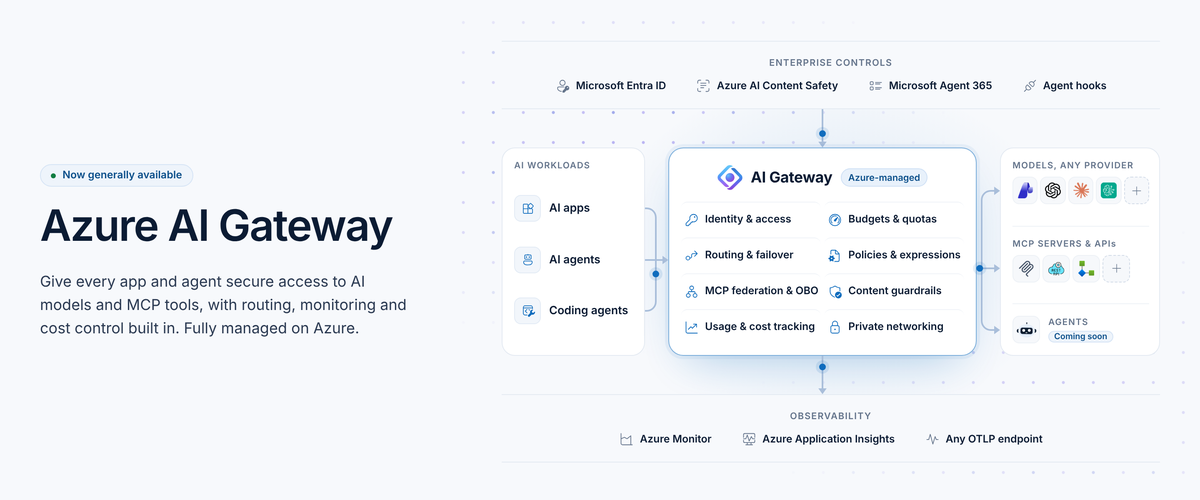
Connect AI apps and agents to models and MCP tools across providers, and govern access, policies, and costs from one fully managed gateway.
Today at Microsoft Ignite 2026, we're announcing the general availability of Azure AI Gateway, a fully managed Azure service that lets you set up a single, controlled path from your AI applications and agents to models and tools across providers. Developers build with the models and tools they choose, and platform teams manage access, enforce policies, control costs, and monitor usage from one place, without operating gateway infrastructure.
Azure AI Gateway, previously in public preview as the AI Gateway tier of Azure API Management, is now a standalone product optimized for governing access to AI models and tools, with a roadmap focused entirely on AI. You can use it by itself with any app or agent, or together with Microsoft Foundry, where you build and run agents, and Microsoft Agent 365, where you manage them.
Azure AI Gateway is available today in 17 Azure regions. To make it easy to get started, it offers a freemium, per-use pricing model with 10,000 free requests per gateway each month. Paid billing begins January 1, 2027. See the Regions and pricing section below for details.
Why enterprise AI needs a unified governance layer
Enterprise AI has moved beyond one app calling one model. Organizations use models from several providers, build agents that act through enterprise tools, and scale AI across teams.
When each app manages its own credentials, routing, safety, and usage limits, governance becomes fragmented. Developers struggle to find approved models and tools, and platform teams can't see who is using what, what it costs, or which policies apply. Azure AI Gateway lets you move those controls out of individual apps and into one place, where they apply consistently to every app and agent you connect.
How Azure AI Gateway works
Apps and agents you connect call the gateway instead of calling each model or tool directly. On every request, the gateway authenticates the caller with Microsoft Entra ID or a gateway access key, enforces access rules and your policies, routes the request to the right model or tool, and records telemetry.
Figure 1. Azure AI Gateway sits between callers and backends, governing every request that passes through it.
What you can do with Azure AI Gateway
Build with models and tools across providers
- Any model, one name: Use models from Microsoft Foundry, Azure OpenAI, OpenAI, Anthropic, Amazon Bedrock, Google Vertex AI, or any OpenAI-compatible endpoint. Apps call each model by an alias you define, so you can switch models without changing app code.
- Routing and failover: Route by priority, weight, or custom conditions, with configurable failover, or let Model Router (preview) choose by cost or quality.
- Consolidated tools: Federate MCP servers and turn OpenAPI specs, connectors, and API Management APIs into MCP tools. Multiple MCP spec versions are supported, including the latest (July 2026).
- The APIs you know: Call models through an OpenAI-compatible API or the Anthropic Messages API and connect agents to tools from any MCP client.
Govern and observe AI interactions
- Access with Entra ID: Built-in roles control who can use models and tools. Provider keys and tool credentials never reach app code.
- Safety on every prompt: Screen prompts and responses with Azure AI Content Safety.
- Only approved tools: Curate and block tools at the gateway, or through Microsoft Agent 365 policies.
- Protection from poisoned tools (preview): Through the Microsoft Agent 365 integration, Microsoft Defender and Microsoft Purview inspect tool calls and results and block threats before an agent acts.
- Delegated identity: With on-behalf-of (OBO) authentication, tools act with the signed-in user’s own permissions.
- Every call on record: Record the caller, target, tokens, and outcome of each model and tool call, trace each call to its agent, and export the data over OpenTelemetry to Application Insights, Datadog, Splunk, Grafana Cloud, or any OTLP endpoint.
- Private by design: Private Link (preview) for inbound calls, VNet integration (preview) for private backends, IP filtering, and managed identity.
Control AI spend as adoption scales
- See who spends what: Track tokens and estimated cost by user, team, app, agent, provider.
- Enforced budgets: Cost limits stop new requests once estimated spend reaches a budget.
- Fair sharing: Token and request limits keep one caller from crowding out the rest.
Discover, build, and operate in your existing workflow
- Coding agent plugin: Developers find approved models and tools and connect their apps from their coding agent.
- Portal, CLI, Bicep, and REST API: Configure in the portal or with the CLI, then deploy the same setup as code from your CI/CD pipelines with Bicep or the REST API.
See Azure AI Gateway in action
From connecting models and MCP tools to securing access, controlling costs, and monitoring AI traffic, this demo shows how Azure AI Gateway helps you run AI applications with confidence.
Extend AI governance across your Microsoft ecosystem
Already using Microsoft Foundry, Microsoft Agent 365, or Azure API Management? Azure AI Gateway works with all three.
Microsoft Foundry: Foundry has governance built in for its resources and projects. When AI spreads across teams, Foundry resources, subscriptions, and other providers, the gateway adds a shared layer on top. In a hub-and-spoke model, the gateway is the hub: a central platform team sets the rules once, and developers keep building in their Foundry projects, the spokes, using approved models and tools without managing credentials. Projects can share one deployment, including PTU, and fail over to another Foundry resource or provider. Foundry prompt agents can use gateway models through a model connection (preview), without code changes.
Microsoft Agent 365: Agent 365 discovers the gateway’s MCP servers and lets you set tool policies. The gateway enforces those policies, alongside its own, on every tool call, with added threat protection (preview) from Defender and Purview.
Regions and pricing
Azure AI Gateway is available today in 17 Azure regions: East US, East US 2, East US 2 EUAP, West US, West US 2, Central US, North Central US, South Central US, Canada East, West Europe, North Europe, UK South, France Central, Sweden Central, Australia East, Japan East, and Southeast Asia.
Azure AI Gateway offers a freemium, per-use pricing model with 10,000 free requests per gateway each month. Paid billing begins January 1, 2027.
|
Monthly gateway requests |
Service fee |
Additional request charges |
|
Up to 10,000 |
Free |
None |
|
More than 10,000, up to 10 million |
$500 per month, per gateway, billed hourly |
None (includes 10 million requests) |
|
More than 10 million |
$500 per month, per gateway, billed hourly |
$20 per additional million requests, billed in increments of 10,000 requests |
Prices are in US dollars and may vary by region. Exact regional prices will be available when billing begins.
Get started with Azure AI Gateway
Create a gateway at ai.gateway.azure.com. It’s ready in about a minute and free to start. Then:
- Connect an existing model and give it an alias.
- Expose the MCP tools your agents need.
- Give your team access with an AI Gateway role.
- Set a cost limit.
- Point your app or agent at the gateway.
Or start from your coding agent. Install the Azure AI Gateway plugin, and it finds approved models and tools and connects your app for you.
Explore the documentation and quickstarts at ai.gateway.azure.com/docs.

 Microsoft