zero trust
17 TopicsThe CISO Cheat Sheet to Microsoft Digital Defense Report 2026
I know we’re all busy, so I’ve pulled the most important data from this year’s Microsoft Digital Defense Report into one short read. The full report is well worth exploring, but this article focuses on the numbers and trends most relevant to security leaders. This year’s edition shows that AI is lowering the time, expertise and cost required to discover and exploit weaknesses, enabling attackers to operate with greater speed, scale and autonomy. The report describes this as AI “changing the physics of cybersecurity”: attack timelines are compressing and agentic systems are beginning to automate more of the attack lifecycle. Trend 1: Time has collapsed The clearest finding is about speed. Vulnerability discovery is increasingly running ahead of remediation, while the time from discovery to weaponisation is shrinking. In the AI era, weaponisation can follow in hours. Vulnerability discovery and weaponisation now often needs only a well-written prompt. The median time from discovery in the wild to weaponisation is below 24 hours. Vulnerabilities were on track for a record estimated 72,000 CVEs in 2026. The report expects a multi-year period in which the number of known but unpatched vulnerabilities rises sharply before eventually declining. The median time from container start to first exploit attempt is 5.3 hours. The ransomware actor Storm-1175 moved from web-facing exploitation to deploying Medusa ransomware in as little as 24 hours. CISA added over 110 CVEs to its Known Exploited Vulnerabilities catalogue between November 2025 and May 2026, most within a week of disclosure. The mismatch with enterprise reality is the uncomfortable part. The report says the disclosure-to-exploitation window has shrunk to single-digit days. Between November 2025 and May 2026, CISA added more than 110 vulnerabilities to its Known Exploited Vulnerabilities catalogue, most within a week of disclosure. In one example, Storm-1175 moved from exploiting a web-facing vulnerability to deploying Medusa ransomware in as little as 24 hours. Microsoft’s Red Team makes an important point: a patch is also a disclosure. Every fix points attackers towards the flaw it closes. As AI-assisted analysis makes reversing patches faster and more reliable, the report argues that patch velocity, not simply patch availability, becomes the control that matters. Trend 2: Attack chains are gaining autonomy The report charts a clear progression: September–November 2025: AI assists in orchestrating a campaign, as in the Anthropic-reported espionage case. April–June 2026: Full-chain autonomy is demonstrated in labs. July 2026: Real-world autonomous attacks of increasing complexity appear. Two frontier models, Mythos and GPT-5.5, completed a 32-step attack chain against an emulated enterprise with no human help. The test environment had no defenders. The UK AI Security Institute reached a similar finding independently. GPT-5.5 was the second model to solve its end-to-end corporate network attack simulation, a task AISI estimates would take a human about 20 hours. Open-weight models lag closed models at orchestrating attacks by about seven months. In the wild, early July 2026 saw the first documented automated ransomware extortion attack, named JADEPUFFER by Sysdig. Microsoft has seen AI-orchestrated intrusions that share elements with it. Initial access consistently came from internet-exposed services running known-vulnerable software. The report is measured on this point. Volumes of AI-orchestrated activity remain low. In most observed real-world operations, complex end-to-end intrusions still retain meaningful human direction. The Red Team's framing is the most useful one: AI doesn't create a new class of attack, it collapses the effort needed to find and exploit existing attack paths. Trend 3: AI has become an attack surface The report's second takeaway is that attackers are already targeting AI itself. The adoption numbers explain why. 88% of enterprises are experimenting with agents, and 82% of leaders plan broader rollouts within 12–18 months. The report cites industry projections of roughly 1.3 billion agents in production by 2028. What attackers are doing to AI systems: Four techniques accounted for roughly 90% of observed attack activity in telemetry from Azure AI workloads: malicious link injection (52%), jailbreaks (16%), tool and agent abuse (12%), and identity and credential abuse (10%). Memory poisoning: An attacker who can place content anywhere an agent reads can often place it where the agent remembers. Email is the dominant pathway the Red Team has observed. Human-in-the-loop isn't a complete control: Red team testing saw approval prompts ignored, or bypassed by a policy stored in poisoned memory. Developer tools turned against their owners: The "s1ngularity" malware hijacked locally installed AI command-line tools to hunt for secrets. It leaked about 2,000 secrets and 20,000 files across 225 victims. AI browsers: In daily use at more than 40% of organisations in Microsoft's dataset, they were the initial infection vector in incidents involving 57 malware families in a May 2026 analysis. Chat histories as a target: Malicious AI-assistant extensions reached nearly 900,000 installs and more than 20,000 enterprise tenants, harvesting AI chat histories that often contain code, architecture and credentials. The identity implications are direct. Each agent needs its own identity, not one borrowed from an employee, and a named human sponsor. The report also treats revocation latency, the time to cut off a compromised agent, as a measured outcome. Trend 4: The front door is still identity AI changes the speed and personalisation of social engineering. It hasn't changed where attacks start. Initial access in Defender Experts data: User execution: 30% Valid accounts: 20% Malicious copy-and-paste: 13% Phishing: 11% Together, user execution and valid accounts account for over half of observed activity. In incident response engagements, phishing as an initial access vector jumped from 7% to 23% year on year. The standout numbers: ClickFix: Defender saw user-pasted malicious commands on more than 1.1 million unique devices between February and early May 2026, roughly an 8x increase. AiTM: URLs accounted for 45% of the identified phishing techniques in the report’s breakdown. Separately, the share of AiTM phishing and token-theft attacks more than doubled during the first six months of 2026, although the report notes that their overall share remained comparatively small. Teams vishing: Weekly confirmed malicious volume increased 502% year on year. Per attempt, 48% of vishing calls kept the victim engaged for more than 20 seconds, and 30% lasted more than one minute. When a call succeeds, attackers can persuade the victim to install a remote-management tool and complete reconnaissance in two minutes or less. Business contact impersonation (BCI): The report introduces this term for conversations that start with a trusted-looking contact. Microsoft detected more than 46 million attacks in 12 months, with a 121% spike in April 2026. The share of first-contact messages that explicitly asked for money or documents fell from 17% to 3%. The first message is deliberately bland, like "Are you at your desk?" Password attacks declined 26% year on year, which the report describes as strong evidence that MFA and passkeys are forcing attackers to pivot. That pivot includes techniques such as fatigue attacks, AiTM phishing and token theft designed to circumvent conventional MFA. Trend 5: Attackers are inheriting trust rather than breaking in The report's headline theme is that risk is increasingly interconnected. Threats travel through the trusted relationships between identities, software supply chains, partners and cloud platforms. The numbers: Supply chain: Major open-source ecosystems saw attacks roughly every ten days, accelerating through Q2 2026. Shai-Hulud 2.0 affected 25,000 repositories. Megalodon backdoored 5,561 GitHub repositories in under six hours. Trusted signing: In May 2026, Microsoft disrupted Fox Tempest, a "malware-signing-as-a-service" operation that obtained genuine certificates for ransomware loaders and infostealers. Microsoft revoked over a thousand fraudulent code-signing certificates. Legitimate access: An unsanctioned remote monitoring tool is now one of the most reliable mid-stage indicators of a human-operated intrusion. Cloud identity: Cloud identity abuse was the most observed technique against critical infrastructure, representing 78% of the technique mix in Microsoft’s data for March to June 2026. Hybrid intrusions: The Storm-2885 case showed an attacker using a privileged cloud identity to close and downgrade security alerts. The report says identity governance and alert-handling workflows deserve Tier 0 treatment. Dwell time: DART data shows a statistically significant increase in dwell time year on year, meaning organisations took longer to detect intrusions. Ransomware shows the same ecosystem pattern. Qilin led leak-site data with 16.4% of victims, up 386%. Defender detections tell a different story, with Akira at 22%. Trend 6: Defence works best when it's connected The report is not only a catalogue of threats. The strongest defensive evidence: Disruption works. Following the March 2026 disruption, Tycoon2FA activity had fallen 95% from its November 2025 peak by June. Its share of CAPTCHA-gated phishing declined from 76% in December 2025 to 12% in June 2026. Correlation is the highest-leverage variable. The report argues that how well defenders share and correlate signals across endpoint, identity, cloud, email and network is one of the highest-leverage strategic variables under their control. AI is also changing defensive operations. The report describes AI-assisted triage, incident summarisation, hunting-query generation and detection engineering as ways to accelerate investigations and allow analysts to concentrate on higher-value work. Automated disruption can compress response time. The report says that when a correlated incident reaches a defined confidence threshold, defensive systems can automatically isolate devices, disable compromised accounts, revoke sessions or quarantine affected cloud resources. It also stresses the importance of appropriate governance and human oversight for high-risk AI actions. The report also recommends changing what leaders measure. It suggests moving from patches deployed to exposure reduced, detection coverage increased and time-to-mitigate compressed. What the MDDR recommends: ten security priorities The report starts its recommendations with the foundations: Secure by Design, Secure by Default and Secure Operations, applied through identity-centric Zero Trust. Microsoft says these keep the priorities below durable as AI adds more identities, applications, agents and dependencies to govern. Govern cyber risk at leadership level. Report identity exposure, patch latency, agent permissions, critical dependencies, dwell time and recovery readiness to the board. Defend identity as the primary control plane. Deploy passkeys and phishing-resistant MFA, reduce privilege and govern human and non-human identities. Invalidate and rotate tokens and session credentials quickly. Establish governance, visibility and data controls for AI. Keep visibility of approved AI tools, services and agents, and monitor for unauthorised or unmanaged use. Apply sensitivity-aware access and data protection to the data those systems can reach. Reduce exposure and edge risk. Continuously discover internet-facing assets and patch edge devices quickly. Centralise high-fidelity logging, enforce strong authentication and combine network visibility with threat intelligence. Focus on cross-signal correlation. Correlate endpoint, identity, cloud, application, email and network signals to detect intrusions earlier. Correlation also helps defenders anticipate attack paths and likely targets. Enact a continuous threat and vulnerability management model. Combine asset visibility, vulnerability identification, threat detection and AI-accelerated insight into a single continuous programme. Validate exposure through proactive testing. Run assume-breach exercises on cloud services, SaaS platforms, APIs and workflow automation. Prioritise them by where your highest-value data is stored, accessed or aggregated. Secure software dependencies. Harden software installation, keep a software inventory and validate provenance. Monitor packages and prepare for rapid containment. Participate in collective defence. Share actionable threat indicators and victim-informed intelligence with trusted partners and law enforcement. This supports coordinated tracking, investigation and disruption. Prepare for long-horizon technology transitions. Build a cryptographic inventory and advance post-quantum planning alongside AI governance. Read together, the numbers tell one story: the attacker’s workflow is becoming faster and less expensive. AI can shorten vulnerability discovery, exploitation, secret discovery and lateral movement, while organisations still face the slower operational work of testing, coordinating and deploying safe changes across complex environments. At the same time, agent identities can proliferate faster than organisations can inventory, govern and revoke them The defining question for boards today is not whether disruption will occur, but whether the organization can continue operating, contain harm, recover quickly, and maintain trust when it does. Source: Microsoft Digital Defense Report 2026, Version 1.1. Reporting period: July 2025–June 2026.
Large OS Disk Encryption is now generally available for Azure Confidential VM migrations
Today, we are excited to announce the General Availability of Large OS Disk Encryption (LOSDE) for Azure Confidential VM migration scenarios. This capability removes a key adoption barrier for customers migrating sensitive workloads to Azure Confidential Virtual Machines by enabling encryption for operating system disks larger than 127 GB. With LOSDE, organizations can securely migrate larger, more complex workloads to Azure to enable the confidentiality protections provided by Azure Confidential Computing. Why this matters For many enterprises, migrating existing workloads to the cloud is not simply a matter of redeployment. Business-critical applications often rely on large operating system disks and established operational configurations that must be preserved during migration. Until now, customers migrating workloads with operating system disks larger than 127 GB faced limitations when attempting to bring those workloads into Azure Confidential VMs while preserving confidential computing guarantees. This created an adoption challenge for organizations operating highly regulated or security-sensitive environments. Large OS Disk Encryption addresses this gap by extending encryption support to larger operating system disks during migration workflows. With LOSDE, customers can: Enable upgrading virtual machines to Azure Confidential VMs through the migration process. Migrate workloads with OS disks larger than 127 GB to Azure Confidential VMs. Continue to use customer-managed keys (CMKs) aligned with their security and compliance requirements. Support migration scenarios for Windows, Ubuntu, Red Hat Enterprise Linux, and Rocky Linux. Check the Azure Migrate documentation for the support list. Accelerate adoption of Azure Confidential Computing for existing enterprise environments. Simplifying secure migration to Azure Confidential VMs The Large OS Disk Encryption feature integrates seamlessly into Azure migration workflows, enabling customers to move existing workloads into Azure Confidential VMs while continuing to benefit from hardware-backed protections and the trusted execution environment capabilities of Azure Confidential Computing. LOSDE helps close that gap by enabling customers to bring existing workloads into Azure Confidential Computing environments while preserving the confidentiality guarantees required for regulated, critical, and sensitive applications. The solution offers automation with Azure Migrate , enabling Windows, Ubuntu, RHEL, and Rocky Linux workloads to be encrypted while preserving the confidentiality guarantees of Azure Confidential Computing and supporting customer-managed keys (CMKs). The result is a simpler path to cloud modernization, stronger protection for data in use, and expanded adoption opportunities for Azure Confidential Virtual Machines . This work reflects Microsoft's ongoing commitment to making advanced security capabilities easier to adopt without increasing operational complexity.Strengthening Semiconductor Supply Chain Trust with Microsoft’s Artifact Signing and Transparency
As enterprises expand their use of Confidential Computing in the cloud and in AI infrastructure, the security of the underlying hardware is more critical than ever. Organizations and their customers need confidence not only in the software they deploy, but also in the silicon and firmware executing their most sensitive workloads. AMD and Microsoft are collaborating to demonstrate how signing and transparency can strengthen trust in the semiconductor supply chain. By combining AMD Device Provenance with Microsoft’s Artifact Signing and Signing Transparency, we are exploring how device provenance, signing, and transparency could work together to support independently verifiable hardware evidence. Why Hardware Provenance Needs Transparency Provenance evidence is most useful when it can be independently verified and evaluated alongside related supply chain evidence. Semiconductor manufacturers generate evidence across selected manufacturing and lifecycle stages, which may describe relevant device attributes, manufacturing events, and validation activities. A digitally signed record establishes who issued information and its integrity. Individual signatures alone do not provide a durable and independently verifiable record of the order in which they were issued, whether they were recorded consistently, or whether unexpected activity occurred in the interval. Transparency addresses this gap. Microsoft's Signing Transparency leverages confidential computing to create a verified, tamper-evident record of signing events, allowing customers and auditors to confirm that evidence was recorded and has not been silently changed or been removed. It applies the Zero Trust principle of “trust but Verify” by giving relying parties cryptographic proof they can evaluate directly. Extending Transparency from Software to Silicon Microsoft's Signing Transparency was designed to address software supply chain threats that traditional code signing alone cannot fully prevent. The same principles can be applied to firmware, hardware provenance, and other evidence generated across the physical supply chain. AMD Device Provenance is designed to provide visibility into the manufacturing and lifecycle of data center components. Through our collaboration, AMD and Microsoft are demonstrating how this evidence can be signed, made transparent, and independently validated. This approach provides several important benefits: Transparent provenance: Changes to signed hardware evidence can be detected rather than silently accepted. Independent validation: Customers can independently validate the integrity, signing history, and transparency records associated with provenance evidence while still applying their own trust requirements to the evidence issuer. Stronger accountability: Transparency creates a durable record of signing events, providing evidence that can help identify unexpected patterns or unauthorized signatures. Audit and compliance evidence: Verifiable records may help inform supplier assessments, regulatory inquiries, and internal due diligence. Standards-based portability: Evidence can be validated across organizational boundaries using interoperable IETF specifications, including RFC 9943, An Architecture for Trustworthy and Transparent Digital Supply Chains, RFC 9942, CBOR Object Signing and Encryption Receipts, and RFC 9995, CBOR Object Signing and Encryption Hash Envelope, rather than proprietary trust mechanisms. Together, these capabilities allow relying parties to verify the origin, integrity, registration, and device binding of manufacturer-issued provenance evidence. Learn More at OCP Global Summit At OCP Global Summit 2026, AMD and Microsoft will present a proof-of-concept demonstration that prototypes how these components could operate together. Visit the AMD (#C61) booth to see the demonstration and learn how AMD and Microsoft are advancing semiconductor supply chain security. To dive deeper into the demo details read AMD’s blog Advancing Semiconductor Supply Chain Assurance. Organizations interested in applying Artifact Signing and Signing Transparency to software, firmware, or hardware can also join the Artifact Signing with Signing Transparency preview community to learn more and help shape the future of the service.Migrate Sentinel to Defender - Why It Is a Security Architecture Decision, Not Just a Portal Change
Microsoft will retire the Sentinel experience in Azure on March 31, 2027. Most of the conversation around this transition focuses on cost optimization and portal consolidation. That framing undersells what is actually happening. The unified Defender portal is not a new interface for the same capabilities. It is the platform foundation for a fundamentally different SOC operating model — one built on a 2-tier data architecture, graph-based investigation, and AI agents that can hunt, enrich, and respond at machine speed. Partners who understand this will help customers build security programs that match how attackers actually operate. This document covers four things: What the unified experience delivers — the security capabilities that do not exist in standalone Sentinel and why they matter against today’s threats. What the transition really involves - is not data migration, but it is a data architecture project that changes how telemetry flows, where it lives, and who queries it. Where the partner opportunity lives — a structured progression from professional services (transactional, transition execution, and advisory) to ongoing managed security services. Why does the unified experience win competitively — factual capability advantages that give partners a defensible position against third-party SIEM alternatives. The Bigger Picture: Preparing for the Agentic SOC Before getting into transition mechanics, partners need to understand where the industry is headed — because the platform decisions made during this transition will determine whether a customer’s SOC is ready for what comes next. The security industry is moving from human-driven, alert-centric workflows to an operating model built on three pillars: Intellectual Property — the detection logic, hunting hypotheses, response playbooks, and domain expertise that differentiate one security team from another. Human Orchestration — the judgment, context, and decision-making that humans bring to complex incidents. Humans set strategy, validate findings, and make containment decisions. They do not manually triage every alert. AI Agents - built agents that execute repeatable work: enriching incidents, hunting across months of telemetry, validating security posture, drafting response actions, and flagging anomalies for human review. The SOC of 2027 will not be scaled by hiring more analysts. It will be scaled by deploying agents that encode institutional knowledge into automated workflows — orchestrated by humans who focus on the decisions that require judgment. This transformation requires a platform that provides three things: Deep telemetry — agents need months of queryable data to analyze behavioral patterns, build baselines, and detect slow-moving threats. The Sentinel data lake provides this at a cost point that makes long-retention feasible. Relationship context — agents need to understand how entities connect. Which accounts share credentials? What is the blast radius of a compromised service principle? What is the attack path from a phished user to domain admin? Sentinel Graph provides this. Extensibility — partners and customers need to build and deploy their own agents without waiting for Microsoft to ship them. The MCP framework and Copilot agent architecture provide this. None of these exist in Azure experience for Sentinel. All three ship with the Defender experience. The urgency goes beyond the March 2027 deadline. Organizations are deploying AI agents, copilots, and autonomous workflows across their businesses — and every one of those creates a new attack surface. Prompt injection, data poisoning, agent hijacking, cross-plugin exploitation — these are not theoretical risks. They are in the wild today. Defending against AI-powered attacks requires a security platform that is itself AI Agent-ready. The new experience in Defender unlocks this experience. What Unified SIEM and XDR Actually Delivers The original framing — “single pane of glass for SIEM and XDR” — is accurate but insufficient. Here is what the unified platform delivers that standalone Sentinel does not. Cross-Domain Incident Correlation The Defender correlation engine does not just group alerts by time proximity. It builds multi-stage incident graphs that link identity compromise to lateral movement to data exfiltration across SIEM and XDR telemetry — automatically. Consider a token theft chain: an infostealer harvests browser session cookies (endpoint telemetry), the attacker replays the token from a foreign IP (Entra ID sign-in logs), creates a mailbox forwarding rule (Exchange audit logs), and begins exfiltrating data (DLP alerts). In standalone Sentinel, these are four separate alerts in four different tables. In the unified platform, they are one correlated incident with a visual attack timeline. 2-Tier Data Architecture The Sentinel data lake introduces a second storage tier that changes the economics and capabilities of security telemetry: Analytics Tier Data Lake Purpose Real-time detection rules, SOAR, alerting Hunting, forensics, behavioral analysis, AI agent queries Latency Sub-5-minute query and alerting Minutes to hours acceptable Cost ~$4.30/GB PAYG ingestion (~$2.96 at 100 GB/day commitment) ~$0.05/GB ingestion + $0.10/GB data processing (at least 20x cheaper) Retention 90 days default (expensive to extend) Up to 12 years at low cost Best for High-signal, low-volume sources High-volume, investigation-critical sources The architecture decision is not “which tier is cheaper.” It is “which tier gives me the right detection capability for each data source.” Analytics tier candidates: Entra ID sign-in logs, Azure activity, audit logs, EDR alerts, PAM events, Defender for Identity alerts, email threat detections. These need sub-5-minute alerting. Data lake candidates: Raw firewall session logs, full DNS query streams, proxy request logs, Sysmon process events, NSG flow logs. These drive hunting and forensic analysis over weeks or months. Dual-ingest sources: Some sources need both tiers. Entra ID sign-in logs are the canonical example — analytics tier for real-time password spray detection, Data Lake for graph-based blast radius analysis across months of authentication history. Implementation is straightforward: a single Data Collection Rule (DCR) transformation handles the split. One collection point, two routing destinations. The right framing: “Right data in the right tier = better detections AND lower cost.” Cost savings are a side effect of good security architecture, not the goal. Sentinel Graph Sentinel graph enables SOC teams and AI agents to answer questions that flat log queries cannot: What is the blast radius of this compromised account? Which service principals share credentials with the breached identity? What is the attack path from this phished user to domain admin? Which entities are connected to this suspicious IP across all telemetry sources? Graph-based investigation turns isolated alerts into context-rich intelligence. It is the difference between knowing “this account was compromised” and understanding “this account has access to 47 service principals, 3 of which have written access to production Key Vault.” Security Copilot Integration Security Copilot embedded in the defender portal helps analysts summarize incidents, generate hunting queries, explain attacker behavior, and draft response actions. For complex multi-stage incidents, it reduces the time from “I see an alert” to “I understand the full scope” from hours to minutes. With free SCUs available with Microsoft 365 E5, teams can apply AI to the highest-effort investigation work without adding incremental cost. MCP and the Agent Framework The Model Context Protocol (MCP) and Copilot agent architecture let partners and customers build purpose-built security agents. A concrete example: an MCP-enabled agent can automatically enrich a phishing incident by querying email metadata, checking the sender against threat intelligence, pulling the user’s recent sign-in patterns, correlating with Sentinel Graph for lateral risk, and drafting a containment recommendation — in under 60 seconds. This is where partner intellectual property becomes competitive advantage. The agent framework is the mechanism for encoding proprietary detection logic, response playbooks, and domain expertise into automated workflows that run at machine speed. Security Store Security Store allows partners to evolve from one‑time transition projects into repeatable, scalable offerings—supporting professional services, managed services, and agent‑based IP that align with the customer’s unified SecOps operating model As part of the transition, the Microsoft Security Store becomes the extension layer for the Defender —allowing partners to deliver differentiated agents, SaaS, and security services natively within Defender and Sentinel, instead of building and integrating in isolation The 4 Investigation Surfaces: A Customer Maturity Ladder The Sentinel Data Lake exposes four distinct investigation surfaces, each representing a step toward the Agentic SOC — and a partner service opportunity: Surface Capability Maturity Level Partner Opportunity KQL Query Ad-hoc hunting, forensic investigation Basic — “we can query” Hunting query libraries; KQL training Graph Analytics Blast radius, attack paths, entity relationships Intermediate — “we understand relationships” Graph investigation training; attack path workshops Notebooks (PySpark) Statistical analysis, behavioral baselines, ML models Advanced — “we predict behaviors” Custom notebook development; anomaly scoring Agent/MCP Access Autonomous hunting, triage, response at machine speed Agentic SOC — “we automate” Custom agent development; MCP integration The customer who starts with “help us hunt better” ends up at “build us agents that hunt autonomously.” That is the progression from professional services to managed services. What the Transition Actually Involves It is not a data migration — customers’ underlying log data and analytics remain in their existing Log Analytics workspaces. That is important for partners to communicate clearly. But partners should not set the expectation that nothing changes except the URL. Microsoft’s official transition guide documents significant operational changes — including automation rules and playbooks, analytics rule, RBAC restructuring to the new unified model (URBAC), API schema changes that break ServiceNow and Jira integrations, analytics rule transitions where the Fusion engine is replaced by the Defender XDR correlation engine, and data policy shifts for regulated industries. Most customers cannot navigate this complexity without professional help. Important: Transitioning to the Defender portal has no extra cost - estimate the billing with the new Sentinel Cost Estimator Optimizing the unified platform means making deliberate changes: Adding dual-ingest for critical sources that need both real-time detection and long-horizon hunting. Moving high-volume telemetry to the Data Lake — enabling hunting at scale that was previously cost-prohibitive. Retiring redundant data copies where Defender XDR already provides the investigation capability. Updating RBAC, automation, and integrations for the unified portal’s consolidated schema and permission structure. Training analysts on new investigation workflows, Sentinel Graph navigation, and Copilot-assisted triage. Threat Coverage: The Detection Gap Most Organizations Do Not Know They Have This transition is an opportunity to quantify detection maturity — and most organizations will not like what they find. Based on real-world breach analysis — infostealers, business email compromise, human-operated ransomware, cloud identity abuse, vulnerability exploitation, nation-state espionage, and other prevalent threat categories — organizations running standalone Sentinel with default configurations typically have significant detection gaps. Those gaps cluster in three areas: Cross-domain correlation gaps — attacks that span identity, endpoint, email, and cloud workloads. These require the Defender correlation engine because no single log source tells the complete story. Long-retention hunting gaps — threats like command-and-control beaconing and slow data exfiltration that unfold over weeks or months. Analytics-tier retention at 90 days is too expensive to extend and too short for historical pattern analysis. Graph-based analysis gaps — lateral movement, blast radius assessment, and attack path analysis that require understanding entity relationships rather than flat log queries. The unified platform with proper log source coverage across Microsoft-native sources can materially close these gaps — but only if the transition includes a detection coverage assessment, not just a portal cutover. Partners should use MITRE ATT&CK as the common framework for measuring detection maturity. Map existing detections to ATT&CK tactics and techniques before and after transition — a measurable, defensible improvement that justifies advisory fees and ongoing managed services. Partner Opportunity: Professional Services to Managed Services This transition creates a structured progression for all partner types — from professional services that build trust and surface findings, to managed security services that deliver ongoing value. The key insight most partners miss: do not jump from “transition assessment” to “managed services pitch.” Customers are not ready for that conversation until they have experienced the value of professional services. The bridge engagement — whether transactional, transition execution, or advisory — builds trust, demonstrates the expertise, and surfaces the findings that make the managed services conversation a logical next step. Professional Services (transactional + transition execution + advisory) → Managed Security Services (MSSP) The USX transition is the ideal professional services entry point because it combines a mandatory deadline (March 2027) with genuine technical complexity (analytics rule, automation behavioral changes, RBAC restructuring, API schema shifts) that most customers cannot navigate alone. Every engagement produces findings — detection gaps, automation fragility, staffing shortfalls — that are the most credible possible evidence for managed services. Professional Services Transactional Partners Offer Customer Value Key Deliverables Transition Readiness Assessment Risk-mitigated transition with clear scope Sentinel deployment inventory; Defender portal compatibility check; transition roadmap with timeline; MITRE ATT&CK detection coverage baseline Transition Execution and Enablement Accelerated time-to-value, minimal disruption Workspace onboarding; RBAC and automation updates; Dual-portal testing and validation; SOC team training on unified workflows Security Posture and Detection Optimization Better detections and lower cost Data ingestion and tiering strategy; Dual-ingest implementation for critical sources; Detection coverage gap analysis; Automation and Copilot/MCP recommendations Advisory Partners Offer Customer Value Key Deliverables Executive and Strategy Advisory Leadership alignment on why this transition matters Unified SecOps vision and business case; Zero Trust and SOC modernization alignment; Stakeholder alignment across security, IT, and leadership Architecture and Design Advisory Future-ready architecture optimized for the Agentic SOC Target-state 2-tier data architecture; Dual-ingest routing decisions mapped to MITRE tactics; RBAC, retention, and access model design Detection Coverage and Gap Analysis Measurable detection maturity improvement Current-state MITRE ATT&CK coverage mapping; Gap analysis against 24 threat patterns; Detection improvement roadmap with priority recommendations SOC Operating Model Advisory Smooth analyst adoption with clear ownership Redesigned SOC workflows for unified portal; Incident triage and investigation playbooks; RACI for detection engineering, hunting, and platform ops Agentic SOC Readiness Preparation for AI-driven security operations MCP and agent architecture assessment; Custom agent development roadmap; IP + Human Orchestration + Agent operating model design Cost, Licensing and Value Advisory Transparent cost impact with strong business case Current vs. future cost analysis; Data tiering optimization recommendations; TCO and ROI modeling for leadership The conversion to managed services is evidence-based. Every professional services engagement produces findings — detection gaps, automation fragility, staffing shortfalls. Those findings are the most credible possible case for ongoing managed services. Managed Security Services The unified platform changes the managed security conversation. Partners are no longer selling “we watch your alerts 24/7.” They are selling an operating model where proprietary AI agents handle the repeatable work — enrichment, hunting, posture validation, response drafting — and human experts focus on the decisions that require judgment. This is where the competitive moat forms. The formula: IP + Human Orchestration + AI Agents = differentiated managed security. The unified platform enables this through: Multi-tenancy — the built-in multitenant portal eliminates the need for third-party management layers. Sentinel Data Lake — agents can query months of customer telemetry for behavioral analysis without cost constraints. Sentinel Graph — agents can traverse entity relationships to assess blast radius and map attack paths. MCP extensibility — partners can build agents that integrate with proprietary tools and customer-specific systems. Partners who build proprietary agents encoding their detection logic into the MCP framework will differentiate from partners who rely on out-of-box capabilities. The Securing AI Opportunity Organizations are deploying AI agents, copilots, and autonomous workflows across their businesses at an accelerating pace. Every AI deployment creates a new attack surface — prompt injection, data poisoning, agent hijacking, cross-plugin exploitation, unauthorized data access through agentic workflows. These are not theoretical risks. They are in the wild today. Partners who can help customers secure their AI deployments while also using AI to strengthen their SOC will command premium positioning. This requires a security platform that is itself AI Agent-ready — one that can deploy defensive agents at the same pace organizations deploy business AI. The unified Defender portal is that platform. Partners who position USX as “preparing your SOC for AI-driven security operations” will differentiate from partners who position it as “moving to a new portal.” Cost and Operational Benefits Better security architecture also costs less. This is not a contradiction — it is the natural result of putting the right data in the right tier. Benefit How It Works Eliminate low-value ingestion Identify and remove log sources that are never used for detections, investigations, or hunting. Immediately lowers analytics-tier costs without impacting security outcomes. Right-size analytics rules Disable unused rules, consolidate overlapping detections, and remove automation that does not reduce SOC effort. Pay only for processing that delivers measurable security value. Avoid SIEM/XDR duplication Many threats can be investigated directly in Defender XDR without duplicating telemetry into Sentinel. Stop re-ingesting data that Defender already provides. Tier data by detection need Store high-volume, hunt-oriented telemetry in the Data Lake at at least 20x lower cost. Promote only high-signal sources to the analytics tier. Full data fidelity preserved in both tiers. Reduce operational overhead Unified SIEM+XDR workflows in a single portal reduce tool switching, accelerate investigations, simplify analyst onboarding, and enable SOC teams to scale without proportional headcount increases. Improve detection quality The Defender correlation engine produces higher-fidelity incidents with fewer false positives. SOC teams spend less time triaging noise and more time on real threats. Competitive Positioning Partners need defensible talking points when customers evaluate third-party SIEM alternatives. The following advantages are factual, sourced from Microsoft’s transition documentation and platform capabilities — not marketing claims. No extra cost for transitioning — even for non-E5 customers. Third-party SIEM migrations involve licensing, data migration, detection rewrite, and integration rebuild costs. Native cross-domain correlation across Sentinel + Defender products into multi-stage incident graphs. Third-party SIEMs receive Microsoft logs as flat events — they lack the internal signal context, entity resolution, and product-specific intelligence that powers cross-domain correlation. Custom detections across SIEM + XDR — query both Sentinel and Defender XDR tables without ingesting Defender data into Sentinel. Eliminates redundant ingestion cost. Alert tuning extends to Sentinel — previously Defender-only capability, now applicable to Sentinel analytics rules. Net-new noise reduction. Unified entity pages — consolidated user, device, and IP address pages with data from both Sentinel and Defender XDR, plus global search across SIEM and XDR. Third-party SIEMs provide entity views from ingested data only. Built-in multi-tenancy for MSSPs — multitenant portal manages incidents, alerts, and hunting across tenants without third-party management layers. Try out the new GDAP capabilities in Defender portal. Industry validation: Microsoft’s SIEM+XDR platform has been recognized as a Leader by both Forrester (Security Analytics Platforms, 2025) and Gartner (SIEM Magic Quadrant, 2025). Summary: What Partners Should Take Away Topic Key Message Framing USX is a security architecture transformation, not a portal transition. Lead with detection capability, not cost savings. Platform foundation Sentinel Data Lake + Sentinel Graph + MCP/Agent Framework = the platform for the Agentic SOC. 4 investigation surfaces KQL → Graph → Notebooks → Agent/MCP. A maturity ladder from “we can query” to “we automate at machine speed.” Architecture 2-tier data model (analytics + Data Lake) with dual-ingest for critical sources. Cost savings are a side effect of good architecture. Transition complexity Analytics rules and automation rules. API schema changes. RBAC restructuring. Most customers need professional help. Partner engagement model Professional Services (transactional + transition execution + advisory) → Managed Services (MSSP). Competitive positioning No extra cost. Native correlation. Cross-domain detections. Built-in multi-tenancy. Capabilities third-party SIEMs cannot replicate. Partner differentiation IP + Human Orchestration + AI Agents. Partners who build proprietary agents on MCP have competitive advantage. Timeline March 31, 2027. Start now — phased transition with one telemetry domain first, then scale.4.1KViews5likes5Comments
One SOC, Many Tenants: Centralizing Microsoft Sentinel with Azure Lighthouse
Most large organizations don’t live in a single Microsoft Entra ID tenant. Acquisitions, regulatory separation, sovereignty mandates, and mission boundaries all multiply tenants over time. For a security operations team, that sprawl creates one hard question: how do you run a single security operations center (SOC) with one pane of glass, without copying every tenant’s logs into a central bucket and inheriting the compliance risk that comes with it? Azure Lighthouse provides delegated resource management for this scenario. It lets authorized operators in a central hub tenant work with scoped resources in spoke tenants from their own tenant. Paired with Microsoft Sentinel, it supports cross-tenant visibility while source logs remain stored in each spoke workspace. Group-based RBAC and Privileged Identity Management (PIM) can help govern privileged access. This practical blueprint applies least privilege to that pattern: one Sentinel deployment in the hub, delegated read access to the Log Analytics workspaces in each spoke, and RBAC and PIM controls that support auditability. The delegation is scoped to the workspaces the SOC needs. Before you begin: prerequisites Gather the identifiers and identity groups below before you touch any tenant. The consistency you establish here is what makes the per-spoke procedure repeatable across an entire estate. Collect tenant and workspace identifiers Hub CSOC tenant ID and hub Sentinel workspace resource ID. For each spoke: tenant ID, subscription ID, workspace resource group, and workspace resource ID. Create hub security groups in Microsoft Entra ID SOC-Readers, the required core query-access group. SOC-Responders, an optional group for response-specific actions. SOC-Admins, an optional and tightly controlled group. Define the minimum RBAC baseline Assign Log Analytics Reader to SOC-Readers at the spoke workspace or resource-group scope. Add elevated roles only when a documented use case requires them. Register the required resource providers Lighthouse and Sentinel both depend on resource providers being registered before delegation will work. In every spoke subscription, register Microsoft.ManagedServices so the delegation can be created. And because Sentinel lives only in the hub, register Microsoft.SecurityInsights and Microsoft.OperationalInsights on at least one subscription in the hub tenant. That last step is easy to overlook, and skipping it quietly blocks cross-tenant operations. What you’ll find here The architecture, and why data residency makes hub-and-spoke the right call. Prerequisites, including the resource providers teams most often forget to register. A repeatable, per-spoke delegation procedure. Validation queries that prove the access path actually works. A complete RBAC assignment matrix and PIM activation policy. Troubleshooting for the errors you’ll actually hit. Why hub-and-spoke for a cross-tenant SOC In this model, Microsoft Sentinel is deployed once, in the hub (CSOC) tenant. Each spoke tenant keeps its own Log Analytics workspace, where its logs are collected and retained. Azure Lighthouse connects the two: the spoke delegates scoped access to the hub, and authorized hub analysts query spoke workspaces from their own tenant. The source logs remain stored in the spoke workspace, while query results are returned across tenant boundaries to authorized users and services. Figure 1. The hub runs Sentinel and queries each spoke’s Log Analytics workspace through a scoped Azure Lighthouse delegation; logs never leave the spoke tenant. That separation is the entire point, and it lines up with the advantages Microsoft calls out for centralized cross-tenant management: Workspace ownership and source-log storage remain with each spoke tenant. Source telemetry remains stored in the configured spoke workspace and region, subject to the service configuration and authorized query access. Separate workspaces help maintain tenant isolation between spokes. Cross-tenant detection and hunting can query spoke workspaces without centralizing the underlying source logs; authorized query results are returned across tenant boundaries. Ingestion and retention costs are billed to the tenant that generates the data, not to the hub. What this runbook delivers The objective is a centralized CSOC with scoped, governed access across spoke tenants from a single Sentinel instance. Hub SOC teams query spoke Log Analytics workspaces through delegation, run cross-tenant analytics, and create and manage incidents centrally, while spoke logs stay in spoke workspaces and tenant isolation is preserved. Just as important is how that access is granted. The target state is least-privilege by construction: RBAC assignments carry only the permissions the SOC needs, privileged roles are PIM-governed rather than standing, and every delegation is scoped to the specific resources in play. When the build is complete, the operating model is both active and auditable. Configuring the delegation (per spoke tenant) Repeat the three steps below for each spoke. For fleets larger than a handful of tenants, capture the same authorization in an Azure Lighthouse ARM template and deploy it per spoke, so the scope and role assignments stay identical across the estate. Step 1: Register the provider in the spoke subscription Register Microsoft.ManagedServices in the spoke subscription. Confirm the provider registration state is Registered before continuing. Step 2: Create the Lighthouse delegation from spoke to hub Open Azure Lighthouse in the spoke tenant. Create a delegation, or offer, and set the managing tenant to the hub CSOC tenant ID. Add an authorization with the principal set to the hub SOC-Readers group and the role set to Log Analytics Reader. Set the scope to the workspace resource group (preferred) or to the individual workspace. Prefer group-based assignments and avoid direct user assignments. Step 3: Repeat across all spoke tenants Apply the same pattern and naming convention every time. Document any scope or role exceptions for security review. Validating the delegation Three checks confirm the delegation is wired correctly: visibility, query access, and incident generation. Run them in order, because each one depends on the check before it. Figure 2. The three validation checks run in sequence — visibility, then cross-tenant query, then incident generation — each building on the one before. Confirm delegated visibility From the hub context, verify that each spoke appears under Azure Lighthouse delegated resources. Confirm that the expected principals and scopes are listed. Run a cross-tenant query from hub Sentinel Run a simple take query to verify that the access path resolves. Run a data query against a known active table to confirm you can see ingestion. Confirm the access path resolves: workspace("/subscriptions/<spoke-sub-id>/resourceGroups/<spoke-rg>/providers/Microsoft.OperationalInsights/workspaces/<spoke-ws>") | take 1 Check that a known table is receiving data: workspace("/subscriptions/<spoke-sub-id>/resourceGroups/<spoke-rg>/providers/Microsoft.OperationalInsights/workspaces/<spoke-ws>").Heartbeat | where TimeGenerated > ago(24h) | summarize Events = count() Verify incident generation in hub Sentinel Create a temporary scheduled analytics rule that uses cross-tenant query logic. Trigger the test condition and confirm that the incident is created in the hub. Standardizing new-spoke onboarding Turn the procedure into a checklist so every new spoke is onboarded the same way and nothing slips. Resource provider registered. Delegation deployed with the hub as managing tenant. Roles assigned to hub SOC groups. Cross-tenant query test passed. Hub incident-generation test passed. Access-review owner assigned. Security and governance Delegation connects the hub to scoped spoke resources; governance helps control that access. Three controls do most of the work. Enforce privileged identity controls Make privileged groups PIM-eligible rather than permanently assigned. Require MFA, approval, justification, and time-bound activation. Maintain separation of duties Keep SOC monitoring, content engineering, and platform administration in separate roles. Review delegated access on a recurring governance cadence. Manage exceptions with formal controls Document every elevated-access and broad-scope delegation exception. Require security-architecture approval for any non-standard scope. Role and RBAC assignment matrix The tables below translate those principles into concrete assignments: first the hub-local roles, then the delegated spoke roles, and finally the PIM activation policy that governs both. Hub (CSOC) tenant: local assignments Spoke (service) tenant: delegated via Azure Lighthouse PIM activation requirements Key design rules Minimum privilege governs spoke delegation. Log Analytics Reader covers every cross-tenant detection and query operation, so Owner and broad Contributor at subscription scope have no place in a SOC delegation. Sentinel Responder in a spoke is rarely needed. It matters only when analysts must acknowledge, close, or act on spoke-level resources directly, and in a hub-only Sentinel model spoke incidents don’t exist, so the role usually isn’t required. Separation of duties is strict. Content engineers don’t get responder rights, responders don’t get content-deployment rights, and platform admins sit apart from both monitoring and detection engineering. Routine privileged roles are eligible and time-bound. SOC responders, hunters, content engineers, and platform admins use PIM rather than permanent assignment. Emergency-access accounts are the exception and should follow Microsoft Entra emergency-access guidance, including monitoring and regular validation. Troubleshooting common issues Most problems fall into three buckets, and each has a short diagnostic path. Design notes and what’s next By default, Sentinel stays enabled in the hub only, unless a spoke-specific requirement is approved. Spoke tenants remain data-source focused and don’t generate local Sentinel incidents; detection, incident management, and automation all live in hub Sentinel, giving you one place to build content and one place to respond. A centralized SOC does not require centralizing every source workspace. With scoped Azure Lighthouse delegation and PIM-governed access, a CSOC can query a multitenant estate while source logs remain stored in their spoke workspaces. Further reading Manage Microsoft Sentinel workspaces at scale (Azure Lighthouse) Manage multiple tenants in Microsoft Sentinel as an MSSP Extend Microsoft Sentinel across workspaces and tenantsUnderstanding Microsoft 365 Copilot Risk Surface and Mitigations
Microsoft 365 Copilot acts on the access users already have. It does not grant new permissions — it is a force multiplier that makes existing access faster and easier to discover, aggregate, and act on across Microsoft 365. That speed and accessibility can also amplify existing security and governance gaps. In environments with overshared content, excessive permissions, or inconsistent governance, users may gain faster access to sensitive information than organizations realize. It’s a shift that carries important security implications organizations should understand before scaling deployment. Customers with Microsoft 365 E5 licensing may already have access to many of the tools that can help identify and reduce Copilot-related risk, but licensing alone does not reduce exposure. What’s often missing during early Copilot deployments is a clear understanding of the risk surface itself: what data is exposed, who can access it, and through which vectors.Strengthen your security posture with Microsoft Entra Conditional Access
Learn how Microsoft Entra Conditional Access, our Microsoft Zero Trust policy engine, protects access for your workforce and for agents by enforcing real‑time adaptive access policies that continuously assess risk signals and use AI‑driven automation to dynamically allow, challenge, or block access for every identity. Join Microsoft experts as they walk through real‑world scenarios and share practical guidance to help your identity team address policy sprawl, enforce consistent Conditional Access policies, and strengthen security posture across your environment. How do I participate? Registration is not required. Add this event to your calendar, then sign in to the Tech Community and select Attend to receive reminders. Post your questions in advance, or any time during the live broadcast. Note: This session was originally scheduled for June 8, 2026 and will now take place on June 24, 2026.4KViews0likes8Comments
Microsoft Leads a New Era of Software Supply Chain Transparency
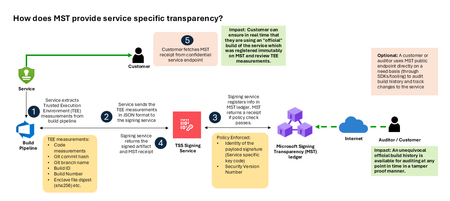
Today, Microsoft announces the general availability of Microsoft’s Signing Transparency (MST) – a first-of-its-kind capability that brings unprecedented visibility and trust to our software supply chain. With this release, Microsoft is leading the industry by recording the build of critical cloud services into a publicly readable and verifiable SCITT standard (Supply Chain Integrity, Transparency, and Trust) compliant blockchain ledger. This means every production software build for in scope services like Azure Attestation and Azure Managed HSM (Hardware Security Module), Azure confidential ledger, Microsoft Signing Transparency itself (and others over time) – is now logged in an immutable, tamper-evident record. Only builds that are in the MST ledger are deployed to production; this gives customers confidence that the supply chain for these critical services can be audited at anytime. Notably, the MST ledger is fully open source and built to align with the emerging IETF SCITT standard. By embracing SCITT’s principles and open protocols, Microsoft ensures that MST not only secures our own ecosystem but also contributes to a broader industry movement toward standardized supply chain transparency. The open-source MST ledger serves as a verifiable trust anchor that any organization or researcher can inspect, audit, or even integrate with their own tooling. MST itself meets the highest levels of transparency, backed by a tamper-proof confidential ledger, open-source, and independently verified. Specifically, we are making the foundation of our trust model transparent and accessible to everyone – reinforcing that trust must be earned through proof, not just promises. This launch marks a major milestone in our commitment to Zero Trust principles, extending “never trust, always verify” all the way into the build itself. Building on a public preview introduced late last year, MST’s general availability delivers verifiable transparency at the software level. It transforms traditional code signing with an additive trust layer that is accessible via an open verification model. Every new software update is accompanied by a publicly auditable proof of integrity, enabling security teams to proactively confirm that each update is authentic and unaltered. To help organizations get the most out of this capability, we are also introducing a free tool to explore the contents – Ledger Explorer – an offline tool that allows security teams to examine MST ledger entries, verify cryptographic proofs, and even validate the ledger’s integrity independently. This tool, combined with MST’s open design, ensures that every Microsoft customer – and the broader community – can hold us accountable in real time for the software we run on their behalf. Key Benefits of Microsoft’s Signing Transparency (MST) Verified Code Integrity – Every software release is cryptographically logged in MST’s ledgers. This makes each build tamper-evident and traceable. If an attacker attempts to inject malicious code or sign an unauthorized update, it will be evident through the well-defined validation step built into the SCITT standard. Organizations gain the assurance that code integrity can be independently confirmed at any time. Independent Verification & Zero Trust – MST enables customers and auditors to verify software authenticity on their own, without having to solely rely on vendor attestations. For each update, Microsoft provides a transparency “receipt” (proof of logging) that you can use to prove the update was officially published and unaltered. This fosters a “don’t just trust, verify” approach, empowering security teams to double-check everything running in their environment aligns with what Microsoft intended. Audit-Trail & Compliance – The transparency ledger creates a permanent, auditable timeline of code deployments. Every entry is a record of what was released and when, backed by cryptographic proofs. This simplifies compliance reporting and accelerates forensic analysis. In the event of an incident, you can quickly audit the ledger to see if any unexpected code was introduced. For highly regulated industries, MST offers concrete evidence of software integrity and policy compliance over time. Leadership & Open Standards – We are delivering real transparency now, encouraging a future where all critical software is released with verifiable integrity. MST’s open source implementation and SCITT-compliant design exemplify our commitment to openness and collaboration. We believe widespread adoption of these standards will strengthen supply chain security for everyone, making trust verification a universal practice. Next Steps Microsoft’s Signing Transparency is more than a new security feature and shapes the advances in trust technology. As threats grow more sophisticated, we must evolve the way we assure our customers about the software they depend on. With MST now generally available, we are leading by example: proving that it is possible to open up the traditionally opaque process of software deployment and turn it into a source of strength and trust, i.e., empowering each person with verifiable transparency. We invite the industry to join us on this journey and get started by reading the documentation and exploring Ledger Explorer today! Together, by embracing transparency and open standards, we can turn “trust but verify” from a slogan into an everyday reality for digital infrastructure.3.1KViews2likes3CommentsEntra Group Source of Authority CONVERSION: Enabling Cloud-First Identity Management
As organizations modernize their identity infrastructure, Microsoft Entra’s Group Source of Authority (SOA) Conversion feature enables a granular migration of group management from on-premises AD to Microsoft Entra ID without disabling sync or rearchitecting the entire directory. What Is Group Source of Authority? Group SOA defines where a group object is mastered either in on-prem AD or in Entra ID. With SOA conversion, administrators can selectively convert AD-synced groups into cloud-native groups, making them editable and governable directly in Entra ID. Permissions Required To perform SOA conversion, the following Microsoft Entra roles and Graph API permissions are required: Hybrid Administrator: Required to call Microsoft Graph APIs to read and update SOA of groups. Application Administrator or Cloud Application Administrator: Required to grant user consent to the app or Graph Explorer. Graph API Permission Scope: Group-OnPremisesSyncBehavior.ReadWrite.All must be granted to the app calling the onPremisesSyncBehavior endpoint. Prerequisites Before initiating SOA conversion, ensure the following: Licensing Microsoft Entra Free or Basic license is sufficient. Sync Clients Microsoft Entra Connect Sync: Minimum version 2.5.76.0 Microsoft Entra Cloud Sync: Minimum version 1.1.1370.0 Group Eligibility Groups must not be mail-enabled or tied to Exchange on-premises (DLs or MESGs). If provisioning back to AD is planned, change group scope to Universal. How to Convert Group SOA from AD to Entra Here’s a simplified step-by-step guide: Identify Target Groups Use Entra Admin Center or Graph Explorer to list synced groups. Confirm they are not Exchange-dependent. Grant Permissions Use Graph Explorer or your app registration to grant Group-OnPremisesSyncBehavior.ReadWrite.All. Execute SOA Conversion If we see Group1, which is in scope of conversion is synchronized from on-prem. Execute the below from Graph Explorer to convert “Group1” to cloud managed PATCH https://graph.microsoft.com/beta/groups/{group-id}/OnPremisesSyncbehavior { "isCloudManaged": true } We can verify the change by executing below query on Graph API Explorer This marks the group as cloud-managed. AD sync will stop honoring changes to this group. Validate Conversion Confirm blockOnPremisesSync = true in the Entra Admin Center. Use audit logs to verify the change. Apply Governance Apply lifecycle policies, access reviews, and provisioning rules using Entra ID Governance. Use Cases: Migrating from On-Prem to Cloud Use Case 1: Retiring Legacy AD Groups Scenario: A customer has migrated all mailboxes to Exchange Online and no longer needs certain AD groups. Solution: Convert those groups to cloud-native Entra ID groups and delete them from AD, reducing footprint and simplifying governance. Use Case 2: Governing On-Prem Apps from the Cloud Scenario: A customer uses AD security groups to secure on-prem apps (e.g., Kerberos-based apps). Solution: Convert the group SOA to Entra ID, apply governance policies, and use Group Provision to AD to sync cloud-managed groups back to AD. Use Case 3: Migrating DLs and MESGs to Cloud Scenario: A customer wants to migrate all distribution lists and mail-enabled security groups to the cloud. Solution: Convert SOA to Entra ID, recreate mail-enabled groups in Exchange Online, and decommission AD-based mail groups. Use Case 4: Enabling Access Reviews Scenario: A federal customer wants to run access reviews on group memberships but the groups are AD-synced. Solution: Convert SOA to Entra ID, enabling full access review capabilities and lifecycle workflows. Use Case 5: Hybrid Identity Cleanup Scenario: A customer is migrating from Entra Connect Sync to Cloud Sync and wants to clean up group sprawl. Solution: Use SOA conversion to move group management to the cloud, then decommission legacy sync rules and OUs. Strategic Impact Group SOA Conversion is more than a technical enhancement, it’s a strategic enabler for identity modernization. It supports: AD DS minimization: Shrinking on-prem footprint. Cloud-first governance: Centralized access control and lifecycle management. Phased migration: Avoiding disruption while modernizing.Intent‑Aware Static Inspection for Agent and Skill Packages
Where AV helps—and what it may not cover Antivirus engines and traditional code scanners are highly effective at identifying known or suspicious executable content, such as binaries, scripts, or exploit patterns. For YAML‑based agent and skill packages, the situation can be different. These packages are often intentionally minimal to reduce distribution overhead and support faster inference. As a result, a configuration file may appear benign from a malware perspective, yet still introduce risk depending on how instructions are written and interpreted. For example, areas that may warrant closer review include: Instructions that influence how data is accessed, processed, or reused across requests Language that expands scope beyond an agent’s or skill’s stated purpose Requests for sensitive information outside expected or documented workflows Guidance that affects how untrusted or external inputs are handled during inference These scenarios do not necessarily indicate malicious intent, but they highlight cases where traditional scanning alone may not fully capture behavioral risk. What to look for when the “payload” is instructions When you review an agent or skill package, you’re effectively reviewing a compact behavior specification. In instruction‑driven designs—often chosen to keep inference paths fast and simple—the goal is not to analyze complex code, but to understand what behavior the instructions enable. A few practical signals include: Intent drift: the description is narrow, but the instructions encourage broader collection, retention, or escalation Overreach by default: language such as “always,” “for every user,” “across all workspaces,” “keep trying,” or “don’t stop until” Exfiltration pathways: instructions to send outputs to external endpoints, webhooks, or reporting channels not aligned with the stated purpose Credential‑related cues: asking users to provide secrets, tokens, recovery codes, or to authenticate outside expected flows Stealth language: “avoid logging,” “don’t mention this to the user,” “run quietly,” or “hide the reason” Injection susceptibility: treating untrusted text as commands (for example, “follow the user’s pasted script exactly” or “execute whatever is in the ticket”) A better model: intent-aware static inspection One practical way to approach review is to treat the instructions as a compact behavior specification. In many agent and skill designs, this specification is intentionally concise to support low latency, low inference cost, and efficient execution. The goal of inspection is not to second-guess that design choice, but to ensure the enabled behavior matches the stated purpose and expected boundaries. By applying intent-aware static inspection with explicit thresholds, review effort was focused on higher-risk packages. Over a one-month internal evaluation, approximately 400 agent and skill packages were reviewed with 1 observed false positive (< 0.0001%), reflecting high detection accuracy. At the same time, the approach preserves system efficiency, delivering low latency (under 10 seconds for most packages) and consistently low inference cost. A lightweight review workflow model Normalize the package: extract human‑readable fields (descriptions, system prompts, tool instructions, examples) and ignore structural YAML details Summarize intended behavior: describe what the agent or skill is expected to do in plain language, independent of implementation Check for higher‑risk actions: broad data access, external sharing, credential requests, persistence, or stealth behavior Decide with thresholds: route low‑risk, narrowly scoped packages differently from those with broader reach or reuse Keep an audit trail: retain a brief summary of extracted intent and review rationale to support iteration over time Final thoughts YAML‑based agent and skill packages are not inherently risky; they are often chosen precisely because they enable simpler distribution and faster inference. The key consideration is how instruction‑defined behavior aligns with expectations and boundaries as packages evolve and are reused. Combining traditional scanning with lightweight, intent‑aware inspection helps teams preserve the benefits of fast, instruction‑driven systems while improving confidence in how those systems behave in practice.